
wheelfun TH23665-AMZUS2-S
1/16 RC Loader L260H User Manual
Model: TH23665-AMZUS2-S | Brand: wheelfun
Introduction
This manual provides essential information for the safe operation, setup, maintenance, and troubleshooting of your wheelfun 1/16 RC Loader L260H. Please read this manual thoroughly before operating the product to ensure proper function and longevity.
What's in the Box
- 1/16 RC Loader Model
- Electronic Speed Controller (ESC)
- Motor
- Servo
- Light System
- Sound System
- Remote Controller
- Receiver
- Battery
- Charger

Figure 1: RC Loader and its included components (loader, remote, battery, charger, and packaging).
Safety Information
Always operate the RC loader in a safe manner to prevent injury or damage. This product is recommended for ages 21 years and up due to its complexity and power.
- Adult Supervision: Adult supervision is recommended, especially during initial setup and operation.
- Battery Safety: Use only the provided battery and charger. Do not overcharge or short-circuit the battery. Keep batteries away from heat and open flames.
- Operating Environment: Operate in open areas free from obstacles, people, and pets. Avoid operating near water or in wet conditions.
- Moving Parts: Keep fingers, hair, and loose clothing away from moving parts such as wheels and the loader arm/bucket.
- Electrical Components: Do not attempt to modify or disassemble the electrical components.
Components Overview
Familiarize yourself with the main parts of your RC loader and remote controller.
RC Loader

Figure 2: Front view of the RC Loader with the bucket lowered.
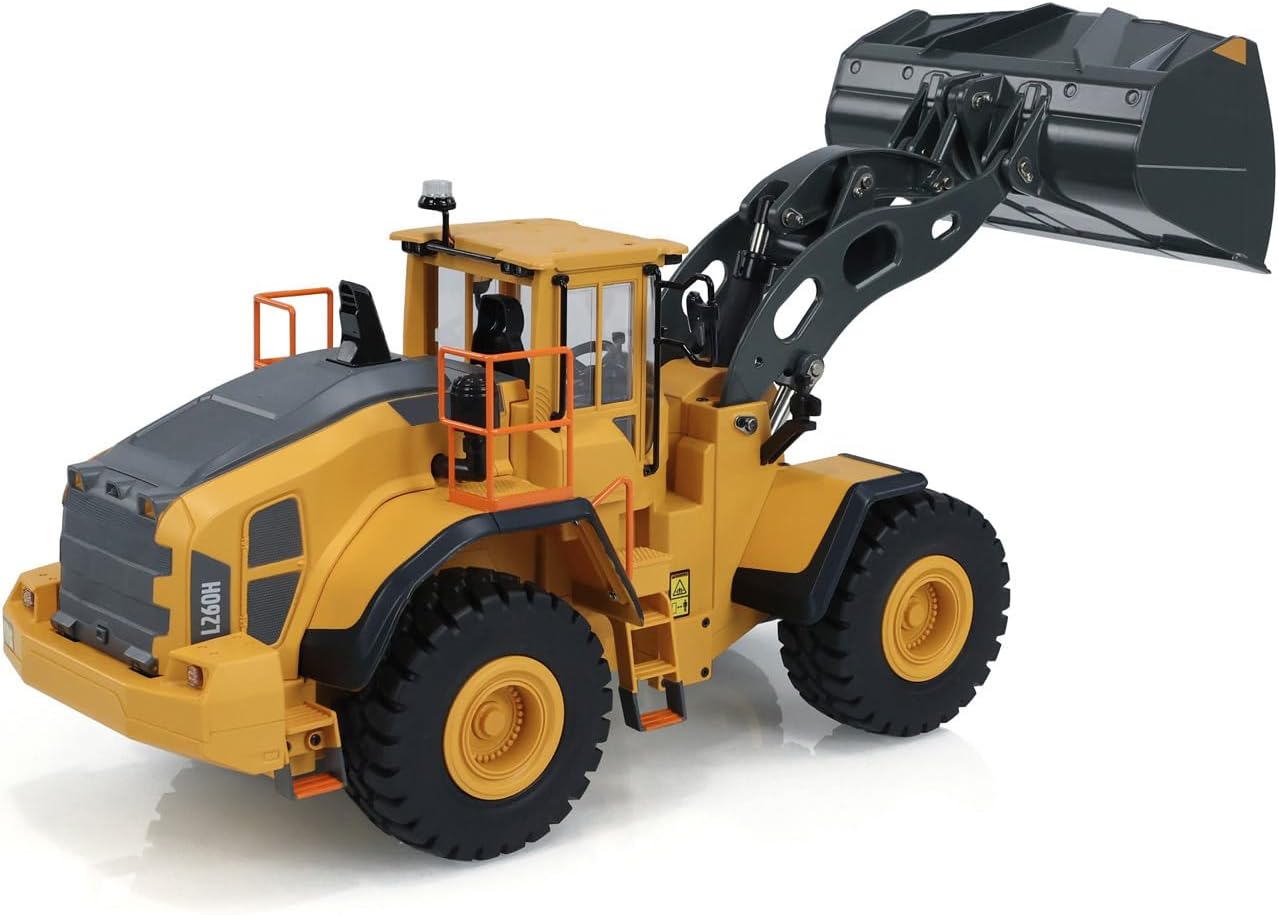
Figure 3: Side view of the RC Loader demonstrating the raised bucket position.

Figure 4: Underside view of the RC Loader, showing the 2.4GHz antenna and drive components.

Figure 5: Close-up of the loader arm mechanism, highlighting the robust construction.

Figure 6: Top view of the loader with the engine compartment cover open, revealing internal components.

Figure 7: Close-up of a loader wheel, showing tire tread and hub detail.
Remote Controller
Figure 8: The remote controller, featuring dual joysticks and control buttons.
Setup
1. Charging the Loader Battery
- Connect the provided 7.4V 1200mAh lithium battery to the charger.
- Plug the charger into a suitable USB power source.
- Allow the battery to charge fully. The indicator light on the charger will change (e.g., from red to green) when charging is complete.
- Disconnect the battery from the charger once fully charged.
Figure 9: The included battery and USB charger.
2. Installing Batteries in the Remote Controller
The remote controller requires 4x AA batteries (not included). Open the battery compartment on the back of the remote and insert the batteries, observing correct polarity.
3. Installing the Loader Battery
- Locate the battery compartment on the RC loader (refer to Figure 6 for general location).
- Carefully connect the charged battery to the loader's power connector.
- Secure the battery within the compartment and close the cover.
4. Pairing the Remote Controller
- Ensure both the loader and the remote controller are powered off.
- Turn on the RC loader.
- Turn on the remote controller. The remote and loader should automatically pair. A successful connection is usually indicated by a solid light on both devices.
- If pairing fails, turn both devices off and repeat the process.
Operating Instructions
Your RC loader features full-scale precise control for realistic operation.
Basic Controls
- Left Joystick: Controls forward/backward movement and steering (left/right).
- Right Joystick: Controls the loader arm and bucket movement (up/down, tilt).
- Function Buttons: Activate lights, sound system, and other auxiliary functions. Refer to the remote controller diagram for specific button assignments.

Figure 10: Diagram illustrating the remote control's functions and improved design.
Key Features in Operation
- Screw Drive Transmission: Provides high precision, efficiency, and torque for powerful bucket operation.
- Four-Wheel Drive: Ensures strong driving force to each wheel, enhancing handling and passing capabilities on various terrains.
- High Climbing Angle: Capable of climbing angles ≥35 degrees.
- Alloy Differential: Located in the front axle, it balances traction and steering for smooth and accurate turning.
- Loading Capacity: The loading bucket has a capacity of 780ml and can handle a maximum loading weight of ≥5kg. The loader is designed to handle a driving load up to 45kg.
- Acoustic-Optic Simulation: Features start/close sound, driving/backward sound, steering sound, operation sound, and mute function. Includes 4 sets of LED simulation lights and 5 kinds of cockpit warning light modes, all controllable by independent keys.
- Electronic Limit for Movable Joints: Ensures smooth and safe operation, preventing anti-jam and abnormal noise.
- High-Performance Motors: Equipped with five high-performance carbon brush motors for strong power, suitable for rugged fields and steep slope climbing.

Figure 11: Diagram illustrating the loader's mechanical features, including screw drive and four-wheel drive system.
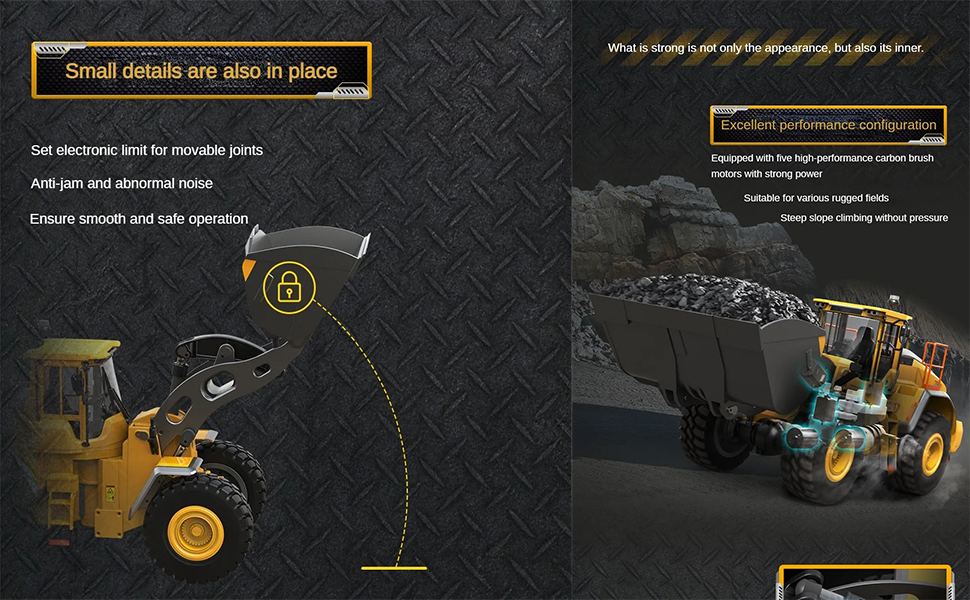
Figure 12: Diagram showcasing the high simulation acoustic-optic features and the loader's capacity for material and driving load.

Figure 13: Diagram detailing the electronic limits for movable joints and the excellent performance configuration of the loader.
Maintenance
- Cleaning: Use a soft, dry cloth to clean the loader after each use. Avoid water or harsh chemicals.
- Storage: Store the loader and remote in a cool, dry place away from direct sunlight and extreme temperatures. Remove batteries from the remote controller if storing for extended periods.
- Battery Care: Always fully charge the battery before storage and recharge it every 3 months if not in use to maintain battery health.
- Inspection: Periodically inspect all moving parts, screws, and connections for wear or damage. Tighten any loose screws.
Troubleshooting
| Problem | Possible Cause | Solution |
|---|---|---|
| Loader does not turn on. | Battery not charged or not connected. | Ensure battery is fully charged and properly connected. |
| Loader does not respond to remote. | Remote batteries low or not installed correctly; pairing issue. | Replace remote batteries. Re-pair the remote and loader as per setup instructions. |
| Short operating time. | Battery not fully charged; battery degradation. | Ensure battery is fully charged. Consider replacing the battery if it's old or damaged. |
| Loader moves slowly or lacks power. | Low battery; motor/gear issue. | Charge the battery. Check for obstructions in gears or wheels. |
Specifications
| Feature | Detail |
|---|---|
| Product Dimensions | 25.6 x 14 x 11.21 inches |
| Item Weight | 14.3 pounds |
| Model Number | TH23665-AMZUS2-S |
| Manufacturer | wheelfun |
| Recommended Age | 21 years and up |
| Battery | 7.4V 1200mAh Lithium Battery |
| Remote Frequency | 2.4GHz |
| Max Climbing Angle | ≥35 degrees |
| Bucket Capacity | 780ml |
| Max Loading Weight | ≥5kg |
| Max Driving Load | Up to 45kg |
Warranty and Support
For warranty information and customer support, please contact the seller, Wheelfun RC Hobby, or refer to the product packaging for specific details. Keep your purchase receipt as proof of purchase.
Related documentsTH23665-AMZUS2-S

Ask a question about this manual
Ask about setup, troubleshooting, compatibility, parts, safety, or missing instructions. Manuals+ will review the question and use this page’s manual context to help answer it.