
1. Introduction
The Radiomaster Pocket is a compact and lightweight radio transmitter designed for remote control applications, featuring Hall effect gimbals and pre-installed EdgeTX firmware. This manual provides essential information for setting up, operating, and maintaining your transmitter.

Figure 1: Radiomaster Pocket Hall Gimbal EdgeTX Transmitter (ELRS Transparent M2 with Battery)
2. Key Features
- Available in ExpressLRS and MPM CC2500 versions.
- Pre-installed with EdgeTX firmware.
- Compatible with 18650 batteries for extended operation.
- Portable and lightweight design with removable stick ends and a foldable antenna.
- Hall effect gimbals for smooth centering and precise response.
- Built-in LED lights to visualize switch inputs.
- Backlit 128x64 Monochrome LCD screen for clear display.
- Trim buttons for easy channel adjustment.
- External Module Bay compatible with RadioMaster Nano-size modules and TBS Nano Crossfire/Nano Tracer.
3. Package Contents
Verify that all items are present in your package:
- 1 x Radiomaster Pocket Radio
- 1 x Custom Carry Pouch
- 1 x USB-C Cable
- 1 x Screen Protector
- 1 x Sticker
- 4 x Low Tension Springs
- 1 x User Manual
4. Setup
4.1 Battery Installation
The Radiomaster Pocket requires two 18650 batteries (not included in all versions). Ensure correct polarity when inserting the batteries into the designated compartment on the back of the transmitter.
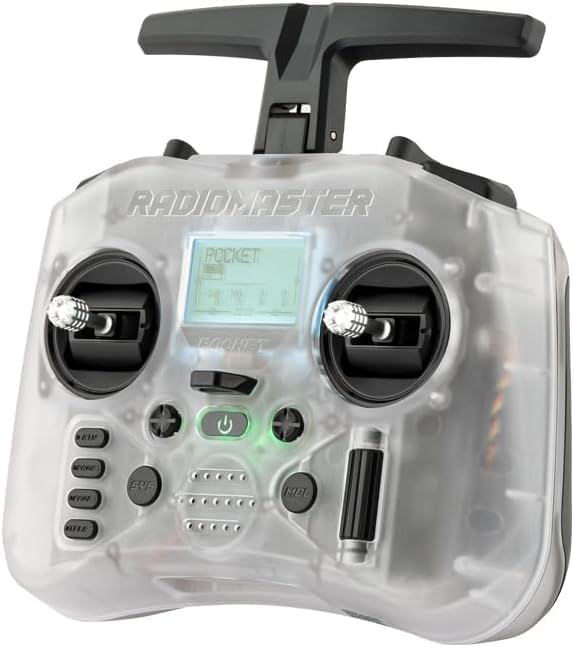
Figure 2: Front view of the Radiomaster Pocket Transmitter.
4.2 Antenna and Stick Ends
- The transmitter features a foldable antenna. Ensure it is unfolded and positioned correctly before operation for optimal signal.
- The stick ends are removable for convenient storage and transport. Attach them securely before use.

Figure 3: Side view illustrating the foldable antenna design.
4.3 Firmware
The transmitter comes pre-installed with EdgeTX firmware. Firmware can be upgraded via USB-C or using the included SD card. Refer to the official EdgeTX documentation for detailed upgrade procedures.
5. Operating Instructions
5.1 Powering On/Off
Press and hold the power button located on the front panel to turn the transmitter on or off. The backlit LCD screen will illuminate upon power-on.
5.2 Gimbals and Controls
The Hall effect gimbals provide smooth and precise control. Utilize the trim buttons for fine-tuning channel adjustments during flight or setup.
5.3 Display and Indicators
The 128x64 Monochrome LCD screen displays essential information. Built-in LED lights provide visual feedback for switch inputs and operational status.
5.4 External Module Bay
The Nano-size external module bay supports various modules, including RadioMaster Nano-size modules, TBS Nano Crossfire, and Nano Tracer, expanding the transmitter's compatibility and capabilities.
5.5 RF Options and Power
The internal RF options include CC2500 multi-protocol or ELRS 2.4GHz, depending on the version. RF power output varies by protocol: CC2500 up to 100mW (20dBm), ELRS FCC up to 250mW (24dBm), and ELRS EU-LBT up to 100mW (20dBm). The control distance is typically greater than 2km at 20dBm.
Video 1: Overview of the Xiangtat Radiomaster Pocket Hall Gimbal Transmitter with EdgeTX firmware, highlighting its features and compact design.
Video 2: Demonstrates the Radiomaster Pocket Crush 2.4G 16CH ExpressLRS Radio Controller, showcasing its functionality and ease of use.
6. Maintenance
- Keep the transmitter clean and free from dust and debris. Use a soft, dry cloth for cleaning.
- Store the transmitter in its custom carry pouch when not in use to protect it from physical damage.
- Ensure batteries are charged using the built-in USB-C QC3 charging feature. For long-term storage, it is recommended to store batteries at a partial charge (around 3.8V per cell) to prolong their lifespan.
- Regularly check for firmware updates to ensure optimal performance and access to new features.
7. Troubleshooting
- No Power: Check if the 18650 batteries are correctly installed and sufficiently charged. Ensure the USB-C cable is properly connected if charging.
- No Signal/Poor Range: Verify that the foldable antenna is fully extended and positioned correctly. Ensure the internal RF option is correctly configured for your receiver.
- Display Issues: If the LCD screen is not functioning correctly, try restarting the transmitter. Ensure the screen protector is applied without bubbles or obstructions.
- Control Issues: Calibrate gimbals and check trim settings in the EdgeTX firmware.
8. Specifications
| Item | Specification |
|---|---|
| Physical dimensions (Folded) | 156.6 x 65.1 x 125.3 mm |
| Physical dimensions (Unfolded) | 156.6 x 73.1 x 154.8 mm |
| Weight | 288 grams |
| Operating frequency | 2.400GHz-2.480GHz |
| Internal RF Options | CC2500 multi-protocol / ELRS 2.4GHz |
| Supported protocols | Module dependent |
| RF power (CC2500) | 100mW Max (20dBm) |
| RF power (ELRS FCC) | 250mW Max (24dBm) |
| RF power (ELRS EU-LBT) | 100mW Max (20dBm) |
| Operational voltage | 6.6-8.4V DC |
| Control distance | > 2km @ 20dBm |
| Operating system | EdgeTX |
| Control channels | Maximum 16 (Receiver dependent) |
| Display | 128x64 Monochrome LCD |
| Battery | 2pcs 18650 batteries (Not included) |
| Charging | Built-in USB-C QC3 Charging |
| Upgradable Firmware | Via USB or the included SD card |
| Gimbal | Hall-effect |
| Module bay | Nano size (Compatible with RadioMaster Nano-size modules, TBS Nano Crossfire / Nano Tracer) |

Figure 4: Physical dimensions of the Radiomaster Pocket Transmitter.
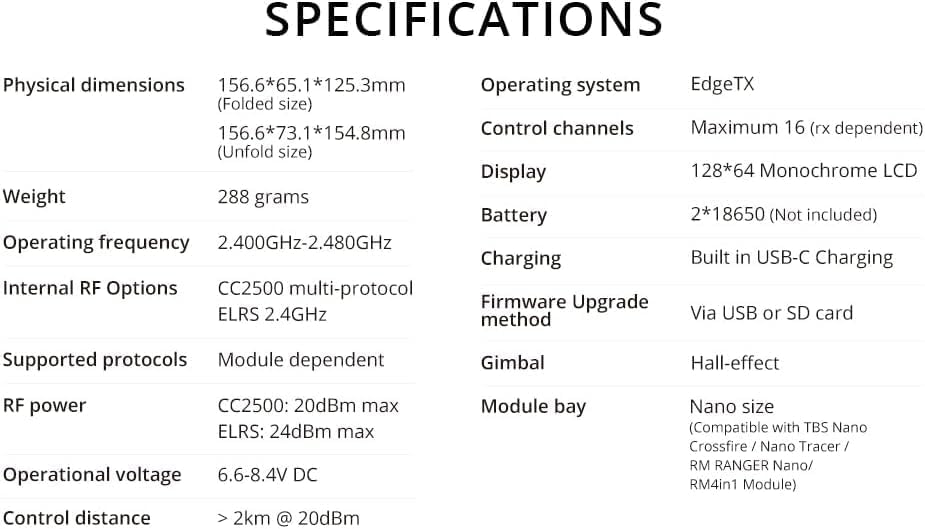
Figure 5: Detailed specifications of the Radiomaster Pocket Transmitter.
9. Safety Information
This product is a radio transmitter. Always operate it responsibly and in accordance with local regulations. Ensure all connections are secure and batteries are handled safely. Avoid exposing the device to extreme temperatures or moisture.
10. Warranty and Support
For warranty information and technical support, please refer to the official Radiomaster website or contact your retailer. Keep your purchase receipt as proof of purchase.


