Introduction
This manual provides instructions for the LemonMemory Y-Splitter and 13-foot extension cable. This product is designed to expand the reach and configuration options for compatible Govee Permanent Outdoor Lights Pro systems. Please read this manual carefully before installation and use to ensure proper functionality and safety.
Product Components
The package includes:
- One (1) 1-foot Y-Shaped Extension Cable (1 Female to 2 Male, 3-pin)
- One (1) 13-foot IP68 Extension Cable (Male to Female, 3-pin)
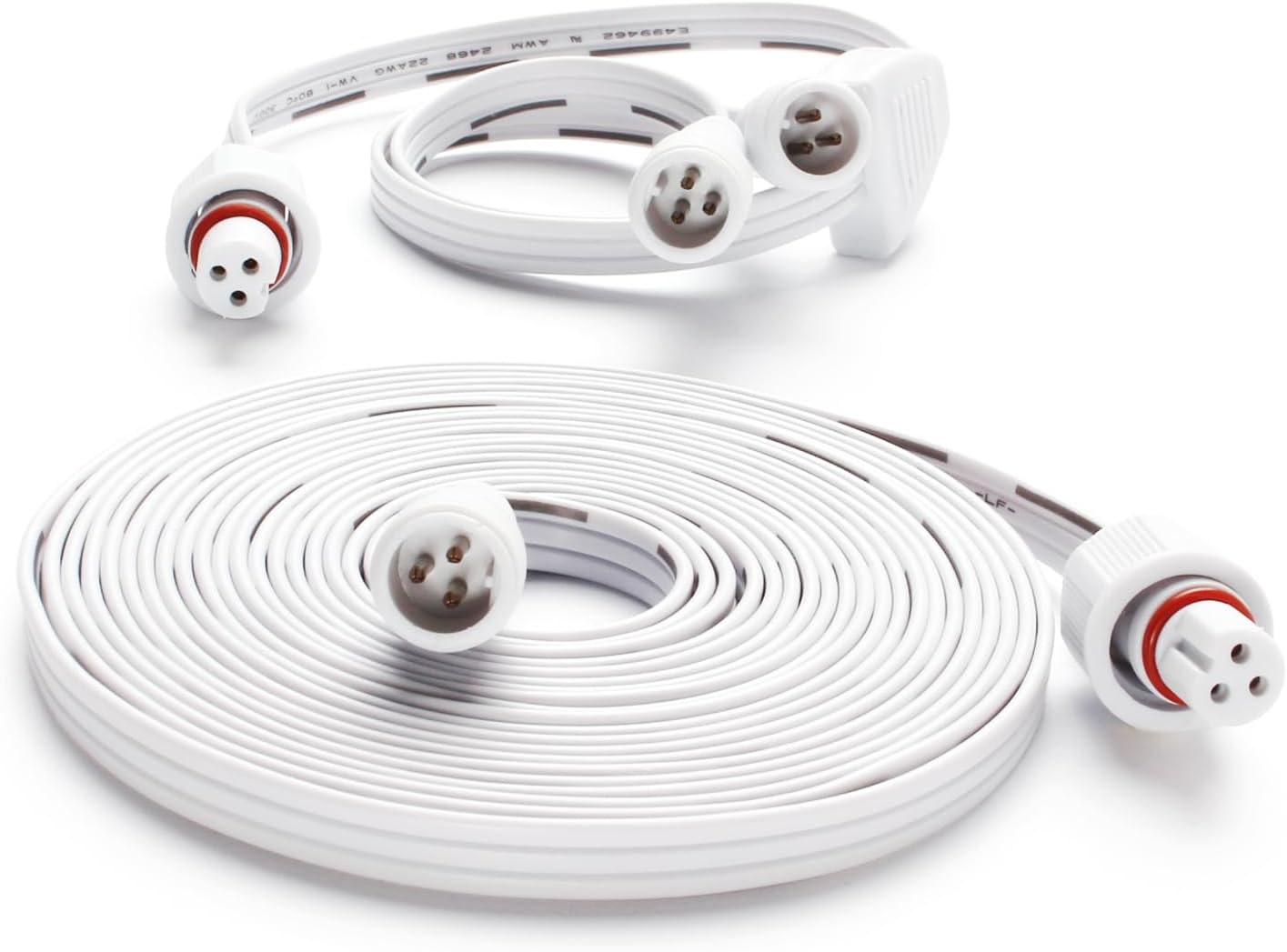
Image 1: LemonMemory Y-Splitter and 13-foot Extension Cable. Shows the coiled 13-foot extension cable and the shorter Y-splitter cable with its distinct branching design.
Compatibility
This LemonMemory extension cable and Y-splitter are specifically designed for use with certain Govee Permanent Outdoor Lights Pro systems. Ensure your lighting system is compatible before attempting installation.
Compatible Models:
- Govee Permanent Outdoor Lights Pro: H705C, H706A, H706C
- Govee Permanent Outdoor Lights: H704A, H705B, H703B
- Lemon23 Permanent Lights: 2822, 2822W, 4022W
Important Compatibility Notes:
- Not compatible with other brands or standard LED strip lights.
- The Y-splitter component is designed for specific Govee Pro models. Some users have reported issues with the splitter functionality on certain setups.
- Always verify the connector type (3-pin, male/female configuration) of your existing lights with the product images provided.

Image 2: Compatibility chart showing supported Govee models (H705A, H706A, H705C, H706C, H703B) with a checkmark, and incompatible light types (string lights, strip lights) with a cross.

Image 3: Diagram illustrating compatible and incompatible plug configurations for the extension cord. Shows a checkmark for 2 Female + 1 Male and 1 Female + 1 Male, and a cross for 2 Male + 1 Female.

Image 4: Diagram of the Y-splitter showing its male and female ends, explicitly stating compatibility with Govee models H704A, H705B, H705C, and noting it's not for LED strip lights.
Setup and Installation
Follow these steps to properly connect the extension cable and Y-splitter to your Govee Permanent Outdoor Lights Pro system:
- Power Off: Ensure your Govee lighting system is completely powered off and unplugged from the power source before making any connections.
- Identify Connectors: Observe the male and female ends of your existing Govee lights and the LemonMemory cables. The extension cable has one male and one female end. The Y-splitter has one female end and two male ends.
- Connect Extension Cable:
- Align the male end of the 13-foot extension cable with a female connector on your Govee light string or existing extension.
- Align the female end of the 13-foot extension cable with a male connector on your Govee light string or another extension.
- Gently push the connectors together, ensuring the pins align correctly.
- Screw down the waterproof collar securely to create a tight, waterproof seal. Do not overtighten.
- Connect Y-Splitter (Optional):
- If using the Y-splitter, connect its female end to a male connector from your Govee light string or extension cable.
- Connect the two male ends of the Y-splitter to two separate female connectors on your Govee light strings or extensions.
- Ensure all connections are aligned and the waterproof collars are securely screwed down.
- Verify Connections: Double-check all connections to ensure they are firm and sealed.
- Power On: Once all connections are secure, plug in and power on your Govee lighting system.

Image 5: Close-up view of the Y-splitter and extension cable connectors, highlighting the male and female ends with their 3-pin configuration.
Operation
The LemonMemory Y-Splitter and Extension Cable are passive components. Once properly connected, they integrate seamlessly with your Govee Permanent Outdoor Lights Pro system, allowing the lights to operate as usual but with extended reach or split configurations. No additional operational steps are required beyond controlling your Govee lights as per their original instructions.
Maintenance
The cables are designed with IP68 waterproofing, making them suitable for outdoor use. To ensure longevity and continued performance:
- Regularly inspect all connections for tightness and signs of wear or damage.
- Keep connectors clean and free from dirt or debris.
- Avoid bending the cables sharply or placing them under excessive tension.
- While waterproof, avoid submerging the connections for extended periods if possible, especially if the seals appear compromised.

Image 6: The coiled extension cable shown partially submerged in water, demonstrating its IP68 waterproof rating.
Troubleshooting
- Lights Not Illuminating:
- Ensure all connections are fully seated and the waterproof collars are securely tightened. A loose connection can prevent power flow.
- Verify that the power source for your Govee lights is active.
- Confirm compatibility: Double-check that your Govee light model is listed as compatible.
- If using the Y-splitter and lights are not working, try connecting the extension cable directly without the splitter to isolate the issue. Some users have reported the splitter not working in their specific Govee setups.
- Intermittent Light Function:
- Check for any physical damage to the cables or connectors.
- Ensure environmental factors (e.g., extreme weather, physical stress) are not affecting the connections.
- Water Ingress:
- If water is found inside connectors, immediately disconnect power. Dry all components thoroughly before re-connecting. Ensure waterproof collars are tightened correctly.
Specifications
| Feature | Detail |
|---|---|
| Product Type | Y-Splitter and Extension Cable Set |
| Model Number | WYD-YCXGV-1P-LM-US |
| Brand | LemonMemory |
| Y-Splitter Length | 1 foot (approximately) |
| Extension Cable Length | 13 feet (4 meters) |
| Connector Type | 3-pin, Male-to-Female (Extension), 1 Female to 2 Male (Y-Splitter) |
| Waterproof Rating | IP68 |
| Voltage | 24 Volts (compatible with Govee systems) |
| Item Weight | 4.6 ounces |
| Package Dimensions | 7.24 x 5.12 x 1.18 inches |
Warranty and Support
For product support, technical assistance, or warranty inquiries, please contact LemonMemory customer service through the retailer where the product was purchased. Please have your purchase details and model number (WYD-YCXGV-1P-LM-US) available when contacting support.


