
1. Introduction
This instruction manual provides comprehensive guidance for the installation, operation, and maintenance of your AC Infinity AIRBLAZE T10 Universal Fireplace Blower Fan Kit. Please read this manual thoroughly before installation and use to ensure proper function and safety. Retain this manual for future reference.
2. Product Overview
The AC Infinity AIRBLAZE T10 is a universal fireplace blower fan kit designed to enhance heat circulation from your fireplace into your living space. It effectively draws cool air from lower vents, heats it within the fireplace cavity, and then expels the warmed air into the room. This system is compatible with various fireplace brands, including Lennox, Hearth Glo, Majestic, and Rotom, and can serve as a replacement for existing blower units. The kit includes a smart controller with temperature and speed adjustments for optimized performance.

Image 2.1: The AC Infinity AIRBLAZE T10 blower fan and its digital controller.

Image 2.2: Diagram illustrating how the fireplace blower kit circulates warm air into a room.
3. Key Features
- Enhanced Heat Circulation: Designed to boost warm air distribution from your fireplace.
- Universal Compatibility: Suitable for various fireplace models, including Lennox, Hearth Glo, Majestic, and Rotom.
- Smart Controller: Features an LCD display with active temperature and humidity monitoring.
- Programmable Settings: Fan speeds can be set to automatically adjust based on temperature and humidity thresholds. Manual control, timer functions, and alarm warnings are also available.
- Quiet Operation: Utilizes a PWM-controlled DC motor and dual-ball bearings for efficient, low-noise performance.
- Durable Construction: Enclosed in heavy-duty steel with a cold-rolled steel mounting frame and aluminum impeller.
- Easy Installation: Includes all necessary components for securing the unit and connecting to a standard power outlet.
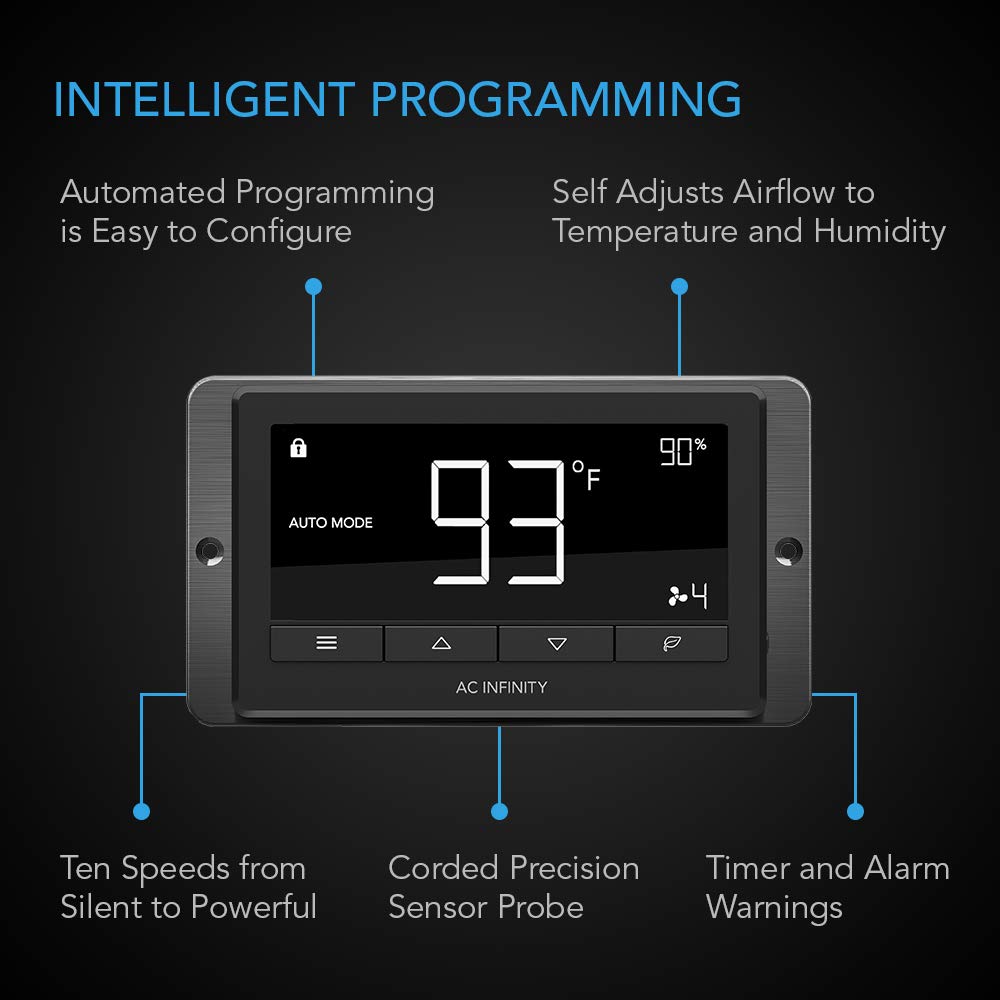
Image 3.1: Detailed view of the intelligent controller, highlighting its display, buttons, and sensor probe connection.

Image 3.2: Cross-section diagram illustrating the ultra-quiet dual-ball bearing PWM-controlled DC motor design.
4. Package Contents
Verify that all components are present before proceeding with installation:
- AC Infinity AIRBLAZE T10 Blower Fan Unit
- Digital Controller (U-Controller 2)
- 12-foot Corded Temperature and Humidity Sensor Probe
- Power Adapter
- Mounting Hardware (screws, anchors, or Velcro pads)
- User Manual (this document)

Image 4.1: The main components of the AIRBLAZE T10 kit, including the controller, sensor probe, and power adapter.
5. Safety Information
Always observe the following safety precautions:
- Ensure the fireplace is completely cool before attempting installation or maintenance.
- Disconnect power to the fireplace and the blower kit before any installation, cleaning, or service.
- Do not operate the blower if any part is damaged or if the power cord is frayed.
- Keep all wiring clear of hot surfaces within the fireplace.
- This product is designed for indoor use only.
- Do not block the air intake or exhaust vents of the blower.
6. Installation Guide
The AIRBLAZE T10 is designed for straightforward installation in fireplaces with an accessible cavity beneath the firebox. Installation typically involves placing the blower unit, routing the sensor probe, and connecting the controller.
6.1. Pre-Installation Check
- Confirm your fireplace has adequate space for the blower unit (refer to specifications for dimensions).
- Ensure a standard electrical outlet is available nearby for the power adapter.
- Gather necessary tools: screwdriver, measuring tape, and potentially a drill if mounting with screws.
6.2. Blower Placement
- Carefully slide the blower unit into the designated compartment beneath your fireplace.
- Position the blower to maximize airflow into the fireplace cavity.
- Secure the blower using the provided mounting hardware. Velcro pads can be used for non-permanent installation, or screws for a more secure fit.
6.3. Sensor Probe Installation
- Route the 12-foot corded sensor probe into the fireplace cavity.
- Place the sensor tip in an area that accurately reflects the temperature of the fireplace, typically near the heat exchanger or where warm air exits. Avoid direct flame contact.
6.4. Controller and Power Connection
- Connect the blower unit cable to the controller.
- Connect the sensor probe to the controller.
- Plug the power adapter into the controller, then into a standard electrical outlet.
- Position the controller in a convenient location. It can be mounted on a wall or placed discreetly near the fireplace.

Image 6.1: An example of a fireplace blower installed within a fireplace cavity, with the controller mounted externally.
7. Operating Instructions
The digital controller provides various modes and settings to optimize your fireplace blower's performance.
7.1. Controller Interface
The controller features an LCD display showing current temperature, humidity, fan speed, and mode. Buttons allow for navigation and setting adjustments.
7.2. Operating Modes
- AUTO Mode: The fan automatically adjusts speed based on programmed temperature and humidity thresholds. Set a desired high temperature for activation and a low temperature for deactivation.
- ON Mode: The fan runs continuously at a manually selected speed (1-10).
- OFF Mode: The fan remains off.
- TIMER Mode: Set the fan to run for a specific duration at a chosen speed.
- ECO Mode: Optimizes fan operation for energy efficiency.
7.3. Adjusting Settings
- Use the menu button to navigate through settings.
- Use the up/down arrows to adjust values (e.g., fan speed, temperature thresholds).
- Confirm selections to save changes.
Refer to the controller's on-screen prompts for specific programming steps for temperature triggers, fan speeds, and timer settings. The controller also features alarm warnings for fan failure or out-of-range conditions, and backup memory to retain settings during power outages.
8. Maintenance
Regular maintenance ensures optimal performance and longevity of your AIRBLAZE T10 fan kit.
8.1. Cleaning the Blower Unit
- Disconnect Power: Always unplug the unit from the power outlet before cleaning.
- Allow to Cool: Ensure the fireplace and blower are completely cool.
- Remove Debris: Use a soft brush or vacuum cleaner with a brush attachment to gently remove dust and debris from the fan blades and housing.
- Wipe Surfaces: Use a dry or slightly damp cloth to wipe the exterior surfaces of the blower and controller. Do not use harsh chemicals or abrasive cleaners.
8.2. Sensor Probe Care
Keep the sensor probe clean and free from obstructions to ensure accurate readings. Do not bend or damage the probe cable.
9. Troubleshooting
If you encounter issues with your AIRBLAZE T10, refer to the following common problems and solutions:
| Problem | Possible Cause | Solution |
|---|---|---|
| Fan does not turn on. | No power; incorrect mode; temperature not met. | Check power connection. Ensure controller is in ON or AUTO mode with appropriate temperature settings. |
| Fan is too noisy. | High fan speed; vibration; debris in fan. | Reduce fan speed. Check for proper installation and secure mounting to minimize vibration. Clean fan blades. |
| Inaccurate temperature readings. | Sensor probe placement; dirty sensor. | Relocate sensor probe to a more representative area. Clean sensor tip. |
| Fan runs constantly or not at all in AUTO mode. | Incorrect temperature thresholds. | Adjust the high and low temperature settings on the controller to suit your fireplace's operating temperatures. |
If the problem persists after attempting these solutions, please contact AC Infinity customer support.
10. Specifications
| Attribute | Detail |
|---|---|
| Model | AIRBLAZE T10 (AC-FBA10) |
| Blower Size | 10 inches |
| Product Dimensions (Blower) | 10.5" L x 3.6" W x 4" H (26.6 cm x 9.1 cm x 10.2 cm) |
| Product Dimensions (Controller) | 5.19" L x 1.06" W x 2.91" H (13.2 cm x 2.7 cm x 7.4 cm) |
| Airflow Capacity | 120 CFM (Cubic Feet Per Minute) |
| Noise Level | 26 dB (at lowest setting), up to 55 dBA (at highest setting) |
| Power Usage | 8 Watts (max) |
| Voltage | 12 Volts |
| Cooling Method | Air |
| Motor Type | DC-Motor PWM Controlled |
| Bearings | Dual Ball Bearings (rated 67,000 hours) |
| Controller | U-Controller 2 (with Temp. & Humidity Sensors) |
| Sensor Probe Length | 12 feet (144 inches / 366 cm) |
| Power Cord Length | 6 feet (72 inches) |
| Fan to Controller Cord Length | 6 feet (72 inches) |
| Material | Alloy Steel, Aluminum |

Image 10.1: Detailed dimensions of the AIRBLAZE T10 blower unit, controller, and cable lengths.

Image 10.2: Detailed dimensions of the U-Controller 2.
11. Warranty and Support
AC Infinity products are designed with quality and durability in mind. For specific warranty details, please refer to the warranty card included with your product or visit the official AC Infinity website. If you require technical assistance or have questions regarding your AIRBLAZE T10, please contact AC Infinity customer support through their official channels.
Manufacturer: AC Infinity Inc.
Date First Available: January 3, 2019


