
Introduction
This manual provides essential information for setting up, operating, and maintaining your Boowen Wireless Controller, compatible with PlayStation 4, PS4 Pro, and PS4 Slim consoles. Please read these instructions carefully to ensure optimal performance and longevity of your device.
Setup
Initial Connection
For the first connection, the controller must be activated using a USB cable.
- Connect one end of the provided USB cable to the controller's charging port.
- Connect the other end of the USB cable to an available USB port on your PlayStation 4 console.
- Press the PlayStation button on the controller to turn it on. The controller will pair with the console.
- Once paired, you can disconnect the USB cable for wireless operation.
Video: Demonstrates the initial connection process of the wireless controller to a PlayStation 4 console using a USB cable.
Charging the Controller
The controller features a built-in 800mAh rechargeable battery.
- Connect the USB cable to the controller and your PS4 console or a compatible USB wall adapter.
- The light bar on the controller will indicate charging status.
- A full charge provides approximately 7-10 hours of working time.
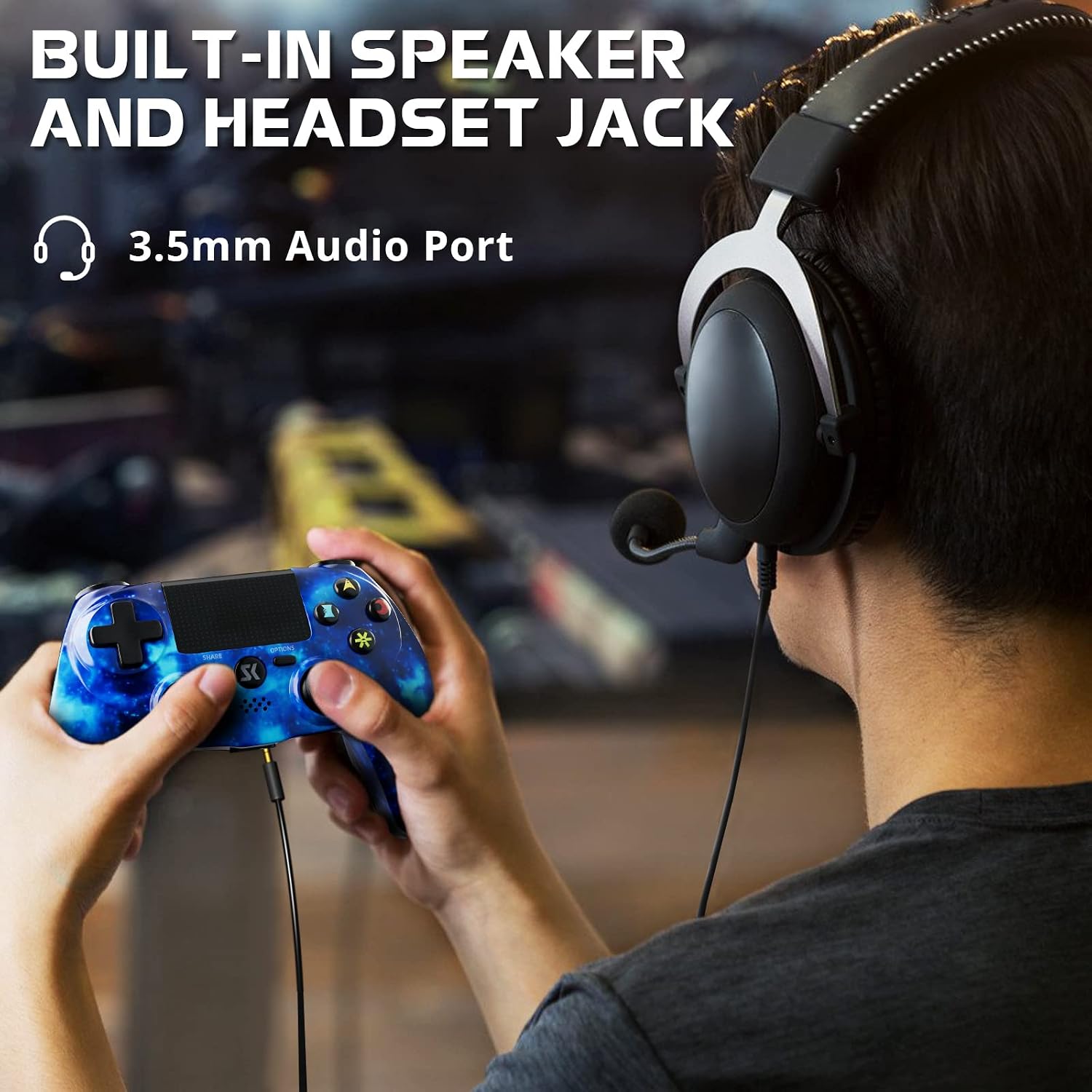
Image: The Boowen Wireless Controller on a charging dock, with a glowing light bar and an on-screen indicator showing 100% charge, highlighting its built-in rechargeable battery.
Operating the Controller
Key Features
- Sensitive Touch Pad: The integrated touch pad provides an additional layer of interaction for compatible games.
- Built-in Speaker: Enhances immersion by delivering sound effects directly from the controller.
- 3.5mm Audio Port: Allows connection of a headset for private audio and communication.
- Light Bar: Provides visual cues for player identification, health status, and other in-game information.
- Share Button: Facilitates easy sharing of gameplay moments with friends.

Image: A close-up of the Boowen Wireless Controller, highlighting its sensitive touch pad with an active blue spiral graphic, indicating interactive functionality.

Image: A user holding the Boowen Wireless Controller, with a headset connected to the 3.5mm audio port, demonstrating the built-in speaker and headset jack features during gameplay.
Immersive Gaming Experience
- Dual Motors: Provide realistic vibration feedback for in-game actions like hits, explosions, and collisions.
- 6-Axis Gyroscope: Enables precise motion sensing for intuitive control in games that support tilt and motion input.

Image: The Boowen Wireless Controller shown with blue arrows illustrating its double shock and 6-axis motion control capabilities, set against a dynamic space game background.
Ergonomics
- The controller features enhanced analog sticks and trigger buttons for precise control.
- An improved grip design ensures comfort during extended gaming sessions, reducing fatigue.

Image: A graphic illustrating the ergonomic design of the Boowen Wireless Controller, showing how it comfortably fits within a user's hand for prolonged use.
Maintenance
Proper maintenance ensures the longevity and performance of your controller.
- Cleaning: Use a soft, dry cloth to wipe the controller. Avoid using harsh chemicals or abrasive materials.
- Storage: Store the controller in a cool, dry place away from direct sunlight and extreme temperatures.
- Battery Care: To preserve battery life, avoid fully discharging the controller frequently. Charge it regularly, even if not in use for extended periods.
Troubleshooting
Connection Issues
- Controller Not Connecting: Ensure the controller is charged. For the first connection or if issues persist, connect the controller to the PS4 console with a USB cable and press the PS button to re-pair.
- Intermittent Disconnections: Check for obstacles between the controller and the console. Ensure the controller is within the effective wireless range (approximately 10 meters/33 feet).
Audio Issues
- No Sound from Headset: Ensure the headset is fully plugged into the 3.5mm audio port. Check the audio settings on your PS4 console to ensure output is directed to the headset.
- Microphone Not Working: Verify microphone settings on your PS4. Ensure the headset's microphone is not muted.
Specifications
| Feature | Detail |
|---|---|
| Compatibility | PlayStation 4, PS4 Pro, PS4 Slim |
| Battery Type | Lithium Polymer (included) |
| Working Time | 7-10 hours (approx.) |
| Wireless Distance | 10M / 33FT |
| Product Dimensions | 5 x 5 x 3 inches |
| Item Weight | 1.39 pounds |
| Manufacturer | Boowen |
Warranty and Support
For warranty information or technical support, please refer to the contact details provided with your purchase or visit the official Boowen website. Keep your proof of purchase for any warranty claims.