
1. Product Overview
The Shahoo L-Shaped Gaming Desk, model SH-GD2111-V33, is designed to provide a spacious and stable workstation for gaming and office use. It features a durable carbon fiber desktop and a robust alloy steel frame, including a removable monitor stand for optimized viewing.
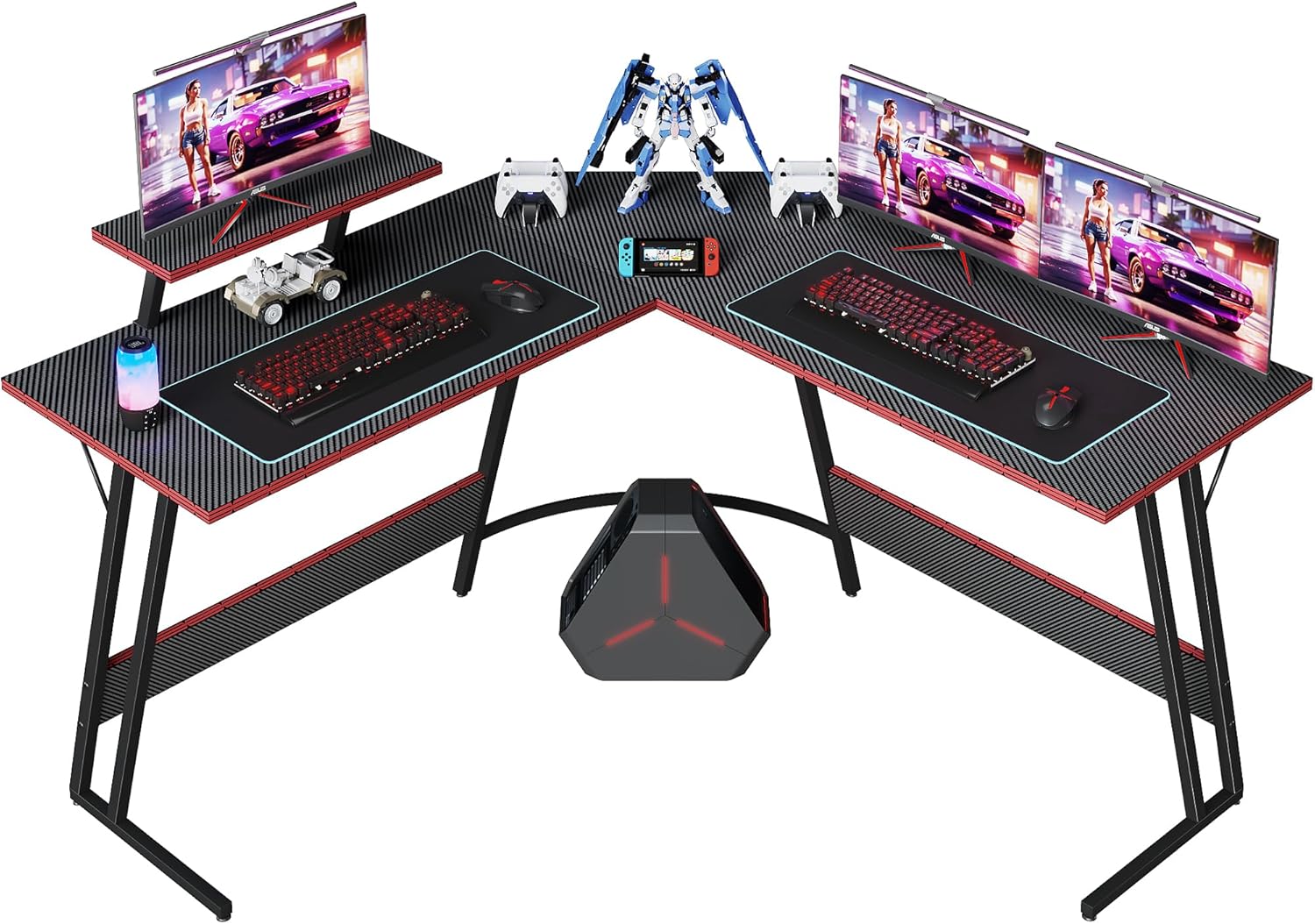
Image 1.1: The Shahoo L-Shaped Gaming Desk, showcasing its design with multiple monitors and gaming peripherals.
Key Features:
- L-Shaped Design: Maximizes corner space, providing ample room for multiple monitors and equipment.
- Carbon Fiber Desktop: Offers durability and a sleek aesthetic, resistant to daily wear.
- Removable Monitor Stand: Adjustable position for optimal viewing angles and ergonomic setup.
- Sturdy Construction: Built with a strong alloy steel frame and Z-shaped legs for enhanced stability.
- Easy Assembly: Designed for straightforward installation with included tools and instructions.
2. Package Contents
Before beginning assembly, please verify that all components listed below are present and undamaged. If any parts are missing or damaged, please contact customer support.
- L-Shaped Gaming Desk components
- Removable Monitor Stand
- Assembly Tool Kit
- Instruction Manual (this document)
3. Setup and Assembly
The Shahoo L-Shaped Gaming Desk is designed for easy assembly by one person. Please follow these steps carefully.
3.1 Preparation
- Clear a spacious area for assembly.
- Unpack all components and lay them out on a soft, clean surface to prevent scratches.
- Identify all parts and hardware using the included parts list (if provided separately, otherwise refer to diagrams).
- Ensure all necessary tools from the tool kit are available.
3.2 Assembly Steps
- Assemble the Frame: Connect the alloy steel frame components according to the diagrams. Ensure all screws are finger-tightened initially.
- Attach Desktop Panels: Carefully place the carbon fiber desktop panels onto the assembled frame. Align the pre-drilled holes.
- Secure Desktop: Insert and tighten all screws to secure the desktop panels to the frame. Do not overtighten.
- Install Monitor Stand: Attach the removable monitor stand to the desired position on the desktop. The stand can be adjusted to suit your preference.
- Adjust Foot Pads: Once the desk is fully assembled and in its intended location, adjust the foot pads at the bottom of the legs to ensure the desk is level and stable.

Image 3.1: Illustration of the desk's Z-shaped leg design for stability, its 220 lbs weight capacity, and adjustable foot pads for leveling.

Image 3.2: Detail of the removable monitor stand, highlighting its mobile bracket and adjustable positioning.
4. Operating and Usage
The Shahoo L-Shaped Gaming Desk is designed for versatile use in gaming, home office, study, and writing environments.
4.1 Monitor Stand Adjustment
The monitor stand can be repositioned along the desk's edge to achieve your preferred viewing angle and ergonomic setup. Simply loosen the securing mechanism, slide the stand to the desired location, and re-tighten to secure it.
4.2 Weight Capacity
The desk is designed to support a maximum weight of approximately 220 lbs (100 kg). Distribute weight evenly across the desktop to maintain stability and prevent damage.

Image 4.1: An example setup of the L-shaped gaming desk in a room, demonstrating its capacity for multiple monitors and accessories.
5. Maintenance
Proper maintenance will ensure the longevity and appearance of your Shahoo L-Shaped Gaming Desk.
- Cleaning: Wipe the carbon fiber desktop and alloy steel frame with a soft, damp cloth. Avoid abrasive cleaners or harsh chemicals that could damage the finish.
- Inspection: Periodically check all screws and connections to ensure they remain tight. Re-tighten if necessary.
- Avoid Excessive Heat/Moisture: Do not place hot items directly on the desktop without protection. Avoid prolonged exposure to excessive moisture.
- Protect Surface: Use coasters for drinks and mouse pads for gaming to protect the carbon fiber surface from scratches and spills.

Image 5.1: A detailed view of the carbon fiber desktop, highlighting its texture and finish.
6. Troubleshooting
If you encounter any issues with your Shahoo L-Shaped Gaming Desk, refer to the following common problems and solutions.
6.1 Desk is Unstable/Wobbly
- Check Foot Pads: Ensure all adjustable foot pads are making firm contact with the floor and are properly adjusted to level the desk.
- Tighten Screws: Verify that all assembly screws are securely tightened. Loose connections can cause instability.
- Even Weight Distribution: Ensure heavy items are not concentrated on one side of the desk.
6.2 Scratches on Desktop
- The carbon fiber surface is designed to be durable, but sharp objects can still cause scratches. Use protective mats or pads for gaming peripherals and other items.
6.3 Monitor Stand Does Not Stay in Place
- Ensure the securing mechanism for the monitor stand is fully tightened after adjustment.
7. Specifications
| Attribute | Detail |
|---|---|
| Brand | Shahoo |
| Model Name | L Shaped Gaming Desk |
| Model Number | SH-GD2111-V33 |
| Product Dimensions (D x W x H) | 17"D x 50.4"W x 27.5"H |
| Shape | L-Shape |
| Color | Black |
| Top Material Type | Carbon Fiber |
| Base Material | Alloy Steel |
| Item Weight | 39 Pounds (approx. 17.7 kg) |
| Special Feature | Removable Monitor Stand, Adjustable Foot Pads |
| Assembly Required | Yes (Recommended 1 person) |
| Included Components | Desk components, Monitor Arm, Assembly Tools |

Image 7.1: Detailed dimensions of the L-shaped gaming desk, including desktop length, width, and height.
8. Warranty and Support
For warranty information or technical support, please refer to the contact details provided with your purchase documentation or visit the official Shahoo website.
If you have questions regarding assembly, missing parts, or product functionality, please contact Shahoo customer service for assistance.
Online Resources: