
Gofunly H2
Contents

Kids Camera Instant Print Instruction Manual
Model: H2
1. Product Overview
The Gofunly Kids Instant Print Camera (Model H2) is a versatile digital camera designed for children aged 3-12. It features a 3.0-inch HD screen, 32MP photo resolution, 1080P video recording, and instant black and white photo printing. This camera encourages creativity with various filters and frames, and includes accessories for immediate use.

Image: The Gofunly Kids Instant Print Camera in green, shown with included accessories: 3 rolls of printer paper, 5 color pencils, USB-C charging cable, and a 32GB SD card.
Included Components:
- Gofunly Kids Instant Print Camera (Model H2)
- 32GB SD Card
- Lanyard
- 3 Rolls of Printer Paper
- 5 Color Pencils
- USB-C Charging Cable
2. Setup
2.1 Charging the Battery
The camera has a built-in 1000mAh rechargeable battery. Before first use, fully charge the camera using the provided USB-C cable. Connect the USB-C cable to the camera's charging port and the other end to a compatible USB power adapter (not included) or a computer USB port. The charging indicator light will show the charging status. A full charge provides up to 3 hours of continuous photography.

Image: Close-up of the camera showing the USB-C charging port and the 32GB SD card slot.
2.2 Inserting the SD Card
Locate the SD card slot on the side of the camera. Insert the provided 32GB SD card into the slot until it clicks into place. Ensure the card is inserted in the correct orientation to avoid damage.
2.3 Installing Printer Paper
- Step 1: Pull open the film door on the side of the camera as shown in the image.
- Step 2: Insert a roll of printer paper into the compartment. Ensure the paper feeds out with 1-2 inches of length extending from the slot.
- Step 3: Close the film door securely.
- Step 4: In photography mode, press the "Print" button to start printing photos.

Image: A visual guide demonstrating the four steps for installing printer paper into the Gofunly Kids Instant Print Camera.
3. Operating Instructions
3.1 Basic Functions
The camera features a 3.0-inch HD screen for clear viewing and an improved operating experience.

Image: A comparison highlighting the larger 3.0-inch HD screen of the Gofunly camera compared to a smaller 2.0-inch screen found on other models.
- Taking Photos: Use the shutter button to capture 32MP high-definition images.
- Recording Videos: Switch to video mode to record 1080P videos.
- Instant Print: Press the dedicated print button to instantly print black and white photos directly from the camera. The thermal paper ensures no smearing and quick drying.
- Flashlight: The camera includes a built-in flashlight for improved lighting in low-light conditions.
- Time Lapse: Set a timer for delayed photo capture, allowing for group photos or creative shots.
- Burst Shooting: Capture multiple photos in quick succession for action shots.
- Filters and Frames: Enhance photos with a variety of built-in filters and 18 funny frames.
- MP3 Playback: The camera supports MP3 playback for added entertainment.
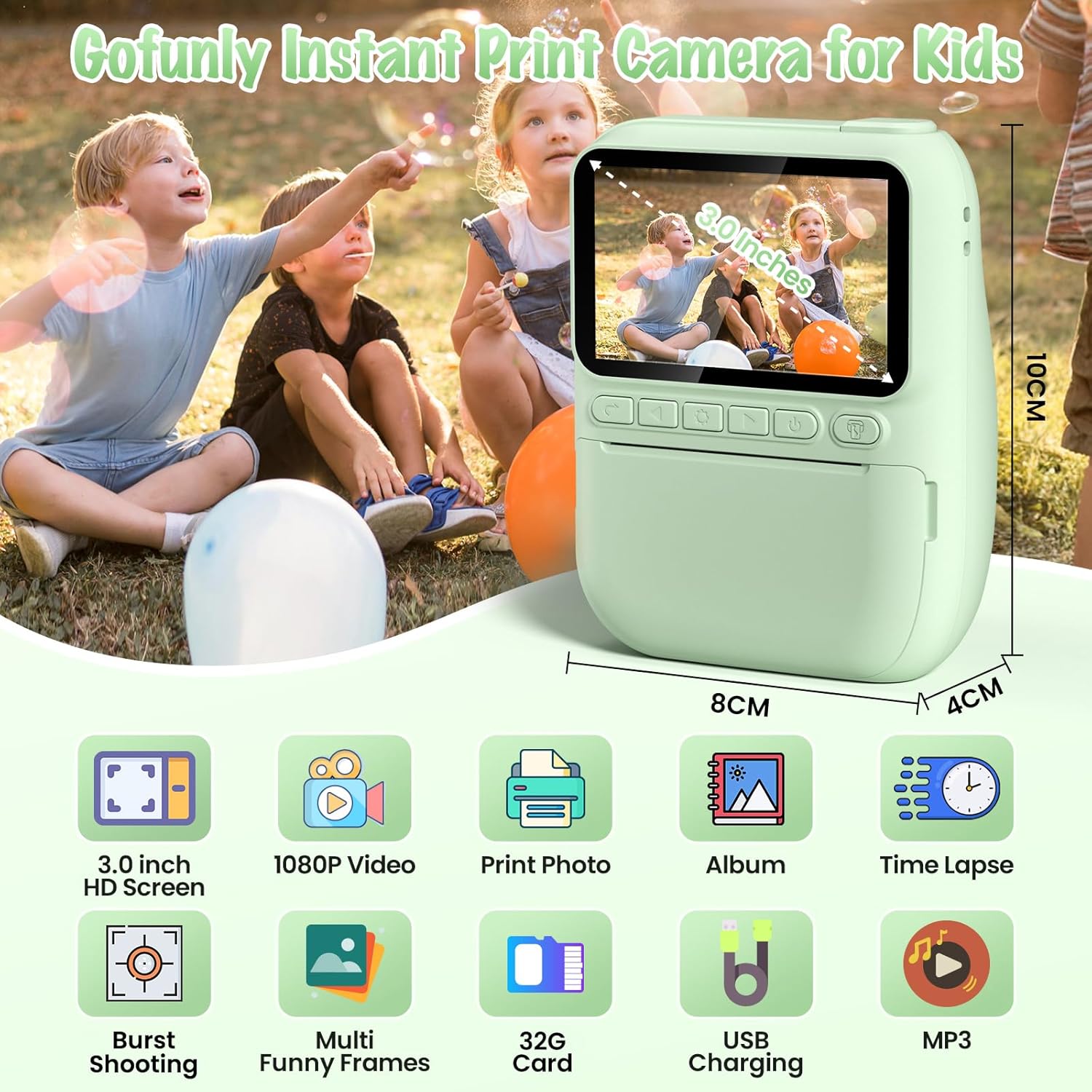
Image: An infographic displaying the various features of the Gofunly Instant Print Camera, such as 3.0-inch HD screen, 1080P video, instant photo printing, album view, time lapse, burst shooting, multiple funny frames, 32GB card support, USB charging, and MP3 functionality.

Image: Visual examples of the camera's flashlight function (on/off), 5-second time lapse, and burst shooting capabilities (x1, x2, x3).

Image: A display of various funny frames and photo filters that can be applied to images taken with the camera, showing 18 different options.
3.2 Selfie Feature
The camera includes a small mirror located next to the front lens. This mirror allows users to easily frame themselves when taking selfies, ensuring they are perfectly centered in the shot.
3.3 Customizing Prints with Color Pens
After printing black and white photos, use the included 5 color pencils to add personalized designs and colors to your instant prints. This feature encourages artistic expression and makes each photo unique.

Image: A child engaged in coloring a black and white instant print photo using the provided color pens, demonstrating the DIY customization feature.
4. Maintenance
- Cleaning: Use a soft, dry cloth to clean the camera body and screen. Avoid using liquid cleaners or abrasive materials.
- Storage: Store the camera in a cool, dry place away from direct sunlight and extreme temperatures.
- Paper Handling: The instant print paper is made from high-quality, BPA-free, non-toxic materials. It does not emit odor or carbon dust, making it safe for children. Handle paper rolls with clean hands to maintain print quality.
- Battery Care: To prolong battery life, avoid fully discharging the battery frequently. Charge the camera regularly, even if not in use for extended periods.
5. Troubleshooting
| Problem | Possible Cause | Solution |
|---|---|---|
| Camera does not turn on. | Low battery or battery fully discharged. | Charge the camera using the provided USB-C cable. Ensure the charging indicator lights up. |
| Photos are not printing. | No printer paper, paper incorrectly loaded, or print head issue. | Check if paper is loaded correctly and if there is enough paper. Refer to "2.3 Installing Printer Paper". If problem persists, contact customer support. |
| Poor print quality. | Low battery, dirty print head, or low-quality image. | Ensure battery is charged. Gently clean the print head if accessible. Take photos in good lighting conditions. |
| SD card error. | SD card not inserted correctly or corrupted. | Reinsert the SD card. If the issue continues, try formatting the card (this will erase all data) or use a different SD card. |
6. Specifications
| Feature | Detail |
|---|---|
| Brand | Gofunly |
| Model Name | H2 |
| Product Dimensions | 1.57 x 3.15 x 3.94 inches |
| Item Weight | 14 ounces |
| Screen Size | 3.0 inches HD |
| Photo Resolution | 32MP |
| Video Resolution | 1080P |
| Battery | 1000mAh Lithium Polymer (rechargeable) |
| Storage | Supports up to 32GB SD Card (included) |
| Special Features | Instant Print, Built-in Flash, Time Lapse, Burst Shooting, Filters, Frames, MP3 Playback, Selfie Mirror |
| Film Format Type | Instant (Black & White Thermal Paper) |
7. Warranty and Support
Gofunly is committed to providing high-quality products and excellent customer service. For any inquiries, technical support, or warranty claims, please contact our professional customer support team.


Images: Gofunly's commitment to quality through an excellent service team, advanced factory, and professional R&D team.
For further assistance, please visit the official Gofunly Store on Amazon: Gofunly Store.
Optional protection plans are available for purchase separately on Amazon to extend coverage for your product.
Ask a question about this manual
Ask about setup, troubleshooting, compatibility, parts, safety, or missing instructions. Manuals+ will review the question and use this page’s manual context to help answer it.