Important Safety Instructions
Please read and understand all instructions before using this product. Keep this manual for future reference.
- Keep the trash can away from children and pets to prevent accidents.
- Do not immerse the lid unit in water or any other liquid, as this may damage the electronic components.
- Use only 6 AA batteries. Do not mix old and new batteries, or different types of batteries.
- Avoid placing the trash can in direct sunlight or near strong light sources, as this may interfere with the motion sensor's operation.
- Ensure there is adequate clearance (at least 10 inches) above the lid for it to open and close freely without obstruction.
- Do not force the lid open or closed manually when the sensor is active, as this may damage the motor.
Product Overview
The Goplus 19 Gallon Motion Sensor Stainless Steel Trash Can offers a convenient and hygienic solution for waste management with its multi-compartment design and touchless operation.
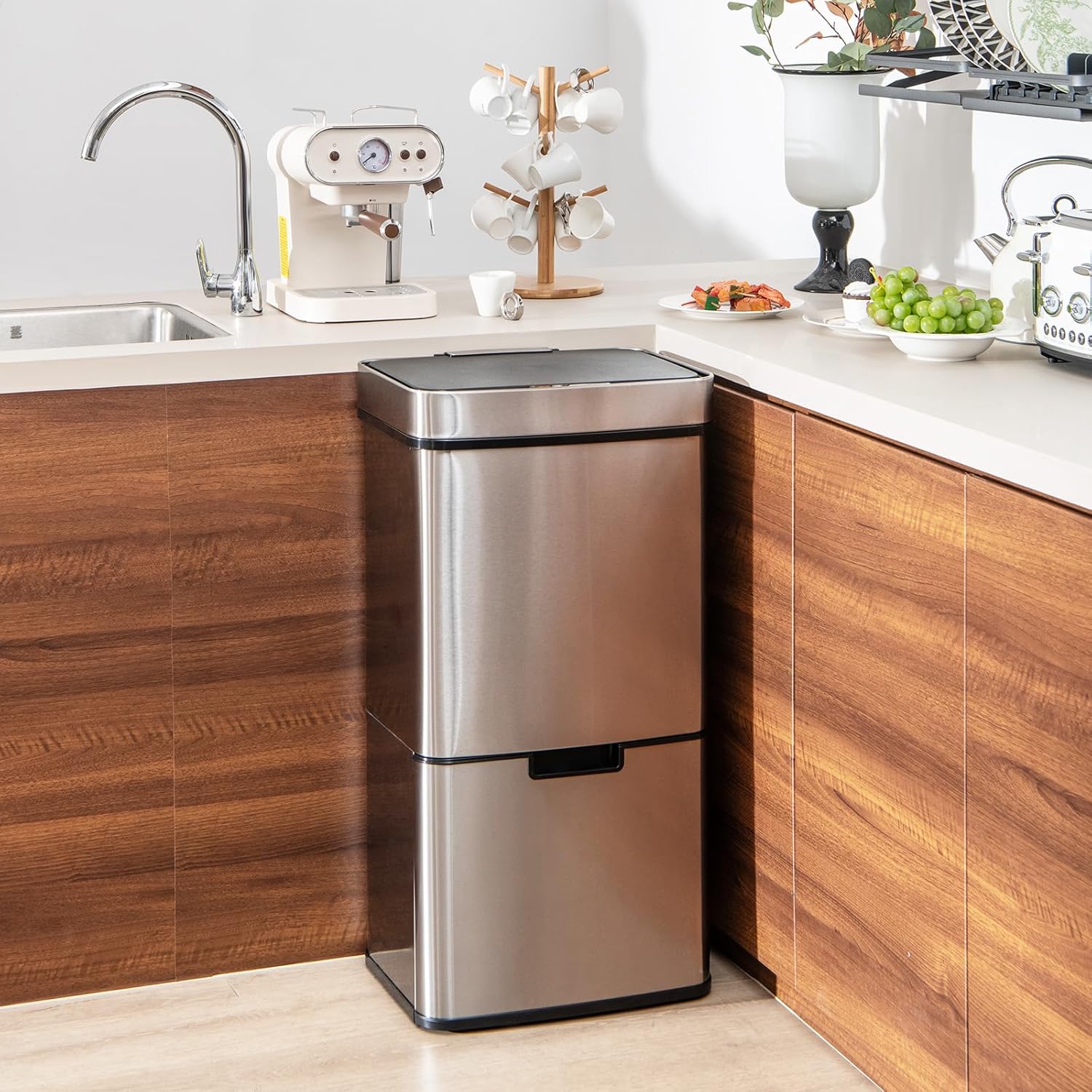
Image: The Goplus 19 Gallon Motion Sensor Stainless Steel Trash Can positioned in a modern kitchen.
Key Features:
- Smart Motion Sensor: Provides touchless operation for hygienic waste disposal.
- Large Capacity: Total 19 Gallons (72 Liters) with multiple compartments for efficient sorting.
- Multi-Compartment Design: Includes a 12-gallon upper main bin, a 1-gallon removable kitchen waste bin, and two 3-gallon removable bottom recycling bins.
- Durable Construction: Made with 3-layered stainless steel for fingerprint resistance, durability, rustproof, and waterproof properties.
- Soft-Close Lid: Ensures quiet and gentle closing, preventing slamming.
- Stay-Open Function: Lid remains open at an 88-degree angle for extended use during food preparation or cleanup.
- Bottom Pull-Out Design: Features smooth wheels for easy access to recycling bins.
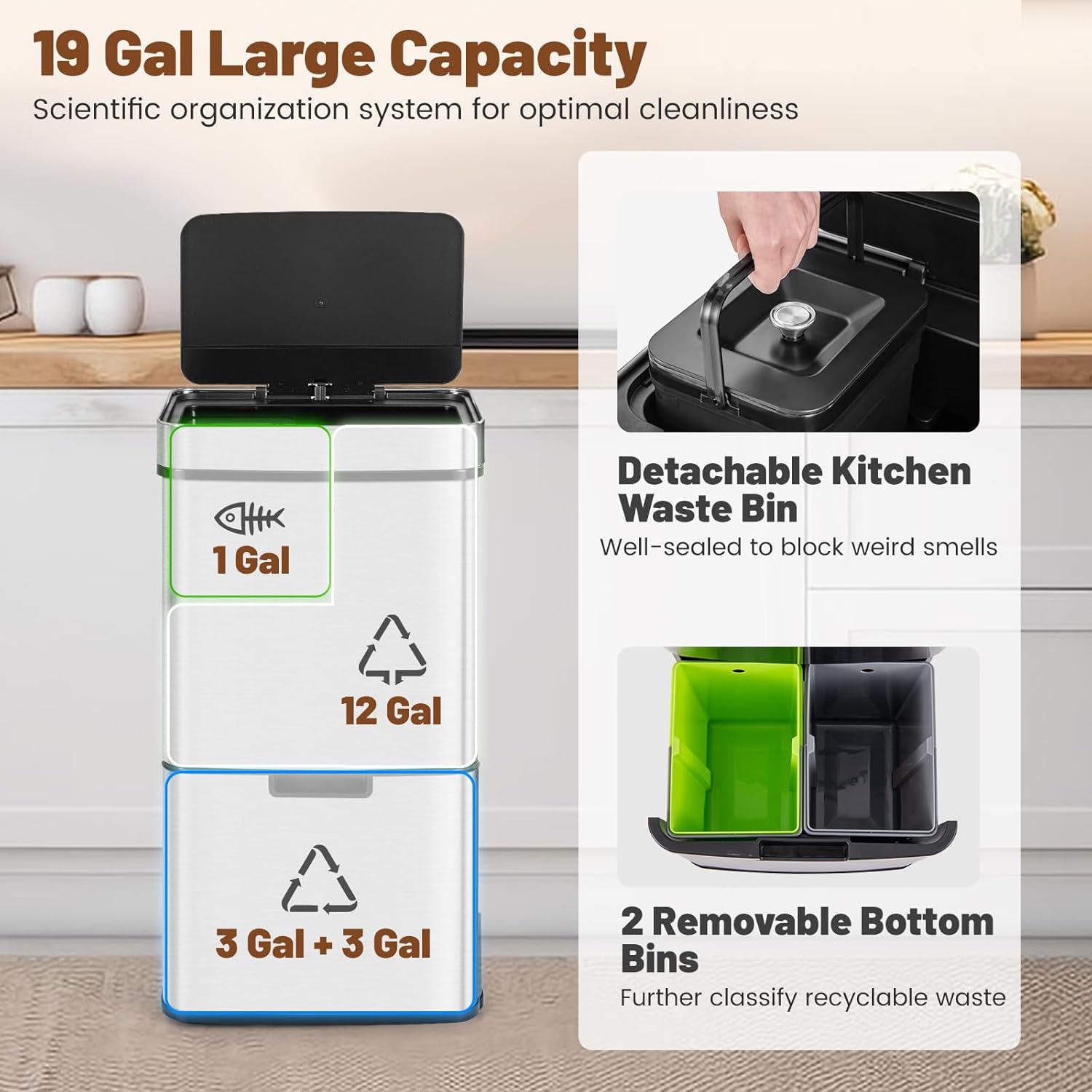
Image: A visual breakdown of the trash can's 19-gallon capacity, illustrating the separate compartments for kitchen waste, general trash, and recycling.
What's in the Box
Carefully unpack all components and ensure you have received the following items:
- 1 x Goplus 19 Gallon Motion Sensor Stainless Steel Trash Can Unit
- 1 x Removable 1 Gallon Kitchen Waste Bin with Lid
- 2 x Removable 3 Gallon Recycling Bins
- 1 x User Guide
Setup Instructions
1. Battery Installation
- Locate the battery compartment on the underside of the lid unit.
- Open the battery compartment cover.
- Insert 6 new AA batteries, ensuring correct polarity (+/-) as indicated inside the compartment.
- Close the battery compartment cover securely.
2. Inner Bin Placement
- Main Upper Bin: Place a standard 12-gallon trash bag into the large upper compartment. Secure the bag by tucking its edges under the retainer ring.
- Kitchen Waste Bin: Place a small liner (if desired) into the 1-gallon removable bin. Insert this bin into its designated slot within the main upper compartment. Ensure its lid is properly seated to help contain odors.
- Bottom Recycling Bins: Gently pull out the bottom drawer using the handle. Place liners (if desired) into the two 3-gallon removable bins. Insert these bins into the drawer. Push the drawer back into the main unit until it clicks into place.

Image: Detailed view of the trash can's internal components, including the battery compartment, power switch, and bag retainer ring.
3. Positioning the Trash Can
Place the trash can on a flat, stable surface. Ensure there is sufficient space around the unit for the lid to open fully (88 degrees) without hitting walls or cabinets. The anti-slip foot pads on the base will help keep the unit stable and protect your floor.
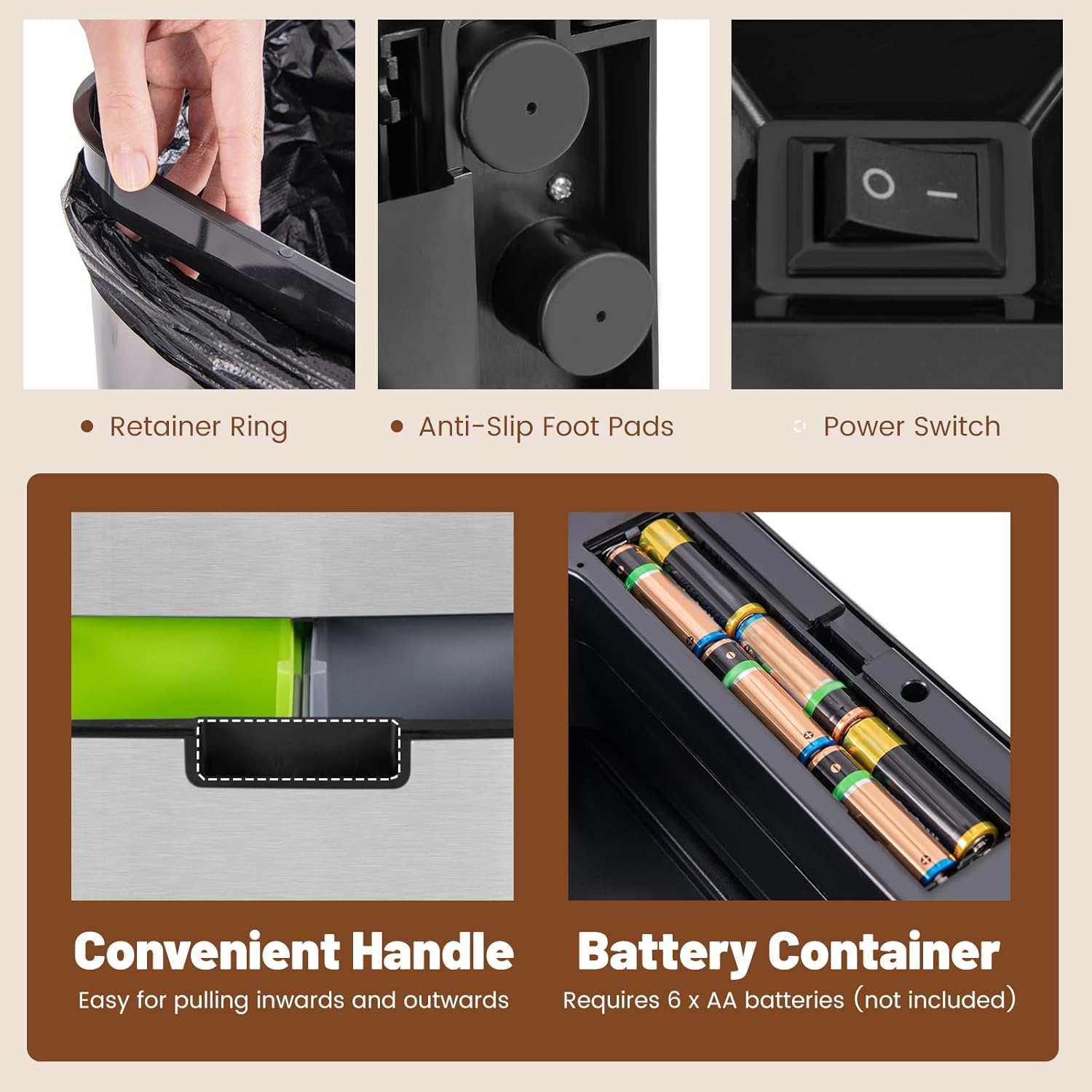
Image: The bottom section of the trash can, demonstrating the smooth pull-out mechanism for accessing the recycling bins.
Operating Instructions
1. Power On/Off
Locate the power switch (typically on the back or side of the lid unit). Flip the switch to the "ON" position to activate the motion sensor and automatic lid functions.
2. Motion Sensor Operation
To open the lid, simply wave your hand approximately 6-10 inches above the motion sensor located on the front of the lid. The lid will open automatically in 0.3 seconds. It will remain open for 5 seconds, then close softly and quietly.

Image: The motion sensor on the lid, indicating its quick response time and the manual control buttons.
3. Manual Control and Stay-Open Function
For longer tasks, such as food preparation, you can use the manual "OPEN" and "CLOSE" buttons on the lid. Press the "OPEN" button to keep the lid open indefinitely. Press the "CLOSE" button to close the lid at any time.
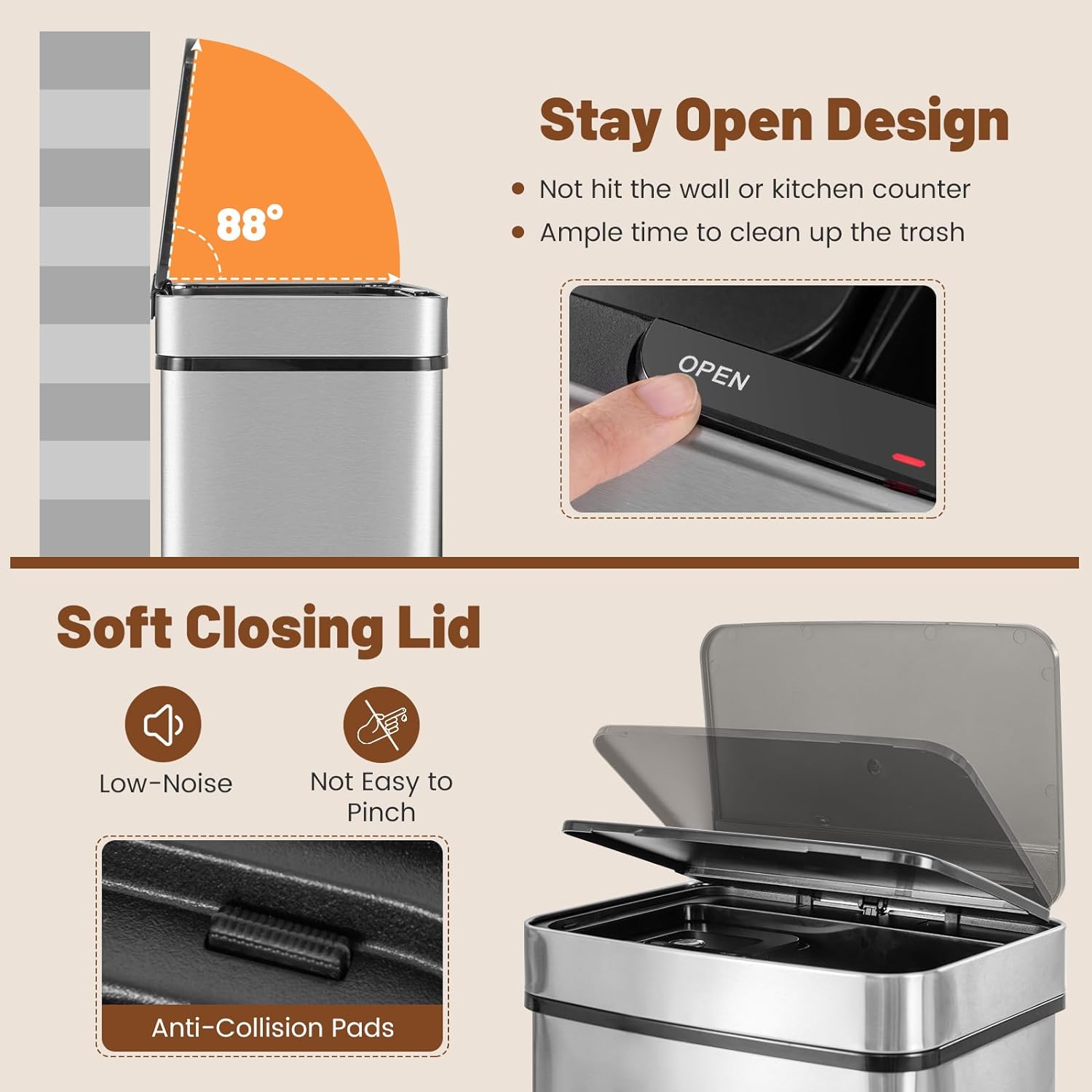
Image: The lid demonstrating its 88-degree stay-open feature and soft-closing mechanism, designed to prevent collisions and noise.
4. Accessing Recycling Bins
To access the recycling bins, simply pull the handle on the bottom drawer. The drawer will slide out smoothly on its wheels, allowing you to easily remove or empty the individual 3-gallon bins.
Maintenance and Care
1. Exterior Cleaning
The 3-layered stainless steel exterior is designed to be fingerprint-resistant and easy to clean. Wipe the surface with a soft, damp cloth and a mild, non-abrasive cleaner. Dry immediately with a clean, soft cloth to prevent water spots. Avoid using harsh chemicals, abrasive pads, or steel wool, as these can damage the finish.
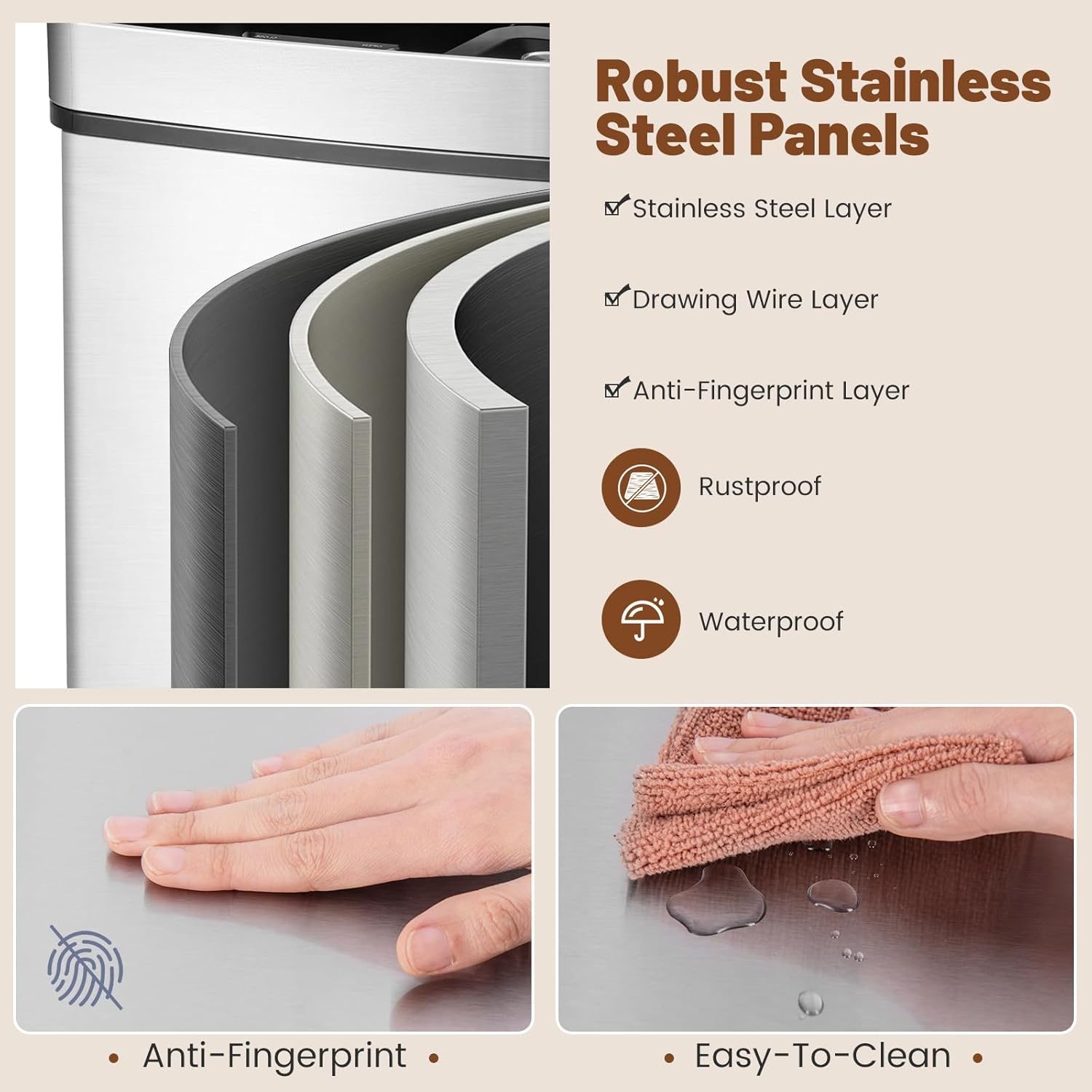
Image: Illustration of the trash can's 3-layered stainless steel construction, highlighting its resistance to fingerprints and ease of cleaning.
2. Interior Bins Cleaning
Regularly remove and empty all inner bins (main, kitchen waste, and recycling). Wash them with warm, soapy water and rinse thoroughly. Allow the bins to air dry completely before placing them back into the trash can unit to prevent odors and mildew.
3. Sensor and Battery Care
Gently wipe the motion sensor window with a soft, dry cloth to ensure it remains free of dust and debris, which could affect its performance. Replace all 6 AA batteries simultaneously when the sensor light indicates low power or if the lid's operation becomes inconsistent or sluggish.
Troubleshooting
| Problem | Possible Cause | Solution |
|---|---|---|
| Lid not opening/closing automatically. | Low or dead batteries. Power switch is OFF. Sensor obstructed or dirty. | Replace all 6 AA batteries. Ensure power switch is in the "ON" position. Clean the motion sensor window with a soft, dry cloth. |
| Lid opens unexpectedly. | Interference from direct sunlight, strong lights, or high-traffic areas. | Relocate the trash can to an area with less direct light or motion. |
| Lid closes too quickly or slowly. | Low battery power. | Replace all 6 AA batteries. |
| Bottom drawer is difficult to pull out or push in. | Obstruction in the drawer mechanism. Wheels are dirty. | Check for any items blocking the drawer. Clean the wheels and tracks. |
Specifications
| Feature | Detail |
|---|---|
| Model Number | SU-10018SL-YG |
| Total Capacity | 19 Gallons (72 Liters) |
| Upper Main Bin Capacity | 12 Gallons |
| Kitchen Waste Bin Capacity | 1 Gallon |
| Bottom Recycling Bins Capacity | 2 x 3 Gallons |
| Dimensions (L x W x H) | 16.5" x 13" x 33" |
| Item Weight | 25.5 pounds |
| Material | Stainless Steel, Acrylonitrile Butadiene Styrene (ABS) |
| Opening Mechanism | Motion-Sensor, Manual Buttons |
| Power Source | 6 x AA Batteries (not included) |
| Special Features | Heavy Duty, Motion Sensor, Quiet Close, Removable Buckets, Anti-Fingerprint, Rustproof, Waterproof |

Image: Detailed dimensions of the trash can and its individual compartments.
Warranty and Support
For warranty information, product registration, or customer support, please refer to the documentation included with your purchase or visit the official Goplus website. Keep your purchase receipt as proof of purchase for any warranty claims.