
Introduction
This manual provides essential information for the safe and efficient operation of your Uocub 57-Inch Smart RGB LED Corner Floor Lamp. This product features dynamic lighting effects with 16 million color options, 68+ dynamic modes, and over 300 light modes. Control is available via a mobile application, remote control, or the integrated control box. The lamp also includes music synchronization and a timing function for enhanced user experience.

Image: The Uocub 57-inch Smart RGB LED Corner Floor Lamp showcasing its vibrant 16 million color capabilities, perfect for creating various atmospheres.
What's in the Box
Please verify that all components are present before beginning assembly:
- 2 x Floor Lamp (consisting of multiple sections)
- 2 x User Manual
- 2 x Power Adapter
- 2 x Remote Control
Setup Instructions
Follow these steps to assemble your Uocub Corner Floor Lamp:
- Remove Screw Cap: Locate the base of the lamp and remove the protective screw cap.
- Attach First Tube: Screw the first lamp tube section securely into the base.
- Connect Remaining Tubes: Plug in the remaining lamp tube sections one by one, ensuring each connection is firm.
- Connect Power: Plug the power adapter into the lamp's control box, then into a suitable power outlet.
Note: If disassembly is required, use a screwdriver to gently press the locking buckle on each tube connection before separating.

Image: A visual guide demonstrating the four-step plug-and-play assembly process for the Uocub Corner Floor Lamp, including how to connect the base and lamp sections.
Operating Instructions
Your Uocub Corner Floor Lamp offers multiple control methods:
1. Mobile App Control
Download the designated mobile application (refer to the included user manual for app name and QR code). Connect your lamp via Bluetooth to access advanced features:
- Color Selection: Choose from 16 million colors.
- Dynamic Modes: Select from 68+ dynamic lighting modes and over 300 light effects.
- Brightness & Speed: Adjust the intensity and speed of light effects.
- DIY Modes: Create and save your custom lighting patterns.
- Music Sync: Activate the music synchronization feature.
- Timing Function: Schedule automatic on/off times.

Image: A smartphone screen showing the mobile application interface with a color wheel, demonstrating the DIY light show customization feature.
2. Remote Control
Use the included remote control for convenient access to basic functions:
- Power On/Off
- Static Color Selection
- Dynamic Mode Selection
- Brightness Adjustment
- Speed Adjustment
3. Control Box
The integrated control box on the lamp provides basic power and mode cycling functionality.

Image: The Uocub Corner Floor Lamp alongside its three control methods: the mobile app, the remote control, and the physical control box.
Features
- Dynamic Alluring Lighting Effects: Equipped with 88 LED beads, the lamp offers 16 million color options, 68 dynamic lighting modes, and over 300 light modes. Customize each segment color to match your desired atmosphere.
- Adjustable Brightness and Speed: The lamp provides 1000 lumens of brightness, which is fully adjustable. You can also control the speed of dynamic lighting effects.
- Music Sync Function: A built-in sensitive microphone allows the LED light to synchronize with the beat of your music, movies, or games, creating an immersive ambient experience.
- Timing Function: Set schedules for the lamp to automatically turn on or off, providing convenience and energy efficiency. This can also function as a night light.
- Height Adjustable & Stable Design: The lamp is designed with 4 removable sections for adjustable height and easy assembly. It features an aluminum alloy shell and a heavy metal octagonal base for stability and space-saving placement.

Image: The Uocub Corner Floor Lamp illustrating its versatility with multiple scene modes, including Party, Movie, Gaming, Night Lighting, and Work settings.

Image: A visual representation of the lamp's adjustable features, showing sliders for color, speed, and brightness to fine-tune the lighting experience.
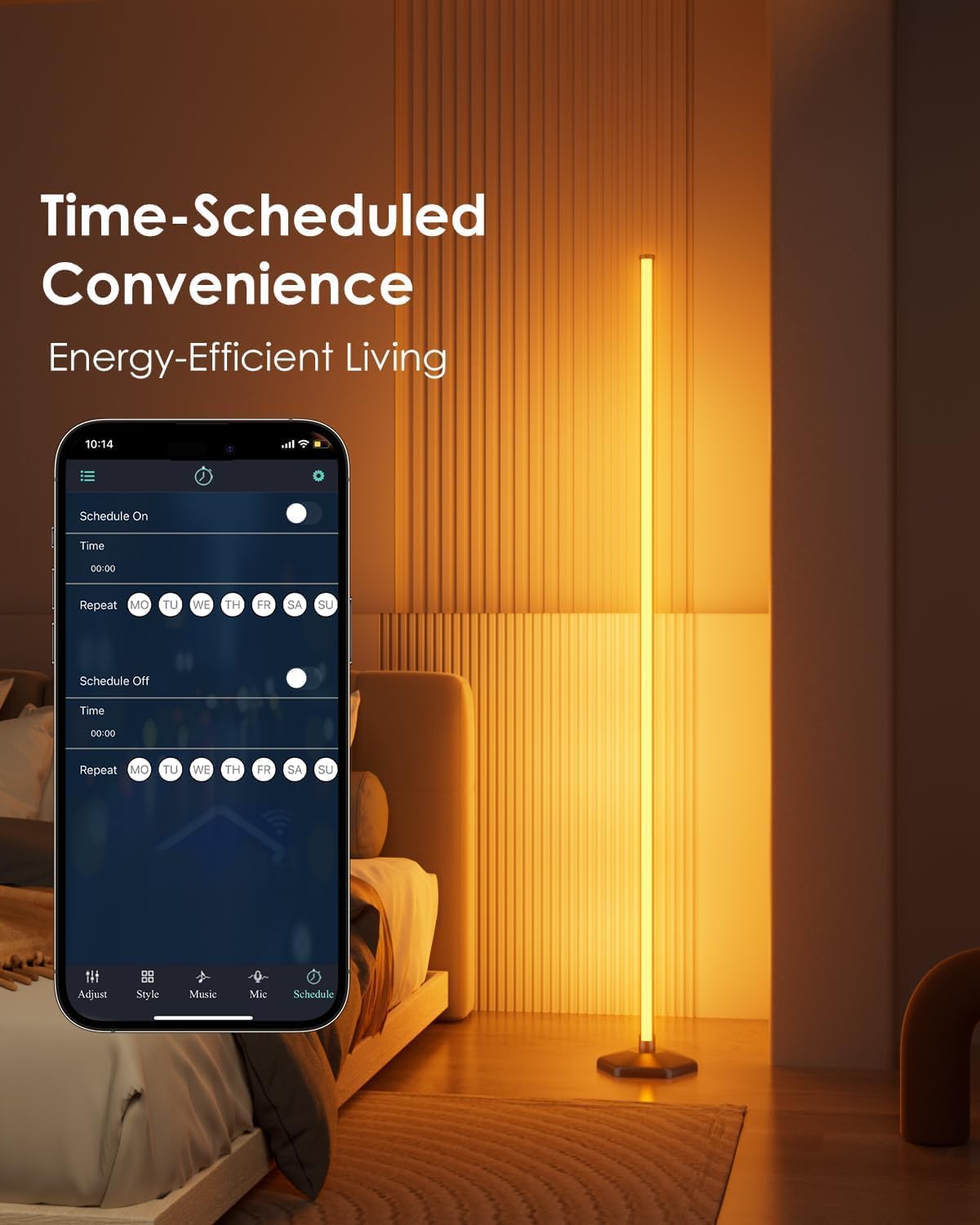
Image: A scene depicting the music sync feature, where the Uocub Corner Floor Lamp changes colors in rhythm with music played by a woman on a guitar, while a child dances.

Image: A smartphone screen displaying the timing function interface within the app, allowing users to schedule the lamp's operation for convenience and energy saving.
Maintenance
To ensure the longevity and optimal performance of your Uocub Corner Floor Lamp, follow these maintenance guidelines:
- Cleaning: Always unplug the lamp before cleaning. Use a soft, dry cloth to wipe the lamp body and base. Avoid using abrasive cleaners, solvents, or excessive moisture, as these can damage the finish or electronic components.
- Placement: Place the lamp on a stable, flat surface to prevent tipping. Ensure it is not exposed to direct sunlight, high temperatures, or high humidity, which can affect its performance and lifespan.
- Storage: If storing the lamp for an extended period, disassemble it carefully (refer to setup instructions for disassembly note) and store it in its original packaging in a dry, cool place.
Troubleshooting
If you encounter issues with your Uocub Corner Floor Lamp, refer to the following common problems and solutions:
| Problem | Possible Cause | Solution |
|---|---|---|
| Lamp does not turn on. | No power supply; remote battery depleted. | Check if the power adapter is securely plugged into the lamp and wall outlet. Replace remote control batteries. |
| App cannot connect to the lamp. | Bluetooth is off; lamp is out of range; app not paired. | Ensure Bluetooth is enabled on your device. Move closer to the lamp. Re-pair the lamp within the app settings. |
| Colors or modes are not changing. | Remote/app signal interference; incorrect mode selected. | Ensure clear line of sight for the remote. Verify the correct mode or color is selected in the app or remote. |
| Music sync is not responsive. | Microphone obstructed; low music volume; app settings. | Ensure the lamp's microphone is not covered. Increase music volume. Check music sync sensitivity settings in the app. |
If the problem persists after attempting these solutions, please contact customer support.
Specifications
| Specification | Detail |
|---|---|
| Model Number | SPL-FLL001 |
| Product Dimensions (D x W x H) | 7.87"D x 7.87"W x 57.09"H |
| Item Weight | 1.25 kg |
| Power Source | Corded Electric |
| Wattage | 15 watts |
| Voltage | 230 volts |
| Light Source Type | LED |
| Number of Light Sources | 88 LED beads |
| Control Method | App (Bluetooth), Remote, Button |
| Connectivity Technology | USB |
| Base Material | Aluminum |
| Shade Material | Acrylic |
| Shade Color | Milky White |
| Color | Black |
| Indoor/Outdoor Usage | Indoor |
| Number of Items | 2 |
| UPC | 768771264693 |
Official Product Videos
Video: An official Uocub video demonstrating the 65-inch LED Corner Floor Lamp, highlighting its features and usage. (Duration: 4:58)
Video: An official Uocub video showcasing the Smart RGB LED Floor Lamp, demonstrating its various color options and smart functionalities. (Duration: 0:40)
Video: An official Uocub video demonstrating the Smart Modern Floor Lamp's music sync feature, showing lights reacting to audio. (Duration: 0:17)
Warranty and Support
Warranty: The Uocub Corner Floor Lamp comes with a 1-year manufacturer's warranty covering defects in materials and workmanship. Please retain your proof of purchase for warranty claims.
Customer Support: For technical assistance, troubleshooting beyond this manual, or warranty inquiries, please refer to the contact information provided in your product packaging or visit the official Uocub website. When contacting support, please have your model number (SPL-FLL001) and purchase date available.