
1. Introduction
Thank you for choosing the EQBVZZRD WS0232 Wireless Anemometer Weather Station. This device provides comprehensive weather data including indoor and outdoor temperature, humidity, wind speed, wind direction, and weather forecasts. This manual will guide you through the setup, operation, and maintenance of your new weather station to ensure optimal performance and accurate readings.

2. Key Features
- Indoor and outdoor temperature display in degrees Fahrenheit or Celsius (user selectable).
- Indoor and outdoor relative humidity displays.
- Wind speed in mph, km/h, m/s, knots, Bft, or gust.
- Wind direction (N, S, W, E, NE, SE, SW, NW) display with LCD compass.
- Wind chill and Dew point temperature display.
- Weather forecast display by weather icons (sunny, overcast, cloudy, rainy, snowy).
- Weather forecast tendency arrow.
- Weather alarm modes for temperature.
- Records Max/Min indoor and outdoor temperature and humidity.
- Radio controlled time and date with manual setting option (DCF, WWVB selectable).
- 12 or 24 hour time display.
- Perpetual calendar.
- Time zone and Time alarm setting.
- Wall hanging or free standing display unit.
- Synchronized instant reception for outdoor weather data.
- Low battery indicator on the receiver.
- Transmission range up to 330ft (100m).
- Outdoor Temperature Range: -40°F to 140°F (-40°C to 60°C).
3. Package Contents
Please ensure all items are present before proceeding with installation:
- Instruction Manual
- Indoor Display Unit (Receiver)
- Outdoor Sensor Array (Transmitter)
- Mounting Hardware (screws, anchors, pole mount)
4. Setup
4.1 Battery Installation
Batteries are not included and must be purchased separately.
- Indoor Display Unit (Receiver): Requires 2 x AAA 1.5V Alkaline batteries. Open the battery compartment on the back of the unit, insert batteries according to polarity markings, and close the compartment.
- Outdoor Sensor Array (Transmitter): Requires 2 x AA 1.5V Alkaline batteries. Locate the battery compartment on the outdoor sensor array, insert batteries according to polarity markings, and securely close the compartment to ensure weather resistance.
4.2 Sensor Assembly and Placement
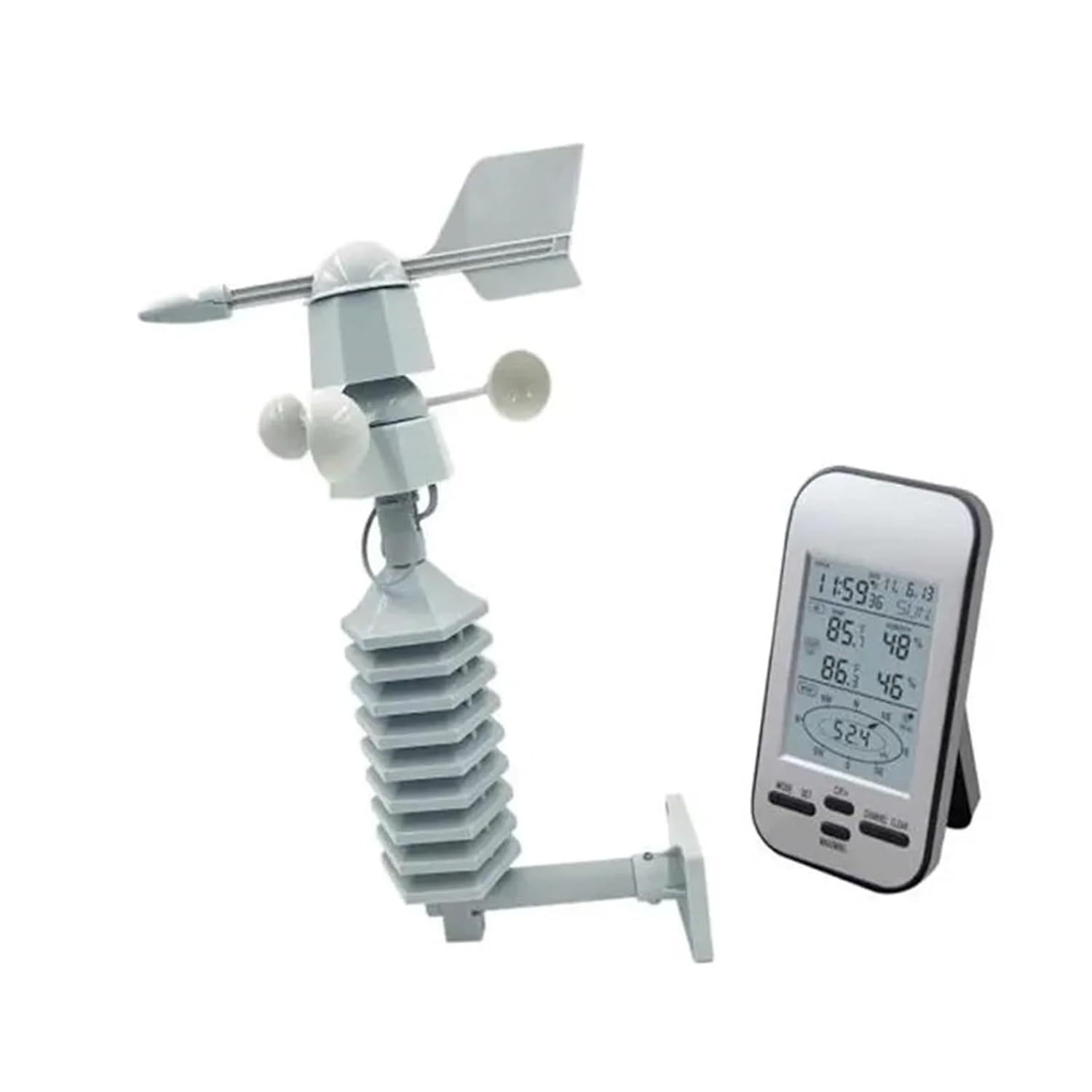
Proper assembly and placement of the outdoor sensor array are crucial for accurate readings. The sensor array includes an anemometer (wind speed), wind vane (wind direction), and temperature/humidity sensors.
- Assemble the wind cups and wind vane onto the main sensor body as per the diagrams. Ensure they can rotate freely.
- Choose an open location for the outdoor sensor array, free from obstructions like buildings, trees, or fences, which could interfere with wind readings. The ideal height is at least 10 feet (3 meters) above the ground.
- Mount the sensor array securely using the provided mounting hardware. Ensure it is level for accurate wind direction readings.
- The maximum transmission range between the outdoor sensor and the indoor display unit is 330 feet (100m) in open air. Walls and other obstacles will reduce this range.


5. Operation
5.1 Display Overview
The LCD display unit shows various weather parameters. Familiarize yourself with the layout:
- Time/Date: Top section, often radio-controlled.
- Indoor Temperature/Humidity: Displays current indoor conditions.
- Outdoor Temperature/Humidity: Displays current outdoor conditions received from the sensor array.
- Wind Speed/Direction: Shows current wind speed and direction, often with gust and average readings.
- Weather Forecast Icons: Indicates predicted weather conditions (sunny, cloudy, rainy, etc.).
- Wind Chill/Dew Point: Calculated values based on temperature and humidity.
5.2 Basic Settings
Use the buttons on the display unit (e.g., MODE, SET, CH, CLEAR, MAX-MIN) to navigate and adjust settings.
- Time and Date: The unit attempts to synchronize with a radio-controlled time signal (DCF or WWVB). If synchronization fails or is unavailable, you can manually set the time, date, time zone, and 12/24 hour format.
- Units: Select desired units for temperature (°F/°C) and wind speed (mph, km/h, m/s, knots, Bft).
- Max/Min Records: Press the MAX-MIN button to view the maximum and minimum recorded values for temperature and humidity. Press CLEAR to reset these records.
5.3 Weather Alarms
The weather station supports temperature alarm modes. Refer to the detailed instructions in the manual for setting specific high or low temperature alerts.
6. Maintenance
- Battery Replacement: Replace batteries in both the indoor unit and outdoor sensor array when the low battery indicator appears on the display. Use fresh alkaline batteries.
- Cleaning: Periodically clean the outdoor sensor array to remove dust, dirt, or debris that may accumulate on the wind cups, wind vane, or temperature/humidity sensors. Use a soft, damp cloth. Do not use abrasive cleaners.
- Sensor Check: Ensure the wind cups and wind vane rotate freely. Clear any obstructions.
7. Troubleshooting
- No Outdoor Data:
- Check if the outdoor sensor batteries are correctly installed and not depleted.
- Ensure the outdoor sensor is within the transmission range (330ft/100m) and there are no major obstructions.
- Try resetting both the indoor unit and outdoor sensor by removing and reinserting batteries.
- Inaccurate Readings:
- Ensure the outdoor sensor is placed in an open area, away from direct sunlight (for temperature accuracy) and obstructions (for wind accuracy).
- Verify the sensor array is level for correct wind direction.
- Clean the sensors if dirt or debris is present.
- Time Synchronization Failure:
- Ensure the unit is placed away from electronic interference.
- Try moving the unit to a window or an area with better signal reception.
- Manually set the time if automatic synchronization is consistently unsuccessful.
8. Specifications
| Feature | Specification |
|---|---|
| Indoor Temperature Range | 0°C to +50°C (32°F to 122°F) |
| Outdoor Temperature Range | -40°C to +60°C (-40°F to 140°F) |
| Temperature Accuracy | ±1.0°C |
| Humidity Range | 20% to 90% RH |
| Humidity Accuracy | ±5% RH |
| Wind Speed Units | mph, km/h, m/s, knots, Bft, gust |
| Transmission Range | Up to 330ft (100m) in open air |
| Receiver Power | 2 x AAA 1.5V Alkaline batteries |
| Transmitter Power | 2 x AA 1.5V Alkaline batteries |
| Battery Life (approx.) | Minimum 12 months for base station |
| Receiver Dimensions (HxWxD) | 140mm x 84mm x 25mm |
| Connectivity Technology | Radio Frequency |
| Sensor Technology | Mechanical, Thermistor, Capacitive |
9. Warranty and Support
This product is covered by a standard manufacturer's warranty. Please refer to the warranty card included in your packaging or contact your retailer for specific details regarding warranty terms and conditions. For technical support or inquiries, please contact the vendor or refer to the product support section on the retailer's website.