
1. Introduction
The Jebao Jecod EP3500 DC Aquarium Return Pump is a high-performance, energy-efficient pump designed for various aquatic applications including aquariums, ponds, fountains, sumps, and hydroponic systems. Featuring an advanced LCD controller, this pump offers adjustable flow rates and quiet operation, ensuring optimal water circulation and management.
2. Safety Instructions
- Read all instructions carefully before installation and operation.
- Ensure the power supply voltage matches the pump's requirements.
- Always disconnect power before performing any maintenance, installation, or cleaning.
- Do not operate the pump dry. Ensure the pump is fully submerged in water or properly primed if used externally before connecting to power.
- Do not use the pump for flammable or corrosive liquids.
- Keep the power cord and controller away from water. Do not immerse the controller in water.
- Regularly inspect the power cord for damage. Do not use if the cord is damaged.
- This appliance is not intended for use by persons (including children) with reduced physical, sensory or mental capabilities, or lack of experience and knowledge, unless they have been given supervision or instruction concerning use of the appliance by a person responsible for their safety.
3. Package Contents
Verify that all components are present and undamaged upon opening the package:
- Jebao Jecod EP3500 DC Return Pump
- LCD Controller
- Power Adapter
- Hose Connectors/Fittings (various sizes)
- User Manual (this document)
4. Product Overview
The EP3500 pump consists of the main pump body and a separate LCD controller for precise adjustments.
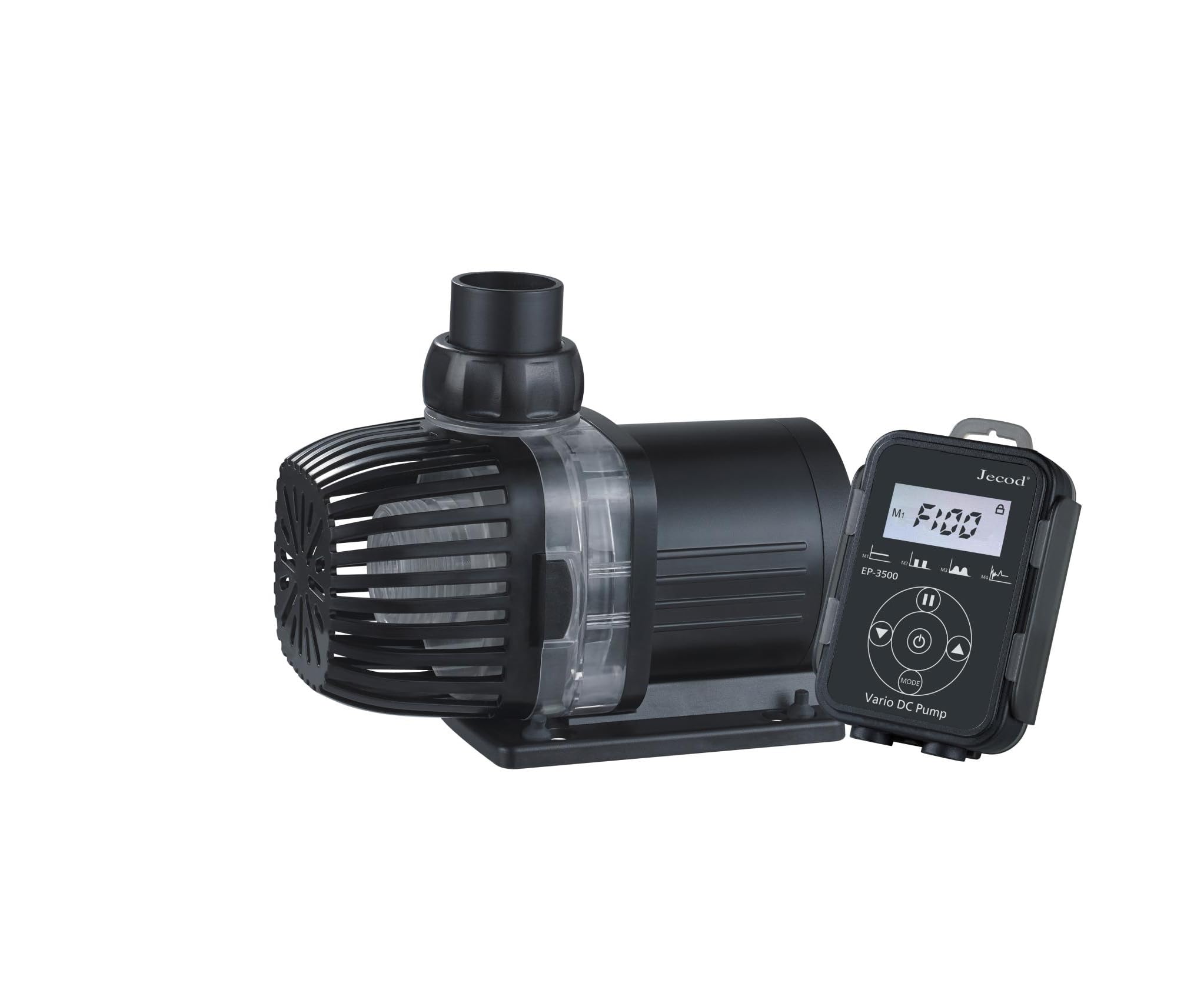
Image 1: Jebao Jecod EP3500 DC Aquarium Return Pump with LCD Controller. This image shows the complete pump unit, including the main pump body with its intake screen and the attached LCD controller.

Image 2: Jebao Jecod EP3500 DC Aquarium Return Pump with LCD Controller, showing pump and controller unit. This image provides an alternative view of the pump and controller, highlighting the compact design.
4.1 Pump Components
- Pump Body: Houses the motor and impeller.
- Impeller: The rotating component that moves water.
- Intake Screen: Protects the impeller from large debris.
- Outlet Nozzle: Where water exits the pump.
4.2 LCD Controller
The controller allows for precise adjustment of pump settings.
- LCD Display: Shows current flow rate, speed setting, and error codes.
- Up/Down Buttons: Adjust pump speed.
- Mode Button: Selects different operating modes (if applicable).
- Feed Button: Initiates a temporary pause for feeding.
5. Setup and Installation
Follow these steps for proper installation of your EP3500 pump:
- Unpack: Carefully remove all components from the packaging. Inspect for any damage.
- Choose Placement: The EP3500 can be used submersibly or externally. For submersible use, place the pump in the desired location within your sump or reservoir, ensuring it is fully submerged. For external use, ensure the pump is placed below the water level of the intake to allow for gravity priming.
- Connect Tubing: Attach appropriate hose connectors to the pump's inlet and outlet. Securely connect your aquarium or pond tubing to these connectors. Ensure all connections are tight to prevent leaks.
- Connect Controller: Connect the pump cable to the LCD controller. Then, connect the power adapter to the controller.
- Power On: Once all connections are secure and the pump is either submerged or primed (for external use), plug the power adapter into a suitable electrical outlet.
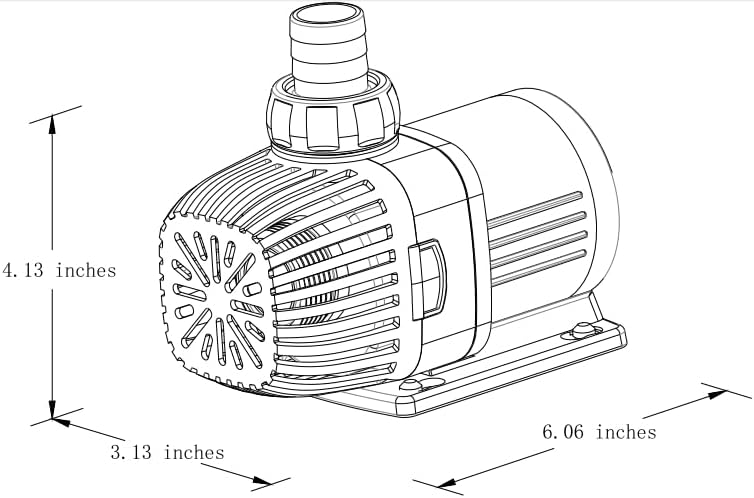
Image 3: Dimensional drawing of the Jebao Jecod EP3500 pump. This diagram illustrates the physical dimensions of the pump unit, useful for planning installation space.
6. Operating Instructions
The LCD controller provides intuitive control over the pump's functions.
- Power On/Off: The pump will start automatically when connected to power. To turn off, disconnect from the power outlet.
- Adjusting Flow Rate: Use the 'Up' and 'Down' arrow buttons on the controller to increase or decrease the pump's speed and thus the flow rate. The LCD display will show the current speed setting.
- Feed Mode: Press the 'Feed' button to temporarily pause the pump for a set duration (e.g., 10 minutes) to allow for feeding without water circulation. The pump will automatically resume operation after the timer expires. Press 'Feed' again to cancel the mode early.
- Mode Selection: If your controller has a 'Mode' button, press it to cycle through any available special operating modes (e.g., wave-making, constant flow). Refer to the display for the active mode.
7. Maintenance
Regular maintenance ensures optimal performance and longevity of your pump.
- Disconnect Power: Always unplug the pump from the power outlet before any maintenance.
- Clean Impeller: Periodically remove the pump's front cover and impeller assembly. Clean the impeller and its chamber thoroughly to remove any debris, algae, or mineral buildup. A small brush can be helpful.
- Clean Intake Screen: Ensure the intake screen is free from blockages to maintain proper water flow.
- Inspect Power Cord: Check the power cord and connections for any signs of wear, cuts, or damage.
- Reassemble: After cleaning, carefully reassemble the pump, ensuring all parts are correctly seated and sealed.
8. Troubleshooting
If you encounter issues with your pump, refer to the following common problems and solutions:
- Pump Not Starting:
- Check if the power adapter is securely plugged into the outlet and the controller.
- Ensure the controller cable is firmly connected to the pump.
- Verify there is power to the outlet.
- Inspect the impeller for any obstructions preventing it from spinning.
- Reduced Flow Rate:
- Clean the impeller and pump chamber for debris or buildup.
- Check the intake screen for blockages.
- Ensure tubing is not kinked or obstructed.
- Verify the pump speed setting on the controller is at the desired level.
- Unusual Noise:
- Disconnect power and inspect the impeller for foreign objects or damage.
- Ensure the pump is properly seated and not vibrating against hard surfaces.
- Check for air trapped in the pump or tubing (especially for external setups).
- Error Codes (e.g., Er-03):
- If an error code appears on the LCD, disconnect power, wait a few minutes, and then reconnect.
- Common error codes often indicate impeller blockage or dry running. Clean the impeller and ensure the pump is submerged/primed.
- If the error persists, contact customer support.
9. Specifications
| Feature | Specification |
|---|---|
| Model | EP-3500 |
| Brand | Jebao |
| Maximum Flow Rate | 3500 Litres Per Hour (924 GPH) |
| Maximum Lifting Height | 3.5 Metres (11.4 feet) |
| Power Source | Corded Electric |
| Product Dimensions (L x W x H) | 15.4L x 7.9W x 10.5H centimetres |
| Material | Stainless Steel |
| Colour | Black |
| Usage | Aquariums, Ponds, Fountains, Sump, Hydroponics |
10. Warranty and Support
This product comes with a standard manufacturer's warranty. Please refer to the warranty card included in your package or contact your retailer for specific warranty terms and conditions. For technical support, troubleshooting assistance, or spare parts, please contact the retailer where you purchased the product or the Jebao customer service department.
