
Introduction
The Mighty Max Battery ML-24TMBX Smart Battery Box Power Center is designed to transform a standard 12V battery into a versatile power station. This unit is compatible with 12V battery groups 24, 27, and 31. It provides protection for your battery while offering convenient access to power connections for trolling motors, as well as integrated USB ports and a 12V DC outlet for charging various devices. The box also features a built-in voltmeter and a resettable circuit breaker for enhanced safety and monitoring.
This manual provides essential information for the safe and effective use of your ML-24TMBX Smart Battery Box Power Center. Please read all instructions carefully before installation and operation.

Image: The Mighty Max Battery ML-24TMBX Smart Battery Box Power Center.
Safety Information
Always prioritize safety when handling batteries and electrical equipment. The ML-24TMBX Smart Battery Box is designed with several safety features:
- Battery Acid Containment: The box is designed to effectively collect battery acid, preventing spills and corrosion.
- Ventilation: Ensures sufficient ventilation to prevent gas buildup from the battery.
- Secure Latching: The lid securely locks to the base, preventing accidental opening.
- Terminal Protection: Prevents accidental contact with underground battery terminals, reducing the risk of short circuits or electric shock.
- Circuit Breaker: An integrated resettable circuit breaker protects connected devices from overcurrent.
General Safety Precautions:
- Always wear appropriate personal protective equipment (PPE), such as safety glasses and gloves, when handling batteries.
- Ensure the battery box is placed on a stable, level surface.
- Do not expose the battery box to extreme temperatures or direct flame.
- Keep children and unauthorized personnel away from the battery box during operation.
- Disconnect all power sources before performing any maintenance or installation.
Product Components
Familiarize yourself with the various components of your Mighty Max Battery ML-24TMBX Smart Battery Box Power Center:
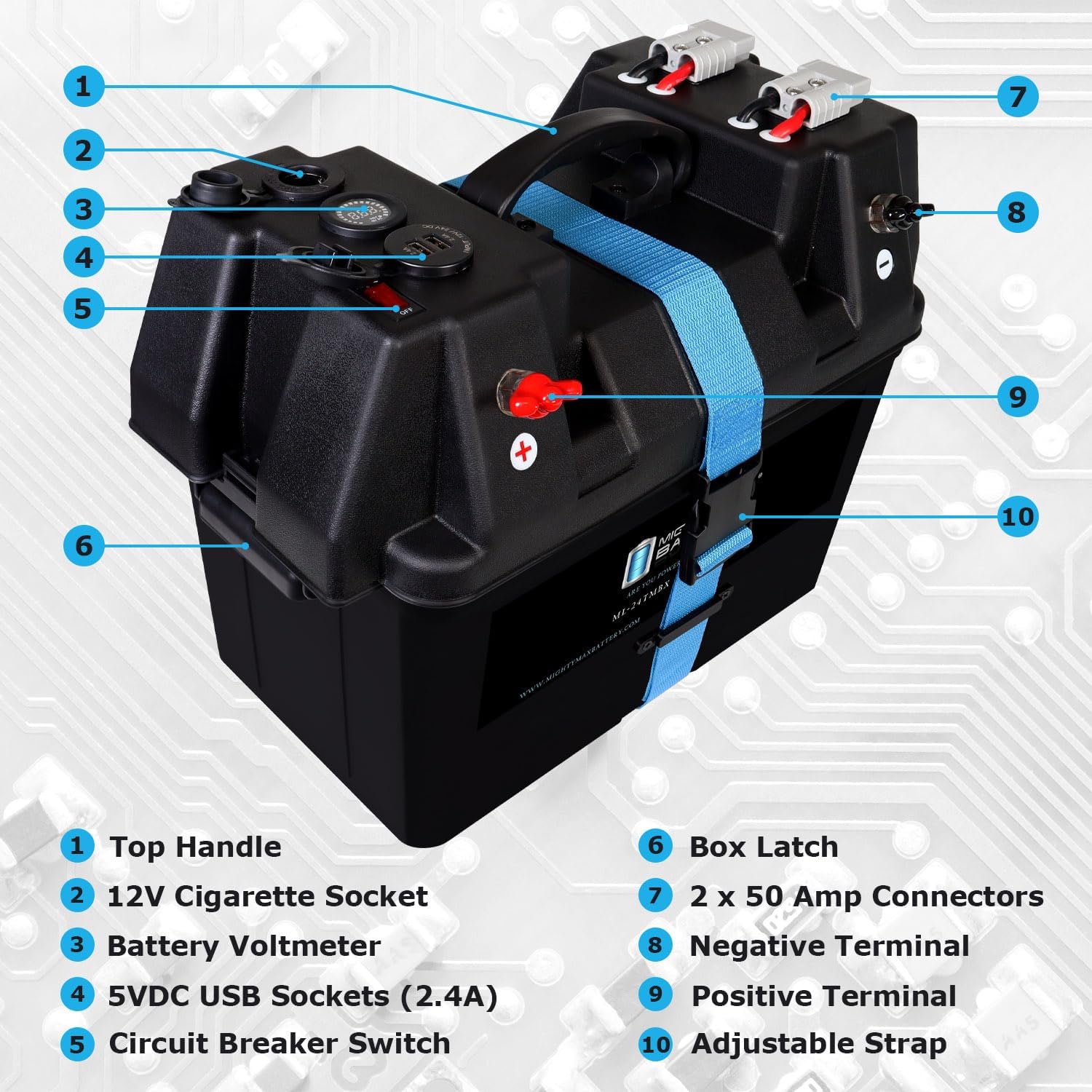
Image: Labeled diagram of the ML-24TMBX Smart Battery Box components.
- Top Handle: For easy carrying and transport.
- 12V Cigarette Socket: Provides a 12V DC power output for compatible devices.
- Battery Voltmeter: Digital display showing the current battery voltage.
- 5VDC USB Sockets (2.4A): Dual USB ports for charging mobile devices.
- Circuit Breaker Switch: On/Off switch with a resettable circuit breaker for power control and protection.
- Box Latch: Secures the lid to the base of the battery box.
- 2 x 50 Amp Connectors: Heavy-duty connectors for high-current applications, such as trolling motors.
- Negative Terminal: Internal connection point for the battery's negative terminal.
- Positive Terminal: Internal connection point for the battery's positive terminal.
- Adjustable Strap: Secures the battery within the box.
Setup Instructions
Follow these steps to properly set up your Mighty Max Battery ML-24TMBX Smart Battery Box:
- Open the Battery Box: Unlatch the box and remove the lid.
- Insert Battery: Carefully place your 12V Group 24, 27, or 31 battery into the box. Ensure it fits snugly.
- Secure Battery: Use the adjustable strap to firmly secure the battery in place, preventing movement during transport or operation.
- Connect Internal Wiring:
- Connect the red internal cable to the positive (+) terminal of your battery.
- Connect the black internal cable to the negative (-) terminal of your battery.
Warning: Ensure correct polarity. Reversing polarity can damage the battery box and connected devices.
- Close the Lid: Carefully place the lid back onto the base, ensuring all wires are clear of the seal. Secure the latches.

Image: Internal view of the ML-24TMBX showing battery placement and wiring connections.
Operating Instructions
Once your battery is installed and the box is secured, you can begin using the power center's features:
- Power On/Off: Use the Circuit Breaker Switch (Item 5 in Components diagram) located on the lid to turn the power center on or off. When switched to "ON", the voltmeter will illuminate.
- Monitoring Battery Voltage: The Battery Voltmeter (Item 3) displays the current voltage of your installed battery. Monitor this to ensure your battery is adequately charged.
- Using USB Ports: Plug your USB-compatible devices into the 5VDC USB Sockets (Item 4) for charging. These ports provide 2.4A output.
- Using 12V DC Outlet: Connect 12V DC accessories to the 12V Cigarette Socket (Item 2).
- Connecting High-Current Devices: For devices like trolling motors, use the 2 x 50 Amp Connectors (Item 7). Ensure your device's connectors are compatible and properly secured.
- Resetting the Circuit Breaker: If an overload occurs, the circuit breaker will trip, cutting power. To reset, switch the Circuit Breaker Switch to "OFF", wait a few seconds, then switch it back to "ON". If it trips repeatedly, check for a short circuit or an overloaded device.

Image: Detailed view of the digital battery voltmeter and circuit breaker switch.
Maintenance
Regular maintenance helps ensure the longevity and optimal performance of your Smart Battery Box:
- Cleaning: Periodically wipe down the exterior of the battery box with a damp cloth. Avoid using harsh chemicals or abrasive cleaners.
- Terminal Inspection: Regularly check the internal battery terminals and external connectors for corrosion. Clean any corrosion with a wire brush and a baking soda solution (for lead-acid batteries).
- Strap Tension: Ensure the adjustable strap remains tight to keep the battery secure.
- Storage: When not in use for extended periods, store the battery box in a cool, dry place. Ensure the battery inside is fully charged before storage and periodically recharged to prevent deep discharge.
- Lid Seal: Inspect the lid seal for any damage that could compromise its water resistance.
Troubleshooting
If you encounter issues with your ML-24TMBX Smart Battery Box, consider the following common troubleshooting steps:
- No Power to Outlets/USB:
- Ensure the Circuit Breaker Switch is in the "ON" position.
- Check the Battery Voltmeter. If the voltage is very low, the battery may need charging.
- Verify that the internal battery connections (positive and negative) are secure and free of corrosion.
- If the circuit breaker has tripped, reset it as described in the Operating Instructions.
- Voltmeter Not Displaying:
- Confirm the Circuit Breaker Switch is "ON".
- Check internal wiring connections to the battery.
- Device Not Charging via USB/12V Outlet:
- Ensure the device is properly connected and compatible with the output voltage/current.
- Check if the battery has sufficient charge.
- Try a different device to rule out a faulty accessory.
If these steps do not resolve the issue, please contact Mighty Max Battery customer support for further assistance.
Specifications
Technical specifications for the Mighty Max Battery ML-24TMBX Smart Battery Box Power Center:
| Feature | Specification |
|---|---|
| Model Number | ML-24TMBX |
| Battery Compatibility | 12V Group 24, 27, 31 Batteries |
| External Dimensions (L x W x H) | 42.5 cm x 25.4 cm x 32.5 cm (16.75 in x 10.00 in x 12.81 in) |
| Internal Dimensions (L x W x H) | 13.25 in x 7.75 in x 8.25 in |
| Voltage | 12 Volts |
| Weight (Empty) | 6.03 lbs (2.73 kg) |
| USB Output | Dual 5VDC, 2.4A |
| DC Outlet | 12V Cigarette Socket |
| High Current Connectors | 2 x 50 Amp |
| Safety Features | Resettable Circuit Breaker, Battery Acid Containment, Ventilation, Terminal Protection |

Image: Diagram illustrating the external dimensions of the ML-24TMBX Smart Battery Box.
Warranty and Support
For information regarding product warranty, please refer to the warranty card included with your purchase or visit the official Mighty Max Battery website. If you require technical support or have questions not covered in this manual, please contact Mighty Max Battery customer service directly.
Contact information can typically be found on the product packaging or the manufacturer's website.