1. Product Overview
The FITCAMX 4K Dash Cam (HD2-7738) is designed for Audi vehicles, offering an OEM-style integration that blends seamlessly with your car's interior. It records high-definition video to capture driving events.

Image: FITCAMX 4K Dash Cam (HD2-7738) installed, demonstrating its integrated design.
Key features include 2160P UHD video recording, built-in WiFi for app connectivity, loop recording, and parking mode functionality. The camera is constructed from durable PC+ABS material, designed to withstand temperatures from -20°C to 85°C (-4°F to 185°F).

Image: Dash cam view from inside a vehicle.
2. Package Contents
Verify that all items are present in the package:
- 1 x FITCAMX 4K Front Dash Cam (HD2-7738)
- 1 x Power Cable
- 1 x User Manual (this document)
- 1 x 64GB Memory Card
- 1 x Removal Pry Tool
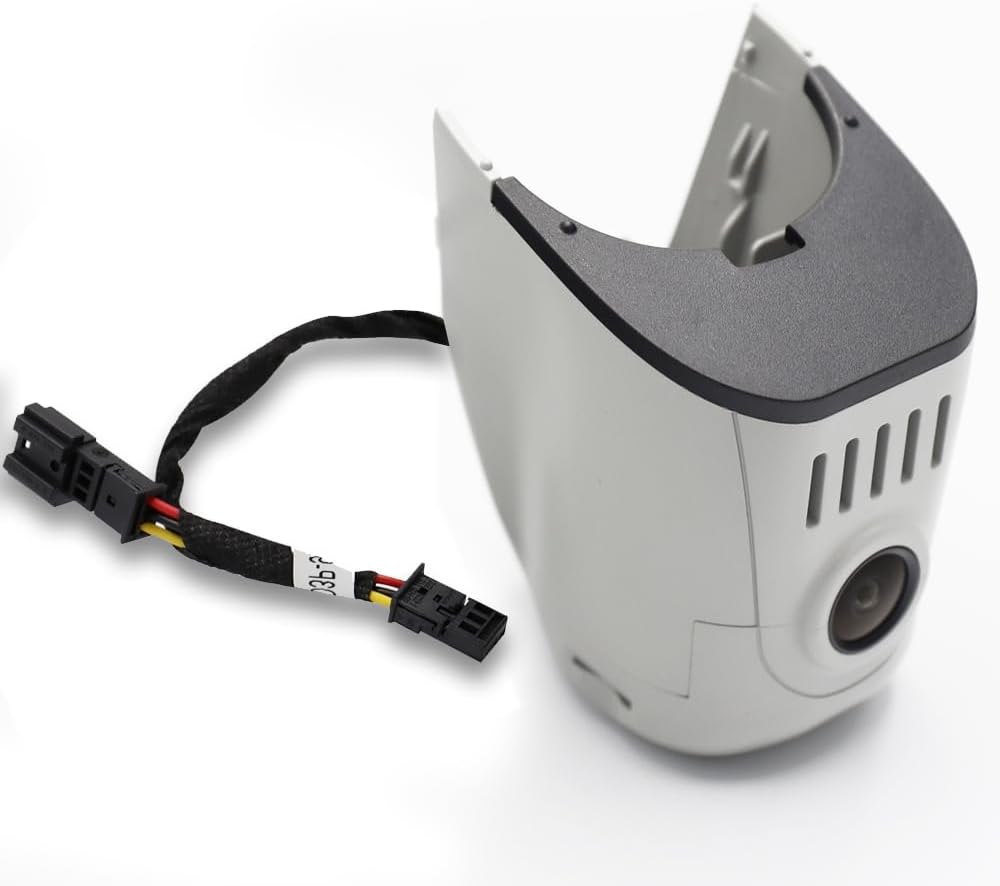
Image: FITCAMX Dash Cam unit and cable.
3. Product Identification and Model Selection
To ensure compatibility, it is crucial to select the correct dash cam model for your Audi vehicle. The HD2-7738 model is specifically designed for certain Audi vehicle styles.
Identifying the Correct Model:
- Confirm Vehicle Details: Verify your vehicle's style and year of manufacture (e.g., 2013 Audi A3).
- Compare Rearview Mirror Cover: Examine the shape of your original rearview mirror cover.
- Color Match: Confirm the color of your original cover (Grey or Black) to match the dash cam variant.

Image: Guide to identify the correct dash cam model based on rearview mirror cover shape. HD2-7738 is Model D.
4. Installation Instructions
The FITCAMX dash cam is designed for a clean, OEM-style installation without visible wires or suction cups. Follow these steps carefully:
Installation Steps:
- Remove Original Plastic Cover: Use the provided pry tool to carefully remove the original plastic cover around your rearview mirror.
- Unplug Humidity Sensor: Locate and unplug the humidity sensor cable.
- Remove Back Cover: Detach the back cover of the original housing.
- Transfer Humidity Sensor: Carefully transfer the humidity sensor from the original cover to the FITCAMX dash cam unit.
- Connect Y Harness: Connect the provided Y harness to the rain sensor connection point.
- Insert Humidity Sensor Plug: Plug the humidity sensor back into its designated port on the FITCAMX unit.
- Install Camera: Securely install the FITCAMX dash cam unit into position, ensuring all connections are firm and the unit is properly seated.
- Final Check: Verify that the camera is firmly installed and all covers are properly reattached.
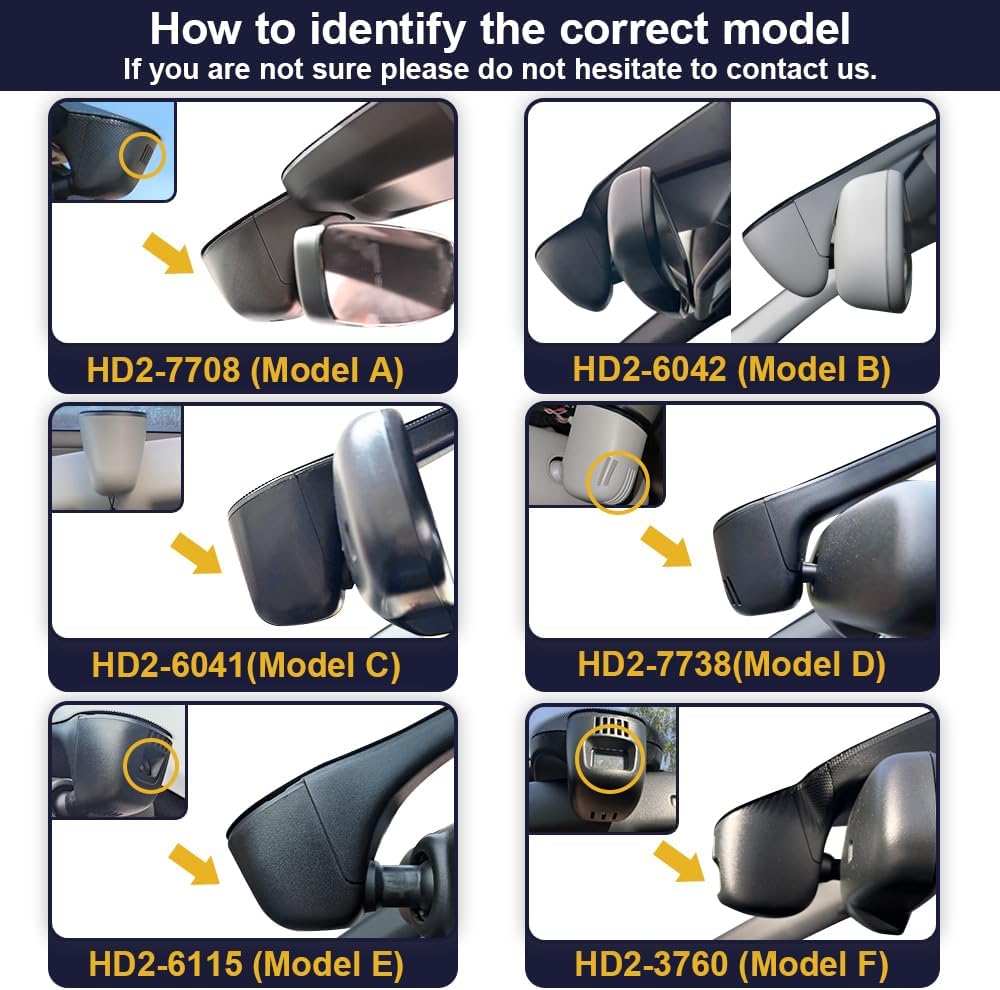
Image: Step-by-step installation guide.

Image: Comparison of the rearview mirror area before and after FITCAMX installation.
5. Operating Instructions
The FITCAMX dash cam operates automatically once installed and powered. It begins recording when the vehicle starts.
Key Operating Features:
- Automatic Recording: The camera automatically starts recording when the vehicle's ignition is turned on.
- Loop Recording: Older footage is automatically overwritten by new recordings when the memory card is full, ensuring continuous recording. Important footage can be locked to prevent overwriting.
- Parking Mode: When enabled, the dash cam can detect impacts or motion while the vehicle is parked and automatically record footage. Refer to the FITCAMX app for detailed settings and activation of parking mode.
6. App Usage (FITCAMX APP)
The FITCAMX dash cam features built-in 2.4Ghz WiFi for seamless connection to the FITCAMX mobile application (available for Android and iOS devices).
App Functions:
- Real-time View: Stream live video footage from the dash cam directly to your smartphone.
- Video Playback: Review recorded videos directly on your phone.
- Download Footage: Download important video clips to your device for storage or sharing.
- Settings Adjustment: Configure dash cam settings, including resolution, loop recording duration, parking mode sensitivity, and more.
Note: To ensure proper preview functionality, it may be necessary to temporarily turn off cellular data or Bluetooth on your smartphone when connecting to the dash cam's WiFi. The FITCAMX camera will not interfere with Apple CarPlay or Android Auto functionality.
7. Maintenance
Regular maintenance ensures optimal performance and longevity of your FITCAMX dash cam.
- Clean Lens: Periodically clean the camera lens with a soft, dry cloth to ensure clear video recording. Avoid abrasive materials.
- Memory Card Management: Format the 64GB memory card regularly (e.g., once a month) via the app to maintain optimal recording performance and prevent data corruption. Back up any important footage before formatting.
- Firmware Updates: Check the FITCAMX app or official website for any available firmware updates to ensure your dash cam has the latest features and bug fixes.
8. Troubleshooting
If you encounter issues with your FITCAMX dash cam, refer to the following common solutions:
- Dash Cam Not Recording:
- Ensure the memory card is properly inserted and formatted.
- Check if the power connection is secure.
- Verify that loop recording is enabled in the app settings.
- WiFi Connection Issues:
- Ensure your phone's cellular data or Bluetooth is temporarily disabled when connecting to the dash cam's WiFi.
- Restart both the dash cam and your smartphone.
- No Video Preview in App:
- As mentioned, turn off cellular data/Bluetooth on your phone.
- Ensure a stable WiFi connection to the dash cam.
- Can I use CarPlay/Bluetooth while driving?
Yes. Your phone cannot be connected to CarPlay and the dash cam's WiFi simultaneously for app functions. However, the camera records automatically after the car starts, so you do not need to maintain a WiFi connection to the camera at all times for recording. - Can I add a rear camera to a front-only setup?
No, because the internal PCB boards are different. If you require a front and rear camera setup, you would need to replace the entire unit with a compatible dual-channel system.
For further assistance, please contact FITCAMX customer support.
9. Specifications
| Brand | FITCAMX |
| Model Number | HD2-7738 |
| Video Resolution | 4K / 2160P (Front Only) |
| Aperture | f/1.6 |
| CPU | Novatek |
| WiFi | 2.4Ghz |
| App Compatibility | Android / iOS (FITCAMX APP) |
| Shell Material | PC + ABS |
| Operating Temperature | -20°C to 85°C (-4°F to 185°F) |
| Product Dimensions | 9 x 7 x 4 inches |
| Item Weight | 1 pound |
| Batteries | 1 Lithium Metal battery (included) |
| Connectivity Technology | Powerline |
| Special Feature | OEM Style |
| Vehicle Service Type | Audi (HD2-7738) / Grey |
10. Warranty and Support
FITCAMX offers lifetime after-sales support for its products. If you have any questions, concerns, or require technical assistance, please do not hesitate to contact our customer service team.
For support, please refer to the contact information provided on the official FITCAMX website or through your purchase platform.