
1. Introduction
Thank you for choosing the EZVALO LED Wall Mounted Lights. This manual provides essential information for the safe and efficient use of your product. Please read it thoroughly before installation and operation, and retain it for future reference.
2. Important Safety Information
- This product is designed for indoor use only. Do not expose to rain or moisture.
- Ensure the mounting surface is clean, dry, and stable before installation.
- Do not attempt to disassemble or modify the light unit. This may void the warranty and pose safety risks.
- Keep the product away from heat sources and direct sunlight.
- Use only the provided USB charging cable.
- Keep out of reach of children.
3. Package Contents
Verify that all items are present in your package:
- EZVALO LED Wall Mounted Lights (Quantity: 3)
- Magnetic Mounting Bases (Quantity: 3)
- Remote Control (Quantity: 1)
- USB-C Charging Cables (Quantity: 3)
- Mounting Screws and Wall Anchors (for optional screw installation)

4. Product Overview
The EZVALO LED Wall Mounted Light features a compact design with integrated touch controls and a magnetic mounting system for versatile placement.
- Light Unit: Contains the LED light source, rechargeable battery, and touch control sensor.
- Magnetic Mounting Base: Attaches to surfaces via adhesive or screws, allowing the light unit to magnetically connect and rotate.
- USB-C Charging Port: Located on the side of the light unit for convenient recharging.
- Remote Control: Provides wireless control over power, color temperature, brightness, and timer functions.
5. Setup
5.1 Initial Charging
Before first use, fully charge each light unit. Connect the provided USB-C cable to the light's charging port and the other end to a USB power adapter (not included). The charging indicator will show status (e.g., red for charging, green for fully charged).
5.2 Installation Methods
Your EZVALO LED Wall Mounted Lights offer two installation options: adhesive mounting for tool-free setup or screw mounting for a more permanent fixture.
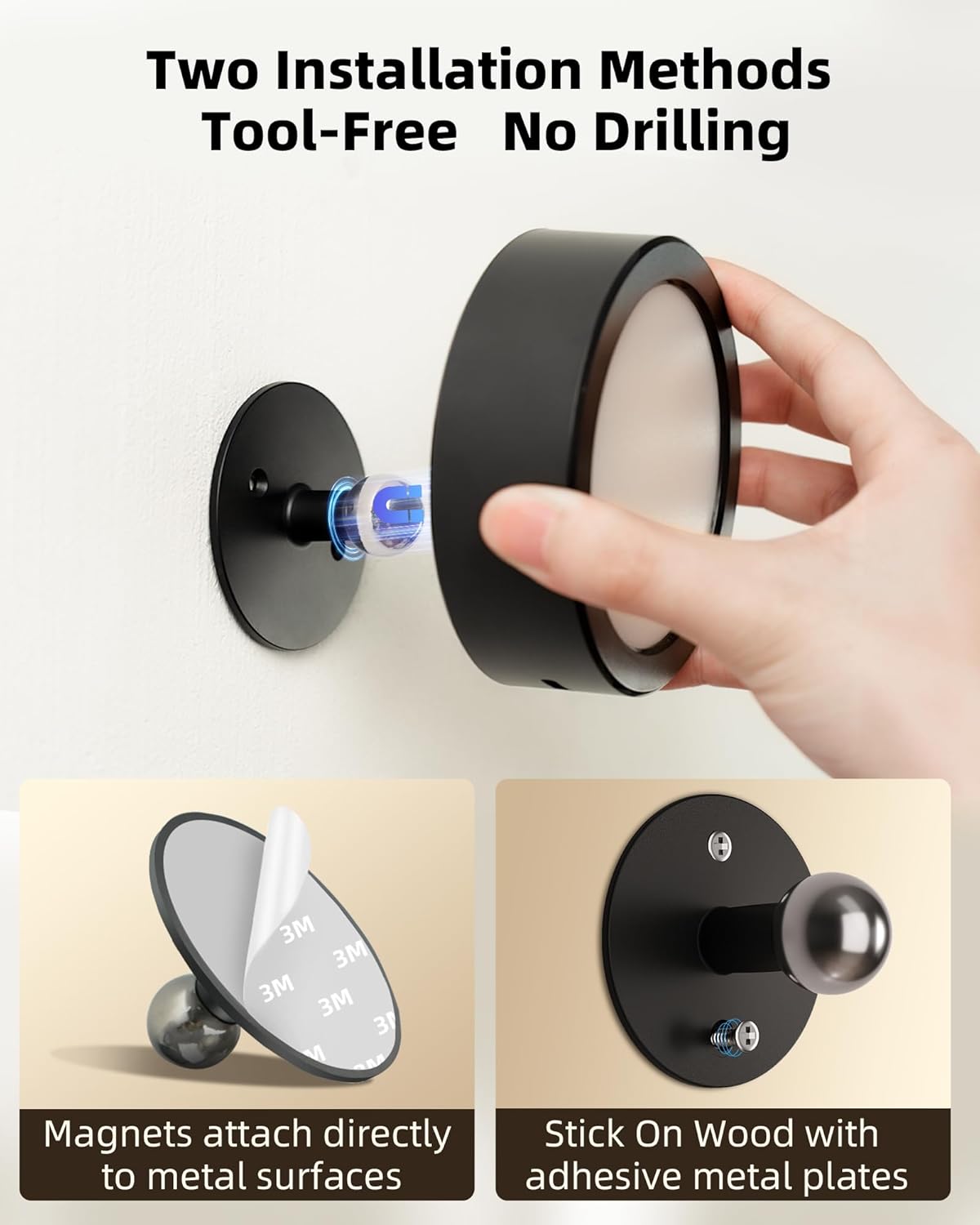
Method 1: Adhesive Mounting (Tool-Free)
- Clean the desired mounting surface thoroughly to ensure it is free of dust, grease, and moisture.
- Remove the protective film from the double-sided adhesive on the back of the magnetic mounting base.
- Firmly press the magnetic base onto the cleaned surface for at least 30 seconds. Allow the adhesive to set for 24 hours before attaching the light unit.
- Once the adhesive is secure, place the light unit onto the magnetic ball joint of the base. The strong magnet will hold it in place.
Method 2: Screw Mounting
- Choose the desired mounting location.
- Use the magnetic mounting base as a template to mark the positions for the two screws.
- Drill pilot holes if necessary, then secure the magnetic base to the wall using the provided screws and wall anchors.
- Place the light unit onto the magnetic ball joint of the base.


6. Charging the Device
The EZVALO LED Wall Mounted Lights are equipped with a high-capacity 5500mAh rechargeable battery, providing extended illumination.
- Battery Capacity: 5500mAh
- Charging Time: Approximately 4-4.5 hours for a full charge.
- Runtime: Up to 12 hours at maximum brightness, or up to 92 hours at minimum brightness.
- Charging Port: USB Type-C.


7. Operating Instructions
Control your EZVALO lights using either the integrated touch sensor or the included remote control.
7.1 Touch Control
The touch sensor is located on the side of the light unit.
- Single Press: Tap the touch sensor to turn the light ON/OFF. When ON, a single press will cycle through the three color temperatures: 3000K (Warm White), 4200K (Natural White), and 5700K (White Light).
- Long Press: Press and hold the touch sensor to smoothly adjust the brightness level. Release when the desired brightness is reached.


7.2 Remote Control
The remote control allows for convenient adjustment of your lights from a distance. For optimal performance, use the remote within 5 feet of the light unit.
- ON/OFF Button: Turns the light on or off.
- Color Temperature Buttons: Select between 3000K (Warm White), 4200K (Natural White), and 5700K (White Light).
- Brightness Adjustment (+/-): Increase or decrease the light brightness.
- Timer Buttons: Set the light to automatically turn off after 15, 30, or 60 minutes.


8. Features
8.1 360° Free Rotation
The light unit attaches to its base via a magnetic ball joint, allowing for full 360-degree rotation. This enables you to direct the light precisely where needed, providing versatile illumination for any space.


8.2 Eye-Friendly Lighting
Designed with eye comfort in mind, these LED lights feature anti-blue light technology, no flickering, and produce a soft, even illumination without harsh shadows, making them ideal for reading and extended use.

8.3 Versatile Application
These lights are suitable for various indoor settings, including bedrooms, reading nooks, studies, hallways, and for accentuating artwork or plants.

9. Maintenance
- Cleaning: To clean the light unit, gently wipe it with a soft, dry cloth. Do not use abrasive cleaners or solvents.
- Battery Care: For optimal battery life, avoid fully discharging the battery frequently. Recharge the lights when the brightness noticeably diminishes. If storing for an extended period, charge the battery to about 50% every 3-6 months.
- Magnetic Base: Ensure the magnetic base and the light unit's magnetic contact area are kept clean to maintain a strong connection.
10. Troubleshooting
| Problem | Possible Cause | Solution |
|---|---|---|
| Light does not turn on. | Battery is depleted. | Charge the light unit using the provided USB-C cable. |
| Light does not turn on. | Touch sensor or remote control issue. | Ensure the touch sensor area is clean. Check remote battery and ensure it's within 5 feet of the light. |
| Remote control is unresponsive. | Remote battery is low or depleted. | Replace the remote control battery (typically a CR2025 coin cell). |
| Light flickers or dims unexpectedly. | Low battery. | Recharge the light unit. |
| Light unit falls from the base. | Magnetic base not securely installed or surface is unsuitable. | Re-install the magnetic base, ensuring the surface is clean and dry for adhesive, or screws are tightened for screw mount. |
11. Specifications
| Feature | Specification |
|---|---|
| Brand | EZVALO |
| Model Number | EZL2404A |
| Product Dimensions (L x W x H) | 3.74" x 3.74" x 1.57" |
| Item Weight | 6.2 Ounces |
| Battery Capacity | 5500mAh |
| Light Source Type | LED |
| Maximum Brightness | 200 Lumens |
| Color Temperatures | 3000K (Warm White), 4200K (Natural White), 5700K (White Light) |
| Control Method | Remote, Touch |
| Installation Type | Screw Mount, Adhesive (Magnetic) |
| Material | Acrylonitrile Butadiene Styrene, Aluminum, Plastic |
| Indoor/Outdoor Usage | Indoor |
| Special Features | Dimmable, 360° Rotation |
12. Warranty and Support
EZVALO products are manufactured to high-quality standards. For warranty information or technical support, please refer to the contact details provided with your purchase or visit the official EZVALO website. Please retain your proof of purchase for warranty claims.