
1. Introduction
Thank you for choosing the Viribus Electric Tricycle. This manual provides essential information for the safe assembly, operation, and maintenance of your new electric trike. Please read it thoroughly before your first ride to ensure optimal performance and safety.

Image 1.1: The Viribus Electric Tricycle, showcasing its design and spacious rear basket.
2. Safety Information
Your safety is paramount. Always wear a helmet and appropriate safety gear when riding. Be aware of your surroundings and obey all local traffic laws. This tricycle is designed for adult use.
2.1 Battery Safety
- Use only the original Viribus charger and battery provided with your tricycle.
- The 468Wh battery is UL2271 certified for safety, featuring automatic shutoff and temper proofing.
- Do not expose the battery to extreme temperatures or direct sunlight.
- Avoid puncturing or damaging the battery pack.

Image 2.1: Illustration of the Viribus battery's enhanced safety features, including UL2271 certification, clear status indicator, automatic shutdown, and temper proofing.
3. Package Contents
Upon unboxing, please verify that all components are present:
- 1x Adult Electric Tricycle
- 1x Charger
- 1x Battery (468Wh Removable)
- 1x Power Cord
- 1x Screwdriver
- 1x Wrench Set
- 1x Horn
- 1x Basket
- 1x Lock
- 1x Instructions (this manual)

Image 3.1: The included charger and lock for your Viribus Electric Tricycle.
4. Setup and Assembly
The Viribus Electric Tricycle features a dual-chain design with a pre-installed gearbox, significantly simplifying assembly. Most users can complete assembly in approximately 2 hours.
4.1 Assembly Steps
- Carefully remove all components from the packaging.
- Attach the handlebars, ensuring they are securely fastened.
- Install the front wheel and fender.
- Mount the rear basket onto the frame.
- Insert the battery into its designated slot and lock it with the key.
- Adjust the seat height for comfortable riding.
- Perform a thorough safety check of all bolts, brakes, and tire pressure before your first ride.
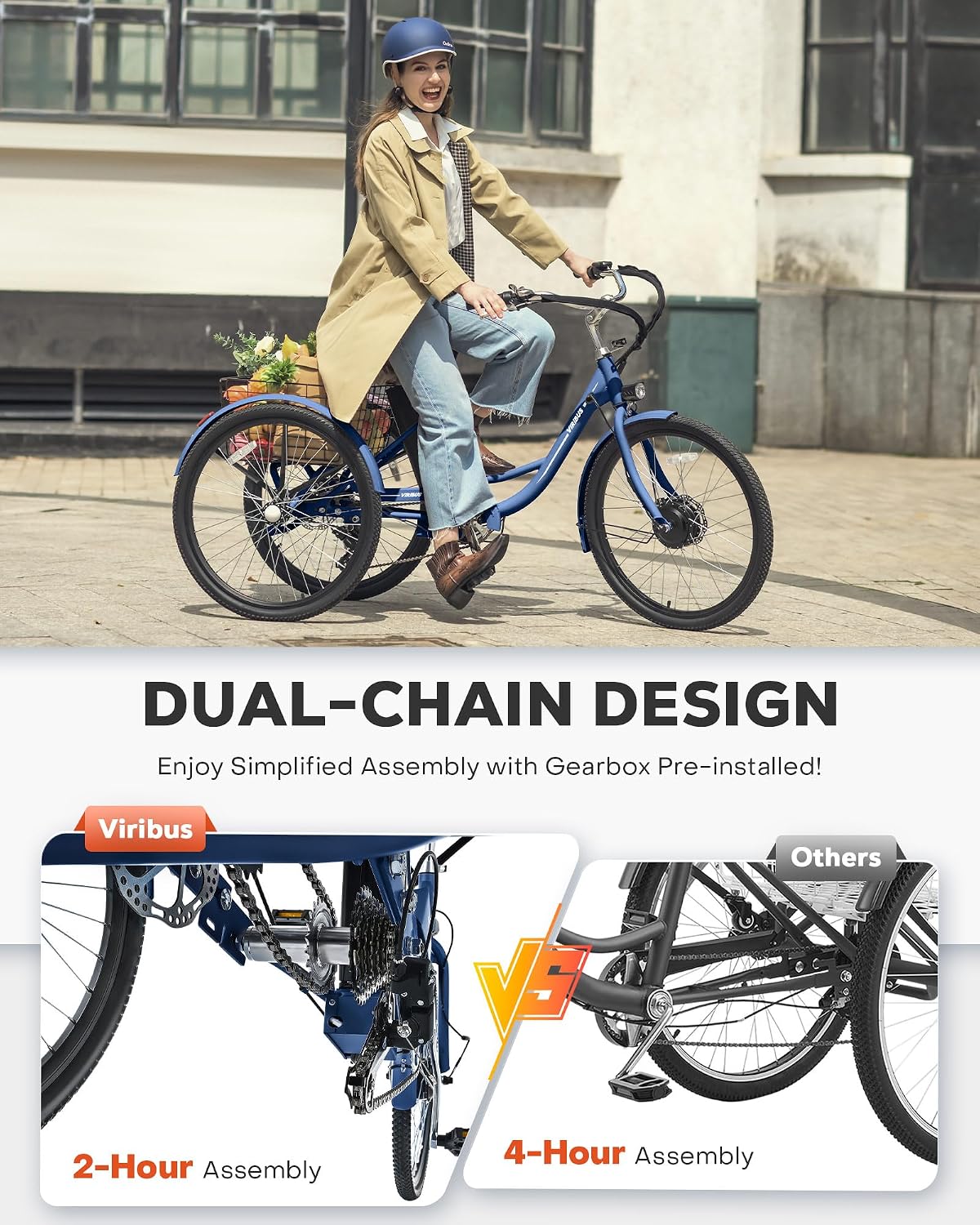
Image 4.1: The dual-chain design, highlighting the simplified assembly process compared to other models.
5. Operating Instructions
Your Viribus Electric Tricycle offers three distinct riding modes to suit your preference and terrain.
5.1 Riding Modes
- Throttle Mode: Engage the twist throttle for fully motorized assistance, reaching a maximum speed of 15.5 mph.
- Pedal Assist (PAS) Mode: The motor provides assistance as you pedal. Choose from five assistance levels (7.5, 9.5, 11, 13, 15.5 mph) via the LCD display.
- Manual Control: Ride the tricycle like a traditional bike, utilizing the 7-speed Shimano derailleur for gear changes without motor assistance.

Image 5.1: Visual representation of the three riding modes: Throttle, Pedal Assist, and Manual Control.
5.2 LCD Display Panel
The intuitive LCD display provides real-time information about your ride:
- Battery Meter: Always know your current charge level.
- Speedometer: Track your current speed in miles per hour (MPH).
- PAS Level: Select your desired pedal assist level from 1 to 5.
- Odometer: View your trip's distance and total distance traveled.

Image 5.2: Close-up of the handlebars and LCD display, showing controls for light, throttle, horn, and display readouts.
5.3 7-Speed Shimano Derailleur
The 7-speed Shimano derailleur provides steady control, whether you're on straightaways or inclines, allowing for smooth gear transitions.

Image 5.3: Detail of the 7-speed Shimano derailleur, illustrating its function for varied terrains.
6. Battery Information and Charging
The Viribus Electric Tricycle is equipped with a powerful 36V 13Ah (468Wh) removable battery, providing an extended range for your rides.
6.1 Range
- Full Throttle Mode: Up to 31 miles on a single charge.
- Pedal Assist Mode: 55-60 miles depending on the assistance level and riding conditions.
6.2 Charging
To charge the battery, connect the provided charger to the battery port and a standard wall outlet. The battery can be charged while installed on the trike or removed for convenience. Ensure the battery is fully charged before your first ride and after each use for optimal performance and longevity.

Image 6.1: Close-up of the UL2271 certified 36V 13Ah lithium battery, highlighting its safety and dual charging options.
7. Comfort and Design Features
The Viribus Electric Tricycle is designed with rider comfort and practicality in mind.
- Cushioned Saddle: The spring suspension saddle is extra soft, flippable, adjustable, and shock-resistant, absorbing bumps for a smooth ride.
- Convenient Step-Through Frame: The low step-through frame makes it easy for riders to hop on and off.
- Spacious Rear Basket: Capable of accommodating up to 110 lb., the large rear basket offers ample space for groceries, personal items, or even furry companions.
- Sturdy Tires: Equipped with 1.95-inch wide tires and aluminum alloy hubs for enhanced durability and stability.

Image 7.1: The spacious rear basket, ideal for carrying items, and a detailed view of the comfortable, cushioned saddle.
8. Maintenance
Regular maintenance ensures the longevity and safe operation of your Viribus Electric Tricycle.
- Tire Pressure: Check tire pressure regularly and inflate to the recommended PSI.
- Brakes: Inspect brake pads and cables periodically. Adjust or replace as needed.
- Chain: Keep the chain clean and lubricated for smooth operation.
- Battery Care: Store the battery in a cool, dry place. If storing for extended periods, charge it to 50-70% every few months.
- General Cleaning: Wipe down the frame and components with a damp cloth. Avoid using high-pressure water directly on electrical components.
9. Troubleshooting
If you encounter any issues with your tricycle, refer to the following common troubleshooting tips:
- No Power: Check if the battery is properly seated and locked. Ensure the battery is charged. Verify all electrical connections are secure.
- Motor Not Engaging: Confirm you are in the correct riding mode (Throttle or PAS). Check if the brake levers are fully released, as some models have a safety cut-off.
- Brakes Squealing: This can often be resolved by cleaning the brake rotors and pads. If the issue persists, professional adjustment may be required.
- Difficulty Shifting Gears: Ensure the derailleur is clean and lubricated. If shifting remains rough, the derailleur may need adjustment.
For more complex issues, please contact Viribus Customer Service.
10. Specifications
| Feature | Detail |
|---|---|
| Bike Type | Electric Bike, Cruiser Bike |
| Age Range | Adult |
| Number of Speeds | 7 |
| Wheel Size | 24 Inches (also available in 26 Inches) |
| Frame Material | Carbon Steel |
| Suspension Type | Rigid |
| Brake Style | Disc |
| Wheel Width | 1.95 Inches |
| Lithium Battery Energy Content | 468 Watt Hours (36V 13Ah) |
| Maximum Weight Recommendation | 330 Pounds |
| Minimum User Height | 5 Feet |
| UPC | 850072378701 |

Image 10.1: Key dimensions and recommended rider height for the Viribus Electric Tricycle.
11. Warranty and Support
Viribus is committed to providing excellent customer service and support for your electric tricycle.
- Official Warranty: We offer a 1-year warranty on the product.
- Return Policy: Enjoy 30-day easy returns for quality issues.
- Technical Support: Lifetime technical support is available for your peace of mind.
11.1 Contact Information
- Call Center: +1 (320) 377-3106 (Monday – Friday, 9:00 AM – 5:00 PM PST)
- Email Support: support@viribusbikes.com

Image 11.1: Details on Viribus's supportive customer service, including warranty, return policy, and contact information.