1. Introduction
This manual provides instructions for the Houflody Foldable 3-in-1 Wireless Charging Station. This device is designed to simultaneously charge your compatible Samsung Galaxy phone, Galaxy Watch, and Galaxy Buds. Its foldable design enhances portability and saves space, making it suitable for various environments.
2. Package Contents
Please verify that all items listed below are included in your package:
- 1x Houflody 3-in-1 Foldable Wireless Charging Station
- 1x QC 3.0 USB A-C Charger Block (18W)
- 1x USB Type-C Fast Charging Cable
- 1x User Manual
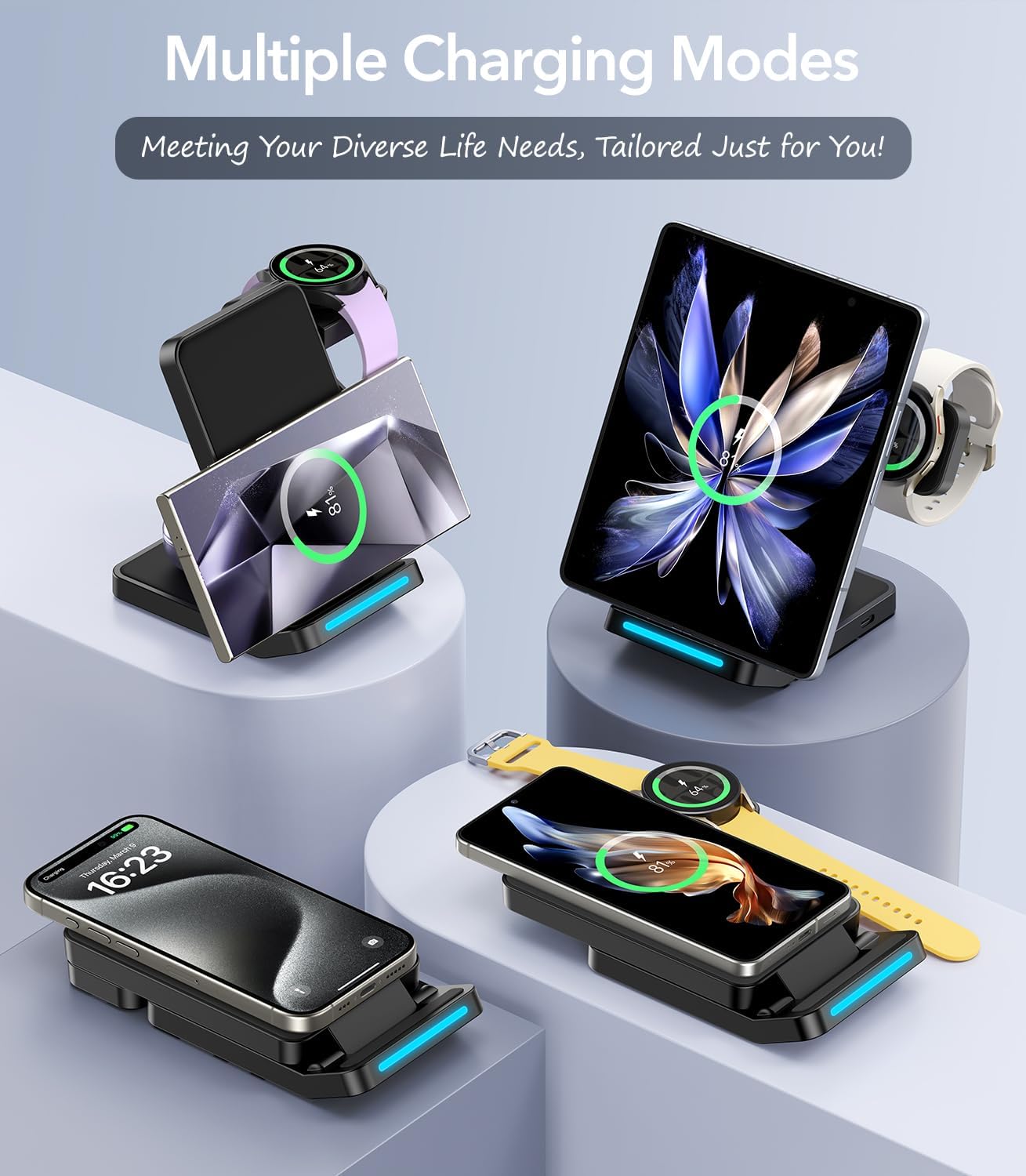
Image: Contents of the Houflody 3-in-1 Wireless Charging Station package.
3. Setup Instructions
- Unfold the Charging Station: Gently unfold the charging station to its desired upright position. The phone charging pad can be adjusted from 0° to 65° for optimal viewing. The watch charging stand rotates 180° backward for storage and can be adjusted from 0° to 55° for charging.
- Connect Power: Insert the USB Type-C cable into the charging station's input port. Connect the other end of the cable to the provided QC 3.0 USB A-C Charger Block. Plug the charger block into a wall outlet.
- Placement: Place the charging station on a stable, flat surface.

Image: The Houflody 3-in-1 Wireless Charging Station in an upright position, charging a phone, watch, and earbuds.

Image: Illustration of the adjustable angles and foldable mechanism of the charging station.
4. Operating Instructions
4.1 Charging Your Phone
Place your compatible smartphone on the main charging pad. The phone can be charged vertically or horizontally. Adjust the angle of the phone stand (0°-65°) for optimal viewing during charging. Ensure the phone is centered on the charging pad for efficient charging. A blue LED indicator light will illuminate briefly to confirm charging has begun and will turn off after approximately 20 seconds to avoid disturbing sleep.
4.2 Charging Your Galaxy Watch
The watch charging stand is rotatable. Rotate the watch charging position to switch between vertical and horizontal charging modes. Place your compatible Galaxy Watch onto the magnetic charging module. Ensure the watch is securely attached and centered for proper charging.

Image: Detail of the rotatable watch charging stand, illustrating horizontal and vertical charging options.
4.3 Charging Your Earbuds
Place your compatible wireless charging earbuds case on the flat charging area located at the base of the station. Ensure the earbuds case is centered on the charging area.

Image: The charging station accommodating multiple devices in different orientations.
5. Compatibility
This charging station is designed for a wide range of wireless charging devices. For optimal performance, use with the following:
5.1 Phones (15W Max)
- Samsung Galaxy S Series: S25, S24, S23, S22, S21, S20, S10 Plus/FE/Ultra/E Series
- Samsung Galaxy Z Series: Z Flip/Fold 7/6/5/4/3
- Samsung Galaxy Note Series: Note 20/10 Series
- Other brands' phones that support wireless charging (e.g., iPhone 16/15/14/13/12/11/SE Series, Google Pixel 9/8/7/6/5 Series)
5.2 Samsung Galaxy Watches (3W Max)
- Galaxy Watch Ultra/Watch 8/Watch 7/Watch 6 Classic/Watch 6
- Watch 5 Pro 45mm/Watch 5
- Watch 4/Watch 4 Classic
- Watch 3
Note: Not compatible with Samsung Galaxy Watch (46mm/42mm), Galaxy Gear S3, S2, S, Gear Fit 2/3/Fit e, Watch Active/2, or any watch released before 2018.
5.3 Earbuds (5W Max)
- Samsung Galaxy Buds Pro 3/Buds live/Buds plus/Buds 2
- AirPods Pro/Pro 2/4/3/2
- Other earbuds that support wireless charging
5.4 Case Compatibility
The charger supports phone cases up to 0.15 inches (4mm) thick. Cases containing credit cards, metal, Pop Sockets, metal rings, or magnetic elements are not compatible and must be removed before charging.

Image: Detailed compatibility information for various devices.
6. Safety Information
The Houflody charging station incorporates multiple safety features to protect your devices:
- Over-charging Protection: Prevents battery damage from excessive charging.
- Over-temperature Protection: Monitors and regulates the device's temperature to prevent overheating.
- Over-current Protection: Safeguards against excessive electrical current.
- Over-voltage Protection: Protects devices from voltage spikes.
The product and its included adapter are certified with FCC, UL, CE, and RoHS standards, ensuring reliable and safe operation.

Image: Visual representation of the charger's safety protections and certifications.
7. Maintenance
- Keep the charging station clean by wiping it with a soft, dry cloth.
- Avoid using abrasive cleaners or solvents.
- Do not expose the device to water or excessive moisture.
- Store in a cool, dry place when not in use.
8. Troubleshooting
| Problem | Possible Cause | Solution |
|---|---|---|
| Device not charging | Incorrect placement; incompatible device; thick phone case; power issue | Ensure device is centered on the charging pad. Verify device compatibility. Remove phone case if thicker than 4mm or contains metal/magnets. Check power cable connection and wall adapter. Use the included QC 18W adapter. |
| Slow charging | Not using QC 3.0 adapter; device misalignment; background apps | Use the provided QC 18W adapter for fast charging. Ensure optimal device placement. Close unnecessary background applications on your device. |
| LED indicator not lighting up | No power; device not detected | Check power connection. Re-position the device. Note that the LED light turns off after approximately 20 seconds during charging. |
| Watch not charging | Incompatible watch model; improper alignment | Refer to the compatibility section for supported watch models. Ensure the watch is securely attached to the magnetic module. |
9. Specifications
- Product Dimensions: 5.7 x 3 x 0.86 inches
- Item Weight: 12.7 ounces
- Model Number: 742440519116
- Input Voltage: 9 Volts
- Amperage: 2.66 Amps
- Phone Output: 15W Max
- Watch Output: 3W Max
- Earbuds Output: 5W Max
- Connector Type: USB Type C
- Form Factor: Foldable
- Color: Black
- Manufacturer: Houflody
- Date First Available: April 26, 2024
10. Warranty and Support
For any questions or concerns regarding your Houflody 3-in-1 Wireless Charging Station, please contact our customer support. We are committed to providing the best solution within 24 hours.
Contact information can typically be found on the product packaging or the official Houflody website.