
1. Important Safety Instructions
Please read all instructions carefully before using the ChefRobot Dual Air Fryer. Failure to follow these instructions may result in electric shock, fire, or serious injury.
- Do not immerse the appliance, cord, or plug in water or other liquids.
- Ensure the voltage indicated on the appliance corresponds to your local mains voltage before connecting.
- Keep the appliance and its cord out of reach of children.
- Do not operate any appliance with a damaged cord or plug, or after the appliance malfunctions or has been damaged in any manner.
- Always unplug the appliance when not in use and before cleaning. Allow it to cool before handling parts.
- Do not place the appliance against a wall or other appliances. Leave at least 10 cm (4 inches) free space on the back and sides and 10 cm (4 inches) free space above the appliance.
- Do not place anything on top of the appliance.
- Do not use the appliance for any purpose other than described in this manual.
- Extreme caution must be used when moving an appliance containing hot oil or other hot liquids.
- Do not touch hot surfaces. Use handles or knobs.
2. Product Overview
The ChefRobot Dual Air Fryer is designed for efficient and versatile cooking with two independent baskets and a user-friendly TFT touch screen.

Figure 2.1: Front view of the ChefRobot Dual Air Fryer, showcasing its dual basket design and digital control panel.
Components:
- Main Unit: Houses the heating elements and control panel.
- Dual Baskets (4 Quart each): Two independent cooking compartments.
- Crisper Plates: Removable plates for optimal air circulation and crisping.
- TFT Touch Screen Display: Digital interface for settings and presets.
- Power Cord: For connecting to an electrical outlet.
3. Setup and First Use
3.1 Unpacking
- Remove all packaging materials from the appliance.
- Check that all components are present and undamaged.
3.2 Initial Cleaning
- Wipe the exterior of the appliance with a damp cloth.
- Wash the baskets and crisper plates with hot water, dish soap, and a non-abrasive sponge. Rinse thoroughly and dry completely.
- Do not use abrasive cleaning materials or steel wool, as this can damage the non-stick coating.
3.3 Placement
- Place the appliance on a stable, horizontal, and heat-resistant surface.
- Ensure there is adequate ventilation around the appliance (at least 10 cm / 4 inches of clear space on all sides).
- Plug the power cord into a grounded electrical outlet.
4. Operating Instructions
The ChefRobot Dual Air Fryer features intuitive controls and a TFT digital display for easy operation.

Figure 4.1: The TFT Touch Screen Display, illustrating temperature and time adjustment buttons for each basket.
4.1 Powering On and Basic Operation
- Plug in the appliance. The display will illuminate.
- Select either the 'LEFT' or 'RIGHT' basket on the touch screen to begin setting parameters.
- Use the 'TEMP' buttons (+/-) to adjust the cooking temperature (100°F to 400°F).
- Use the 'TIME' buttons (+/-) to adjust the cooking time (1 to 60 minutes).
- Press 'START' to begin cooking.
- To cancel cooking, press 'CANCEL'.
4.2 Dual Basket Cooking Functions
This air fryer allows for simultaneous cooking of two different dishes.
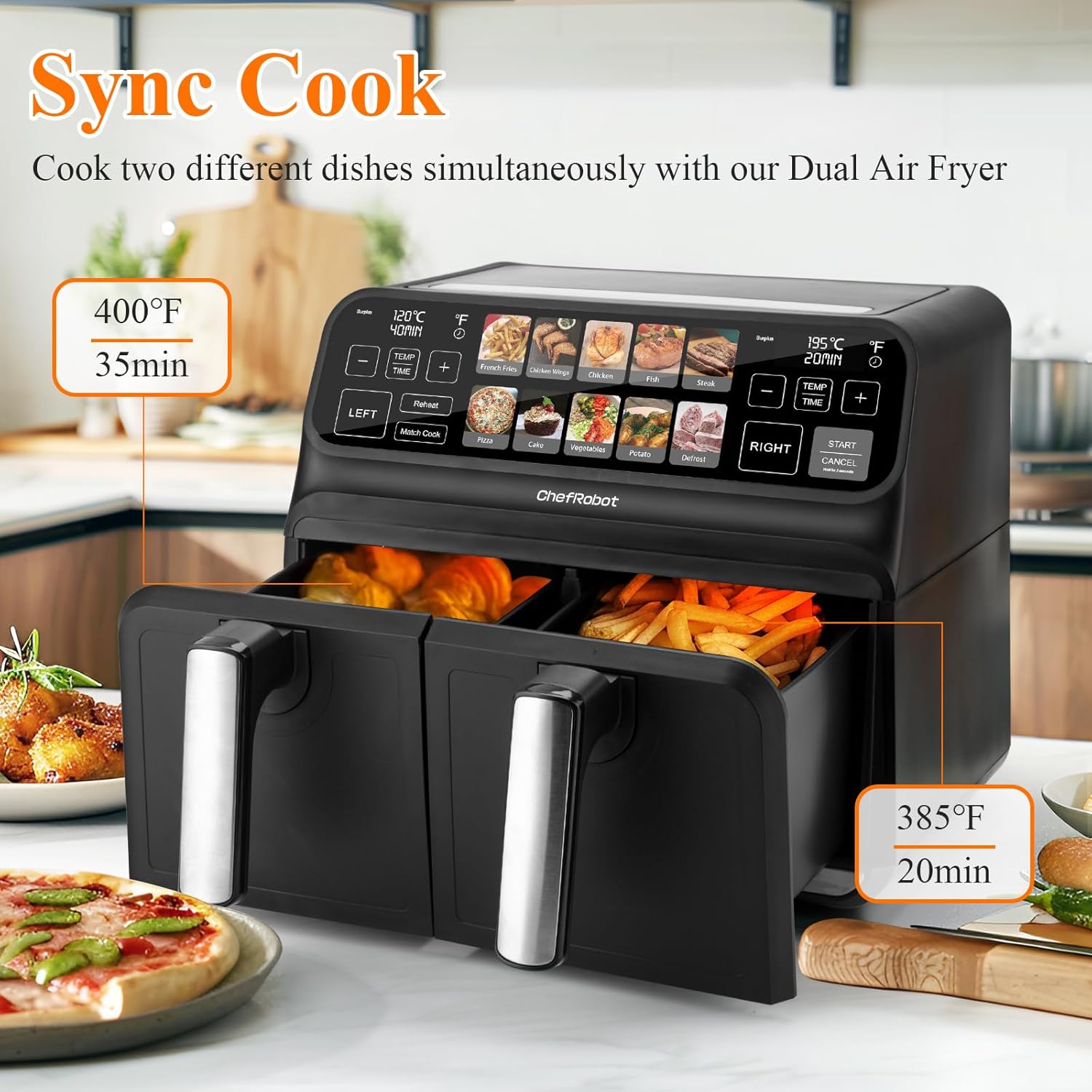
Figure 4.2: The Sync Cook feature in action, showing different temperature and time settings for each basket.
- Sync Cook: Allows both baskets to finish cooking at the same time, even if they have different cooking times and temperatures. Set parameters for each basket, then select 'Sync Cook'.
- Match Cook: Applies the same cooking settings (temperature and time) to both baskets simultaneously. Set parameters for one basket, then select 'Match Cook'.
4.3 Preset Functions
The appliance includes 10 preset cooking functions for common dishes.

Figure 4.3: The 10 preset cooking functions available on the touch screen, including options for chips, chicken, fish, and more.
To use a preset:
- Select the 'LEFT' or 'RIGHT' basket.
- Tap on the desired food icon (e.g., Chips, Chicken, Fish, Roast, Pizza, Cake, Egg Tart, Sweet Potato, Defrost). The appliance will automatically set the recommended temperature and time.
- You can adjust the temperature and time manually after selecting a preset if needed.
- Press 'START' to begin cooking.
4.4 Reheat Function
The 'Reheat' function is available for warming up previously cooked food.
- Select the 'LEFT' or 'RIGHT' basket.
- Tap the 'Reheat' button.
- Adjust temperature and time if necessary.
- Press 'START'.
5. Maintenance and Cleaning
Regular cleaning ensures optimal performance and extends the lifespan of your ChefRobot Dual Air Fryer. The non-stick baskets and removable parts are dishwasher safe.

Figure 5.1: Illustration of cleaning the non-stick basket and removing the oil filter for thorough cleaning.
5.1 Cleaning After Each Use
- Unplug the air fryer and allow it to cool down completely before cleaning.
- Remove the baskets and crisper plates.
- Wash the baskets and crisper plates in hot soapy water or in the dishwasher. Use a non-abrasive sponge to prevent damage to the non-stick coating.
- Wipe the exterior of the appliance with a damp cloth. Do not use harsh chemicals or abrasive cleaners.
- Clean the interior of the appliance with a damp cloth. If necessary, use a soft brush to remove food residue from the heating element.
- Ensure all parts are completely dry before reassembling and storing the appliance.
5.2 Storage
Store the appliance in a cool, dry place, away from direct sunlight and moisture. Ensure the power cord is neatly wrapped and secured.
6. Troubleshooting
If you encounter any issues with your ChefRobot Dual Air Fryer, please refer to the following common problems and solutions:
| Problem | Possible Cause | Solution |
|---|---|---|
| Appliance does not turn on. | Not plugged in; power outlet malfunction. | Ensure the power cord is securely plugged into a working outlet. Check the circuit breaker. |
| Food is not cooked evenly. | Overcrowding the basket; insufficient shaking/flipping. | Do not overcrowd the basket. Shake or flip food halfway through cooking for even results. |
| White smoke coming from the appliance. | Grease residue from previous use; fatty food. | Clean the basket and crisper plate thoroughly after each use. For fatty foods, drain excess oil. |
| Unusual odor during first few uses. | Manufacturing residues burning off. | This is normal for new appliances. Run the air fryer empty for 10-15 minutes at 400°F before first use to burn off any residual odors. Ensure good ventilation. |
| Food is not crispy. | Too much moisture; incorrect temperature/time. | Pat food dry before air frying. Adjust temperature and time as needed. A light coating of oil can help. |
If the problem persists after checking these solutions, please contact customer support.
7. Specifications
Detailed technical specifications for the ChefRobot Dual Air Fryer Model GL-AF1707.

Figure 7.1: Visual representation of the air fryer's dimensions and a summary of its electrical specifications.
- Model Name: GL-AF1707
- Brand: Chef Robot
- Capacity: 8 Quarts (4L + 4L Dual Baskets)
- Product Dimensions: 17"D x 15"W x 16.99"H
- Item Weight: 22.7 Pounds
- Color: Black
- Material: Acrylonitrile Butadiene Styrene (ABS)
- Wattage: 1700 watts
- Control Method: Touch (TFT Touch Screen)
- Temperature Range: 100°F - 400°F
- Timer Range: 1 - 60 minutes
- Special Feature: Temperature Control, Dual Basket Design
- Nonstick Coating: Yes
- Dishwasher Safe Parts: Baskets and Crisper Plates
- Recommended Uses: Defrost, Air Frying, Roasting, Baking
8. Warranty and Support
For warranty information and customer support, please refer to the warranty card included with your purchase or visit the official Chef Robot website. Ensure you have your model number (GL-AF1707) and proof of purchase available when contacting support.
For further assistance, you may visit the Chef Robot Store on Amazon.
