
Important Safety Information
WARNING: Ozone is a powerful oxidant and can be harmful if inhaled directly. Always follow these safety guidelines:
- Occupancy: This device is intended for use in unoccupied spaces only. Ensure no people, pets, or plants are present in the area during operation.
- Ventilation: After treatment, ventilate the area for at least 60 minutes by opening windows and doors before re-entry.
- Delay Start: The unit features a 10-second delay before ozone generation begins, allowing time to exit the treatment area.
- Power Disconnection: Always unplug the device when not in use or before cleaning.
- Damage: Do not operate the device if the power cord or plug is damaged, or if the device malfunctions or has been dropped.
- Children: Keep out of reach of children.
A "DO NOT ENTER!" sign is included to hang on the door during operation, reminding others not to enter the treated area.

Image: PowerScale Ozone Generator with a 'Do Not Enter' sign hanging on a door handle, emphasizing safety during operation.
Product Overview
The PowerScale Ozone Generator OZB1-US is a high-capacity ozone machine designed for effective odor elimination and air purification in various environments. It produces up to 90,000 mg/h of ozone (O3) to neutralize unpleasant smells from smoke, pets, cooking, mold, and volatile organic compounds (VOCs).
Equipped with an intelligent control system and a digital display, this unit offers precise timer settings for optimal performance. Its durable construction and removable, washable filter ensure longevity and ease of maintenance.
Key Features
- High Ozone Output: Generates up to 90,000 mg/h of O3 for powerful odor elimination.
- Intelligent Control & Digital Display: Easy operation with precise timer settings (0-300 minutes).
- 10-Second Safety Delay: Prevents accidental ozone inhalation by delaying startup.
- Removable and Washable Filter: Simplifies maintenance and extends product life.
- Durable Construction: Features a metal handle and robust materials for long-term use.
- High-Speed Fan: 2,600 RPM fan for accelerated ozone diffusion and effective air circulation.
- Wide Application: Suitable for homes, offices, commercial areas, cars, pet zones, basements, and more.
- Certifications: CE Certified, EPA Certified, FCC Certified.

Image: The PowerScale Ozone Generator OZB1-US showcasing its high ozone output, intelligent control, and durable design.
Setup Guide
- Unpack: Carefully remove the ozone generator and all accessories from the packaging.
- Placement: Place the unit on a stable, elevated surface in the center of the area to be treated. Ensure the air intake (rear) and outlet (front) are unobstructed.
- Power Connection: Plug the power cord into a standard 110V AC outlet.
- Prepare Area: Remove all people, pets, and plants from the treatment area. Close all windows and doors to contain the ozone.
- Warning Sign: Hang the "DO NOT ENTER!" sign on the door leading to the treatment area.
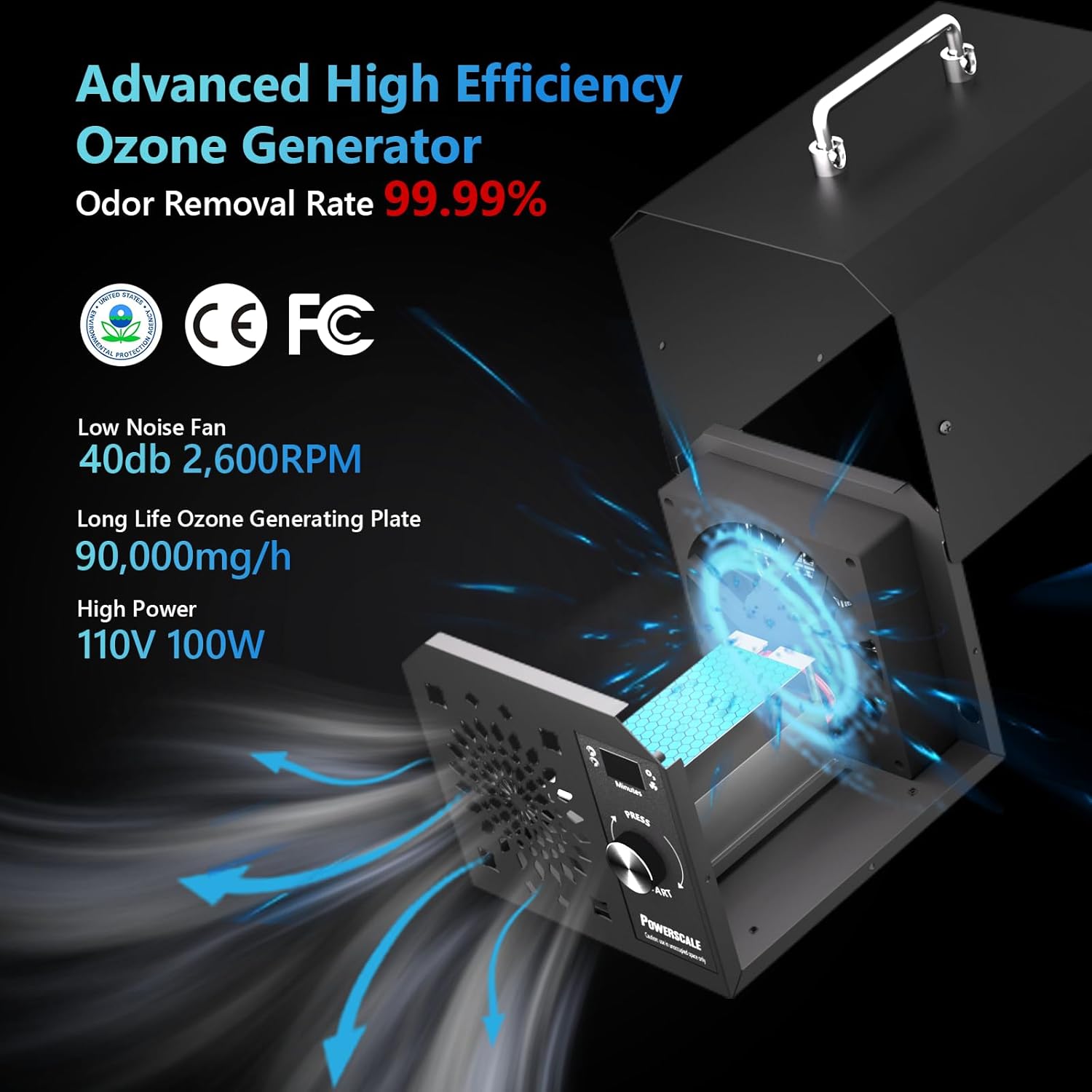
Image: The PowerScale Ozone Generator placed on a kitchen counter, ready for operation.
Operating Instructions
- Set Timer: Rotate the dial to select the desired treatment time (0-300 minutes). The digital display will show the selected duration. Refer to the "Recommended Treatment Duration" table below for guidance.
- Start Treatment: Press the dial to initiate the treatment. The fan will activate, and the red light (ozone) and blue light (fan) indicators will illuminate. A 10-second delay will count down before ozone generation begins.
- Exit Area: Immediately exit the treatment area after pressing the start button.
- Treatment Completion: The unit will automatically shut off after the set time. The fan will continue to run for an additional 10 minutes to aid in ventilation.
- Ventilation: After the fan stops, open windows and doors to ventilate the area for at least 60 minutes before re-entry.
Recommended Treatment Duration
| Area (Sq. Ft.) | Treatment Time (Minutes) |
|---|---|
| Up to 100 | 5-10 |
| 101-200 | 10-20 |
| 201-400 | 20-40 |
| 401-800 | 40-80 |
| 801-1500 | 80-150 |
| 1501-3000 | 150-300 |
| 3000+ | Continuous (with caution) |
Note: These are general guidelines. Adjust treatment time based on odor intensity and room size. Always ensure proper ventilation after treatment.
Video: Official PowerScale video demonstrating the directions for use, including setting the timer and ventilation steps.
Maintenance
Regular maintenance ensures optimal performance and extends the lifespan of your PowerScale Ozone Generator.
Cleaning the Filter
- Power Off: Always unplug the device before performing any maintenance.
- Remove Filter: The filter is located on the back of the unit. Gently detach it.
- Clean: Wash the filter with mild soap and water. Rinse thoroughly and allow it to air dry completely before re-installing.
- Re-install: Once dry, re-attach the filter to the back of the unit.

Image: The PowerScale Ozone Generator showing its detachable and washable filter for easy maintenance.
Usage Scenarios
The PowerScale Ozone Generator is versatile and effective in various settings for odor removal and air purification:
- Homes: Eliminate pet odors, cooking smells, and general stale air.
- Cars: Remove smoke odors, pet smells, and mustiness from vehicle interiors.
- Basements: Combat mold and mildew odors, and damp smells.
- Offices & Commercial Spaces: Freshen air in meeting rooms, lobbies, and other large areas.
- Renovated Spaces: Reduce formaldehyde and other VOCs from new furniture and building materials.

Image: Visual representation of the PowerScale Ozone Generator being used in diverse environments such as a car, smoking area, bathroom, basement, living room, and office.
Video: Official PowerScale video demonstrating the use of the ozone generator to eliminate formaldehyde in new homes, highlighting its effectiveness in improving air quality.
Troubleshooting
Common Issues and Solutions:
- Unit Not Turning On:
- Check if the power cord is securely plugged into both the unit and the outlet.
- Ensure the power outlet is functional by testing it with another device.
- No Ozone Production:
- Verify that the timer is set and the start button has been pressed.
- Check if the ozone plates are clean and free from obstruction.
- Weak Odor Elimination:
- Increase the treatment duration based on the room size and odor intensity.
- Ensure the room is properly sealed during treatment (windows and doors closed).
- Clean the air filter and check for any blockages in the fan.
- Unusual Noise:
- Check if the unit is placed on a stable, flat surface.
- Inspect the fan for any foreign objects or debris.
If you encounter issues not listed here, please contact PowerScale customer support.
Specifications
| Feature | Detail |
|---|---|
| Model Number | OZB1-US |
| Ozone Output | 90,000 mg/h |
| Power Source | Corded Electric |
| Wattage | 55 watts |
| Control Method | Touch, Intelligent Control, Electronic Control |
| Timer Settings | 0-300 minutes (flexible) |
| Safety Delay | 10 Seconds Evacuation Time |
| Filter Type | Pre-Filter, Ozone (Removable and Washable) |
| Max Floor Area | 743.2 Square Meters (approx. 8000 sq. ft.) |
| Noise Level | 60 Decibels |
| Product Dimensions | 8.28 x 6.3 x 6.69 inches |
| Item Weight | 5.07 Pounds (2.3 Kilograms) |
| Color | Black |
| Certifications | CE Certified, EPA Certified (EPA Est. No.: 103861-CHN-1), FCC Certified |
Warranty and Support
The PowerScale Ozone Generator OZB1-US comes with a 1-year protection plan.
For any questions or issues regarding your product, please contact our customer service team at support@powerscale.us. We are committed to providing a satisfactory solution within 24 hours.
PowerScale also offers lifelong technical consultancy.

Image: PowerScale customer support details, including contact information and commitment to service.