
1. Introduction
Thank you for choosing the MeacoDry Arete Two 20L Dehumidifier and Air Purifier. This appliance is designed to effectively reduce humidity levels in your home, preventing issues such as condensation, mold, and dampness, while also purifying the air. Please read this manual thoroughly before operating the unit to ensure safe and efficient use.
2. Safety Information
- Always place the dehumidifier on a stable, level surface.
- Ensure the power cord is not damaged or pinched. Do not operate with a damaged cord or plug.
- Keep the unit away from heat sources, direct sunlight, and flammable materials.
- Do not block the air inlets or outlets. Maintain at least 20 cm clearance around the unit.
- Do not immerse the unit in water or other liquids.
- Unplug the appliance before cleaning, maintenance, or when not in use.
- This appliance is not intended for use by persons (including children) with reduced physical, sensory or mental capabilities, or lack of experience and knowledge, unless they have been given supervision or instruction concerning use of the appliance by a person responsible for their safety.
- Children should be supervised to ensure that they do not play with the appliance.
3. Product Overview
Familiarize yourself with the main components and controls of your MeacoDry Arete Two 20L dehumidifier.
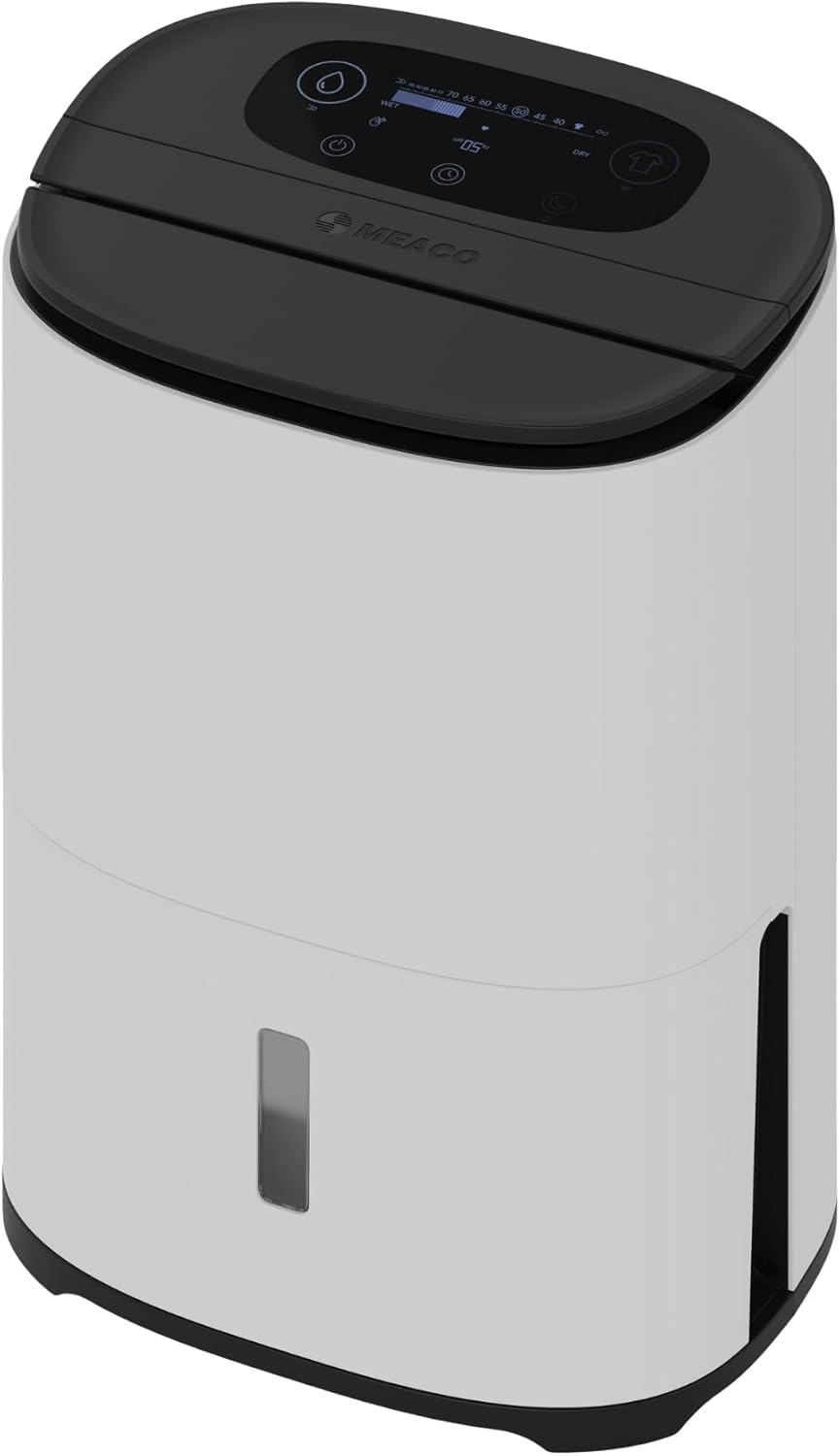


4. Setup
- Unpacking: Carefully remove the dehumidifier from its packaging. Retain all packaging materials for future storage or transport.
- Placement: Place the unit upright on a firm, level surface in the desired location. Ensure there is at least 20 cm of space around all sides for proper airflow. Avoid placing it near walls, furniture, or curtains that could obstruct air circulation.
- Power Connection: Plug the power cord into a suitable grounded electrical outlet.
- Water Tank: Ensure the water tank is correctly inserted into the unit. The dehumidifier will not operate if the tank is full or incorrectly positioned.
5. Operating Instructions
The MeacoDry Arete Two 20L offers various modes and settings for optimal humidity control and air purification.
5.1 Power On/Off
Press the Power button on the control panel to turn the unit on or off.
5.2 Setting Desired Humidity
Use the humidity control buttons (usually indicated by '%' or up/down arrows) to set your desired relative humidity level. The digital display will show the current and target humidity. The unit will operate until the target humidity is reached, then cycle on and off to maintain it.
5.3 Operating Modes
- Dehumidify Mode: Standard operation to reduce ambient humidity.
- Laundry Mode: Increases fan speed and continuous operation to help dry clothes faster.
- Night Mode: Reduces fan speed and dims/turns off display lights for quiet operation during sleep.


5.4 Fan Speed Adjustment
Select between different fan speeds (e.g., High, Low) to control the rate of dehumidification and noise level.
5.5 Timer Function
Set a timer for the unit to automatically turn on or off after a specified period.
5.6 Child Lock
Activate the Child Lock feature to prevent accidental changes to settings by children. Refer to the control panel diagram for the specific button combination.
5.7 Continuous Drainage
For continuous operation without needing to empty the water tank, connect a suitable drainage hose (not included) to the continuous drainage outlet. Ensure the hose is sloped downwards to allow gravity drainage into a floor drain or larger container.

5.8 Wi-Fi and App Control
The MeacoDry Arete Two 20L can be controlled remotely via a smartphone app. Download the official Meaco app from your device's app store and follow the in-app instructions for pairing and control. This allows you to monitor humidity, change settings, and schedule operations from anywhere.

6. Maintenance
Regular maintenance ensures the longevity and efficiency of your dehumidifier.
6.1 Water Tank Cleaning
Empty and clean the water tank regularly to prevent mold and bacteria growth. Use mild soap and water, then rinse thoroughly. Ensure the tank is completely dry before reinserting.
6.2 Air Filter Maintenance
The unit is equipped with a HEPA filter for air purification. Check the filter every two weeks or as indicated by the unit. Clean the pre-filter by vacuuming or washing with water. The HEPA filter is not washable and should be replaced periodically (typically every 6-12 months, depending on usage and air quality). Refer to the back view image for filter access.
6.3 Exterior Cleaning
Wipe the exterior of the unit with a soft, damp cloth. Do not use abrasive cleaners or solvents.
7. Troubleshooting
| Problem | Possible Cause | Solution |
|---|---|---|
| Unit does not turn on | No power; Power cord not plugged in; Water tank full or incorrectly inserted. | Check power supply; Plug in power cord securely; Empty and reinsert water tank correctly. |
| No water collected | Humidity level too low; Room temperature too low; Air filter blocked. | Increase target humidity; Ensure room temperature is above 5°C; Clean or replace air filter. |
| Unusual noise | Unit not on a level surface; Obstruction in fan; Loose parts. | Place on a level surface; Check for and remove obstructions; Contact customer support if noise persists. |
| Poor dehumidification performance | Doors/windows open; Room size too large; Air filter blocked. | Close doors and windows; Ensure unit is suitable for room size; Clean or replace air filter. |
8. Specifications
| Feature | Specification |
|---|---|
| Model | AreteTwo-20L-80m²(WF) |
| Brand | Meaco |
| Dehumidification Capacity | 20 Liters/day |
| Wattage | 350 Watts |
| Dimensions (L x W x H) | 27.2 x 36.6 x 61.8 cm |
| Weight | 15 kg |
| Material | Acrylonitrile Butadiene Styrene (ABS) |
| Number of Speeds | 3 |
| Special Features | Digital Display, Silent Operation, Wi-Fi Control |
| Recommended Floor Area | Up to 42 square meters |
9. Warranty and Support
For warranty information, technical support, or service inquiries, please refer to the warranty card included with your product or visit the official Meaco website. Keep your purchase receipt as proof of purchase.


