
BenQ RD280U
BenQ RD280U Programming Monitor User Manual
Model: RD280U
Brand: BenQ
Your guide to setting up, operating, and maintaining your BenQ RD280U 28.2-inch 4K 3:2 Programming Monitor.
1. Product Overview
The BenQ RD280U is a 28.2-inch 4K (3840x2560) monitor designed specifically for programmers, featuring a unique 3:2 aspect ratio, Nano Matte Panel, and advanced eye-care technologies. It offers a superior visual experience for coding and productivity tasks.

Figure 1.1: Front view of the BenQ RD280U Programming Monitor, showcasing its sleek design and display.
2. Setup and Assembly
2.1 Unpacking the Monitor
Carefully remove all components from the packaging. Ensure all items listed in the packing list are present and undamaged before proceeding with assembly.
2.2 Attaching the Stand
- Place the monitor face down on a soft, clean surface to prevent scratches.
- Align the stand neck with the mounting slot on the back of the monitor.
- Gently push until it clicks into place.
- Attach the base to the stand neck and secure it with the provided screw.
Alternatively, the monitor supports VESA mount (100x100 mm) for wall or arm mounting.
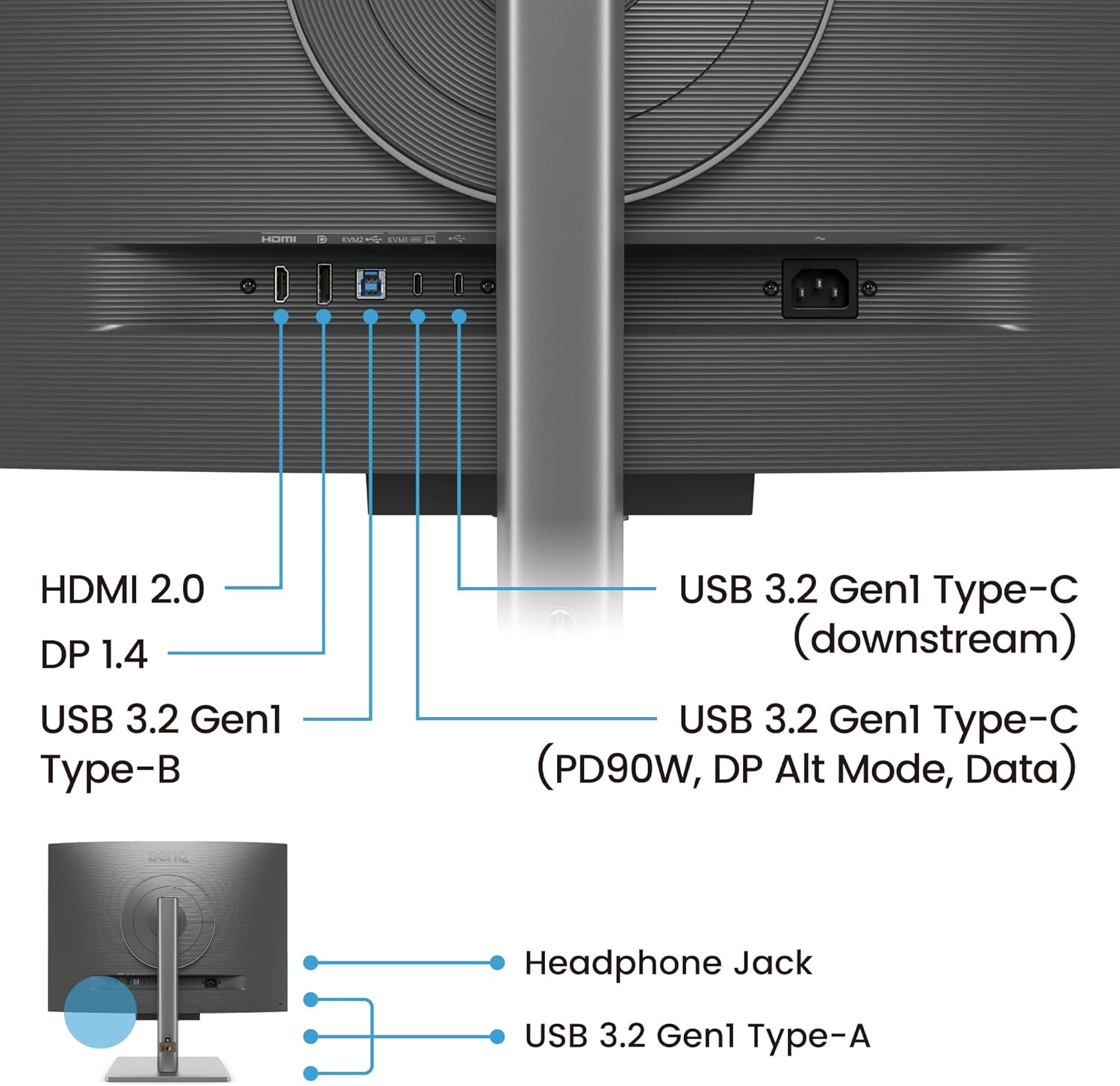
Figure 2.1: Rear view of the BenQ RD280U, showing the stand attachment point and VESA mounting holes.

Figure 2.2: Side view of the BenQ RD280U, illustrating its slim profile.
2.3 Connecting to Your Device
The BenQ RD280U offers multiple connectivity options:
- USB-C (90W Power Delivery, DP Alt Mode, Data): Connect a single USB-C cable for video, data, and power delivery to your laptop.
- HDMI 2.0: For standard video input.
- DisplayPort 1.4: For high-resolution video input.
- USB 3.2 Gen1 Type-B (Upstream): Connect to your computer to enable the monitor's USB-A ports.
- USB 3.2 Gen1 Type-A (Downstream): For connecting peripherals.
- Headphone Jack: For audio output.

Figure 2.3: Detailed diagram of the BenQ RD280U's input and output ports.
3. Operating the Monitor
3.1 Power On/Off
Press the Power key located on the function bar beneath the screen to turn the monitor on or off.
3.2 On-Screen Display (OSD) Navigation
The monitor features a 5-way controller and a function key for navigating the OSD menu. Use the 5-way controller to move through options and confirm selections. The function key provides quick access to frequently used settings.
3.3 Advanced Coding Modes
The RD280U offers specialized coding modes to enhance code differentiation and readability. You can select between Dark Theme and Light Theme modes to match your Integrated Development Environment (IDE) settings.

Figure 3.1: Illustration of the Advanced Coding Modes, showing Dark Theme and Light Theme options.
3.4 MoonHalo Backlight
The MoonHalo backlight provides immersive and comforting illumination behind the monitor, reducing eye strain in low-light environments. It can be adjusted for brightness and color temperature, and features an auto-dimming function based on ambient light.

Figure 3.2: The BenQ RD280U with its MoonHalo backlight active, illuminating the wall behind the monitor.
3.5 Eye-Care Features
- Brightness Intelligence Gen2 (B.I. Gen2): This feature automatically adjusts screen brightness based on ambient light conditions, ensuring optimal viewing comfort throughout the day.
- Low Blue Light Plus: Reduces harmful blue light emissions without compromising color accuracy, protecting your eyes during extended use.
- Night Hours Protection: When the environment becomes darker, the monitor can automatically activate Night Hours Protection, further reducing screen brightness to prevent eye strain.
3.6 KVM Switch Functionality
The integrated KVM (Keyboard, Video, Mouse) switch allows you to control two different computer systems using a single set of keyboard and mouse connected to the monitor. This is particularly useful for developers working with multiple machines.
3.7 Nano Matte Panel
The exclusive Nano Matte Panel minimizes glare and reflections, providing a clear and comfortable viewing experience even in brightly lit environments. This anti-glare, anti-reflective surface is designed to reduce distractions and improve focus.
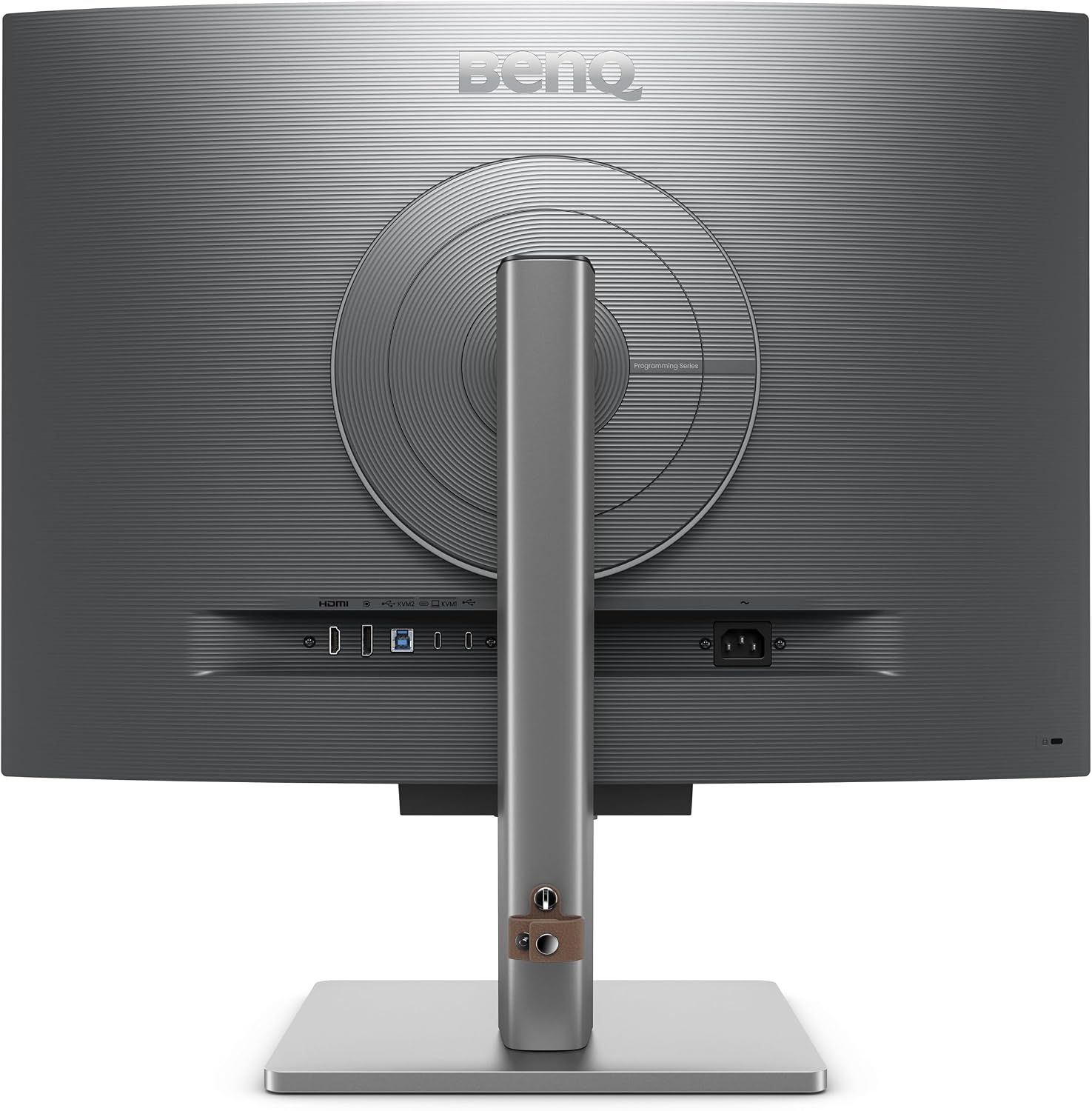
Figure 3.3: Diagram explaining the layers of the Nano Matte Panel and its anti-glare properties.
3.8 Ergonomic Adjustments
The monitor stand allows for various ergonomic adjustments to ensure optimal posture and comfort during long working sessions. These include tilt, swivel, and height adjustment.

Figure 3.4: Illustration demonstrating the ergonomic adjustments for optimal posture with the BenQ RD280U.
3.9 Official Product Video: RD Series How-To Guide
Video 3.1: A comprehensive guide from BenQ INFTY Lab demonstrating the use of the function bar, coding hotkeys, coding modes, Brightness Intelligence Gen2, Night Hours Protection, and MoonHalo features on the RD series monitors.
4. Maintenance
4.1 Cleaning the Monitor
- Always unplug the monitor before cleaning.
- Use a soft, lint-free cloth lightly dampened with water or a non-ammonia, non-alcohol based screen cleaner.
- Wipe the screen gently. Avoid applying excessive pressure.
- For the monitor casing, use a soft, dry cloth.
- Do not spray cleaners directly onto the screen or into any openings.
4.2 Storage
When storing the monitor for an extended period, ensure it is powered off and disconnected from all cables. Store it in a cool, dry place, ideally in its original packaging to protect it from dust and physical damage.
5. Troubleshooting
If you encounter issues with your BenQ RD280U monitor, please refer to the following common troubleshooting steps:
- No Power: Ensure the power cable is securely connected to both the monitor and a working power outlet. Check if the power indicator light is on.
- No Signal: Verify that the video cable (USB-C, HDMI, or DisplayPort) is correctly connected to both the monitor and your computer. Ensure the correct input source is selected on the monitor via the OSD menu.
- Flickering or Distorted Image: Check the video cable for damage or loose connections. Try a different video cable or port. Ensure your graphics card drivers are up to date.
- Display Issues (e.g., incorrect colors, brightness): Reset the monitor to factory default settings via the OSD menu. Adjust brightness, contrast, and color temperature settings.
- USB Ports Not Working: Ensure the USB 3.2 Gen1 Type-B upstream cable is connected from the monitor to your computer.
If the problem persists after trying these steps, please contact BenQ customer support.
6. Specifications
| Feature | Specification |
|---|---|
| Brand | BenQ |
| Model Number | RD280U |
| Screen Size | 28.2 Inches |
| Screen Resolution | 3840x2560 Pixels (4K) |
| Aspect Ratio | 3:2 |
| Panel Type | IPS |
| Screen Surface | Nano Matte |
| USB-C Power Delivery | 90W |
| USB Ports | 1x USB 3.0 (Upstream), Multiple USB 3.2 Gen1 Type-A (Downstream) |
| Video Inputs | HDMI 2.0, DisplayPort 1.4, USB-C |
| KVM Switch | Yes |
| VESA Mount Compatible | 100x100 mm |
| Item Weight | 16.8 pounds |
| Product Dimensions | 9.6 x 24 x 18.7 inches |
7. Warranty and Support
BenQ provides comprehensive warranty coverage for its products. For detailed warranty information, please refer to the warranty card included with your product or visit the official BenQ website.
For technical assistance, troubleshooting, or service inquiries, please contact BenQ Customer Support:
- BenQ Support Website: www.benq.com/en-us/support.html
- Refer to your product packaging for regional contact information.
Related documentsRD280U


Ask a question about this manual
Ask about setup, troubleshooting, compatibility, parts, safety, or missing instructions. Manuals+ will review the question and use this page’s manual context to help answer it.