
Introduction
Thank you for choosing the Mastfuyi FY886B Wood Moisture Meter. This device is designed for accurate and reliable measurement of moisture content in various materials, including wood and building materials. Its pin-type design ensures direct contact for precise readings, making it an essential tool for woodworking, construction, and home inspection. This manual provides detailed instructions for safe and effective operation, maintenance, and troubleshooting.

Image: The Mastfuyi FY886B moisture meter is suitable for various applications, including measuring moisture in firewood, building materials, and detecting water leaks.
Safety Information
Please read and understand all safety warnings and operating instructions before using this device. Failure to follow these instructions may result in electric shock, fire, or serious injury.
- Keep the device away from children.
- The measurement pins are sharp. Handle with care to avoid injury.
- Do not use the device in wet environments or near flammable gases or liquids.
- Do not attempt to modify or disassemble the device. Refer all servicing to qualified personnel.
- Remove batteries if the device will not be used for an extended period to prevent leakage.
Product Overview
The Mastfuyi FY886B is a compact and ergonomic moisture meter. Key components include:
- Measurement Pins: Two sharp pins for penetrating materials to measure moisture.
- LCD Display: Color LED screen showing moisture percentage, temperature, and mode.
- Power Button: Turns the device on and off.
- C/F Button: Switches between Celsius and Fahrenheit temperature units.
- MODE Button: Selects between Wood and Building material measurement modes.
- HOLD Button: Freezes the current reading on the display.
- Battery Compartment: Located at the rear for 9V battery installation.
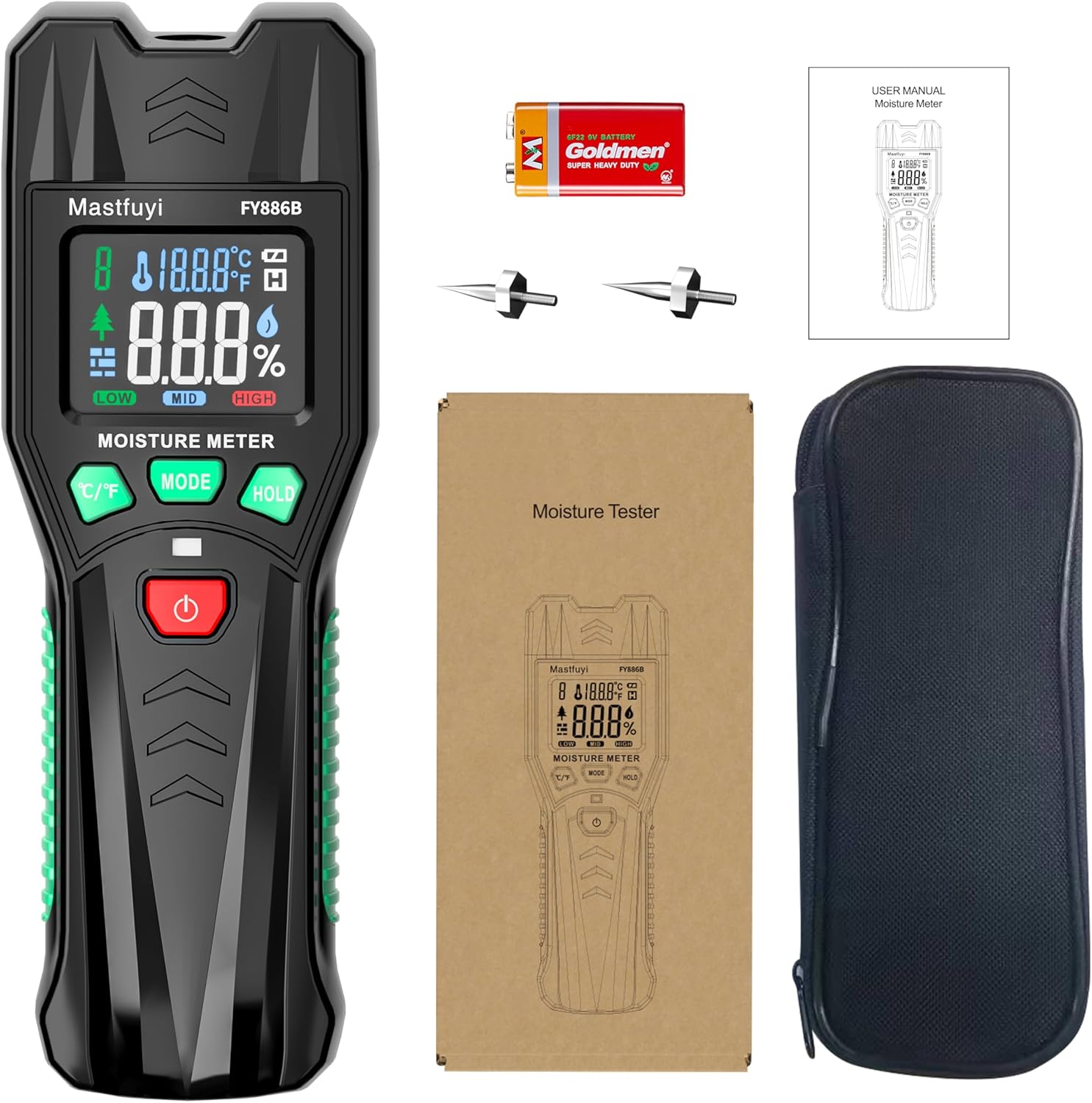
Image: The package includes the Mastfuyi FY886B moisture meter, a 9V battery, spare measurement pins, a user manual, and a protective carrying case.
Setup
1. Battery Installation
- Locate the battery compartment cover on the back of the device.
- Slide the cover open.
- Insert a 9V battery, ensuring correct polarity (+ and -).
- Close the battery compartment cover securely.

Image: The device's display shows moisture levels and temperature. A 9V battery is required for operation, and spare pins are provided for replacement.
2. Pin Installation (if not pre-installed)
The measurement pins are typically pre-installed. If replacement is needed, refer to the Maintenance section.
Operating Instructions
1. Powering On/Off
- Press the Power Button (red button) to turn the device on.
- Press and hold the Power Button for approximately 2 seconds to turn the device off.
2. Selecting Measurement Mode
The device has two universal measurement modes:
- Wood Mode: For measuring moisture in various types of wood (hardwood and softwood).
- Building Material Mode (BLD): For measuring moisture in materials like drywall, gypsum board, concrete, floors, and paper.
Press the MODE Button to switch between these two modes. The selected mode will be indicated on the LCD display.

Image: The device features dedicated buttons for switching between Wood and Building material modes, and for changing temperature units between Celsius and Fahrenheit.
3. Selecting Temperature Unit
Press the C/F Button to switch the temperature display between Celsius (°C) and Fahrenheit (°F).
4. Taking Measurements
- Ensure the correct measurement mode (Wood or Building) is selected.
- Carefully push the measurement pins into the material to be tested. Ensure both pins penetrate the surface for an accurate reading.
- The moisture content percentage and ambient temperature will be displayed on the screen.

Image: The device accurately measures wood moisture content, displaying the percentage on its screen. It is suitable for both hardwood and softwood.

Image: The device is also effective for measuring moisture in various building materials such as drywall, gypsum board, concrete, and floors.
5. Data Hold Function
Press the HOLD Button to freeze the current reading on the display. This is useful for taking readings in hard-to-reach areas. Press the HOLD Button again to release the reading and resume live measurement.

Image: The color LED screen provides clear readings, and the Data Hold function allows users to easily record measurements.
6. Visual Alerts
The device provides visual alerts (LOW, MID, HIGH) to instantly indicate the level of moisture risk. Refer to the table below for interpretation:
| Materials Type | Wood | Building Materials (BLD) |
|---|---|---|
| Low | < 17% | < 12% |
| Mid | 17% ~ 20% | 12% ~ 16% |
| High | > 20% | > 16% |
These alerts help in quickly assessing the moisture condition of the material.
Maintenance
1. Cleaning
Wipe the device with a dry, soft cloth after each use. Do not use abrasive cleaners or solvents. Ensure the pins are clean and free of debris.
2. Pin Replacement
The measurement pins are replaceable. If the pins become dull or damaged, they can be replaced using the included mini wrench or tweezers. A pair of spare pins is provided in the box.
- Carefully unscrew the old pins using the mini wrench or tweezers.
- Insert the new pins and screw them in securely.
- Ensure the pins are firmly seated before use.

Image: The device features replaceable pins. A mini wrench or tweezers can be used for replacement, and spare pins are included.
3. Storage
Store the device in a cool, dry place, away from direct sunlight and extreme temperatures. Remove the battery if storing for extended periods.
Troubleshooting
| Problem | Possible Cause | Solution |
|---|---|---|
| Device does not power on. | Low or dead battery; incorrect battery installation. | Replace the 9V battery; ensure correct polarity. |
| Inaccurate readings. | Pins not fully inserted; incorrect mode selected; damaged pins. | Ensure pins penetrate the material; select the correct Wood or Building mode; replace damaged pins. |
| Display is blank or flickering. | Low battery; device malfunction. | Replace the 9V battery. If the problem persists, contact customer support. |
Specifications
| Feature | Detail |
|---|---|
| Model Number | FY886B |
| Measurement Range (Wood) | 0% ~ 60% |
| Measurement Range (Building Materials) | 0% ~ 60% |
| Accuracy | ±2.0% |
| Display | Color LED Screen |
| Power Source | 9V Battery |
| Item Dimensions | 19.9 x 9.4 x 5.1 cm |
| Item Weight | 240 g |
Warranty and Support
For warranty information or technical support, please refer to the contact details provided with your purchase or visit the official Mastfuyi website. Keep your purchase receipt as proof of purchase for warranty claims.


