1. Introduction
This manual provides comprehensive instructions for the safe and effective use of your Mastfuyi FY8861 Wood Moisture Meter. This portable, pen-style device is designed for quick and accurate measurement of moisture content in wood and various building materials, and also includes ambient temperature measurement. Please read this manual thoroughly before operation and retain it for future reference.
2. Product Overview
The Mastfuyi FY8861 is a compact and lightweight moisture meter, ideal for professionals and DIY enthusiasts. Its ergonomic design ensures comfortable handling and portability.

Image 2.1: Mastfuyi FY8861 Wood Moisture Meter with protective cap and included AAA batteries.
Key Features:
- Portable Pen Design: Weighs approximately 1.83 ounces (52g) without batteries, making it easy to carry.
- High-Precision Pins: Equipped with two durable 303 stainless steel pins for accurate readings.
- Dual Measurement Modes: Dedicated modes for wood and building materials.
- Ambient Temperature Measurement: Measures temperature in Celsius or Fahrenheit.
- MAX/MIN Value Freeze Function: Records peak moisture data during measurement.
- User-Friendly Features: Automatic power-off after 5 minutes of inactivity and a battery indicator.

Image 2.2: The compact and portable pen-style design of the Mastfuyi FY8861, highlighting its dimensions and light weight.
3. Setup
3.1. Battery Installation
- Locate the battery compartment cover, typically on the back or side of the device.
- Carefully remove the cover. Some models may require unscrewing a small screw or sliding a latch.
- Insert two AAA 1.5V batteries, ensuring correct polarity (+/-) as indicated inside the compartment. Note: Some users report difficulty inserting batteries due to spring tension; gentle but firm pressure may be required.
- Replace the battery compartment cover securely.
3.2. Powering On/Off
- To power on the device, press the Power button (
 ). The display will illuminate.
 - The device will automatically power off after 5 minutes of inactivity to conserve battery life.
- To manually power off, press and hold the Power button.
4. Operating Instructions
4.1. Selecting Measurement Modes
The Mastfuyi FY8861 offers two moisture measurement modes and an ambient temperature measurement mode. Use the SEL button to cycle through these modes.
- Mode A (Wood Moisture Measurement):
When the device is powered on, it typically defaults to Mode A. The indicator light will be red. This mode is suitable for measuring moisture in various types of wood, from hardwood to softwood. The measurement range is 0% to 40%.Image 4.1: Device display showing Mode A for wood moisture measurement with a red indicator light.
- Mode B (Building Material Moisture Measurement):
Press the SEL button once to switch to Mode B. The indicator light will be green. This mode is designed for measuring moisture in building materials such as concrete and drywall. The measurement range is 0% to 40%.
Image 4.2: Device display showing Mode B for building material moisture measurement with a green indicator light.
- Ambient Temperature Measurement:
Press the SEL button again to switch to ambient temperature measurement. In this mode, the indicator light will be off. You can toggle between Celsius (°C) and Fahrenheit (°F) by pressing the SEL button once more.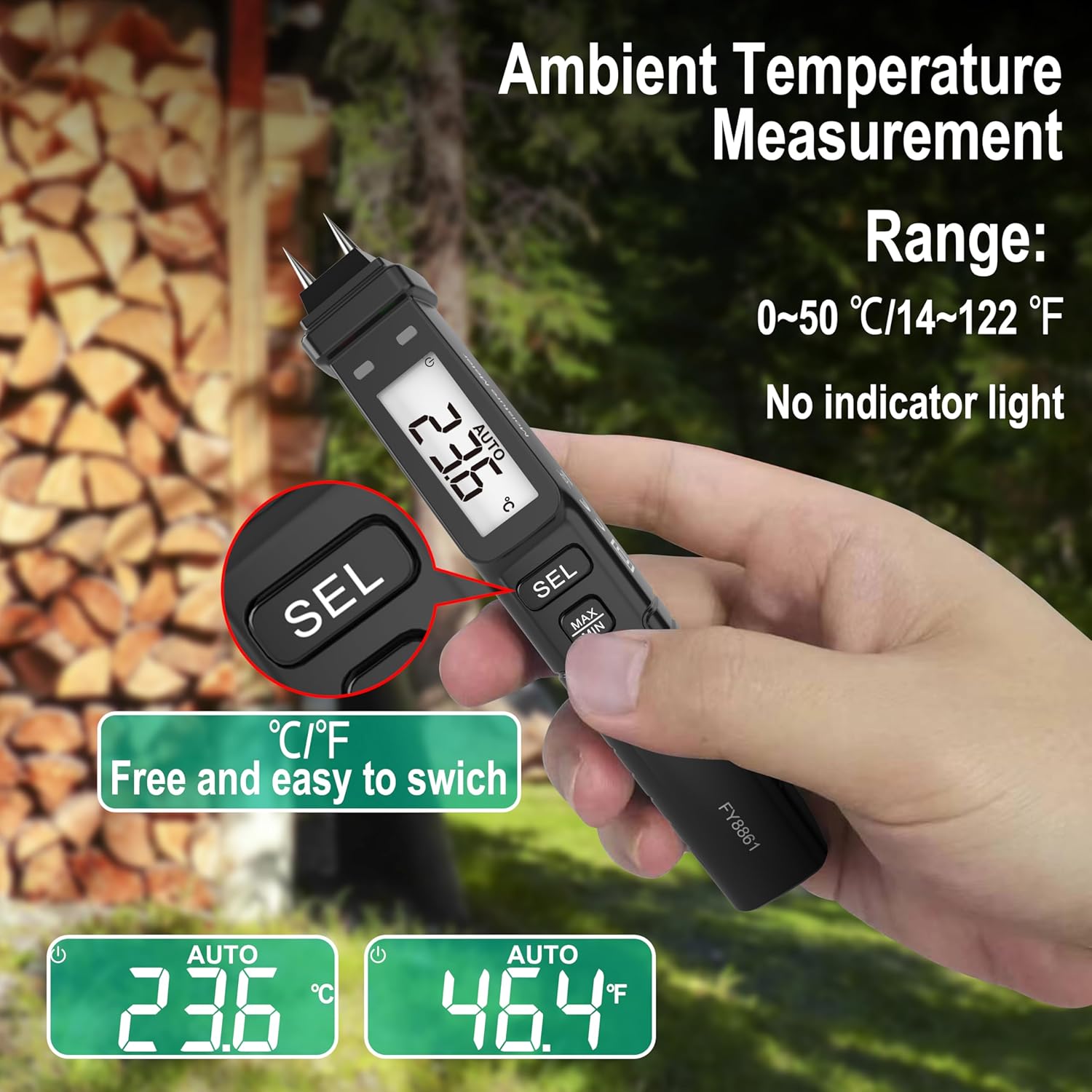
Image 4.3: Device displaying ambient temperature, with options to switch between Celsius and Fahrenheit.
4.2. Taking Measurements
- Remove the protective cap from the measurement pins.
- Select the appropriate measurement mode (Wood or Building Material) using the SEL button.
- Firmly insert the two measurement pins into the material you wish to test. For best results, push the pins deep enough to ensure good contact with the material.
- Read the moisture content percentage displayed on the screen.
- After measurement, carefully withdraw the pins and replace the protective cap.
4.3. MAX/MIN Value Freeze Function
The MAX/MIN function is useful for recording the highest or lowest moisture reading during a measurement session, especially when testing materials with varying moisture levels at different depths.
- During a measurement, press the MAX/MIN button to toggle between displaying the maximum, minimum, or current reading.
- This allows you to capture peak data without continuously monitoring the display.

Image 4.4: Device display illustrating the MAX/MIN hold function, showing recorded maximum and minimum moisture values.
5. Maintenance
5.1. Cleaning
- After each use, wipe the measurement pins with a clean, dry cloth to remove any residue.
- Clean the device body with a soft, damp cloth. Do not use abrasive cleaners or solvents.
- Ensure the device is completely dry before storage.
5.2. Storage
- Always replace the protective cap over the measurement pins when not in use to prevent damage and injury.
- Store the device in a cool, dry place, away from direct sunlight and extreme temperatures.
- If storing for an extended period, remove the batteries to prevent leakage.
6. Troubleshooting
6.1. No Reading or "Lo" Display
- Cause: If the material (e.g., wood board) is extremely dry, it acts as an insulator, preventing electrical conductivity between the two pins.
- Solution: Ensure the material is not excessively dry. For accurate readings, the pins must make good electrical contact. Push the pins deep into the material. If the material is genuinely very dry, a "Lo" reading or no reading is expected and indicates low moisture.
6.2. Inaccurate Readings
- Check Pin Contact: Ensure both pins are fully inserted and making firm contact with the material.
- Select Correct Mode: Verify that you are using the correct mode (Wood or Building Material) for the material being tested.
- Battery Level: A low battery can affect accuracy. Replace batteries if the battery indicator is low.
- Environmental Factors: Extreme humidity or temperature can sometimes influence readings. Allow the device to acclimate to the environment.
6.3. Device Does Not Power On
- Check Batteries: Ensure batteries are correctly installed with proper polarity and are not depleted. Replace with fresh AAA batteries if necessary.
- Battery Compartment: Confirm the battery compartment cover is securely closed.
7. Specifications
| Feature | Specification |
|---|---|
| Model Number | FY8861 |
| Measurement Range (Wood) | 0% to 40% |
| Measurement Range (Building Materials) | 0% to 40% |
| Resolution | 0.1% |
| Accuracy | ±2% |
| Ambient Temperature Range | 0~50°C / 14~122°F |
| Power Source | 2 x AAA 1.5V Batteries (not included, but often supplied) |
| Automatic Power-Off | After 5 minutes of inactivity |
| Item Weight | 3.2 ounces (approx. 90g) |
| Package Dimensions | 7.09 x 1.61 x 1.38 inches |
| Manufacturer | Mastfuyi |
8. Warranty and Support
8.1. Warranty Information
Mastfuyi provides a 48-month unconditional warranty for the FY8861 Wood Moisture Meter. This warranty covers manufacturing defects and ensures product reliability.
8.2. After-Sales Service and Support
We are committed to providing excellent customer service. Mastfuyi offers lifetime after-sales service for this product. If you have any questions, encounter issues, or require assistance, our 24/7 online after-sales service team is available to help you as soon as possible.
For further support or to explore other Mastfuyi products, please visit the official Mastfuyi Store.


