
1. Introduction
The DetectTrek M55 is a professional-grade, rechargeable metal detector designed for adults, offering high accuracy and a waterproof search coil for diverse treasure hunting environments. With its advanced features and user-friendly design, the M55 is suitable for both experienced enthusiasts and beginners looking to discover coins, artifacts, jewelry, and gold.

Overview of the DetectTrek M55 Metal Detector highlighting its main features.
2. What's Included
Your DetectTrek M55 metal detector kit includes the following components:
- Rechargeable Metal Detector (M55 unit)
- Portable Backpack
- Over-ear Headphones with adjustable volume
- Manganese Steel Digger
- Type-C Charging Cable
- Detailed User Manual
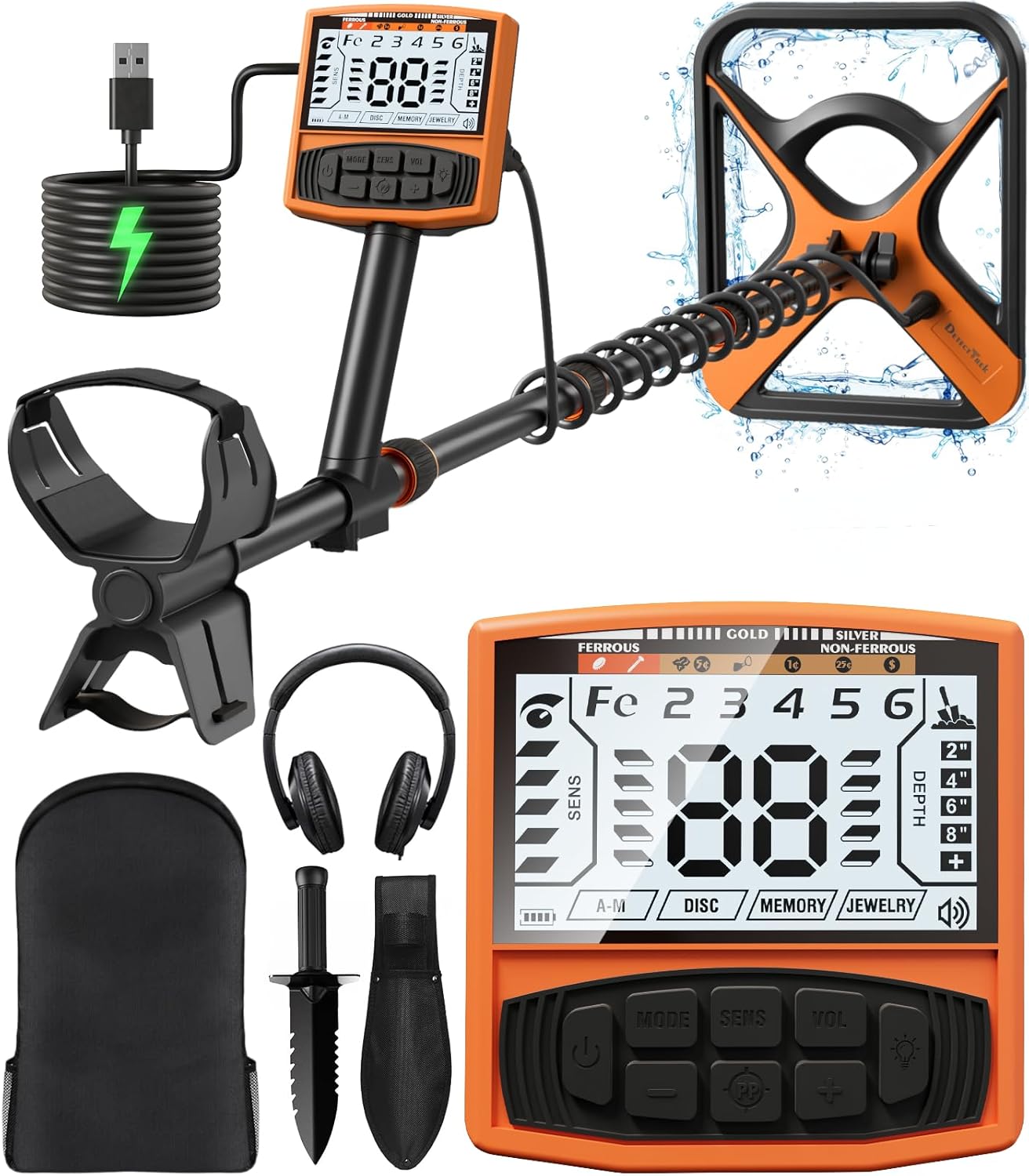
All components included in the DetectTrek M55 Metal Detector kit.
3. Setup
The M55 metal detector features an upgraded helical lock design and screw-less main head for effortless assembly and adjustment.
- Assembly: Connect the search coil to the lower stem, then attach the lower stem to the middle stem. Finally, connect the middle stem to the control box assembly. Ensure all connections are secure.
- Adjustable Length: The telescoping shaft can be adjusted from 19 inches (48cm) to 51 inches (130cm) using the three heavy-duty twist locks. This tool-free system allows users from 4'7" (140cm) to 6'3" (190cm) to find their ideal setup. Simply twist to unlock, adjust, and twist to lock.
- Elbow Support: Position the soft elbow support for comfortable one-handed operation.
- Cable Management: Route the cable securely along the stem to prevent interference during operation.

Adjustable length and structural features for easy setup.
4. Operating Modes
The M55 metal detector offers 5 professional detection modes to accurately and efficiently find various metals. The 2X larger backlit LCD display provides clear information.

The five distinct operating modes for varied detection needs.
- All Metal Mode (① All Metal): Notifies you as soon as any metal is found. Ideal for general searching where all metal types are of interest.
- Discrimination Mode (② Disc): Allows you to distinguish between different detected metal forms and ignore unwanted items (e.g., iron nails, pull-tabs). This helps in focusing on valuable targets.
- Innovative Memory Mode (③ Memory): Lets you focus on a single metal type. The detector will only alert you to the specific metal you have programmed it to remember.
- Jewelry Mode (④ Jewelry): Specifically tuned to enhance the detection of jewelry, making it easier to find rings, necklaces, and other precious items.
- Pinpoint Mode (⑤ PP): Enables you to precisely pinpoint the exact location of the target, saving time and effort during recovery.
Use the silicone comfort buttons on the control panel to switch between modes and adjust settings.

User-friendly interface with clear controls for easy operation.
5. Sensitivity and Depth
The M55 offers 5 sensitivity presets to reduce false alarms and optimize detection in varied environments. It also provides 3-step audio control.
- Sensitivity Adjustment: Use the SENS buttons (+ and -) to increase or decrease the detector's sensitivity. Higher sensitivity allows for deeper detection but may also pick up more interference.
- Depth Indication: The display shows the approximate depth of the detected item, allowing you to gauge how deep you need to dig. For example, it can locate a quarter coin up to 11 inches underground.
- Target ID: The built-in upgraded DSP chip provides 40% more accuracy and stronger detection stability, displaying a target ID to help identify the type of metal found.

High-precision detection with DSP chip for accurate target identification.
6. Battery and Charging
The M55 is equipped with a high-capacity rechargeable lithium battery, offering over 40 hours of continuous use on a single charge.
- Charging: Use the provided universal Type-C charging cable. You can charge the detector using a power bank, portable power station, power adapter, laptop/PC, or car charger.
- Battery Life: A full charge provides ample power for extended treasure hunting sessions.
- Memory Function: The built-in on/off memory function ensures that your settings are saved, so you don't need to reset the detector every time you start it.

The M55 features a high-capacity 4000mAh rechargeable lithium battery.
7. Waterproof Design
The M55 Professional Metal Detector features an IP68 waterproof search coil, allowing for exploration in various outdoor environments.
- Search Coil: The 11-inch search coil is fully waterproof, making it suitable for beach walks, shallow water searches, and other wet conditions.
- Important Note: The control unit (display and buttons) is not waterproof. Ensure the control unit remains dry to prevent damage.

The 11-inch search coil is IP68 waterproof for underwater detection.
8. Maintenance
Proper maintenance will ensure the longevity and optimal performance of your DetectTrek M55 metal detector.
- Cleaning: After each use, especially in sandy or wet conditions, wipe down the search coil and stem with a damp cloth. Ensure the control unit is kept dry and clean.
- Storage: Store the detector in a cool, dry place, away from direct sunlight and extreme temperatures. Use the provided portable backpack for safe transport and storage.
- Battery Care: For long-term storage, ensure the battery is partially charged (around 50%) to maintain its health. Avoid fully discharging or overcharging for extended periods.
- Inspection: Periodically check all connections and cables for any signs of wear or damage.
9. Troubleshooting
If you encounter issues with your DetectTrek M55, please refer to the following common troubleshooting tips:
- No Power: Ensure the battery is fully charged. Check the charging cable and adapter.
- No Signal/Weak Signal: Verify that all connections are secure. Adjust the sensitivity settings. Ensure you are not in an area with high electromagnetic interference.
- False Signals: Lower the sensitivity. Ensure the discrimination settings are correctly configured to filter out unwanted metals. Avoid areas with excessive metallic trash.
- Inaccurate Depth Reading: Ensure the search coil is parallel to the ground and swept consistently.
- Display Issues: Check battery level. If the display is dim, ensure the backlight is enabled.
For persistent issues, please contact DetectTrek customer support.
10. Specifications
| Feature | Specification |
|---|---|
| Brand | DetectTrek |
| Model Number | M55 |
| Color | Orange |
| Power Source | USB C Charge (Rechargeable Lithium Battery) |
| Battery Life | Over 40 hours (4000mAh) |
| Material | Metal, Premium ABS Plastic |
| Item Weight | 3.15 Pounds (1.43 kg) |
| Product Dimensions | 11.02"L x 5.51"W x 17.55"H (28cm L x 14cm W x 44.6cm H) |
| Adjustable Length | 19" - 51" (48cm - 130cm) |
| International Protection Rating | IP68 (Search Coil only) |
| Display Type | LCD (2X larger backlit) |
| Number of Programs/Modes | 5 |
| Search Coil Size | 11 Inches |
| Detection Depth | Up to 11 inches for a quarter coin |
11. Warranty and Support
DetectTrek is committed to providing high-quality metal detecting equipment and excellent customer service.
- Warranty: Please refer to the specific warranty information provided with your product packaging.
- Customer Support: For any questions, technical assistance, or support needs, please contact DetectTrek customer service.

DetectTrek offers 12 months replacement, quick replies within 24 hours, and lifetime service and technical support.
DetectTrek aims to support your journey every step of the way, from seasoned detectorists to curious beginners.