
Introduction
Thank you for choosing the EZVALO LED Under Cabinet Light. This manual provides detailed instructions for the installation, operation, and maintenance of your new light. Please read this manual carefully before use to ensure proper function and longevity of the product. This light features a motion sensor, adjustable color temperatures, and brightness levels, powered by a high-capacity rechargeable battery.
Product Overview
The EZVALO LED Under Cabinet Light is designed to provide versatile and efficient lighting for various indoor spaces such as kitchens, wardrobes, mirrors, and more. It combines convenience with advanced features to enhance your environment.
Key Features:
- Motion Sensor Modes: Automatically activates when motion is detected within a 3m/120° range. Includes Day Mode and Night Mode for energy efficiency.
- High-Capacity Battery: Equipped with a 5000mAh battery, offering up to 8 hours of continuous lighting at maximum brightness or 15-45 days in automatic mode (based on 10-20 activations per day for 20 seconds each).
- Adjustable Angle: The light can be rotated up to 60° (or 135° as per some images) to direct illumination precisely where needed.
- Magnetic Installation: Strong magnetic base allows for secure placement and easy removal for charging.
- 3 Color Temperatures: Choose between Warm (3000K), Neutral White (4200K), and Cool White (6500K).
- Adjustable Brightness: Three levels of brightness (10%, 60%, 100%) up to 300 lumens.

Image: The EZVALO LED Under Cabinet Light, showcasing its sleek design, magnetic attachment, and included USB-C charging cable.

Image: A visual comparison highlighting the EZVALO light's superior 5000mAh battery, three color temperatures, Day & Night mode, and effortless rotation capability.
Setup and Installation
The EZVALO LED Under Cabinet Light offers two convenient installation methods to suit various surfaces.
Before Installation:
- Ensure the light is fully charged before its first use.
- Clean the installation surface thoroughly to ensure optimal adhesion for the magnetic base.
Method 1: Adhesive Tape Installation
- Remove the protective film from the double-sided adhesive tape on the lamp base.
- Stick the lamp base to the desired position, ensuring the surface is sufficiently clean and dry.
- Place the lamp body onto the installed base. The strong magnet will hold it securely.
Method 2: Screw Installation
- Use screws to fix the lamp base in the appropriate position.
- Place the lamp body onto the installed base. The strong magnet will hold it securely.

Image: Visual guide illustrating both adhesive and screw installation methods for the light base.
Operating Instructions
Your EZVALO LED Under Cabinet Light features intuitive controls for various lighting modes and adjustments.
Control Panel Overview:
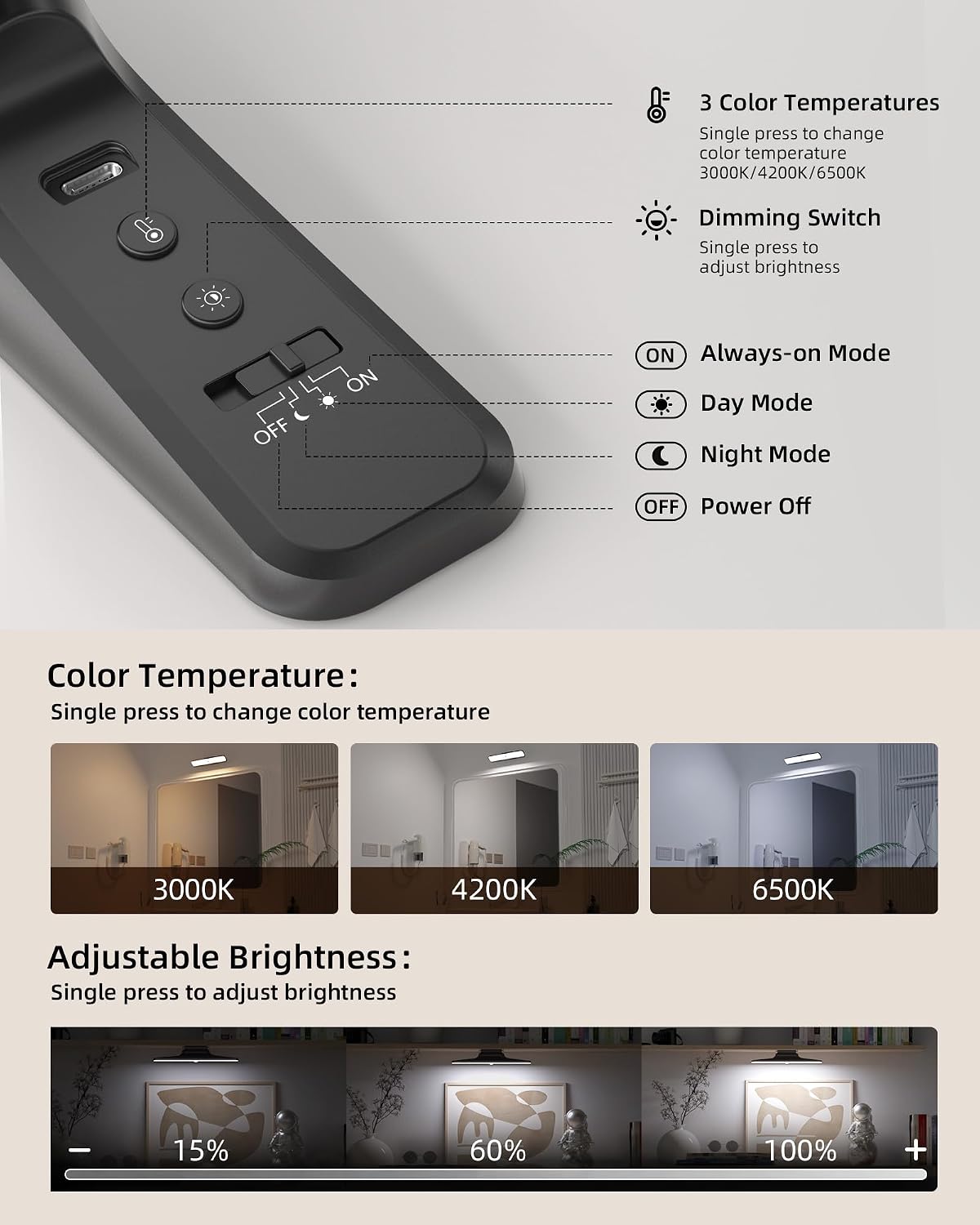
Image: Detailed view of the control buttons on the light, indicating functions for color temperature, brightness, and operating modes.
- Color Temperature Button: Single press to cycle through 3000K (Warm), 4200K (Neutral White), and 6500K (Cool White).
- Dimming Switch: Single press to adjust brightness levels (10%, 60%, 100%).
- Mode Switch (OFF / Day Mode / Night Mode / ON):
- OFF: Light is powered off.
- Day Mode (Sun icon): Motion sensor activates the light in any ambient light condition.
- Night Mode (Moon icon): Motion sensor activates the light only in dark environments.
- ON (Always-on Mode): Light remains continuously on, regardless of motion or ambient light.
Adjusting Color Temperature and Brightness:
Use the dedicated buttons on the light to customize your lighting experience. The light offers three distinct color temperatures and three brightness levels.

Image: Visual representation of the three color temperature options and the adjustable brightness range from 15% to 100%.
Motion Sensor Operation:
In Day Mode or Night Mode, the light will automatically turn on when motion is detected within 3 meters and a 120° angle. If no motion is detected for 20 seconds, the light will automatically turn off to conserve energy.

Image: Depiction of the three operational modes: Always On for continuous lighting, Day Mode for motion detection in any light, and Night Mode for motion detection in dark conditions.
Charging:
The light is equipped with a 5000mAh rechargeable Lithium-ion battery. Use the provided USB-C cable to charge the device. A full charge is recommended before first use. The charging port is typically located on the side of the light unit.

Image: An internal view of the 5000mAh rechargeable battery, illustrating its capacity and the charging process via USB.
Maintenance
To ensure optimal performance and extend the lifespan of your EZVALO LED Under Cabinet Light, follow these maintenance guidelines:
- Cleaning: Wipe the light with a soft, dry cloth. Do not use abrasive cleaners or solvents, as they may damage the finish.
- Battery Care: Recharge the battery when the light output diminishes. Avoid completely draining the battery frequently to prolong its life. Store the light in a cool, dry place if not used for extended periods, and recharge it periodically.
- Environmental Conditions: Avoid exposing the light to extreme temperatures, high humidity, or direct water contact. This product is designed for indoor use only.
Troubleshooting
If you encounter any issues with your EZVALO LED Under Cabinet Light, please refer to the following common problems and solutions:
| Problem | Possible Cause | Solution |
|---|---|---|
| Light does not turn on. | Battery is depleted. Incorrect mode selected. | Charge the light fully. Ensure the mode switch is set to 'ON', 'Day Mode', or 'Night Mode'. |
| Motion sensor is not working. | Light is in 'ON' mode. Ambient light is too bright (for Night Mode). Obstruction in sensor path. | Switch to 'Day Mode' or 'Night Mode'. Ensure it's dark enough for 'Night Mode'. Clear any objects blocking the sensor. |
| Light turns off too quickly. | No continuous motion detected. | The light is designed to turn off after 20 seconds of no motion in sensor modes. If continuous light is needed, switch to 'ON' mode. |
| Light output is dim. | Battery is low. Brightness setting is low. | Recharge the light. Adjust the brightness setting to a higher level. |
Specifications
| Feature | Detail |
|---|---|
| Brand | EZVALO |
| Model Number | EZL2416A |
| Product Dimensions (L x W x H) | 26.8 x 4.2 x 4.2 cm (10.55 x 1.65 x 1.65 inches) |
| Weight | 164 grams (0.36 lbs) |
| Battery Type | 1 Lithium-ion battery (requires 1) |
| Battery Capacity | 5000 mAh |
| Power Source | Battery Powered |
| Voltage | 5 Volts |
| Wattage | 5 Watts |
| Luminous Flux | Up to 300 lm (200 lm listed in specs, 300 lm in feature bullets) |
| Light Source Type | LED |
| Color Temperatures | 3000K (Warm), 4200K (Neutral White), 6500K (Cool White) |
| Special Features | Motion Sensor, Adjustable Brightness, Adjustable Angle |
| Material | Acrylonitrile Butadiene Styrene (ABS) |
| Installation Type | Wall Mount / Countertop (Magnetic Base) |
| Usage | Indoor |
Warranty and Support
EZVALO is committed to providing high-quality products and customer satisfaction. If your product arrives damaged or if you experience any quality issues, please contact EZVALO directly for assistance.
For support, please refer to the contact information provided with your purchase or visit the official EZVALO website. Our customer service team is available to help you with any questions or concerns regarding your LED Under Cabinet Light.