
Introduction
Thank you for choosing the XYH-Win 1000 Lumens Tactical Flashlight Red Laser Combo. This device is designed to provide superior illumination and precise aiming capabilities for firearms equipped with M-Lok and Picatinny rails. Crafted from durable aluminum, it features a powerful 1000 Lumen white light, a Class IIIA red laser, and convenient USB-TypeC recharging. Please read this manual thoroughly before installation and operation to ensure safe and optimal performance.
What's in the Box
- 1 x 1000 Lumen MLOK Laser Light
- 1 x Black Plastic Storage Box
- 1 x Mounting Picatinny Rail
- 2 x Mounting Wrench
- 1 x Type-C Cable
- 2 x Mounting Screw
- 1 x Zeroing Wrench
- 1 x (2000MA) Battery

Image: Contents of the product package, showing the flashlight-laser combo unit, a USB-C cable, various Allen wrenches, mounting screws, and a Picatinny rail adapter, all neatly arranged.
Setup
1. Charging the Device
Before first use, fully charge the device. The unit features a USB-TypeC charging port for convenience. A full charge typically takes approximately two hours.
- Connect the provided Type-C USB cable to the charging port on the device.
- Plug the other end of the cable into a compatible USB power source (e.g., laptop, power bank, USB wall charger, car charger).
- A red indicator light signifies that the device is charging.
- The indicator light will turn green once charging is complete.

Image: The flashlight-laser combo unit being charged via a USB-C cable. The image also shows various charging methods like laptop, power bank, USB charger, and car charger, highlighting the versatility of its charging capabilities.
Video: Demonstrates the USB-C charging process for the tactical flashlight and laser combo. It shows the cable being plugged in and the charging indicator light changing color.
2. Installation on Rail
This device is compatible with both M-Lok and Picatinny rails. Use the appropriate mounting hardware and wrenches provided.
- Identify the correct mounting screws and wrenches for your rail type (M-Lok or Picatinny).
- Align the device's mounting base with the rail slots on your firearm.
- Insert and tighten the mounting screws using the provided wrench until the device is securely attached. Ensure it is firm and does not wobble.

Image: Illustrates the compatibility of the flashlight-laser combo with both Picatinny and M-Lok rail systems, showing how the device attaches to each type of rail.
Image: A detailed diagram of the flashlight-laser combo, pointing out key features such as the flashlight switch, USB-TypeC charging port, vertical and horizontal adjustment screws for the laser, the laser switch, and the Picatinny/M-LOK clamp.
3. Laser Zeroing (Adjustment)
To ensure accuracy, the red laser can be adjusted for windage (horizontal) and elevation (vertical).
- Locate the adjustment screws on the device (refer to the diagram in the previous section).
- Use the provided zeroing wrench to make small adjustments.
- Turn the screws incrementally and observe the laser dot's movement on a target to align it with your point of aim.
- UP/D (Up/Down) adjusts elevation.
- L/R (Left/Right) adjusts windage.
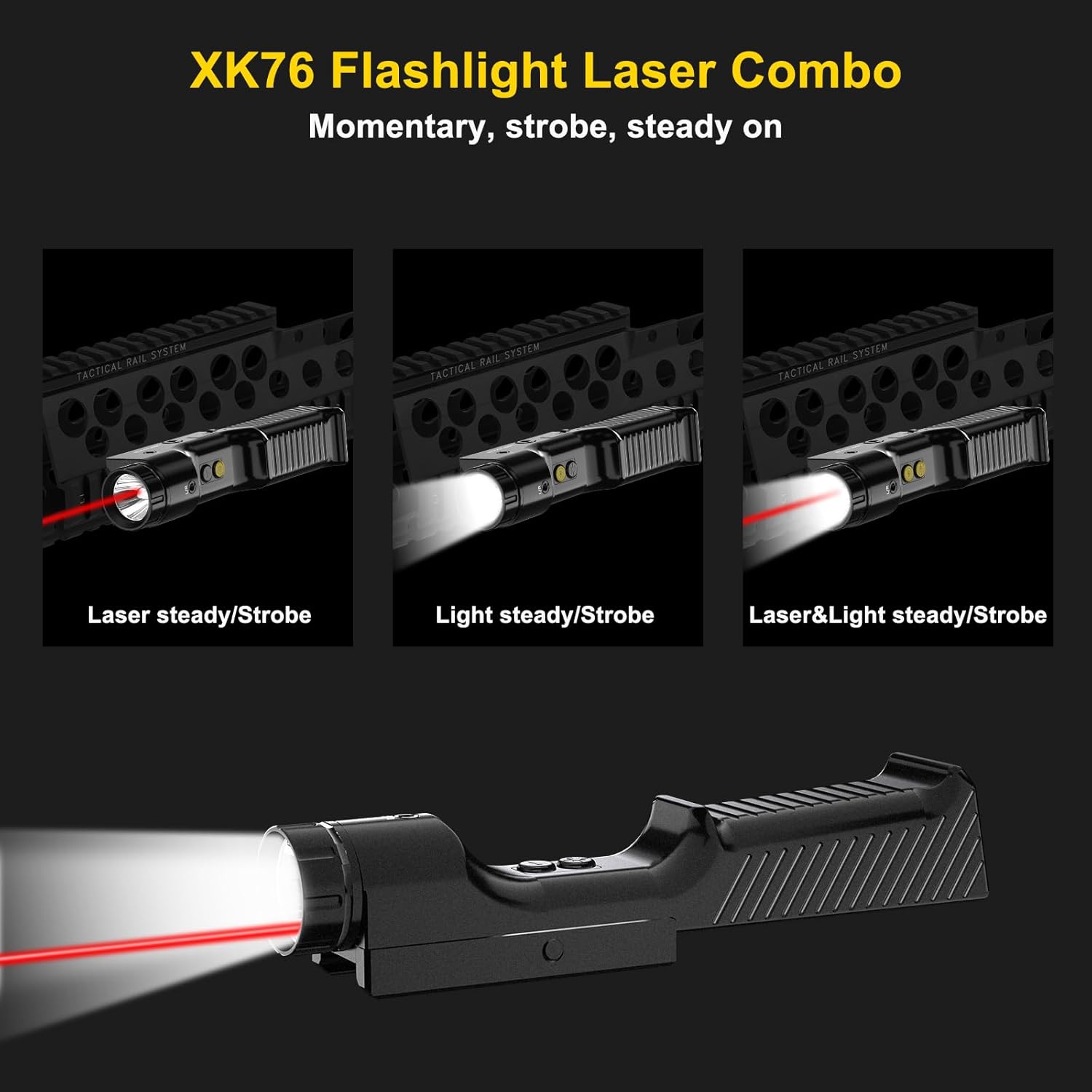
Image: A visual representation of the laser zeroing process, showing a red laser dot on a target and a hand using an Allen wrench to adjust the laser's windage and elevation.
Operating Instructions
The device features separate buttons for the flashlight and laser, allowing for independent or combined operation. Both functions also include a strobe mode.
- Flashlight On/Off: Press the flashlight button once to turn the light on or off.
- Laser On/Off: Press the laser button once to turn the laser on or off.
- Strobe Mode: For either the flashlight or the laser, press and hold its respective button for approximately 3 seconds to activate the strobe function. Repeat the long press to return to steady mode.
- Combined Mode: You can activate both the flashlight and laser simultaneously by pressing both buttons.

Image: A visual guide demonstrating the different operating modes of the XK76 Flashlight Laser Combo: Laser steady/strobe, Light steady/strobe, and Laser & Light steady/strobe.
Maintenance
- Cleaning: Use a soft, dry cloth to clean the exterior of the device. For the lens, use a lens cleaning cloth and solution designed for optics. Avoid abrasive materials or harsh chemicals.
- Battery Care: Recharge the device regularly, even if not in frequent use, to maintain battery health. Store in a cool, dry place when not in use for extended periods.
- Water Resistance: The device is IPX6 waterproof, meaning it is protected against powerful water jets. While durable, avoid prolonged submersion. Ensure the Type-C charging port cover is securely closed when not charging to maintain water resistance.
- Storage: Store the device in its provided plastic storage box to protect it from dust, moisture, and physical damage.
Troubleshooting
| Problem | Possible Cause | Solution |
|---|---|---|
| Device does not turn on. | Low battery; Device malfunction. | Charge the device fully. If problem persists, contact customer support. |
| Laser dot is not visible or dim. | Bright ambient light; Low battery. | Use in lower light conditions. Charge the device fully. |
| Laser dot is not accurate. | Needs zeroing; Device not securely mounted. | Perform laser zeroing as per instructions. Ensure the device is tightly secured to the rail. |
| Charging indicator not working. | Cable issue; Port issue. | Try a different USB-C cable and power source. Ensure cable is fully inserted. |
Specifications
| Feature | Detail |
|---|---|
| Brand | XYH-Win |
| Model Name | XK76RGB |
| Item Model Number | XK76R |
| Color | Updated-Red Laser+Flashlight |
| Style | Compact |
| Product Dimensions (L x W x H) | 5.75" x 1.18" x 1.18" |
| Item Weight | 10.6 ounces (300 Grams) |
| Material | Aluminum |
| Compatible Devices | Some Rifles (M-Lok and Picatinny Rail) |
| Mounting Type | Rifle Mount |
| Luminous Flux | 1000 Lumen |
| Type of Bulb | LED |
| Laser Class | IIIA (≤5mW) |
| Power Source | Battery Powered (2000MA Battery included) |
| Special Features | Mountable, Strobe Function, USB-TypeC Rechargeable, IPX6 Waterproof, Shockproof |
Warranty and Support
For warranty information and technical support, please refer to the documentation included with your purchase or contact XYH-Win customer service directly. Contact details are typically available on the manufacturer's official website or through your point of purchase.


