
Introduction
This manual provides instructions for the Newentor TX15N Floating Digital Pool Thermometer. This device is designed to accurately measure water temperature in swimming pools, hot tubs, and fish tanks, featuring a large display for easy readability and robust waterproofing for reliable performance.
Package Contents
Please check the package for the following items:
- Newentor Pool Thermometer (TX15N)
- User Manual (this document)
- String (for securing the thermometer)
Product Overview
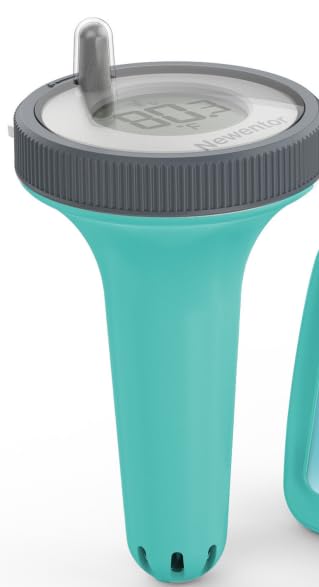
Image: Newentor TX15N Pool Thermometer. This image shows the thermometer floating in water, highlighting its large digital display.
The Newentor TX15N features a large, easy-to-read digital display for clear temperature readings. Its robust design ensures it floats reliably and is protected by IPX8 quadruple waterproof engineering. The device is equipped with high-precision chips for accurate temperature measurement and provides rapid 30-second refreshes.
Battery Installation
The thermometer requires two (2) AAA batteries (not included) for operation. Follow these steps to install the batteries:
- Carefully twist and remove the top display section from the main body of the thermometer. Note the orientation of the components as you disassemble.
- Locate the battery compartment. Insert two new AAA batteries, ensuring the correct polarity (+/-) as indicated inside the compartment.
- Before reassembling, inspect the rubber seal (O-ring) between the display and the main body. Ensure it is clean, free of debris, and properly seated to maintain the waterproof integrity.
- Align the display section with the main body, ensuring any plastic pins or slots match correctly. Gently twist the display section back onto the main body until it is securely tightened. Important: Ensure a tight seal to prevent water ingress. Applying plumber's Teflon sealing tape around the threads before screwing down the top ring can enhance the seal.
- After installation, the display should activate and show the current temperature.
Operating Instructions
Placing the Thermometer
Place the Newentor TX15N thermometer directly into the water of your pool, hot tub, or fish tank. The thermometer is designed to float on the surface. You may use the included string to secure the thermometer to a fixed point, preventing it from drifting into skimmers or other areas.
Reading the Temperature
The large digital display will show the current water temperature. The temperature reading refreshes approximately every 30 seconds, providing up-to-date information. The display is designed for easy readability from a distance, even in varying light conditions.
Maintenance
Cleaning
To clean the thermometer, gently wipe it with a soft, damp cloth. The product care instructions specify Hand Wash Only. Do not use abrasive cleaners or solvents, as these may damage the display or casing. Ensure the thermometer is completely dry before re-submerging if it was opened for cleaning.
Battery Replacement
When the display becomes dim or stops functioning, it is time to replace the batteries. Follow the Battery Installation steps outlined above. Always ensure the waterproof seal is properly re-seated and tightened after replacing batteries to prevent water damage.
Waterproof Seal Inspection
Periodically inspect the rubber seal (O-ring) for any signs of wear, cracks, or damage. A compromised seal can lead to water ingress and damage the internal electronics. Replace the seal if necessary. If you observe any condensation inside the display, open the unit immediately and allow it to dry completely before reassembling and re-sealing.
Troubleshooting
- Display is blank or dim:
Check battery installation. Ensure batteries are inserted with correct polarity. Replace with fresh AAA batteries. - Inaccurate temperature reading:
Ensure the thermometer has been submerged in the water for at least 5 minutes to allow the sensor to stabilize. Verify that the thermometer is not exposed to direct sunlight for prolonged periods while out of water, which can affect readings. - Water inside the display:
This indicates a compromised waterproof seal. Immediately remove the thermometer from water. Open the unit, remove batteries, and allow all components to dry thoroughly in a dry, warm place for at least 24-48 hours. Inspect the rubber seal for damage and ensure it is correctly seated upon reassembly. Consider using Teflon tape on threads for a better seal. - Thermometer does not float correctly:
Ensure no heavy objects are attached to the thermometer. Verify that the internal components are correctly assembled and not causing an imbalance.
Specifications
| Feature | Detail |
|---|---|
| Model Number | TX15N |
| Power Source | 2 x AAA Batteries (not included) |
| Display Type | Digital |
| Measurement Accuracy | +/-0.5% |
| Waterproof Rating | IPX8 Quadruple Waterproof Engineering |
| Special Features | Fast Refresh, High Accuracy, Large Display, Waterproof |
| Item Weight | 227 g |
| Material | Glass (Outer material) |
| Product Care | Hand Wash Only |
