1. Introduction
Thank you for choosing the VDIAGTOOL VD70 Bidirectional Scan Tool and V200 Pro 2-in-1 Automotive Power Circuit Probe Tester Breaker Finder Tool. This comprehensive kit is designed to provide professional-grade automotive diagnostics and electrical circuit testing capabilities for technicians and enthusiasts alike. The VD70 offers advanced scanning functions, while the V200 Pro is an indispensable tool for diagnosing electrical issues.
This manual provides detailed instructions on the proper use, setup, operation, and maintenance of both devices. Please read this manual thoroughly before operating the tools to ensure safe and effective use.
2. Safety Information
- Always wear appropriate personal protective equipment, including eye protection, when working on vehicles.
- Ensure the vehicle is in a well-ventilated area.
- Do not operate the tools near open flames or combustible materials.
- Keep the tools dry and clean. Avoid exposure to moisture or extreme temperatures.
- Disconnect the tools from the vehicle's power source when not in use.
- Refer to the vehicle's service manual for specific diagnostic procedures and safety precautions.
- The V200 Pro operates with 12V/24V vehicle electrical systems. Do not connect to higher voltage systems.
3. Package Contents
Upon opening your VDIAGTOOL VD70 and V200 Pro package, please verify that all the following items are included:
- VDIAGTOOL VD70 Bidirectional Scan Tool
- VDIAGTOOL V200 Pro Power Circuit Probe Tester & Breaker Finder
- OBD-II Diagnostic Cable (for VD70)
- Power Cables with Alligator Clips (for V200 Pro)
- Cigarette Lighter Adapter (for V200 Pro)
- User Manual (this document)
- Protective Carrying Case
4. Product Overview
4.1 VDIAGTOOL VD70 Bidirectional Scan Tool

Image: The VDIAGTOOL VD70 scan tool and V200 Pro circuit tester, along with their accessories, neatly packed in a protective carrying case.
The VD70 is a powerful diagnostic tool featuring a large display, intuitive interface, and robust housing. It provides comprehensive OE-level diagnostics for various vehicle systems.

Image: The VDIAGTOOL VD70 scan tool showing its main menu, highlighting features like 36+ Services, Bi-Directional Control, OE Full System Diagnosis, ECU Coding, 8-In-One Graphing, and 3 Years Software Updates.
4.2 VDIAGTOOL V200 Pro 2-in-1 Automotive Power Circuit Probe Tester Breaker Finder

Image: The VDIAGTOOL V200 Pro circuit tester, featuring its main unit, long power cables with alligator clips, and a cigarette lighter adapter, all contained within its dedicated case.
The V200 Pro is a versatile electrical testing tool that combines a power circuit probe tester and a circuit breaker finder. It features a clear display for readings and a durable probe for accessing circuits.

Image: A visual representation of the VDIAGTOOL V200 Pro's dual functionality, illustrating it as both a circuit probe and a circuit breaker finder, highlighting its 2-in-1 capability.
5. Setup
5.1 VDIAGTOOL VD70 Setup
- Locate the vehicle's OBD-II port, typically found under the dashboard on the driver's side.
- Connect the OBD-II diagnostic cable to the VD70 scan tool.
- Plug the other end of the OBD-II cable into the vehicle's OBD-II port. The VD70 will power on automatically.
- Follow the on-screen prompts to select your vehicle's make, model, and year to begin diagnostics.
5.2 VDIAGTOOL V200 Pro Setup
- The V200 Pro can be powered by connecting to the vehicle's cigarette lighter socket or directly to the vehicle's battery using the provided alligator clips.
- For battery connection: Connect the red alligator clip to the positive (+) terminal of the vehicle battery and the black alligator clip to the negative (-) terminal or a good chassis ground.
- Ensure all connections are secure before proceeding with testing.
6. Operating Instructions
6.1 VDIAGTOOL VD70 Operations
The VD70 offers a wide range of diagnostic functions:
- OE All Systems Diagnostics: Access and scan all available electronic control modules (ECUs) in the vehicle, including Engine, ABS, SRS, Transmission, TPMS, etc., to read and clear fault codes, view live data, and retrieve ECU information.
- Bi-Directional Control / Active Tests: This function allows the tool to send commands to vehicle systems and components to perform active tests, such as turning on/off the ABS motor, cycling the EVAP purge solenoid, or testing window motors. Note: Compatibility varies by vehicle. Please send your VIN to VDIAGTOOL support to check compatibility before purchase if unsure.
- ECU Coding: Modify or adapt certain components after replacement, activate hidden features, or deactivate annoying functions. Important: This function primarily works on specific VW/Audi, Skoda, and Mitsubishi vehicles.

Image: The VDIAGTOOL VD70 scan tool connected to a vehicle, displaying the ECU Coding interface, illustrating its capability to uncover hidden features, deactivate functions, and code retrofitted components.
- 36+ Hot Services: Perform common maintenance and reset functions, including:
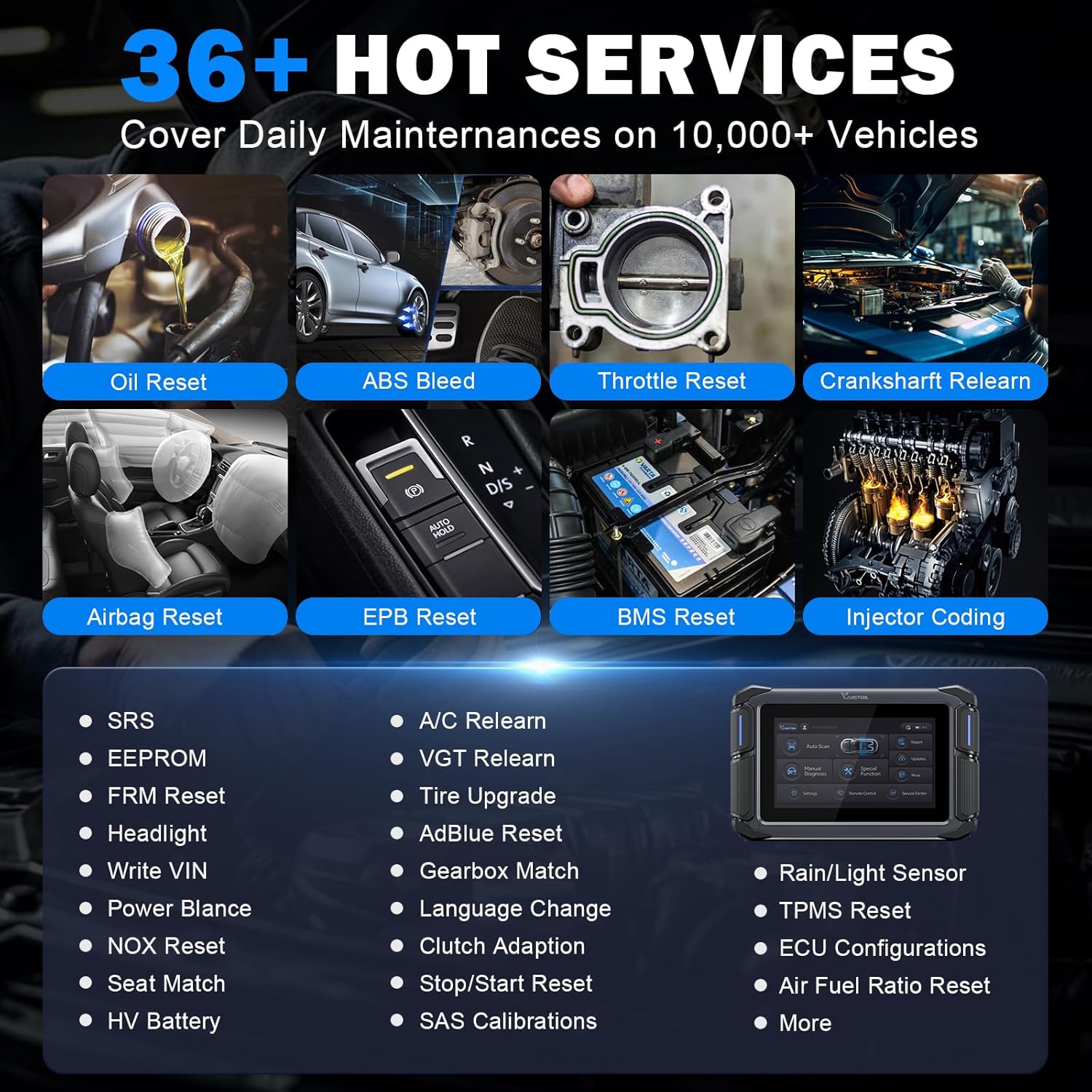
Image: A collage showing various automotive maintenance tasks, representing the 36+ Hot Services offered by the VDIAGTOOL VD70, such as Oil Reset, ABS Bleed, Throttle Reset, Airbag Reset, EPB Reset, BMS Reset, and Injector Coding.
- Oil Reset
- ABS Bleed
- Throttle Reset
- Crankshaft Relearn
- Airbag Reset
- EPB Reset
- BMS Reset
- Injector Coding
- SRS, EEPROM, FRM Reset, Headlight, Write VIN, Power Balance, NOX Reset, Seat Match, HV Battery, A/C Relearn, VGT Relearn, Tire Upgrade, AdBlue Reset, Gearbox Match, Language Change, Clutch Adaption, Stop/Start Reset, SAS Calibrations, Rain/Light Sensor, TPMS Reset, ECU Configurations, Air Fuel Ratio Reset, and more.
- 8-In-One Data Graph: View live data streams from various sensors and components in graphical format for easier analysis.
- FCA AutoAuth & CAN FD/DoIP Protocol: Supports advanced vehicle communication protocols for newer vehicles.
6.2 VDIAGTOOL V200 Pro Operations
The V200 Pro operates in two main modes:
- Mode I: Power Circuit Probe Tester
In this mode, the V200 Pro acts as a comprehensive electrical probe, supporting AC/DC Voltage, Resistance, and Diode tests. It instantly checks 12V/24V electrical systems, indicating whether a wire or circuit is live and its polarity (positive or negative). - Mode II: Circuit Breaker Finder
This mode allows for quick and easy location of short circuits, open connections, broken wires, and current leaks. It can also trace wires within the vehicle's electrical system.

Image: The VDIAGTOOL V200 Pro highlighting its multifunctional capabilities, including Short Circuits Test, Open/Breaker Circuits Test, DC/AC Voltage Test, Resistance & Diode Test, Activate Components, Poor Ground Test, Test Trailer Lights, Polarity Test, Continuity Test, and Tracing Wire.
The V200 Pro can perform the following tests:
- Circuit Breaker/Open Test
- Tracing Wire
- AC/DC Voltage Test
- Diode Test
- Resistance Test
- Polarity Test
- Continuity Test
- Ground Test
- Activate Components (e.g., fuel injectors, relays)
- Signal Circuit Test
- Relay, Fuse, Trailer Light Test

Image: The VDIAGTOOL V200 Pro demonstrating its wide application across different vehicle types, including cars, SUVs, motorbikes, steamers, trucks, and buses, indicating its versatility in testing electrical circuits.
7. Maintenance
- Cleaning: Wipe the tools with a soft, damp cloth. Do not use abrasive cleaners or solvents.
- Storage: Store the tools in their protective carrying case in a cool, dry place away from direct sunlight and extreme temperatures.
- Software Updates (VD70): The VD70 comes with 3 years of free software updates. Regularly check for and install updates to ensure optimal performance, new features, and expanded vehicle coverage. Connect the VD70 to a Wi-Fi network and navigate to the 'Updates' section on the main menu.
- Cable Inspection: Periodically inspect all cables for signs of wear, damage, or fraying. Replace damaged cables immediately.
8. Troubleshooting
- VD70 Not Powering On: Ensure the OBD-II cable is securely connected to both the tool and the vehicle's OBD-II port. Check the vehicle's battery voltage; some tools require a minimum voltage to operate.
- VD70 Communication Error: Verify the vehicle's ignition is ON. Check the OBD-II cable for damage. Ensure the vehicle's battery is adequately charged. Try connecting to a different vehicle to rule out a vehicle-specific issue.
- V200 Pro No Power: Ensure the alligator clips are securely connected to the vehicle battery terminals (red to positive, black to negative/ground) or the cigarette lighter adapter is fully inserted and receiving power. Check the vehicle's fuse for the cigarette lighter socket if using that power source.
- Inaccurate Readings (V200 Pro): Ensure the probe tip is making good contact with the circuit. Check for corrosion on battery terminals or probe tip.
- Function Not Supported (VD70): Some advanced functions like Bi-Directional Control or ECU Coding may not be supported on all vehicle makes, models, or years. Refer to the VD70's vehicle coverage list or contact support for specific compatibility.
9. Specifications
| Feature | Specification |
|---|---|
| Brand | VDIAGTOOL |
| Item Model Number | VD70, V200 Pro |
| VD70 Operating System | Android 10.0 OS |
| VD70 Processor | Quad Core Processor |
| VD70 Memory | 2+64 GB |
| VD70 Battery | 18.25Wh, 2H Fast Charge |
| V200 Pro Operating Voltage | 12V - 24V DC (for Power Circuit Probe Tester) |
| V200 Pro Circuit Breaker Finder Voltage | 6 - 42 Volts DC |
| V200 Pro Receiver Probe Length | 7" flexible probe |
| Connectivity | 2.4G & 5GHz Wi-Fi (VD70) |
| Date First Available | December 18, 2024 |
10. Warranty and Support
VDIAGTOOL stands behind its products with comprehensive support:
- Software Updates: Enjoy 3 years of free software updates for the VD70 scan tool, ensuring your device remains current with the latest vehicle models and diagnostic capabilities.
- Warranty: A 1-year warranty covers manufacturing defects and ensures reliable operation of your VDIAGTOOL products.
- Return Policy: A 30-day risk-free return and replacement policy is offered for your peace of mind.
- Customer Assistance: For any questions, technical support, or assistance, please do not hesitate to reach out to our dedicated support team.
Contact Support: vdiagtool2@outlook.com


