
Introduction
Thank you for choosing the pitaka MagEZ Car Mount Pro 2 Qi2. This magnetic car phone holder is designed to provide secure mounting and efficient 15W wireless charging for your compatible smartphone, featuring Qi2 certification and NFC functionality. This manual will guide you through the setup, operation, maintenance, and troubleshooting of your device.

Image: The pitaka MagEZ Car Mount Pro 2 Qi2, a black magnetic car mount with a carbon fiber texture, designed to attach to an air vent.
Setup Instructions
Follow these steps to properly install your MagEZ Car Mount Pro 2 Qi2 in your vehicle.
- Prepare the Mount: Open the lock mechanism on the air vent mount by turning the bolt anti-clockwise.
- Insert Air Vent Mount: Insert the air vent mount component into the main charging unit.
- Secure the Mount: Turn the bolt clockwise to tighten and secure the air vent mount to the charging unit.
- Attach to Air Vent: Place the hook of the air vent mount into a suitable horizontal or vertical air vent slat in your vehicle. Press firmly and lock it in place by tightening the knob. Ensure the mount is stable and does not obstruct your view or vehicle controls.
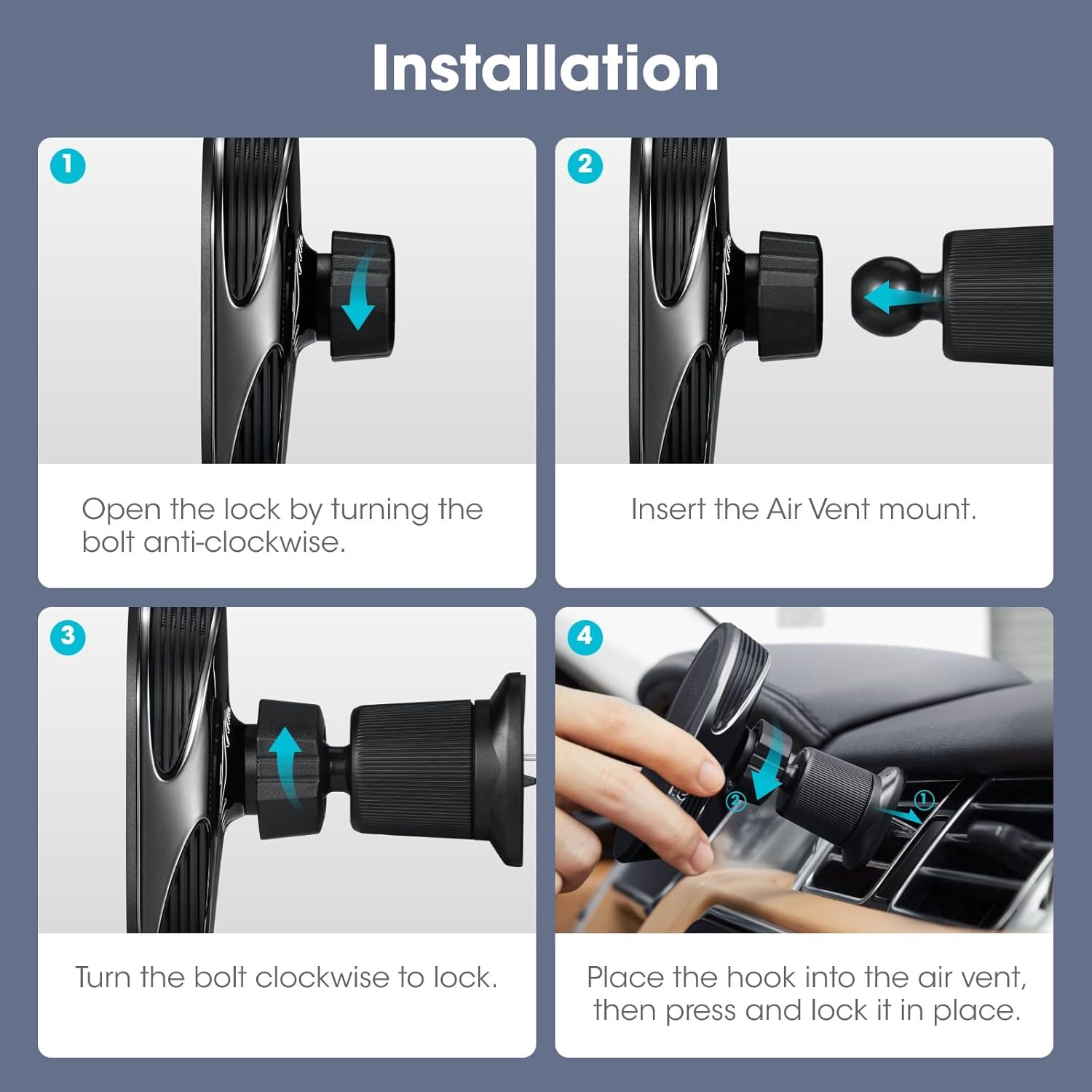
Image: A visual guide demonstrating the four steps for installing the car mount: unlocking, inserting the vent mount, locking, and attaching to the air vent.
Vent Compatibility: The mount is designed to fit most horizontal and vertical air vent grilles. It is generally not compatible with circular (round) vent grilles.

Image: An illustration showing various car air vent designs, indicating that horizontal and vertical vents are compatible, while round vents are not.
Operating Instructions
Wireless Charging
The MagEZ Car Mount Pro 2 Qi2 provides up to 15W fast wireless charging for compatible devices. For optimal 15W charging speed, ensure you use a charging cable and car adapter with a 20W output or higher.
- Connect the provided USB-C cable to the mount and a compatible car charger (not included).
- Place your MagSafe-compatible iPhone (iPhone 17/16/15/14/13/12 Series) or a phone with a MagSafe-compatible case onto the magnetic charging surface of the mount.
- Ensure the phone is centered on the charging pad for proper magnetic alignment and efficient charging.
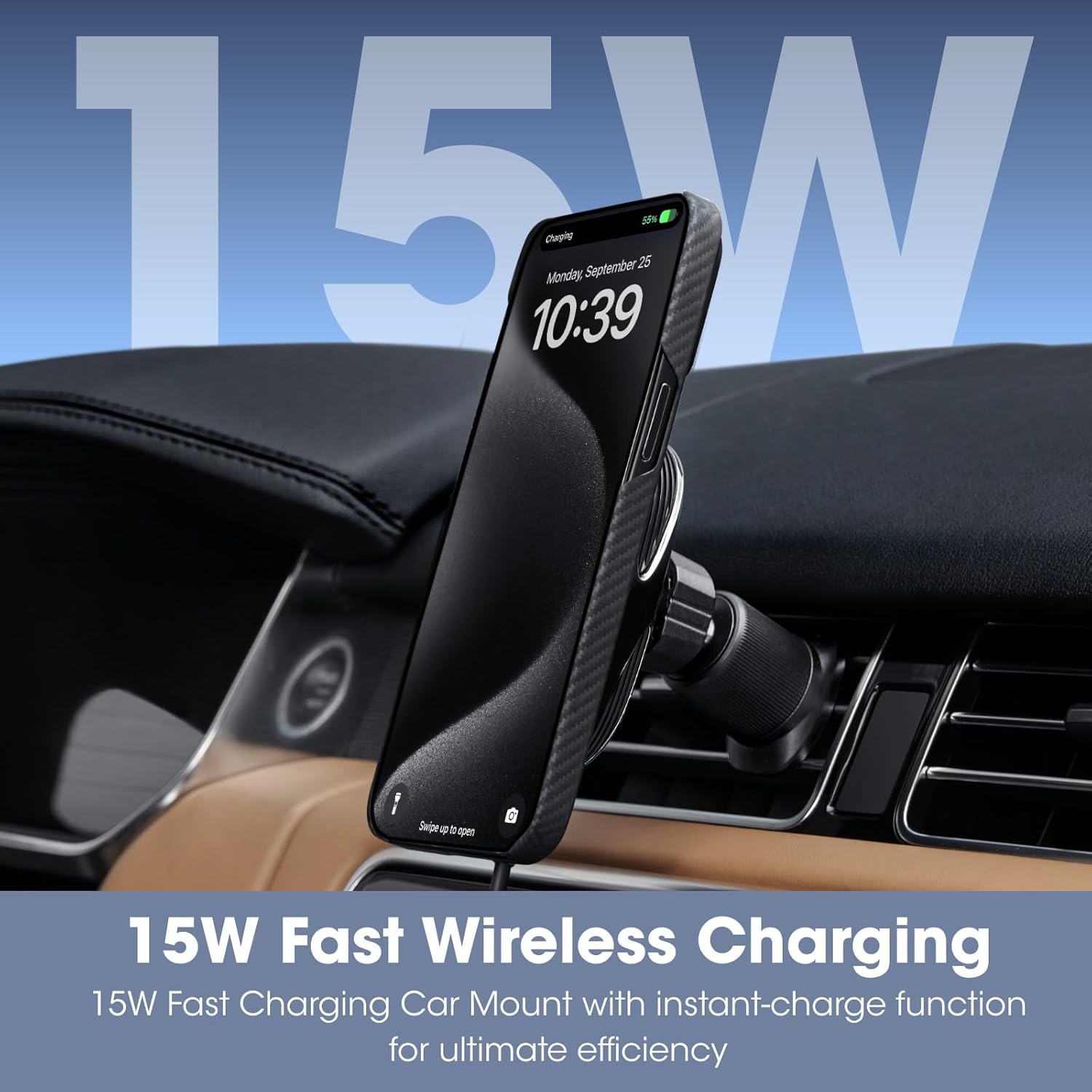
Image: A smartphone displaying a 15W charging indicator while mounted on the pitaka car charger, illustrating its fast wireless charging capability.
NFC Shortcut Feature
The mount includes built-in NFC chips that allow you to trigger preset applications on your NFC-enabled phone. There are three switchable NFC shortcut functions available.
- Ensure your phone's NFC feature is enabled.
- Tap your NFC-enabled phone on the designated NFC area of the car mount.
- You can configure up to three different shortcuts to launch specific apps (e.g., navigation, music player) by tapping the phone on the mount. Refer to your phone's NFC settings or the pitaka app for customization options.

Image: A graphic demonstrating how to use the NFC feature to launch different applications by tapping an NFC-enabled phone on the car mount.
Adjusting Viewing Angle
The universal ball head allows for 360-degree rotation, enabling you to adjust your device to the optimal viewing angle for safe driving.
- Gently rotate the phone while it is mounted to change its orientation (portrait or landscape).
- Adjust the angle of the mount itself by loosening the adjustment knob, positioning it as desired, and then tightening the knob to secure.

Image: An illustration depicting the 360-degree adjustable angle of the car mount, allowing for flexible positioning of the smartphone.
Maintenance
To ensure the longevity and optimal performance of your pitaka MagEZ Car Mount Pro 2 Qi2, follow these simple maintenance guidelines:
- Cleaning: Use a soft, dry, or slightly damp cloth to wipe the surface of the mount. Avoid using harsh chemicals, abrasive cleaners, or solvents, as these can damage the finish and internal components.
- Magnetic Surface: Keep the magnetic charging surface clean and free of dust or debris to ensure a strong and consistent magnetic connection with your phone.
- Storage: If not in use for an extended period, store the mount in a cool, dry place away from direct sunlight and extreme temperatures.
- Cable Care: Handle the charging cable gently. Avoid bending or twisting it excessively, which can lead to internal damage.
Troubleshooting
If you encounter issues with your MagEZ Car Mount Pro 2 Qi2, refer to the following common problems and solutions:
- Phone Not Charging:
- Ensure the USB-C cable is securely connected to both the mount and the car charger.
- Verify that your car charger is functioning correctly and provides sufficient power (20W output recommended for 15W charging).
- Check if your phone is properly aligned on the magnetic charging surface. Misalignment can prevent charging.
- Confirm your phone or phone case is MagSafe-compatible.
- Remove any foreign objects between the phone and the charging surface.
- Weak Magnetic Attachment / Phone Falls Off:
- Ensure your phone or phone case is genuinely MagSafe-compatible. Some non-MagSafe cases may have weaker magnetic rings.
- Verify that the mount is securely fastened to the air vent. Tighten the locking mechanism if necessary.
- Clean the magnetic surfaces of both the mount and your phone/case to remove any dust or debris that might interfere with the magnetic connection.
- Avoid using excessively thick phone cases that might reduce magnetic strength.

Image: A visual representation of the powerful N52SH MagSafe magnets providing a secure attachment for the phone on the car mount.
- NFC Shortcut Not Working:
- Ensure NFC is enabled in your phone's settings.
- Confirm your phone is NFC-enabled and compatible with the feature.
- Tap your phone directly over the NFC icon on the mount.
- Check if the NFC shortcuts are correctly configured in your phone's settings or the pitaka app.
- Mount is Loose on Air Vent:
- Re-tighten the locking bolt that secures the mount to the air vent.
- Ensure the hook is properly engaged with a sturdy air vent slat.
- Confirm your air vent type is compatible (not round).
Product Specifications
| Brand | pitaka |
| Model Number | PMCM20US-ABABADAC |
| Compatible Devices | Smartphones |
| Compatible Phone Models | iPhone 17/16/15/14/13/12 Series (and MagSafe cases) |
| Mounting Type | Air Vent |
| Special Features | Adjustable Angle, Fast Charging (15W), Magnetic, NFC, Wireless Charging |
| Color | Black |
| Item Weight | 2.64 pounds |
| Package Dimensions | 6.34 x 6.18 x 1.73 inches |
Warranty Information
pitaka products typically come with a limited warranty covering manufacturing defects. For specific warranty terms, duration, and claim procedures, please refer to the official pitaka website or the warranty card included with your product. Keep your proof of purchase for warranty claims.
Customer Support
If you require further assistance, have questions not covered in this manual, or need technical support, please contact pitaka customer service through one of the following methods:
- Official Website: Visit the pitaka official store page for FAQs, support resources, and contact forms.
- Email Support: Refer to your product packaging or the official website for the customer support email address.
- Online Chat: Some regions may offer online chat support via the pitaka website.
When contacting support, please have your product model number (PMCM20US-ABABADAC) and a detailed description of your issue ready.


