
1. Introduction
Thank you for purchasing the VEGER 10000mAh Power Bank UQ-L10S. This portable power bank is designed to provide reliable and efficient charging for your mobile devices on the go. With its slim design, large capacity, and multiple charging ports, it offers convenience and versatility. Please read this manual carefully before use to ensure proper operation and to maximize the product's lifespan.
2. Safety Information
This product complies with the technical standards of the Electrical Appliance and Material Safety Act (PSE) in Japan, ensuring high safety standards.
- Do not expose the power bank to extreme temperatures, direct sunlight, or fire.
- Avoid dropping, disassembling, or modifying the device.
- Keep away from water and other liquids.
- Do not use if the power bank is damaged or swollen.
- Keep out of reach of children.
- Use only compatible charging cables and adapters.

Image: The power bank displays the PSE certification mark, indicating compliance with Japanese electrical safety standards. The registered business name is UNIQ Co., Ltd.
3. Product Overview
The VEGER UQ-L10S power bank features a slim and compact design, making it easy to carry. It is equipped with multiple ports for charging various devices.

Image: Front view of the VEGER L10S Power Bank, highlighting its 10000mAh capacity and 15.9mm thickness. An LED display shows the battery percentage.
3.1. Key Features
- Capacity: 10000mAh
- Output Ports: 2 x USB-A (5V/2A), 1 x Type-C
- Input Ports: 1 x Micro-USB, 1 x Type-C
- Simultaneous Charging: Up to 3 devices
- Design: Slim 15.9mm thickness, compact size (142.8mm x 67.7mm), lightweight (220g)
- Indicator: LED display for battery percentage

Image: A size comparison showing the VEGER L10S Power Bank (142.8mm x 67.7mm) next to an iPhone 14 Pro (147.5mm x 71.5mm), illustrating its compact and smartphone-like dimensions. The power bank weighs 220g.

Image: The VEGER L10S Power Bank being placed into a bag, showcasing its slim 15.9mm profile and portability for travel and daily use.
4. Setup
4.1. Charging the Power Bank
Before initial use, fully charge the power bank. To charge the power bank itself, use either the Type-C input port or the Micro-USB input port. Note: Do not use both input ports simultaneously.
- Connect a compatible charging cable (Type-C or Micro-USB) to one of the input ports on the power bank.
- Connect the other end of the cable to a USB wall adapter or a computer's USB port.
- The LED display will show the charging progress. It will indicate 100% when fully charged.

Image: The VEGER L10S Power Bank highlighting its two input ports: Micro-USB and Type-C. Users can choose either port to charge the power bank, but not both simultaneously.
4.2. Checking Battery Level
The power bank is equipped with an LED display that shows the remaining battery percentage. Simply press the power button (if available) or connect a device to activate the display.
5. Operating Instructions
5.1. Charging Devices
The power bank features two USB-A output ports and one Type-C output port for charging your devices.
- Connect your device's charging cable to one of the output ports (USB-A or Type-C) on the power bank.
- Connect the other end of the cable to your device.
- The power bank will automatically begin charging your device. The LED display will show the power bank's remaining charge.

Image: The VEGER L10S Power Bank displaying its three output ports: one Type-C port and two USB-A ports, each providing 5V/2A output. These ports support charging for various devices like smartphones, tablets, and game consoles.
5.2. Simultaneous Charging
You can charge up to three devices simultaneously using the available output ports.
- Connect your devices to the USB-A and Type-C output ports.
- The power bank will distribute power to all connected devices.
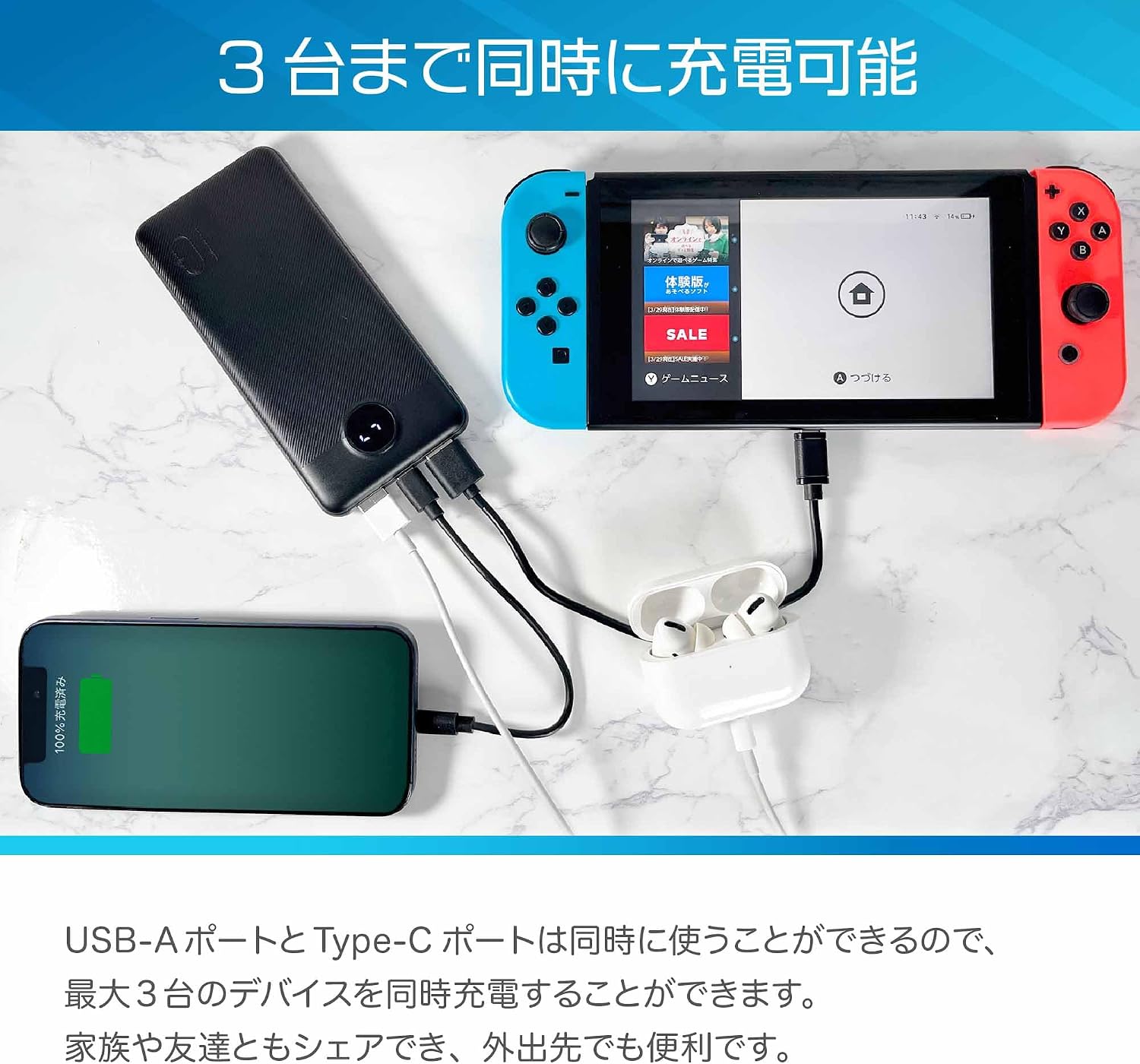
Image: The VEGER L10S Power Bank actively charging three devices at once: a smartphone via USB-A, Apple AirPods via another USB-A, and a Nintendo Switch via Type-C. This demonstrates its capability for simultaneous multi-device charging.
6. Maintenance
6.1. Cleaning
- Wipe the power bank with a soft, dry cloth.
- Do not use harsh chemicals or abrasive cleaners.
6.2. Storage
- Store the power bank in a cool, dry place away from direct sunlight.
- For long-term storage, charge the power bank to approximately 50-70% every three months to maintain battery health.
7. Troubleshooting
- Power bank not charging: Ensure the charging cable is securely connected to both the power bank's input port and the power source. Try a different cable or adapter.
- Device not charging: Ensure the charging cable is securely connected to both the power bank's output port and your device. Check if the power bank has sufficient charge. Try a different cable or output port.
- Slow charging: Ensure you are using a compatible cable and adapter. Some devices may charge slower if multiple devices are connected simultaneously.
- LED display not working: Press the power button to activate the display. If it remains off, the power bank might be fully discharged or require service.
8. Specifications
| Feature | Specification |
|---|---|
| Model | UQ-L10S |
| Battery Capacity | 10000mAh |
| Input (Type-C) | 5V/2A |
| Input (Micro-USB) | 5V/2A |
| Output (USB-A x 2) | 5V/2A (Total) |
| Output (Type-C) | 5V/2A |
| Dimensions | 142.8mm x 67.7mm x 15.9mm |
| Weight | 220g |

Image: The VEGER L10S Power Bank with its 10000mAh capacity, illustrating approximate charging capabilities: iPad mini (approx. 1.2 charges), iPhone 15 (approx. 1.9 charges), iPhone SE (approx. 3.1 charges). This highlights its large capacity for multiple device charges.
9. Warranty and Support
This product comes with a standard manufacturer's warranty. For warranty claims or technical support, please contact your retailer or the official VEGER support channels. Please retain your proof of purchase for warranty services.


