
1. Introduction and Overview
The LUITON LT-198 is a compact and versatile Mini CB Radio designed for mobile and base station use. Its small footprint (102x100x25mm) makes it ideal for installations where space is limited. This device supports multi-standard operation, allowing it to be used across various European CB standards, provided the selected standard is permitted in the country of use. It features an easy-to-read LCD display, VOX function, and is compatible with 12-24V power systems.

Figure 1.1: The LUITON LT-198 Mini CB Radio, showing the compact main unit, attached microphone, and a 12V power plug.
2. Package Contents
Upon opening the package, please verify that all the following components are included:
- 1 x LT-198 CB Radio Unit (with attached microphone)
- 1 x Mounting Bracket
- 2 x Bracket Screws
- 1 x CB Radio Car Power Cable
- 4 x Tooth Washers
- 4 x Mounting Screws

Figure 2.1: Contents of the LUITON LT-198 Mini CB Radio package.
3. Product Features
The LUITON LT-198 Mini CB Radio offers a range of features designed for efficient and convenient communication:
- Ultra-Compact Design: Measuring 102x100x25mm, this radio is highly portable and fits easily into small spaces.
- 4W Power Output: Provides standard CB radio transmission power.
- 40 Channel Operation: Access to the complete range of 40 CB radio channels.
- Multi-Standard Device: Selectable CB standards for use across various regions in Europe.
- VOX Function: Voice-activated transmission for hands-free operation, enhancing safety while driving.
- LCD Display: Backlit orange LCD display for clear visibility of current channel, volume, and other settings, optimized for both day and night viewing.
- Squelch Control (SQ/ASQ): Dynamic squelch control allows adjustment of the level at which the radio suppresses weak signals, ensuring high-quality sound. Both automatic (ASQ) and manual (SQ) modes are available.
- RF Gain Control: Adjustable RF Gain for better sensitivity and signal reception.
- Channel Scan: Function to scan through channels.
- External Speaker Jack: Allows connection of an external speaker for enhanced audio output.
- Wide Voltage Compatibility: Operates with 12-24V DC power sources.
- Emergency Channels: Quick access to emergency channels 9 and 19.
4. Product Layout and Controls
Familiarize yourself with the various parts and controls of your LT-198 CB Radio:

Figure 4.1: Front panel and microphone controls of the LT-198.
- Microphone Connector: Port for connecting the supplied microphone.
- SQ (Squelch Control): Adjusts the squelch level to eliminate background noise.
- A/F (AM/FM Switch): Toggles between Amplitude Modulation (AM) and Frequency Modulation (FM) modes.
- RFG (RF Gain): Adjusts the sensitivity of the receiver.
- EMG (Emergency Channel Keylock): Quick access to emergency channels (CH9/CH19).
- LCD Screen: Displays current channel, mode, signal strength (S-Meter), and other indicators.
- Volume Knob / Power On/Off: Rotates to adjust volume and push to power the unit on or off.
- Microphone PTT Key: Push-To-Talk button for transmitting.
- Microphone UP Key: Changes channel or menu option upwards.
- Microphone AQ (ASQ On/Off): Toggles Automatic Squelch on or off.
- Microphone DN Key: Changes channel or menu option downwards.

Figure 4.2: Numbered diagram of the LT-198 front panel controls.

Figure 4.3: Top and bottom views of the LT-198 unit, highlighting its compact size and heat sink design.
5. Setup
Follow these steps to set up your LUITON LT-198 CB Radio:
- Mounting:
Use the provided mounting bracket and screws to secure the radio in a suitable location within your vehicle or base station setup. Ensure the location allows for proper ventilation and easy access to controls.
- Antenna Connection:
Connect a compatible CB antenna (not included) to the antenna connector on the rear of the radio unit. A properly tuned antenna is crucial for optimal performance and to prevent damage to the radio.
- Power Connection:
Connect the supplied CB radio car power cable to the power input on the radio. Plug the other end into a 12-24V DC power source (e.g., vehicle's cigarette lighter socket). Ensure the power source provides stable voltage within the specified range.
- Microphone Connection:
Plug the microphone cable into the microphone connector on the front panel of the radio.
- External Speaker (Optional):
If desired, connect an external speaker to the external speaker jack (typically located on the rear or side of the unit, refer to specific port layout if available) for improved audio clarity.
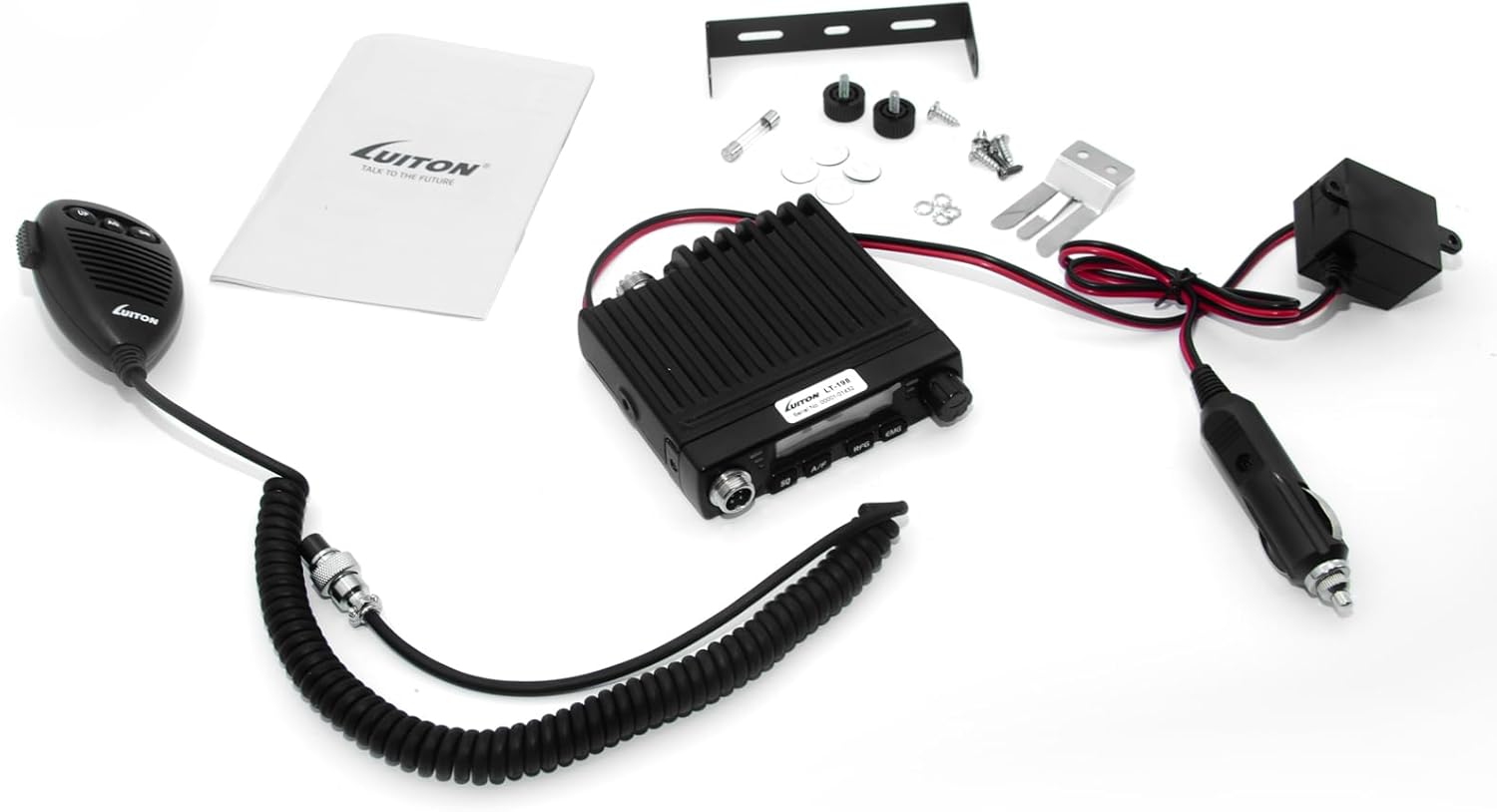
Figure 5.1: Rear view of the LT-198, showing power and antenna connections.
6. Operating Instructions
This section details the basic operation of your LT-198 CB Radio.
6.1 Power On/Off and Volume
To power on the radio, press the Volume knob. The LCD display will illuminate. Rotate the Volume knob clockwise to increase the audio output level, and counter-clockwise to decrease it. To power off, press the Volume knob again.
6.2 Channel Selection
Use the UP and DN keys on the microphone to navigate through the 40 available channels. Pressing the keys will increment or decrement the channel number displayed on the LCD screen.
6.3 Squelch Control (SQ / ASQ)
Squelch eliminates background noise when no signal is being received.
- Manual Squelch (SQ): Press the SQ button on the radio's front panel. Use the UP/DN keys on the microphone to adjust the squelch level. Adjust until background noise disappears but weak signals can still be heard.
- Automatic Squelch (ASQ): Press the AQ button on the microphone to activate or deactivate the Automatic Squelch function. ASQ automatically adjusts the squelch level for optimal performance.
6.4 AM/FM Mode Selection
Press the A/F button on the front panel to switch between Amplitude Modulation (AM) and Frequency Modulation (FM) modes. The selected mode will be indicated on the LCD display.
6.5 RF Gain Adjustment
The RFG (RF Gain) control adjusts the sensitivity of the receiver. Rotate the RF Gain knob to optimize reception, especially in areas with strong or weak signals. Reducing RF Gain can help filter out strong, nearby interference.
6.6 Transmitting (PTT and VOX)
- Push-To-Talk (PTT): To transmit, press and hold the PTT key on the microphone. Speak clearly into the microphone. Release the PTT key to return to receive mode.
- VOX Function: The Voice Operated Transmission (VOX) function allows hands-free transmission. When VOX is enabled, the radio will transmit automatically when it detects your voice. Refer to the full user manual for detailed instructions on activating and adjusting VOX sensitivity.
6.7 Emergency Channels (CH9/CH19)
Press the EMG button on the front panel to quickly switch to emergency channels 9 or 19. Pressing it again will toggle between these two channels or return to the previously selected channel.
6.8 Channel Scan
The LT-198 supports channel scanning. Consult the comprehensive user manual for specific button sequences to activate and manage the channel scan feature.
7. Maintenance
Proper maintenance ensures the longevity and optimal performance of your CB radio.
- Cleaning: Use a soft, dry cloth to clean the exterior of the radio. Do not use abrasive cleaners or solvents, as they may damage the finish or internal components.
- Connections: Periodically check all cable connections (power, antenna, microphone) to ensure they are secure and free from corrosion.
- Storage: When not in use for extended periods, store the radio in a cool, dry place, away from direct sunlight and extreme temperatures.
- Antenna: Ensure your antenna is properly maintained and tuned. A damaged or improperly tuned antenna can negatively affect radio performance and potentially damage the unit.
8. Troubleshooting
If you encounter issues with your LT-198 CB Radio, refer to the following common problems and solutions:
| Problem | Possible Cause | Solution |
|---|---|---|
| Radio does not power on. | No power supply; loose power connection; blown fuse. | Check power cable connection to radio and power source. Verify power source is active. Check the fuse in the power cable. |
| No reception or poor reception. | Antenna not connected; antenna damaged/detuned; squelch set too high; RF Gain too low. | Ensure antenna is securely connected. Check antenna for damage. Adjust SQ/ASQ level. Increase RF Gain. |
| No transmission. | Microphone not connected; PTT button faulty; antenna issue. | Ensure microphone is fully plugged in. Test PTT button. Verify antenna connection and condition. |
| Excessive static or noise. | Squelch set too low; electrical interference. | Increase SQ/ASQ level. Identify and mitigate sources of electrical interference (e.g., vehicle ignition, accessories). |
| Display is blank or flickering. | Power issue; internal fault. | Check power connections. If problem persists, contact customer support. |
9. Specifications
Detailed technical specifications for the LUITON LT-198 Mini CB Radio:
| Feature | Detail |
|---|---|
| Product Type | Mini CB Radio |
| Model Number | LT-198 |
| Frequency Range | 26.965-27.405 MHz (CB Band) |
| Number of Channels | 40 AM Channels |
| Output Power | 4W |
| Voltage Compatibility | 12-24V DC |
| Product Dimensions (L x W x H) | 102 x 100 x 25 mm (3.93 x 4.01 x 0.98 inches) |
| Item Weight | 0.8 KG (1.37 pounds) |
| Special Features | Long Range, Digital Display, Voice Operated Transmission (VOX), Lightweight, Automatic Squelch (ASQ) |
| Talking Range Maximum | 12 Miles (dependent on terrain and antenna) |
| Country of Origin | China |

Figure 9.1: Product details and dimensions of the LT-198.
10. Warranty and Support
The LUITON LT-198 Mini CB Radio comes with a 1-Year Manufacturer Warranty. This warranty covers defects in materials and workmanship under normal use.
For warranty claims, technical support, or any inquiries regarding your product, please refer to the contact information provided with your purchase documentation or visit the official LUITON website. Please have your product model number (LT-198) and purchase details ready when contacting support.