
Retevis RM22
Retevis RM22 VHF Marine Radio User Manual
Model: RM22 | Brand: Retevis
1. Introduction
The Retevis RM22 is a robust and reliable VHF marine radio designed for clear and stable communication in various maritime environments. With its IP67 waterproof rating and floating capability, it ensures durability and ease of retrieval. This manual provides essential information for the proper setup, operation, and maintenance of your RM22 marine radio.
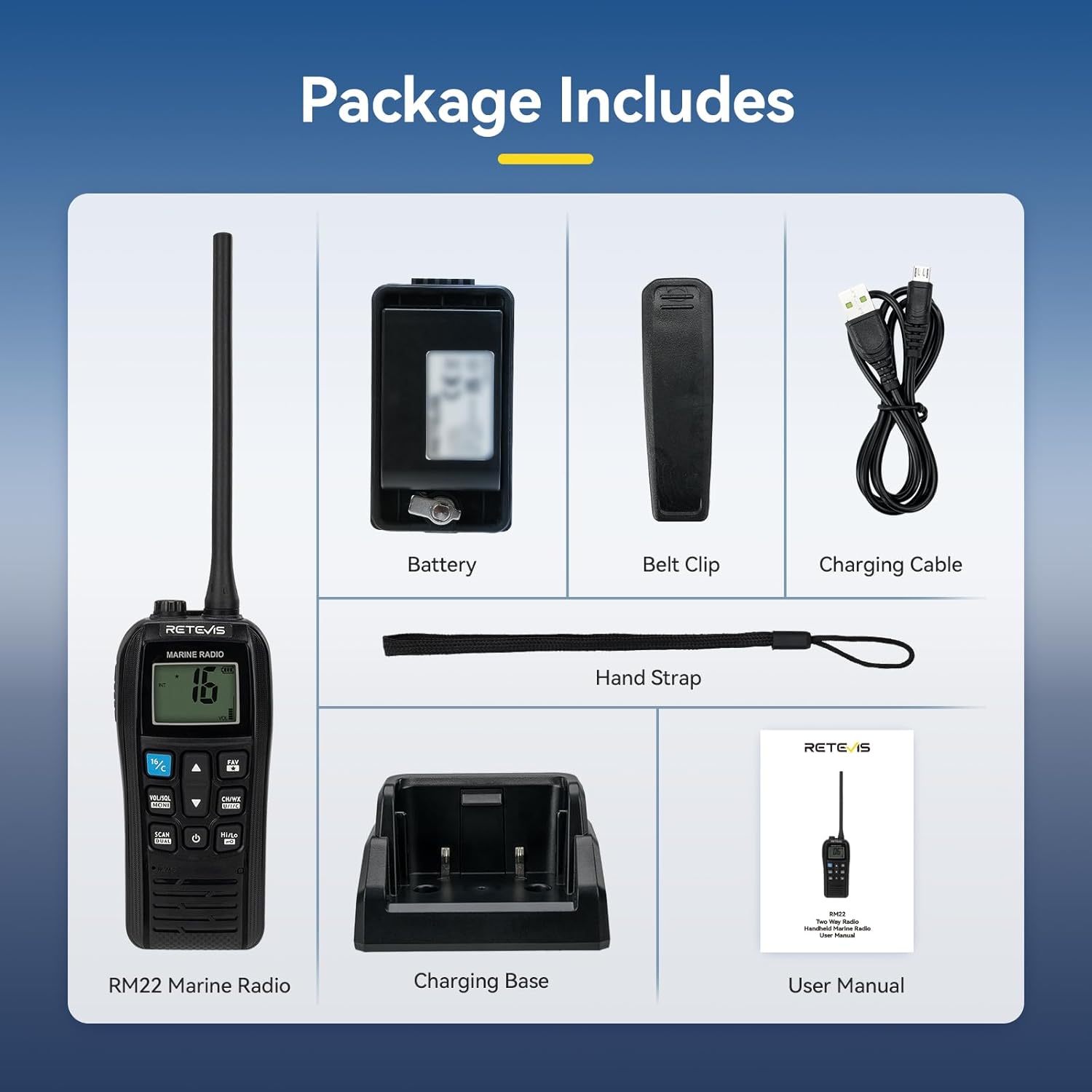
2. Package Contents
Please check the package contents to ensure all items are present:
- Retevis RM22 Marine Radio
- 2200mAh Lithium-ion Battery
- Belt Clip
- Charging Base
- Charging Cable (Micro-USB)
- User Manual
- Hand Strap
3. Product Features
- Long-Range Marine Radio: Ensures stable signal transmission and reception, allowing for smooth communication even at the signal limit.

Figure 3.1: Long-distance marine radio communication. - IP67 Waterproof & Floating: Can be submerged 1 meter deep for 30 minutes. The radio floats and emits an audible alarm if dropped in water, making it easy to retrieve.

Figure 3.2: IP67 waterproof and floating design. - Clear Sound Quality: Features 900mW audio output and a noise reduction microphone for clear sound during marine communications.

Figure 3.3: Enhanced audio clarity. - Built-in 2200mAh Battery: Provides up to 12 hours of use and 120 hours of standby time, suitable for extended periods at sea without frequent recharging.

Figure 3.4: Long-lasting 2200mAh battery. - Micro-USB Charger: Allows flexible recharging in a vehicle or at home.
- Vibration Drainage: After retrieving the radio from water, the speaker can be drained of water to prolong its lifespan.

Figure 3.5: Vibration drainage feature. - Remote Alarm: The radio can send an alarm sound to request help, enhancing safety in emergencies at sea.

Figure 3.6: Remote alarm for safety. - Easy to Use: Equipped with an LCD screen and large keys for easy operation and checking radio information day or night.

Figure 3.7: User-friendly LCD display and large keys. - Dual Watch / Tri-Watch: Easily switch between channels to monitor Channel 16 and another operating channel (Dual Watch) or Channel 16, an operating channel, and a call channel (Tri-Watch).

Figure 3.8: Dual Watch and Tri-Watch functionality. - One-key Switch Channel 9/16: Quickly communicate or ask for help in emergencies by switching to Channel 9 or 16 with a single button press.

Figure 3.9: One-key channel switch for emergency channels.
4. Setup
4.1 Battery Installation
- Ensure the radio is powered off.
- Align the battery pack with the battery compartment on the back of the radio.
- Gently push the battery into place until it clicks securely.
- Close the battery cover firmly to maintain the IP67 waterproof seal.
4.2 Charging the Battery
Before first use, fully charge the battery. The radio can be charged using the included charging base and Micro-USB cable.
- Connect the Micro-USB cable to the charging base and a power source (e.g., USB wall adapter, car charger, power bank).
- Place the RM22 radio into the charging base, ensuring proper contact.
- The charging indicator on the radio or base will show charging status. A full charge typically takes several hours.
4.3 Attaching Accessories
- Belt Clip: Attach the belt clip to the designated slot on the back of the radio for convenient carrying.
- Hand Strap: Loop the hand strap through the eyelet on the radio to prevent accidental drops.
5. Operating Instructions
5.1 Power On/Off
- To power on, press and hold the Power button () until the LCD screen illuminates.
- To power off, press and hold the Power button again until the screen turns off.
5.2 Channel Selection
- Use the Up () and Down () arrow buttons to navigate through available channels.
- Press the 16/C button () to quickly switch to Channel 16 (distress and calling) or Channel 9 (recreational calling).
5.3 Volume and Squelch Adjustment
- Press the VOL/SQL button () to adjust volume. Use the Up/Down arrows to increase or decrease.
- Press and hold VOL/SQL to adjust squelch level, which filters out weak signals and background noise.
5.4 Transmitting and Receiving
- To transmit, press and hold the PTT (Push-To-Talk) button on the side of the radio. Speak clearly into the microphone.
- Release the PTT button to receive.
5.5 Dual Watch / Tri-Watch
- Activate Dual Watch or Tri-Watch mode by pressing the SCAN DUAL button (). This allows monitoring Channel 16 along with other selected channels.
5.6 Vibration Drainage Function
- If water enters the speaker grille, activate the vibration drainage function (refer to specific button or menu option in the full manual if available, otherwise assume a general method). This will emit a sound to expel water.
6. Maintenance
- Cleaning: Wipe the radio with a soft, damp cloth. Do not use harsh chemicals or abrasive cleaners.
- Battery Care: To prolong battery life, avoid fully discharging the battery frequently. Store the radio and battery in a cool, dry place when not in use for extended periods.
- Water Drainage: Regularly use the vibration drainage function after the radio has been exposed to water to ensure optimal speaker performance.
- Storage: Store the radio in a dry, dust-free environment away from direct sunlight and extreme temperatures.
7. Troubleshooting
| Problem | Possible Cause | Solution |
|---|---|---|
| Radio does not power on. | Battery is low or not installed correctly. | Charge the battery. Reinstall the battery securely. |
| No sound from speaker. | Volume is too low or squelch is too high. Speaker may be waterlogged. | Increase volume. Adjust squelch. Use vibration drainage function. |
| Cannot transmit or receive. | Incorrect channel selected. Out of range. | Verify channel. Move closer to other radios. |
| Short communication range. | Obstructions (buildings, terrain). Low battery. | Move to an open area. Ensure battery is fully charged. |
8. Specifications
| Feature | Detail |
|---|---|
| Brand | Retevis |
| Model Number | RM22 |
| Color | Black |
| Special Features | 2200mAh battery, 900 mW audio output, IP67 waterproof |
| Battery Composition | Lithium-ion |
| Rechargeable Battery | Yes |
| Number of Channels | 88 |
| Frequency Range | VHF |
| Maximum Range | 16 Kilometers |
| Tuning Technology | VHF |
| Voltage | 3.7 Volts (DC) |
| Water Resistance Level | Waterproof (IP67) |
| Product Dimensions | 3.9D x 6W x 14.1H centimeters |
9. Warranty and Support
Retevis offers a 2-year warranty for the radio body and a 1-year warranty for accessories. A 30-day no-reason return policy is also provided.
Beyond the warranty period, maintenance services are still available, with buyers responsible for associated costs. For support, please contact Retevis through Amazon, and a response will be provided within 12 hours.
For further assistance, visit the official Retevis store on Amazon: Retevis Amazon Store.
Related documentsRM22


Ask a question about this manual
Ask about setup, troubleshooting, compatibility, parts, safety, or missing instructions. Manuals+ will review the question and use this page’s manual context to help answer it.