
1. Introduction
This manual provides essential instructions for the safe operation, maintenance, and troubleshooting of your PowerSmart 5000-Watt Portable Inverter Generator. Please read this manual thoroughly before operating the generator to ensure proper use and to prevent injury or damage. Keep this manual for future reference.
1.1 Important Safety Information
- Carbon Monoxide Hazard: Generators produce carbon monoxide (CO), an odorless, colorless, and deadly gas. Operate the generator outdoors only, far away from windows, doors, and vents. Never operate indoors or in partially enclosed spaces.
- Fire Hazard: Gasoline is highly flammable. Refuel in a well-ventilated area with the engine off and cool. Do not smoke or allow open flames near the generator.
- Electrical Shock Hazard: Do not operate the generator in wet conditions. Ensure all electrical connections are dry and secure. Never touch electrical components with wet hands.
- Hot Surfaces: The generator's engine and muffler become very hot during operation and remain hot for some time after shutdown. Avoid contact to prevent burns.
2. Product Overview
The PowerSmart 5000-Watt Portable Inverter Generator is designed to provide reliable power for home use, camping, and emergency backup. Its inverter technology ensures clean power suitable for sensitive electronics.
2.1 Key Features
- Power Output: 5000 starting watts and 4000 running watts.
- Clean Power: Produces less than 3% Total Harmonic Distortion (THD), making it safe for sensitive electronics like laptops and smartphones.
- Extended Run Time: Capable of running for up to 10 hours at 50% load on a single tank of fuel.
- Portability: Equipped with a wheel and handle kit for easy transportation, weighing approximately 89 lbs.
- Quiet Operation: Operates at 59 dBA at 25% load and 67 dBA at full load (measured from 23 feet), minimizing noise disruption.
- Versatile Control Panel: Features four 120V 20 Amp receptacles, one 120V 30 Amp receptacle, one 12V DC outlet, and two 5V USB ports. Includes parallel ports for connecting two units for increased power.
- Advanced Safety Features: Includes Eco Mode for fuel efficiency, Low Oil Shutdown to protect the engine, Overload Reset, and Carbon Monoxide (CO) Auto Shutdown for user safety, along with convenient Electric Start.
2.2 Included Components
Your generator package includes the following items:
- PowerSmart 5000-Watt Portable Inverter Generator
- User Manual
- Spark Plug Wrench
- Funnel
- Screwdriver

Figure 2.1: PowerSmart Generator and Included Accessories. This image displays the red and black generator unit alongside its essential accessories: a user manual, a spark plug wrench, a funnel for adding fluids, and a screwdriver for basic maintenance.
2.3 Generator Components
Familiarize yourself with the main parts of your generator:
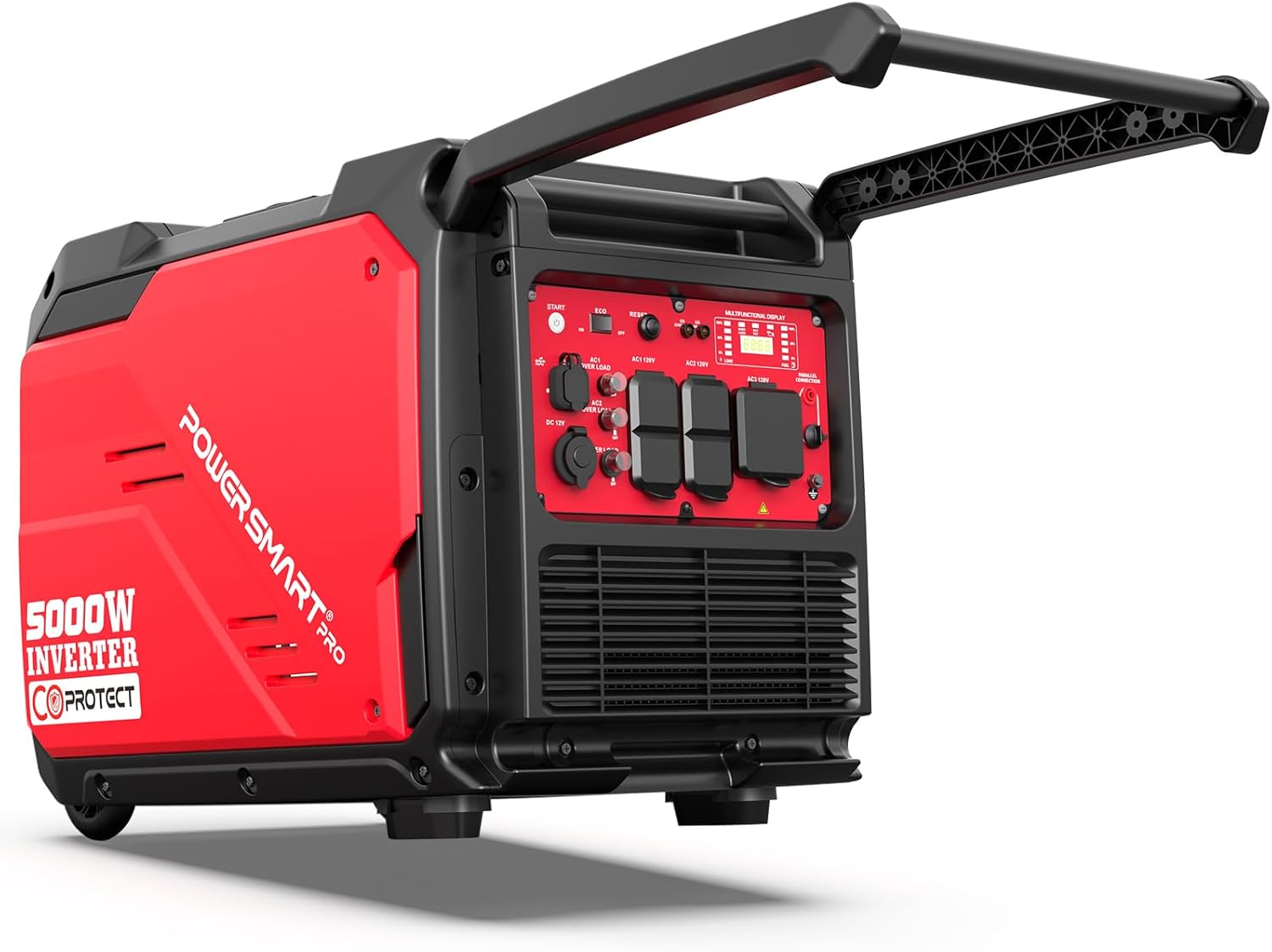
Figure 2.2: PowerSmart 5000-Watt Portable Inverter Generator. This image shows the overall design of the red and black inverter generator, highlighting its integrated handles and wheels for portability.

Figure 2.3: Control Panel. A close-up view of the generator's control panel, detailing the electric start button, various AC and DC outlets, USB ports, and indicator lights.
- Control Panel: Contains all outlets, switches, and indicators for operation.
- Fuel Tank Cap: For adding gasoline.
- Engine Switch: Controls engine power (ON/OFF).
- Choke Lever: Used for starting a cold engine.
- Recoil Starter: Manual pull-start option.
- Electric Start Button: For convenient push-button starting.
- AC Outlets (120V 20A & 30A): For connecting standard electrical devices.
- DC Outlet (12V): For charging 12V batteries.
- USB Ports (5V): For charging small electronic devices.
- Eco Mode Switch: Activates fuel-saving mode.
- Overload Indicator: Lights up if the generator is overloaded.
- Low Oil Indicator: Lights up when oil level is low.
- CO Protect Indicator: Lights up if carbon monoxide levels are detected.
- Parallel Ports: For connecting two compatible generators.
3. Setup
Before operating your generator for the first time, follow these setup steps carefully.
3.1 Unpacking
Remove the generator and all accessories from the packaging. Inspect for any shipping damage. If any components are missing or damaged, contact customer support immediately.
3.2 Adding Engine Oil
The generator is shipped without engine oil. You must add the correct amount and type of oil before starting. Using the provided funnel, add SAE 10W-30 engine oil to the crankcase. Do not overfill. The oil level should be at the upper mark on the dipstick when fully inserted but not screwed in.
3.3 Adding Fuel
Use fresh, unleaded gasoline with an octane rating of 87 or higher. Do not use E85 or any other fuel containing more than 10% ethanol. Fill the fuel tank carefully, avoiding spills. Do not fill above the red indicator inside the fuel tank opening.
3.4 Battery Connection (for Electric Start)
Ensure the battery cables are securely connected to the generator's battery terminals. The positive (+) cable connects to the positive terminal, and the negative (-) cable connects to the negative terminal. Refer to the specific instructions for battery connection in the included user manual.
3.5 Pre-Start Checks
- Verify engine oil level is correct.
- Ensure fuel tank is adequately filled.
- Check that the generator is on a firm, level surface.
- Confirm all electrical loads are disconnected from the generator.
- Ensure the generator is placed outdoors in a well-ventilated area, away from any structures.
4. Operating Instructions
Follow these steps to safely start and operate your PowerSmart inverter generator.
4.1 Starting the Generator
- Place the generator on a level, outdoor surface, away from any combustible materials.
- Open the fuel valve.
- Set the engine switch to the "ON" position.
- If starting a cold engine, pull the choke lever to the "CHOKE" position. For a warm engine, the choke may not be necessary.
- For Electric Start: Press and hold the electric start button until the engine starts. Release the button once the engine is running.
- For Recoil Start: Grasp the recoil starter handle and pull it slowly until resistance is felt, then pull quickly and firmly. Repeat if necessary until the engine starts.
- Once the engine starts, slowly push the choke lever back to the "RUN" position. Allow the engine to warm up for a few minutes before connecting loads.

Figure 4.1: Quiet Operation. This image illustrates the generator's quiet operation, suitable for various environments without causing significant noise disturbance.
4.2 Connecting Electrical Devices
After the generator is running stably, you can connect your electrical devices. Always ensure the total wattage of connected devices does not exceed the generator's running wattage (4000W).
- Plug in devices one at a time, starting with those requiring higher wattage.
- Monitor the overload indicator. If it illuminates, disconnect some devices to prevent damage to the generator.

Figure 4.2: Emergency Backup Power. The generator is shown connected to a house, illustrating its capability to provide essential power during outages.

Figure 4.3: Appliance Power Requirements. This chart provides a guide to the typical wattage needed for common appliances, helping users manage generator load.
4.3 Eco Mode
Engage the Eco Mode switch to optimize fuel consumption and reduce noise levels when the generator is not under full load. In Eco Mode, the engine speed adjusts automatically to match the load, saving fuel and extending run time.
4.4 Parallel Operation
For increased power output, two compatible PowerSmart inverter generators can be connected in parallel using a parallel kit (sold separately). Follow the instructions provided with the parallel kit for safe and proper connection.

Figure 4.4: Parallel Capable. This image shows two PowerSmart generators linked together, demonstrating their ability to combine power for higher demands.
4.5 Stopping the Generator
- Disconnect all electrical loads from the generator.
- Set the engine switch to the "OFF" position.
- Close the fuel valve.
5. Maintenance
Regular maintenance is crucial for the longevity and reliable operation of your generator. Always perform maintenance with the engine off and cool.
5.1 Maintenance Schedule
Refer to the detailed maintenance schedule in the full user manual for specific intervals. General guidelines include:
- Before Each Use: Check engine oil level, inspect for leaks, check air filter.
- First 20 Hours: Change engine oil.
- Every 50-100 Hours or Annually: Change engine oil, clean/replace air filter, inspect spark plug, inspect fuel filter.
- Every 200 Hours or Annually: Inspect valve clearance (professional service recommended).
5.2 Engine Oil Change
- Run the engine for a few minutes to warm the oil, then shut it off.
- Place a drain pan beneath the oil drain plug.
- Remove the oil fill cap/dipstick and the oil drain plug.
- Allow all oil to drain completely.
- Reinstall the oil drain plug securely.
- Refill with the recommended amount of SAE 10W-30 engine oil using the provided funnel.
- Reinstall the oil fill cap/dipstick.
5.3 Air Filter Cleaning
Remove the air filter cover and carefully remove the foam filter element. Wash the element in warm, soapy water, rinse thoroughly, and allow it to air dry completely. Lightly oil the foam element with engine oil, then squeeze out excess oil. Reinstall the filter and cover.
5.4 Spark Plug Maintenance
Using the provided spark plug wrench, remove the spark plug. Inspect for carbon buildup or wear. Clean with a wire brush or replace if necessary. Ensure the gap is set correctly according to the specifications in the full user manual.
5.5 Storage
For long-term storage (over 30 days):
- Add a fuel stabilizer to the fuel tank and run the engine for a few minutes to circulate it.
- Alternatively, drain all fuel from the tank and carburetor.
- Change the engine oil.
- Clean the exterior of the generator.
- Store in a clean, dry, well-ventilated area, away from direct sunlight and extreme temperatures.
6. Troubleshooting
This section addresses common issues you might encounter with your generator. For more complex problems, contact customer support.
6.1 Engine Will Not Start
- No Fuel: Check fuel level and add fresh gasoline if needed.
- Low Oil: Check engine oil level. The low oil shutdown system will prevent starting if oil is insufficient. Add oil if necessary.
- Engine Switch OFF: Ensure the engine switch is in the "ON" position.
- Choke Position: Adjust the choke lever as appropriate for a cold or warm engine.
- Spark Plug: Inspect the spark plug for fouling or damage. Clean or replace if needed.
- Battery (Electric Start): Ensure the battery is charged and connections are secure.
6.2 No Power Output
- Overload: If the overload indicator is lit, disconnect some electrical devices and press the overload reset button.
- Circuit Breaker Tripped: Check and reset any tripped circuit breakers on the control panel.
- Connections: Ensure all power cords are securely plugged into the generator outlets.
6.3 Engine Stops During Operation
- Low Oil Shutdown: Check engine oil level and add oil if low.
- Overload: Reduce the electrical load connected to the generator.
- CO Protect Activation: If the CO Protect indicator is lit, the generator has detected unsafe levels of carbon monoxide. Move the generator to a more open, well-ventilated area immediately and allow it to cool before restarting.
- No Fuel: Refill the fuel tank.
7. Specifications
Detailed technical specifications for the PowerSmart 5000-Watt Portable Inverter Generator.
| Specification | Value |
|---|---|
| Brand | PowerSmart |
| Model | PS5045CE-AIUS |
| Starting Wattage | 5000 Watts |
| Running Wattage | 4000 Watts |
| Fuel Type | Gasoline |
| Engine Type | 4 Stroke |
| Engine Displacement | 224 Cubic Centimeters |
| Voltage | 120 Volts |
| Total Harmonic Distortion (THD) | Less than 3% |
| Run Time (50% Load) | Up to 10 hours |
| Noise Level (23 ft, 25% load) | 59 dBA |
| Noise Level (23 ft, full load) | 67 dBA |
| Item Weight | 89 Pounds |
| Product Dimensions (L x W x H) | 25.4" x 17.8" x 23.5" |
| Power Outlets | 4 x 120V 20A, 1 x 120V 30A, 1 x 12V DC, 2 x 5V USB |
| Starting System | Electric Start, Recoil Start |
| Special Features | Portable, Super Quiet, CO Protect, Eco Mode, Low Oil Shutdown, Overload Reset, Parallel Capable |
8. Warranty Information
This PowerSmart generator comes with a 2-year limited warranty. For detailed terms and conditions, including coverage specifics and exclusions, please refer to the warranty card included with your product. Retain your proof of purchase for warranty claims.
9. Customer Support
For technical assistance, parts inquiries, or warranty claims, please contact PowerSmart customer support. PowerSmart maintains a network of over 500 certified repair centers in the U.S. and provides replacement parts through its Illinois headquarters. For any issues or questions, please reach out directly to our support team.
Please have your model number (PS5045CE-AIUS) and serial number ready when contacting support to expedite service.


