
Introduction
This manual provides comprehensive instructions for the installation, operation, maintenance, and troubleshooting of your SCS Sentinel CarGate 800 Trio Garage Door Drive. Designed for automatic control and closing of garage doors, this system features polarized free wired connection, automatic adjustment, and easy parameter setting. Please read this manual thoroughly before installation and use to ensure safe and efficient operation.

Image: The SCS Sentinel CarGate 800 Trio garage door drive unit shown alongside three remote controls, highlighting the complete system.
Safety Information
Always prioritize safety during installation and operation. Failure to follow these instructions may result in injury or damage to the product. Keep children and pets away from the garage door area during operation. Ensure all moving parts are clear before activating the door. Disconnect power before performing any maintenance or adjustments.
- Read all instructions carefully before beginning installation.
- Ensure the garage door is balanced and in good working order before installing the drive.
- Do not allow children to play with the garage door opener or its controls.
- Keep remote controls out of reach of children.
- Regularly inspect the system for signs of wear or damage.
- Only use genuine replacement parts.
Package Contents
Verify that all components are present in your package before beginning installation:
- 1 x Garage Door Motor Unit
- 1 x Steel Rail Assembly
- 1 x Chain
- 1 x Drive Trolley
- 3 x Remote Controls
- Mounting Hardware (brackets, screws, etc.)
- Instruction Manual
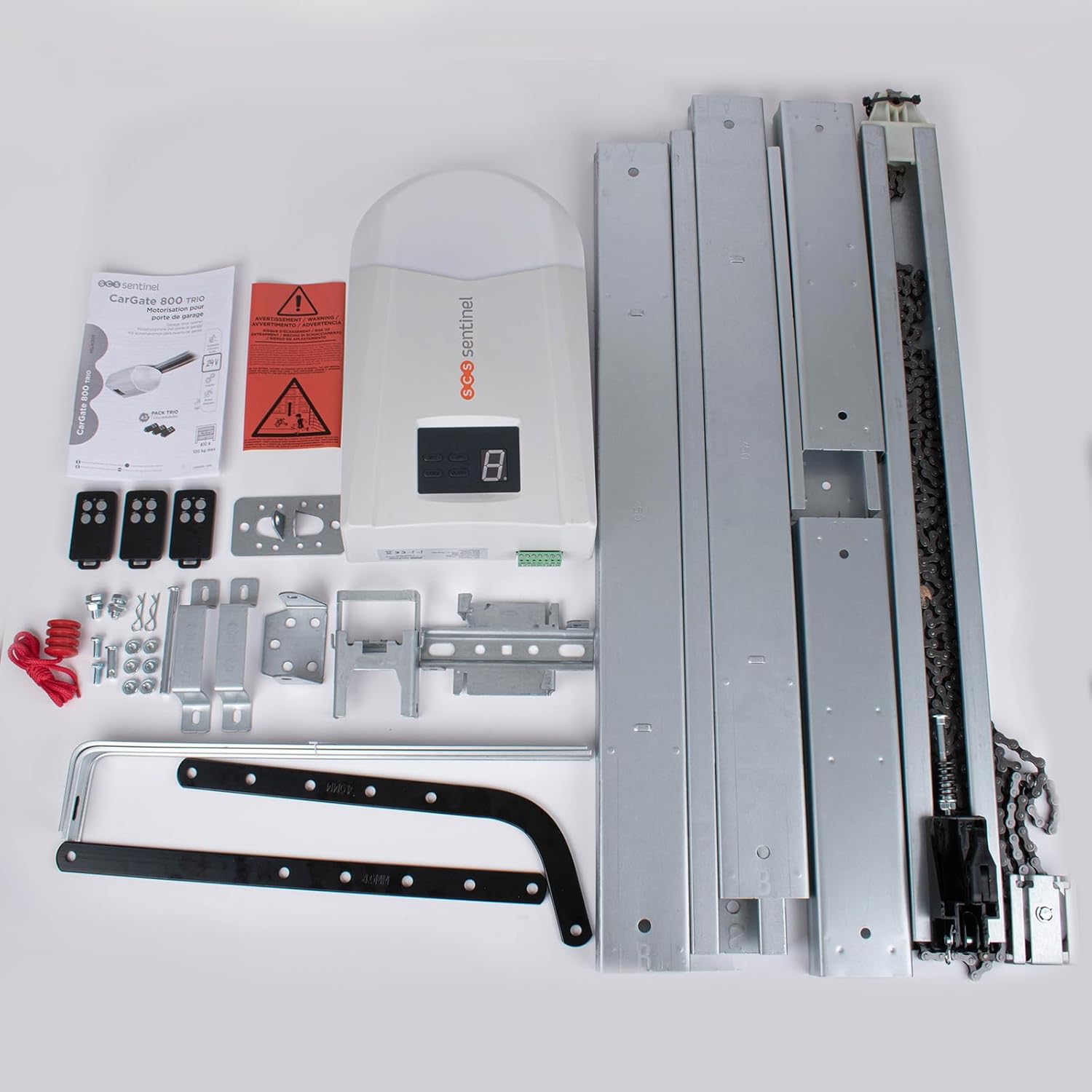
Image: A comprehensive view of all included parts for the garage door drive system, including the motor, rail, chain, and remote controls.
Setup and Installation
Installation of the SCS Sentinel CarGate 800 Trio requires careful attention to detail. While designed for ease of setup, it is recommended to have basic DIY skills or seek professional assistance if unsure. The system features a polarized free wired connection for simplified integration.
- Preparation: Ensure your garage door is in good working condition, balanced, and moves freely. Clear the installation area.
- Assemble the Rail: Connect the steel rail sections according to the diagrams provided in the separate assembly guide (if applicable). Install the chain within the rail.
- Mount the Motor Unit: Securely attach the motor unit to the ceiling or appropriate support structure above the garage door opening. Ensure it is centered and aligned with the door's path.
- Connect the Drive Trolley: Attach the drive trolley to the garage door. This trolley will move along the rail, pulling or pushing the door.
- Wiring: Connect the power supply and any optional safety sensors (e.g., photocells) to the motor unit. The polarized free wired connection simplifies this process.
- Automatic Adjustment: The CarGate 800 Trio features automatic adjustment. Once powered on, follow the on-screen prompts or refer to the control panel instructions to initiate the automatic learning process for the door's open and close limits.
- Parameter Setting: Fine-tune operational parameters such as force limits and speed using the control panel buttons (SET, UP, DOWN, CODE).

Image: The garage door drive unit mounted on the ceiling of a garage, demonstrating a typical installed setup.
Operating Instructions
The CarGate 800 Trio offers convenient automatic control and closing. Operation is primarily via the included remote controls or the control panel on the motor unit.
Using the Remote Controls
Each remote control has multiple buttons, typically used for opening, closing, or stopping the door. Ensure the remote is programmed correctly to your unit.
- Press the designated button once to activate the door (open or close).
- Press again during operation to stop the door.
- Refer to the remote control programming section for pairing new remotes or reprogramming existing ones.

Image: A detailed view of one of the remote controls, showing its four operational buttons.
Control Panel Operation
The control panel on the motor unit allows for direct operation and parameter adjustments.
- SET: Used to enter programming mode or confirm selections.
- UP/DOWN: Used to navigate menus or adjust values.
- CODE: Used for remote control pairing or specific programming functions.
- The digital display shows current status or programming codes.

Image: A close-up of the motor unit's control panel, featuring the digital display and buttons for 'SET', 'UP', 'DOWN', and 'CODE', used for programming and manual operation.
Maintenance
Regular maintenance ensures the longevity and safe operation of your garage door drive. Perform these checks periodically:
- Monthly: Inspect the garage door for balance and smooth operation. Lubricate moving parts of the door (hinges, rollers, springs) as recommended by the door manufacturer.
- Quarterly: Check the chain tension. Adjust if too loose or too tight. Inspect all mounting hardware for tightness.
- Annually: Have a qualified technician inspect the entire system, including electrical connections and safety features.
- Keep the motor unit clean and free from dust and debris.
Troubleshooting
This section addresses common issues you might encounter. For problems not listed here, contact customer support.
| Problem | Possible Cause | Solution |
|---|---|---|
| Door does not move. | No power; remote battery dead; safety sensors obstructed. | Check power supply; replace remote battery; clear sensor path. |
| Door reverses unexpectedly. | Obstruction in door path; force settings too low. | Remove obstruction; adjust force settings (refer to parameter setting). |
| Remote control not working. | Battery dead; remote not programmed; out of range. | Replace battery; reprogram remote; move closer to unit. |
| Excessive noise during operation. | Lack of lubrication; loose chain; worn parts. | Lubricate door parts; adjust chain tension; inspect for worn components. |
Specifications
Key technical specifications for the SCS Sentinel CarGate 800 Trio Garage Door Drive:
| Feature | Detail |
|---|---|
| Model Number | MGA0011 |
| Brand | SCS Sentinel |
| Product Dimensions (L x W x H) | 23.5 x 14 x 14 cm |
| Package Dimensions (L x W x H) | 82 x 23 x 18.5 cm |
| Package Weight | 14.04 Kilograms |
| Material | Stainless Steel |
| Colour | White |
| Included Components | 1 motor, steel rail, chain, drive trolley, 3 remote controls |
Warranty and Support
The SCS Sentinel CarGate 800 Trio Garage Door Drive comes with a standard manufacturer's warranty. Please refer to the warranty card included in your package for specific terms and conditions. For technical support, spare parts, or warranty claims, please contact SCS Sentinel customer service through their official website or the contact information provided with your purchase documentation.
SCS Sentinel is committed to providing quality products and support to ensure your satisfaction.