
1. Introduction and Overview
The BlitzMax Bluetooth 5.3 Audio Adapter is a versatile 2-in-1 device designed to function as both a Bluetooth audio transmitter (TX mode) and a Bluetooth audio receiver (RX mode). It enables wireless audio connectivity for a wide range of devices, enhancing your audio experience in various environments.
This adapter features Bluetooth 5.3 technology for stable connections and supports AptX Adaptive for high-definition audio and low latency in TX mode. Its compact design makes it suitable for use with devices such as televisions, personal computers, airplane entertainment systems, car audio systems, and gym equipment.

Image: The BlitzMax Bluetooth 5.3 Audio Adapter is designed for portability, measuring approximately 2.2 inches (5.5 cm) in length, 1.4 inches (3.5 cm) in width, and 0.5 inches (1.2 cm) in height, weighing only 17.5 grams.
2. Package Contents
Please verify that all items listed below are included in your package:
- Bluetooth Transceiver x1
- Product Manual x1
- Type-C Charging Cable x1
- 3.5mm Audio Cable x1
- Storage Bag x1

Image: The package includes the Bluetooth transceiver, a product manual, a Type-C charging cable, a 3.5mm audio cable, and a storage bag.
3. Product Layout and Controls
Familiarize yourself with the various parts and controls of your BlitzMax Bluetooth 5.3 Audio Adapter:
- Power/Mode Switch (RX/TX): Used to select between Receiver (RX) and Transmitter (TX) modes.
- 3.5mm Audio Interface: For connecting to audio input (TX mode) or audio output (RX mode) devices.
- Type-C Charging Interface (USB DC5V): For charging the device.
- Audio Encoding Light: Indicates the active audio codec.
- Charging Indicator Light: Shows charging status.
- A Bluetooth Status Light: Indicates the connection status for device A.
- B Bluetooth Status Light: Indicates the connection status for device B.
- A Pairing Button: Used to initiate pairing for the first Bluetooth device.
- B Pairing Button: Used to initiate pairing for the second Bluetooth device (for dual link).
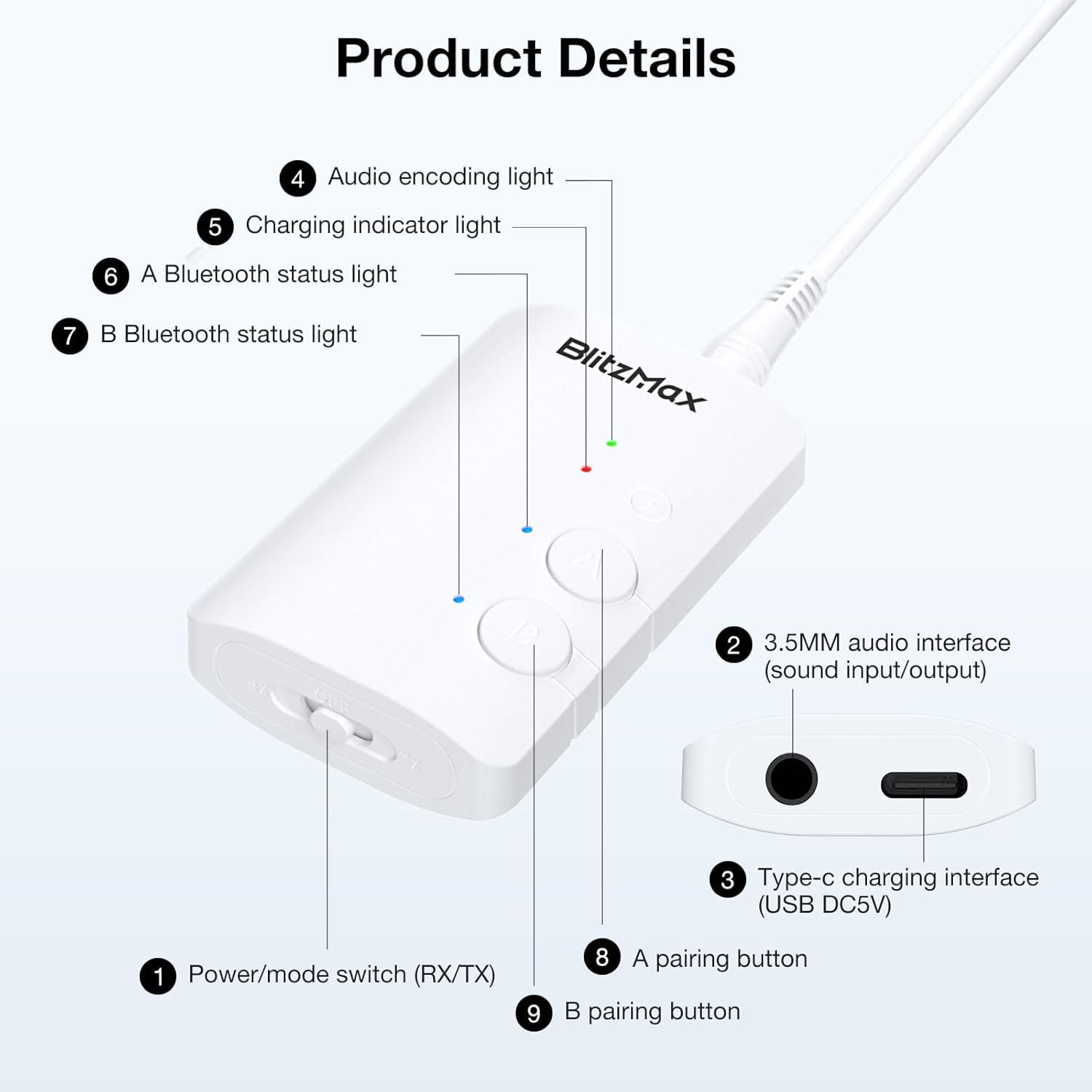
Image: Detailed diagram illustrating the various components and controls of the BlitzMax Bluetooth 5.3 Audio Adapter.
4. Setup Instructions
4.1 Charging the Adapter
Before initial use, fully charge the adapter. Connect the provided Type-C charging cable to the adapter's charging port and a USB power source (e.g., computer USB port, USB wall adapter). The charging indicator light will show the charging status. A full charge typically takes approximately 2 hours. The device can be used while charging.

Image: The adapter features a 250mAh battery, providing up to 20 hours in RX mode and 12 hours in TX mode after a 2-hour full charge.
4.2 Transmitter (TX) Mode Setup
Use TX mode to transmit audio from non-Bluetooth devices (like TVs, PCs, MP3 players, airplane entertainment systems) to Bluetooth headphones or speakers.
- Switch to TX Mode: Slide the Power/Mode switch to the "TX" position.
- Connect Audio Source: Plug one end of the 3.5mm audio cable into the adapter's 3.5mm audio interface and the other end into the audio output jack of your source device (e.g., TV headphone jack, PC audio out).
- Enter Pairing State: Ensure your Bluetooth headphones or speakers are in pairing mode. On the BlitzMax adapter, press and hold either the A or B pairing button for 3 seconds. The corresponding Bluetooth status light (A or B) will flash quickly, indicating it is searching for a device.
- Pairing: Place your Bluetooth headphones or speakers close to the adapter. The devices should automatically pair. Once paired, the A or B Bluetooth status light will remain solid.
- Dual Link (Optional): To connect a second pair of Bluetooth headphones/speakers, press and hold the other pairing button (A or B) for 3 seconds and repeat the pairing process.

Image: Visual guide for connecting the adapter in TX mode, showing connection to a PC and pairing with headphones.

Image: TX mode diagram showing how to connect the adapter to a TV, PC, or MP3/MP4 player to transmit audio to Bluetooth headphones or speakers.
4.3 Receiver (RX) Mode Setup
Use RX mode to receive audio from Bluetooth-enabled devices (like smartphones, tablets, Bluetooth laptops) and play it through wired speakers, wired headphones, or car stereos.
- Switch to RX Mode: Slide the Power/Mode switch to the "RX" position.
- Connect Audio Output: Plug one end of the 3.5mm audio cable into the adapter's 3.5mm audio interface and the other end into the audio input jack of your wired speakers, wired headphones, or car stereo.
- Enter Pairing State: On the BlitzMax adapter, press and hold either the A or B pairing button for 3 seconds. The corresponding Bluetooth status light (A or B) will flash quickly.
- Pairing: On your smartphone, tablet, or Bluetooth laptop, search for Bluetooth devices and select "BlitzMax" (or similar device name) from the list. Once paired, the A or B Bluetooth status light on the adapter will remain solid.
- Dual Link (Optional): To connect a second Bluetooth source device, press and hold the other pairing button (A or B) for 3 seconds and pair it with the second device. You can then switch between the two connected devices.

Image: Visual guide for connecting the adapter in RX mode, showing connection to a speaker and pairing with a smartphone.

Image: RX mode diagram showing how to connect the adapter to wired headphones, wired speakers, or a car stereo to receive audio from a phone, tablet, or Bluetooth laptop.
5. Operating Instructions
5.1 Mode Switching
To switch between Transmitter (TX) and Receiver (RX) modes, simply slide the Power/Mode switch located on the side of the device to the desired position. Ensure the device is powered on for the change to take effect.
5.2 Dual Link Functionality
The adapter supports connecting two Bluetooth devices simultaneously, offering enhanced sharing capabilities:
- In TX Mode: You can connect two Bluetooth headphones or speakers to share audio from a single source device. After pairing the first device using the A button, press and hold the B button to pair the second device.
- In RX Mode: You can connect two Bluetooth source devices (e.g., two smartphones) to the adapter. This allows you to switch between audio signals from the two devices as needed.

Image: The adapter supports dual pairing, allowing two wireless headphones in TX mode or switching between two Bluetooth devices in RX mode.
5.3 Audio Codec Switching (TX Mode Only)
In TX mode, the adapter supports multiple audio encoding formats, including SDC, AAC, aptX, aptX Adaptive, aptX HD, and aptX LL (Low Latency). To switch between these codecs, double-click the corresponding A or B pairing button. The Audio Encoding Light will change to indicate the active codec. AptX Low Latency provides an audio delay of less than 40 milliseconds, ideal for video synchronization. Note that low latency features require support from the connected Bluetooth headphones or speakers and are not available in RX mode.

Image: The adapter supports AptX Low Latency and other codecs, indicated by different colored lights, allowing for audio delay less than 40 milliseconds in TX mode.
6. Maintenance
To ensure the longevity and optimal performance of your BlitzMax Bluetooth 5.3 Audio Adapter, follow these maintenance guidelines:
- Cleaning: Use a soft, dry cloth to clean the device. Avoid using harsh chemicals, solvents, or abrasive cleaners.
- Battery Care: Charge the device regularly, even if not in frequent use, to maintain battery health. Avoid fully discharging the battery for extended periods. Do not expose the device to extreme temperatures (hot or cold), as this can degrade battery performance and lifespan.
- Storage: When not in use, store the adapter in a cool, dry place, away from direct sunlight and moisture. Use the provided storage bag to protect it from dust and scratches.
- Handling: Handle the device with care. Avoid dropping it or subjecting it to strong impacts.
7. Troubleshooting
If you encounter issues with your BlitzMax Bluetooth 5.3 Audio Adapter, refer to the following troubleshooting tips:
- Device Not Powering On:
- Ensure the battery is charged. Connect the adapter to a power source using the Type-C cable.
- Verify the Power/Mode switch is correctly set to either TX or RX.
- Cannot Pair with a Device:
- Confirm the adapter is in the correct mode (TX for transmitting, RX for receiving).
- Ensure the target Bluetooth device (headphones, speakers, phone) is in pairing mode and discoverable.
- Place the adapter and the target device close to each other (within 1 meter).
- Try restarting both the adapter and the target Bluetooth device.
- If connecting to a second device, ensure you are using the correct A or B pairing button.
- No Audio or Low Volume:
- Check all 3.5mm audio cable connections to ensure they are secure.
- Verify the volume levels on both the source device (in TX mode) or the receiving device (in RX mode) and the connected Bluetooth device.
- Ensure the adapter is successfully paired and connected (solid blue light).
- Audio Lag or Disconnections:
- Reduce the distance between the adapter and the connected Bluetooth device.
- Minimize obstacles and potential sources of interference (e.g., Wi-Fi routers, other Bluetooth devices).
- In TX mode, ensure your connected Bluetooth headphones/speakers support AptX Low Latency if you are experiencing significant lag. Double-check the active audio codec on the adapter.
- Note: Some musical instruments or specific audio setups may inherently have higher latency requirements that consumer Bluetooth adapters may not fully meet.
- Compatibility Issues (e.g., with Apple AirPods):
- While the adapter is widely compatible, some specific Bluetooth devices, such as certain models of Apple AirPods, may exhibit pairing difficulties or inconsistent performance with third-party adapters. If you experience issues, try pairing with a different brand of Bluetooth headphones or speakers to isolate the problem.
8. Specifications
| Feature | Specification |
|---|---|
| Product Dimensions (L x W x H) | 2.13 x 1.38 x 0.47 inches (5.41 x 3.51 x 1.19 cm) |
| Item Weight | 2.82 ounces (80 grams) |
| Model Number | 060425226 |
| Batteries | 1 Lithium Ion battery (included) |
| Bluetooth Version | 5.3 |
| Connector Type | Auxiliary (3.5mm) |
| Compatible Devices | Various (TV, PC, CD player, iPod, laptop, tablet, MP3/MP4, wired speakers, wired headphones, car stereo) |
| Charging Time | Approximately 2 hours |
| RX Mode Service Time | Up to 20 hours (fully charged) |
| TX Mode Service Time | Up to 12 hours (fully charged) |
| Transmission Range | Up to 10 meters / 33 feet (stable connection) |
9. Warranty and Support
This product comes with a standard manufacturer's warranty. For specific warranty details, please refer to the documentation included in your product packaging or contact the retailer where the product was purchased.
For technical support, troubleshooting assistance, or any questions regarding your BlitzMax Bluetooth 5.3 Audio Adapter, please contact BlitzMax customer service through their official website or the contact information provided with your purchase.