
1. Introduction
This manual provides essential information for the safe and efficient use of your Power Queen 12V 100Ah Group 24 LiFePO4 Lithium Battery and its accompanying 12V20A charger. Please read all instructions carefully before installation and operation to ensure optimal performance and longevity of your product.
2. Product Overview
Key Features
- Grade-A Battery Cells & Upgraded 100A BMS: Equipped with four Grade-A LiFePO4 cells and an advanced 100A Battery Management System (BMS) for protection against overcharge, over-discharge, over-current, over-voltage, overload, and short circuits.
- Effortless Group 24 Size Upgrade: Designed to meet BCI standard minimum size for Group 24 batteries, allowing for direct replacement of lead-acid batteries without electrical system modifications.
- Extended Lifespan: Offers a 10-year lifespan and up to 15,000 cycles (4000 Cycles @100% DOD, 6000+ Cycles @80% DOD, 15000+ Cycles @60%DOD).
- Versatile Connectivity: Supports series and parallel connections for increased capacity, up to 16 units in a 4P4S configuration (51.2V 400Ah, 20.48kWh maximum energy output).
- Lightweight Design: Weighs approximately 22 pounds, significantly lighter than traditional lead-acid batteries.
What's in the Box
- 1 x Power Queen 12.8V 100Ah LiFePO4 Battery
- 1 x Power Queen 12V 20A LiFePO4 Battery Charger
- 2 x M8 - 5/8" (16MM) Terminal Bolts
- 2 x Insulating Caps for Bolts
- 1 x Product Manual
Note: The battery and charger may be delivered in separate shipments.
3. Setup
Unboxing and Initial Inspection
Upon receiving your Power Queen battery and charger, carefully inspect the packaging for any signs of damage. Remove all components and verify that all items listed in the 'What's in the Box' section are present. If any items are missing or damaged, contact customer support immediately.
Connecting the Battery and Charger
The included 12V 20A LiFePO4 battery charger is designed for safe and efficient charging. Follow these steps to connect and charge your battery:
- Ensure the charger is unplugged from the wall outlet.
- Connect the red (+) clamp of the charger to the positive (+) terminal of the battery.
- Connect the black (-) clamp of the charger to the negative (-) terminal of the battery.
- Plug the charger into a standard wall outlet. The charger's indicator light will show the charging status (e.g., red for charging, green for fully charged).
- Once fully charged, unplug the charger from the wall outlet first, then disconnect the clamps from the battery terminals.
Video: Demonstrates the setup and charging process for the Power Queen 12V 100Ah Group 24 Battery.
Video: Overview of the Power Queen 12V 100Ah Smart Battery, highlighting Bluetooth app connection.
Terminal Connections
The battery features M8 terminals. Ensure all connections are secure and properly tightened to prevent arcing and ensure efficient power transfer. Use the provided insulating caps for safety.
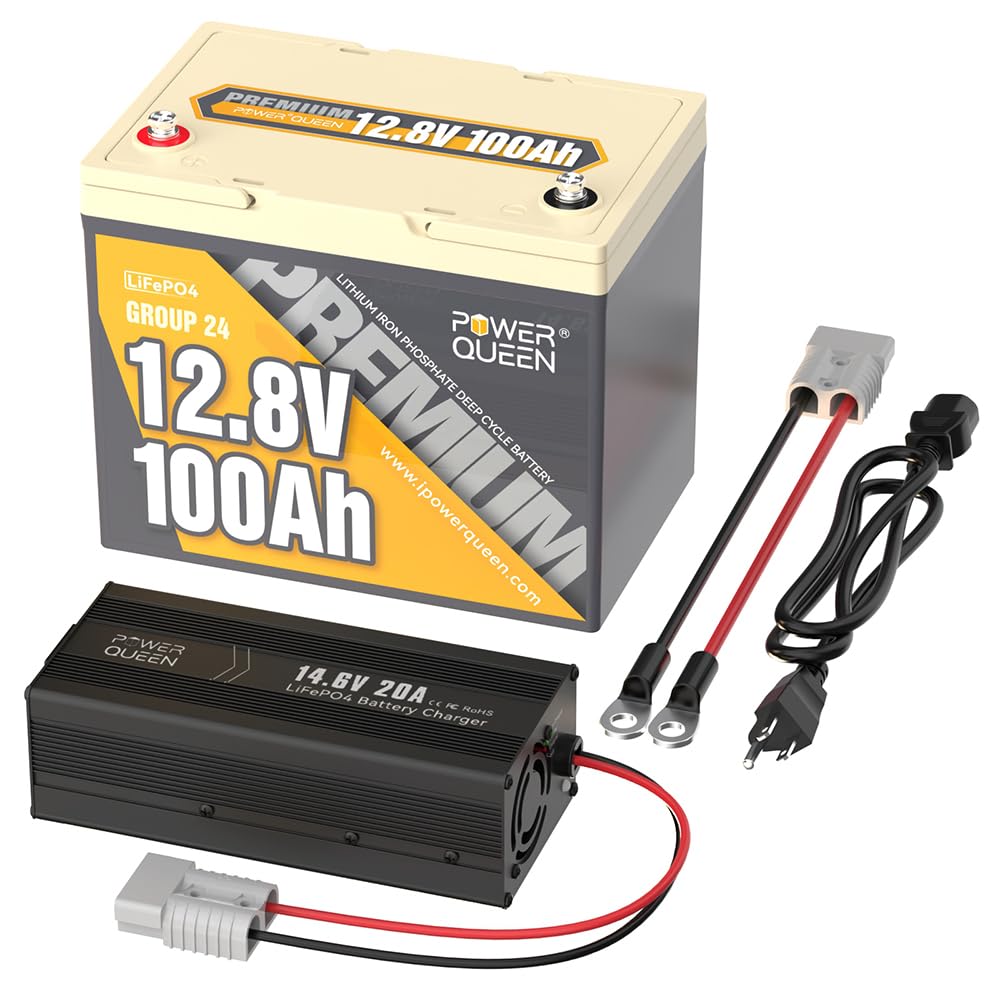
Image: Main product view of the Power Queen 12V 100Ah LiFePO4 Battery.
4. Operating Instructions
Series and Parallel Connections
The Power Queen 12V 100Ah battery supports both series and parallel connections to achieve higher voltage or capacity:
- Parallel Connection: Connect batteries in parallel to increase total capacity (Ah) while maintaining the same voltage (12V). Up to 16 batteries can be connected in parallel.
- Series Connection: Connect batteries in series to increase total voltage (V) while maintaining the same capacity (100Ah). Up to 4 batteries can be connected in series to achieve 48V.
- Series-Parallel Combination: For maximum energy output, up to 16 batteries can be configured in a 4P4S (4 parallel, 4 series) setup, reaching 51.2V 400Ah (20.48kWh).
Always use appropriate cables and ensure all batteries are at a similar state of charge before making series or parallel connections.

Image: Illustrates the compact size and energy density of the Power Queen 12V 100Ah LiFePO4 Battery.

Image: Demonstrates the Power Queen battery as a direct drop-in replacement for lead-acid batteries.
Battery Management System (BMS)
The integrated 100A BMS actively monitors and protects the battery from various conditions, ensuring safe and reliable operation. This includes protection against:
- Overcharge
- Over-discharge
- Over-current
- Over-voltage
- Overload
- Short circuit

Image: Visual representation of the multi-level defense provided by the built-in 100A BMS.
5. Maintenance
Charging Recommendations
For optimal battery health and longevity, it is recommended to charge the battery at 14.6V charging voltage and 20A charging current. This typically takes approximately 5 hours to fully charge a depleted 100Ah battery.
Video: Highlights the robust and reliable Grade A cells used in Power Queen LiFePO4 batteries.
Storage
When storing the battery for extended periods, ensure it is charged to approximately 50% State of Charge (SOC) and stored in a cool, dry place away from direct sunlight and extreme temperatures. The BMS will protect the battery during storage.

Image: Details the impressive cycle life of the Power Queen 12V 100Ah LiFePO4 Battery.
6. Troubleshooting
Common Issues and Solutions
- Battery Not Charging: Check all cable connections for tightness and correct polarity. Ensure the charger is plugged into a working outlet and its indicator light is active. If the battery is too cold, the BMS's low-temperature protection may prevent charging until the temperature rises.
- No Power Output: Verify that the battery is sufficiently charged. Check all connections to your load for tightness. The BMS may have activated a protection mode (e.g., over-discharge, over-current) if the battery was subjected to extreme conditions. Disconnect the load and allow the battery to rest, or apply a small charge to reset the BMS.
- Charger Indicator Light Flashing Red: This indicates a fault. Disconnect the charger from the battery and the wall, then reconnect. If the issue persists, consult the charger's manual or contact customer support.
Video: A short preview showcasing the Power Queen Lithium Battery.
7. Specifications
| Brand | Power Queen |
| Model | P12V100-100-PERM24-4-A70+P12V20A |
| Battery Capacity | 100 Amp Hours |
| Voltage | 12.8 Volts |
| Energy | 1280Wh |
| Battery Cell Composition | Lithium-Phosphate (LiFePO4) |
| BMS | 100A (Upgraded) |
| Terminal Type | M8 |
| Resistance | 40 Milliohms |
| Item Weight | 22 pounds |
| Automotive Fit Type | Universal Fit |
| Vehicle Service Type | Fish finder Kayak, Off-Grid Energy Storage System Solar Power System, RV Campervan, Motorhome, Travel Trailer, Fifth wheel Caravan, Van Truck, Trolling Motor, Marine, Boat Yatch, Bassboat |
8. Warranty and Support
Warranty Information
The Power Queen 12V 100Ah LiFePO4 Battery comes with a 5-year warranty, ensuring peace of mind and product reliability. Please retain your proof of purchase for warranty claims.
Customer Support
For any questions, technical assistance, or warranty inquiries, please contact Power Queen customer support through the official website or the contact information provided in your product packaging.


