1. Introduction
This manual provides instructions for the setup, operation, and maintenance of the Poly CCX 700 IP Phone. The Poly CCX 700 is a business media phone designed for Voice over IP (VoIP) communication, featuring an integrated video camera, a large color touchscreen, and advanced audio technologies.
Key features include:
- Integrated 4-megapixel video camera with privacy shutter.
- 7-inch color LCD touchscreen display.
- Poly HD Voice and Acoustic Clarity technologies for clear audio.
- Poly Acoustic Fence and NoiseBlockAI for background noise reduction.
- Integrated Wi-Fi and Bluetooth connectivity.
- Full-duplex speakerphone.
2. Physical Features
2.1 Front View
The front of the Poly CCX 700 features the handset, a large touchscreen display, an integrated camera, and speakerphone components.
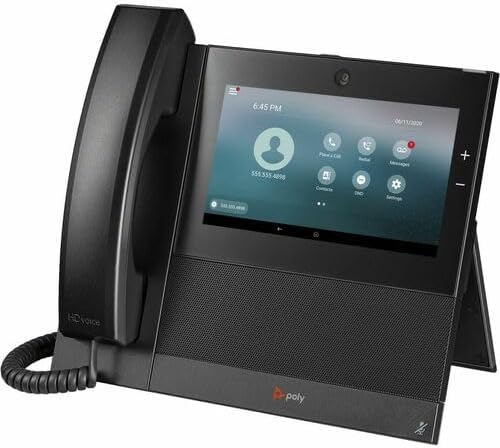
Image Description: A black Poly CCX 700 IP Phone shown from the front-left angle. The handset rests on the left side, connected by a coiled cord. The right side features a large, angled touchscreen display showing a call interface with contact information, call options, and settings icons. A small camera lens is visible above the screen. The base of the phone has a speaker grille and the 'poly' logo.
2.2 Rear View and Ports
The rear of the phone provides various ports for power, network connectivity, and accessories.

Image Description: A close-up view of the back panel of the Poly CCX 700 IP Phone. It shows a recessed area with several ports: a power input (48V), two RJ-45 network ports (one for LAN, one for PC), a USB port, an RJ9 headset port, and an EHS (Electronic Hook Switch) port. The phone's stand is folded down, revealing these connections.
- Power Input (48V): Connects to the power adapter if Power over Ethernet (PoE) is not used.
- LAN Port (RJ-45): Connects the phone to your network. Supports PoE.
- PC Port (RJ-45): Connects a computer to the phone, allowing the computer to share the network connection.
- USB Ports: For connecting USB accessories.
- RJ9 Headset Port: For connecting a wired headset.
- EHS Port: For connecting an Electronic Hook Switch cable for compatible wireless headsets.
3. Setup
3.1 Connecting the Handset
- Connect one end of the coiled handset cord to the handset.
- Connect the other end of the coiled handset cord to the handset port on the side of the phone base.
3.2 Network and Power Connection
The Poly CCX 700 can be powered via Power over Ethernet (PoE) or an optional external power adapter.
- For PoE: Connect an Ethernet cable from a PoE-enabled network switch or injector to the LAN port on the back of the phone.
- For External Power Adapter: Connect an Ethernet cable from your network to the LAN port. Then, connect the external power adapter (sold separately) to the 48V power input port and plug it into a power outlet.
- If connecting a computer, connect an Ethernet cable from your computer to the PC port on the back of the phone.
3.3 Initial Boot-up and Wi-Fi Setup
- Once connected, the phone will power on automatically.
- Follow the on-screen prompts for initial setup, which may include language selection and network configuration.
- To configure Wi-Fi, navigate to Settings > Wi-Fi on the touchscreen. Select your desired network and enter the password if prompted.
4. Operating the Phone
4.1 Making and Receiving Calls
- To Make a Call: Lift the handset, press the speakerphone button, or tap the 'Place a Call' icon on the touchscreen. Dial the number and press the 'Call' button.
- To Answer a Call: Lift the handset, press the speakerphone button, or tap the 'Answer' icon on the touchscreen.
- To End a Call: Replace the handset, press the speakerphone button again, or tap the 'End Call' icon on the touchscreen.
4.2 Using Video Calling
The integrated camera allows for video calls. Ensure your network connection supports video conferencing.
- During a call, tap the 'Video' icon on the touchscreen to enable or disable your video feed.
- To ensure privacy, slide the physical privacy shutter over the camera lens when video is not in use.
4.3 Bluetooth Headset Pairing
- Navigate to Settings > Bluetooth on the touchscreen.
- Enable Bluetooth and put your Bluetooth headset into pairing mode.
- Select your headset from the list of available devices and follow the on-screen instructions to complete pairing.
5. Maintenance
5.1 Cleaning the Phone
- Disconnect the phone from power before cleaning.
- Use a soft, lint-free cloth slightly dampened with water or a mild, non-abrasive cleaner to wipe the display and phone surfaces.
- Avoid using harsh chemicals, abrasive cleaners, or aerosol sprays directly on the phone.
5.2 General Care
- Keep the phone away from excessive heat, direct sunlight, and moisture.
- Do not block ventilation openings on the phone.
6. Troubleshooting
6.1 No Power
- Verify that the Ethernet cable is securely connected to the LAN port and that the network switch provides PoE, or that the external power adapter is correctly connected and plugged into a working outlet.
- Try a different power outlet or Ethernet port.
6.2 No Dial Tone / Cannot Make Calls
- Check network connectivity. Ensure the Ethernet cable is firmly connected.
- Contact your IT administrator or service provider to confirm your VoIP service is active and configured correctly.
6.3 Video Issues
- Ensure the camera's privacy shutter is open.
- Check network bandwidth and stability, as video calls require more data.
- Verify that the video feature is enabled in the call settings.
7. Specifications
| Feature | Detail |
|---|---|
| Product Model | CCX 700 |
| Manufacturer Part Number | 84C18AAABA |
| Handset Connectivity | Corded |
| Base Unit Connectivity | Corded/Cordless |
| IP Phone Technology | VoIP |
| Wireless Technology | Wi-Fi, Bluetooth |
| Total Number of Phone Lines | 24 |
| Caller ID | Yes |
| Speakerphone | Yes |
| Integrated Camera | 4-megapixel with autofocus and autoexposure |
| Display | 7-inch Color LCD Touchscreen |
| Network Ports | 2 x RJ-45 (LAN, PC) with PoE support |
| Other Ports | 2 x USB, RJ9 Headset, EHS |
| Item Weight | 6 pounds |
| Package Dimensions | 18 x 10 x 3 inches |
8. Warranty and Support
The Poly CCX 700 IP Phone is manufactured by HP Inc. For detailed warranty information, technical support, and service options, please refer to the official HP or Poly website or contact your authorized reseller.
Always ensure you have your product model and serial number available when contacting support.