
BANIGIPA T506
BANIGIPA Kids True Wireless Earbuds T506 Instruction Manual
Model: T506
1. Introduction
Thank you for choosing the BANIGIPA Kids True Wireless Earbuds T506. These open-ear clip earbuds are designed with your child's safety and comfort in mind, featuring a unique design that allows awareness of surroundings and a healthy volume limit to protect hearing. This manual provides detailed instructions for setup, operation, and maintenance to ensure optimal performance and longevity of your device.

Image 1.1: BANIGIPA T506 Kids True Wireless Earbuds and Charging Case.
This image displays the pink BANIGIPA T506 true wireless earbuds, showing both earbuds and their matching charging case open, ready for use or charging.
2. Package Contents
Please verify that all items are present in your package:
- 1x T506 True Wireless Earbuds (Left and Right)
- 1x USB-C Charging Cable
- 1x User Manual
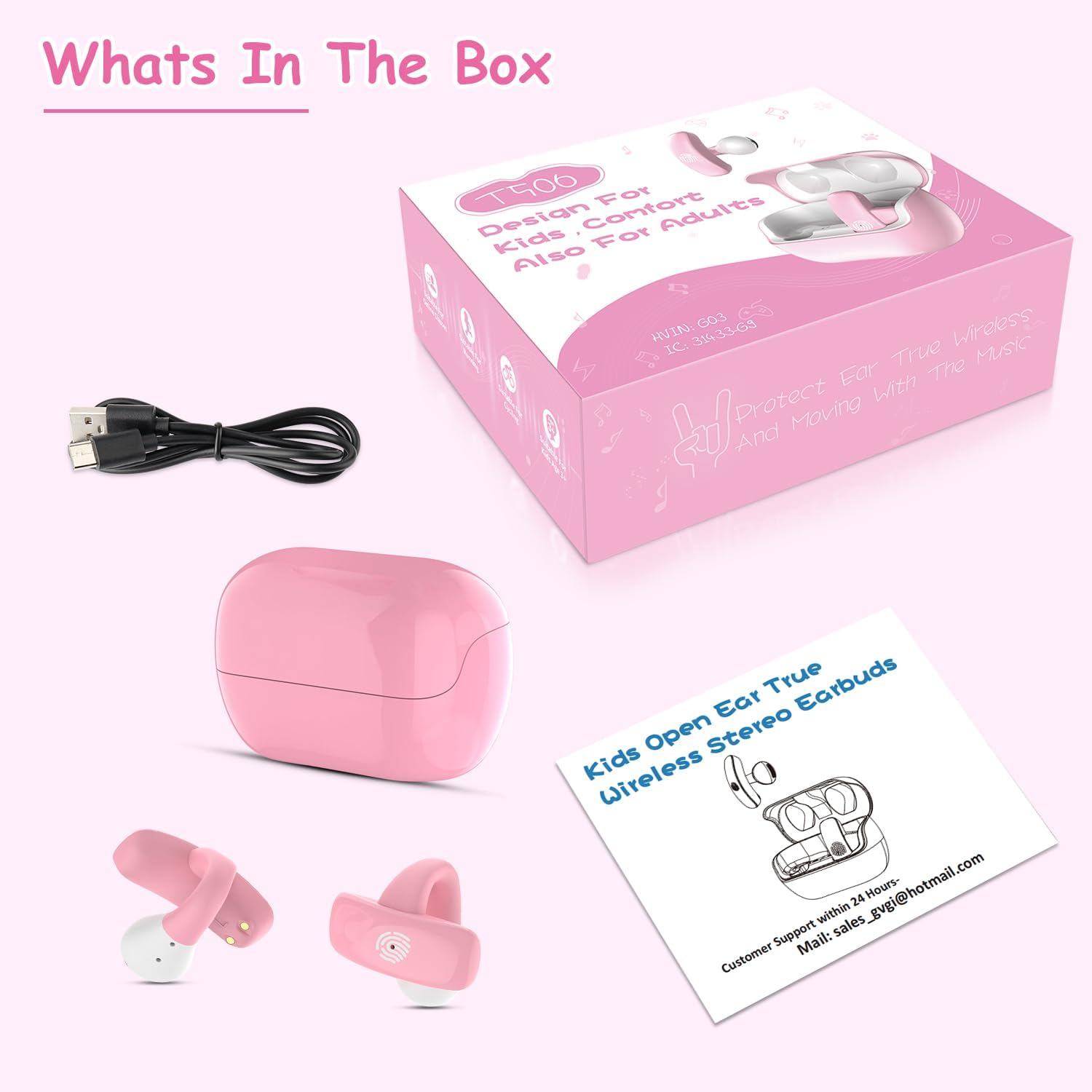
Image 2.1: Package Contents.
This image displays the BANIGIPA T506 earbuds, charging case, USB-C charging cable, and user manual, laid out next to the product packaging, illustrating all included items.
3. Product Overview
The BANIGIPA T506 earbuds feature an open-ear clip design for comfort and safety. Each earbud is ultra-lightweight at 5g, ensuring comfortable wear for extended periods.
Key Features:
- Open-Ear Clip Design: Ensures ear canal hygiene and environmental awareness.
- Ultra-Lightweight: Each earbud weighs only 5g for maximum comfort.
- Healthy Volume Control: Sound pressure limited to 85dB to protect hearing.
- Bluetooth 5.4: Provides stable and fast wireless connection.
- Smart Touch Control: Easy management of music, calls, and voice assistants.
- IPX4 Waterproof: Resistant to sweat, rain, and splashes.
- Long Battery Life: Up to 5 hours per charge, with 3-4 additional charges from the case.
4. Getting Started
4.1 Initial Charging
Before first use, fully charge the earbuds and the charging case. Connect the provided USB-C charging cable to the charging port on the case and a power source. The indicator lights on the case will show the charging status. A full charge typically takes approximately 1.5 hours.
4.2 Wearing the Earbuds
The BANIGIPA T506 earbuds feature an open-ear clip design. To wear them correctly:
- Gently open the ear clip.
- Position the earbud on your ear, ensuring the speaker is aligned with your ear canal.
- Adjust the clip for a secure and comfortable fit. The earbuds should feel stable without causing pressure or discomfort.

Image 4.1: How to Wear the Earbuds.
This three-step diagram illustrates the correct way to position the open-ear clip earbuds on the ear for optimal sound and comfort, showing the earbud being placed and adjusted.
4.3 Pairing with a Device
The earbuds use Bluetooth 5.4 for a fast and stable connection.
- First-time Pairing: Open the charging case. The earbuds will automatically enter pairing mode.
- On your device (smartphone, tablet, PC), go to Bluetooth settings and enable Bluetooth.
- Search for available devices and select "T506" from the list.
- Once connected, you will hear a confirmation tone, and the device will show "Connected."
- Automatic Reconnection: After the initial pairing, the earbuds will automatically connect to the last paired device when removed from the charging case.
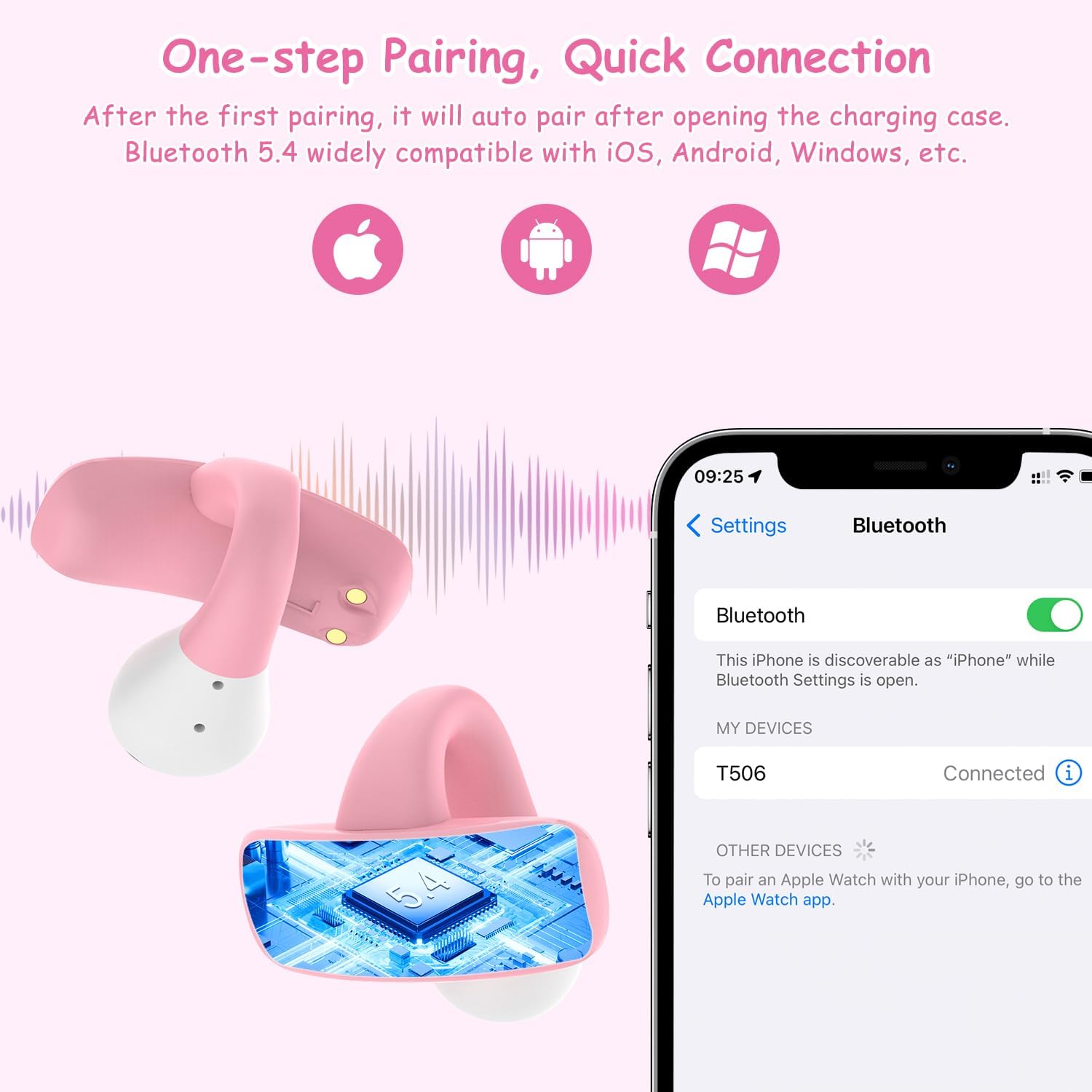
Image 4.2: Bluetooth Pairing.
This image depicts the BANIGIPA T506 earbuds next to a smartphone screen showing the Bluetooth settings, with 'T506' listed as a connected device, demonstrating the one-step pairing process.
5. Operating Instructions
The BANIGIPA T506 earbuds feature intuitive touch controls on each earbud.
Touch Control Functions:
- Play/Pause: Double-tap (Touch x2) on either L/R earbud.
- Answer Call: Double-tap (Touch x2) on either L/R earbud.
- Hang Up Call: Double-tap (Touch x2) on either L/R earbud during a call.
- Reject Call: Triple-tap (Touch x3) on either L/R earbud.
- Cancel Dialing: Double-tap (Touch x2) on either L/R earbud.
- Previous Song: Triple-tap (Touch x3) on the Left (L) earbud.
- Next Song: Triple-tap (Touch x3) on the Right (R) earbud.
- Volume Up: Long press on the Right (R) earbud.
- Volume Down: Long press on the Left (L) earbud.
- Reset: Quadruple-tap (Touch x4) on either L/R earbud.

Image 5.1: Touch Control Functions.
This comprehensive diagram details the touch control functions for the BANIGIPA T506 earbuds, including play/pause, answer/hang up calls, skip tracks, and volume adjustment, along with a reset option.
6. Charging the Earbuds and Case
The charging case provides portable power for your earbuds.
6.1 Charging the Earbuds
Place the earbuds into the charging case. They will automatically begin charging. The case holds enough power for 3-4 full charges of the earbuds, providing up to 20 hours of total listening time.
6.2 Charging the Case
When the charging case battery is low, connect it to a power source using the supplied USB-C cable. The charging time for the case is approximately 1.5 hours.

Image 6.1: Charging the Case.
The pink BANIGIPA T506 charging case is shown connected to a USB-C cable, indicating the charging process, with a smartphone displaying music playback in the background, highlighting the battery life.
7. Care and Maintenance
- Cleaning: Regularly clean the earbuds and charging case with a soft, dry cloth. Avoid using harsh chemicals or abrasive materials.
- Storage: Store the earbuds in their charging case when not in use to protect them from dust and damage. Keep them in a cool, dry place away from extreme temperatures.
- Water Resistance: The earbuds are IPX4 waterproof, meaning they are resistant to sweat, light rain, and splashes. Do not submerge them in water or expose them to heavy rain.
- Battery Care: To prolong battery life, avoid fully discharging the earbuds and case frequently. Charge them regularly, even if not used for extended periods.
8. Troubleshooting
If you encounter issues with your BANIGIPA T506 earbuds, please refer to the following common solutions:
| Problem | Possible Solution |
|---|---|
| Earbuds not pairing |
|
| No sound from one earbud |
|
| Charging case not charging |
|
| Low volume |
|
9. Specifications
| Model Name | T506 |
| Bluetooth Version | 5.4 |
| Ear Placement | Open Ear (Clip Design) |
| Earbud Weight | 5 Grams (each) |
| Charging Case Battery Capacity | 300 mAh |
| Earbud Battery Life | Up to 5 hours (single charge) |
| Total Battery Life (with case) | Up to 20-25 hours |
| Charging Time | Approx. 1.5 hours (earbuds & case) |
| Water Resistance Level | IPX4 |
| Audio Driver Size | 10 Millimeters |
| Sensitivity | 85 dB (volume limited) |
| Connectivity Technology | Bluetooth, Wireless |
| Control Type | Touch Control |
10. Safety Information
- Hearing Protection: The earbuds are designed with an 85dB volume limit to protect children's hearing. Avoid modifying this limit.
- Environmental Awareness: The open-ear design allows users to hear their surroundings, enhancing safety, especially outdoors.
- Choking Hazard: Keep earbuds and small parts away from young children to prevent accidental ingestion.
- Battery Safety: Do not attempt to replace the battery. Do not expose the device to extreme heat or dispose of it in fire.
- Disassembly: Do not attempt to disassemble or repair the earbuds or charging case, as this will void the warranty and may cause damage.

Image 10.1: 85dB Volume Control.
A graphic representation of an earbud with a sound wave and an '85dB' indicator, emphasizing the healthy volume control feature designed to protect children's hearing by keeping sound pressure well below harmful thresholds.
11. Warranty and Support
Warranty Information:
Please refer to your purchase documentation or the product packaging for specific warranty details and duration. The warranty typically covers manufacturing defects.
Customer Support:
If you have any questions, concerns, or require technical assistance with your BANIGIPA T506 Kids True Wireless Earbuds, please do not hesitate to contact our customer support team. We aim to respond within 24 hours to resolve any issues you may have.
Email: Sales_gyg@hotmail.com
For more information, you may also visit the BANIGIPA Store on Amazon.
12. Product Videos
Note: No official product videos from the seller were available with the necessary metadata for embedding in this manual.
Ask a question about this manual
Ask about setup, troubleshooting, compatibility, parts, safety, or missing instructions. Manuals+ will review the question and use this page’s manual context to help answer it.