
Roinvou 6+128G
Roinvou Android Radio User Manual
For Jeep Wrangler (4 Doors) 2007-2010 (6+128G Model)
1. Introduction
This manual provides detailed instructions for the installation, operation, and maintenance of your Roinvou Android Radio. Please read this manual thoroughly before using the product to ensure proper function and safety. This unit is specifically designed for Jeep Wrangler (4 Doors) models from 2007 to 2010.

Figure 1.1: Roinvou Android Radio with included components.
2. Important Safety Information
- Always ensure the vehicle is parked and the engine is off before performing any installation or maintenance.
- Professional installation is recommended to avoid damage to the product or vehicle.
- Do not attempt to disassemble or modify the unit. This may void the warranty and cause damage.
- Keep the unit away from water, moisture, and extreme temperatures.
- Ensure all wiring connections are secure and properly insulated to prevent short circuits.
- Connect the rearview input cable whether you use the rearview camera or not, otherwise it will affect the WiFi and Bluetooth signal.
3. Package Contents
Please verify that all items listed below are included in your package:
- Roinvou Android Car Stereo for Jeep Wrangler (4 Doors)
- Power Cable
- Canbus Box
- Radio Antenna
- RCA Harness
- GPS Antenna
- AHD Backup Camera
- External Microphone
- Rear Camera Input Cable
- Dual USB Cable
- Installation Tool

Figure 3.1: Visual representation of all components included in the Roinvou Android Radio package.
4. Setup and Installation
This section provides general guidance for installing your Roinvou Android Radio. Due to the complexity of vehicle electrical systems, professional installation is highly recommended.
4.1 Compatibility Check
Ensure your vehicle is a Jeep Wrangler (4 Doors) model manufactured between 2007 and 2010. The stereo comes with an in-dash head unit, wiring harness cables, canbus decoder, and frame panel designed for this specific fitment.

Figure 4.1: Compatibility check for Jeep Wrangler (4 Doors) 2007-2010 models, showing a successful installation example.
4.2 Wiring Connections
Carefully connect all cables as per the diagrams provided. Pay close attention to the power cable port to ensure it matches your original car's wiring.
- Power Cable: Connect to the vehicle's power supply.
- Canbus Box: Integrates with the vehicle's existing systems, supporting stock features like steering wheel control.
- Radio Antenna: For FM/AM radio reception.
- RCA Harness: For audio and video input/output connections.
- GPS Antenna: For accurate navigation.
- External Microphone: For clear hands-free calls and voice commands.
- Dual USB Cable: For connecting external devices and wired CarPlay/Android Auto.
- Rear Camera Input Cable: Essential for backup camera functionality.

Figure 4.2: Port details and corresponding cable connections for the Roinvou Android Radio.
4.3 Backup Camera Wiring
The included AHD backup camera requires specific wiring for proper operation. Ensure the camera's video output is connected to the unit's reversing camera input. The red wire connects to the reversing lamp's positive (+) terminal, and the black wire connects to ground (GND).

Figure 4.3: Detailed wiring diagram for the AHD backup camera.
5. Operating Instructions
5.1 User Interface and Customization
The Roinvou Android Radio features a powerful Android system with an 8-core CPU and 6GB RAM + 128GB ROM for a smooth user experience. It comes with 19 wallpaper options and 59 UI desktop themes for personalization.

Figure 5.1: Examples of the 19 wallpaper options and 59 desktop themes available for customization.
Video 5.1: Demonstration of UI functions, CarPlay, Android Auto, and Navigation features.
5.2 Wireless/Wired CarPlay & Android Auto
Connect your smartphone via Bluetooth (wireless) or the original USB data cable (wired) to access CarPlay or Android Auto. This allows for easy phone calls, music playback, and GPS navigation with voice control via Siri or Google Assistant.

Figure 5.2: Connection methods for Wireless CarPlay, Android Auto, and Mirror Link.
5.3 GPS Navigation & WiFi Connectivity
The unit has built-in GPS navigation. You can download offline navigation maps directly from the Play Store. Connect to WiFi to access online maps, stream music, and watch videos on platforms like YouTube.

Figure 5.3: GPS navigation interface and examples of online content access via WiFi.
5.4 Bluetooth 5.0 & Mirror Link
Bluetooth 5.0 ensures a stable connection for hands-free calls, phone book synchronization, and music streaming. Mirror Link allows you to display your Android or iOS smartphone screen directly on the head unit.

Figure 5.4: Bluetooth hands-free calling interface and FM/RDS radio display.
5.5 Audio Control: 32 EQ & FM/RDS Radio
The unit includes pre-installed car tuning software with 32-band EQ technology. Adjust frequency, EQ bands, and sound type to optimize audio quality. The built-in FM/RDS radio provides access to local broadcasts, real-time traffic, and weather forecasts.
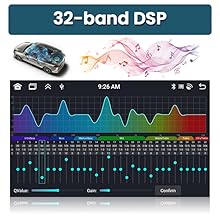
Figure 5.5: The 32-band DSP equalizer interface for fine-tuning audio output.
5.6 Steering Wheel Control & Backup Camera
The unit supports steering wheel controls, allowing you to manage functions without taking your hands off the wheel. It automatically switches to the reverse image when the vehicle is put into reverse, utilizing the included AHD backup camera.

Figure 5.6: Steering wheel control configuration screen and a view of the AHD reversing image.
6. Maintenance
- Cleaning: Use a soft, dry cloth to clean the screen and unit. Do not use abrasive cleaners or solvents.
- Software Updates: Periodically check for software updates to ensure optimal performance and access to new features. Updates can typically be found on the manufacturer's website or through the unit's system settings.
- Temperature: Avoid exposing the unit to extreme temperatures, both hot and cold, for prolonged periods.
7. Troubleshooting
| Problem | Possible Cause | Solution |
|---|---|---|
| Unit does not power on. | Loose power connection, blown fuse, incorrect wiring. | Check all power connections. Inspect vehicle fuses. Verify wiring against the installation diagram. |
| No sound from speakers. | Speaker wires disconnected, volume too low, incorrect audio settings. | Check speaker wiring. Increase volume. Adjust audio settings (EQ, balance, fader). |
| Bluetooth/WiFi signal is weak or unstable. | Rearview input cable not connected. | Ensure the rearview input cable is connected, even if not using a camera. |
| CarPlay/Android Auto not connecting. | Incorrect connection method, phone settings, app issues. | Ensure Bluetooth is on for wireless connection or use original USB cable for wired. Check phone settings and app permissions. Restart both phone and head unit. |
| Backup camera not displaying. | Incorrect camera wiring, camera type setting. | Verify camera wiring (power, ground, video signal). Check camera type settings in the unit's factory settings (CVBS/AHD). |
8. Specifications
- Model: Roinvou Android Radio for Jeep Wrangler (4 Doors) 2007-2010 (6+128G)
- Operating System: Android
- Processor: 8-Core CPU
- Memory: 6GB RAM + 128GB ROM
- Display Size: 9 Inches IPS Touch Screen
- Resolution: 1280 x 720
- Connectivity: Bluetooth 5.0, Wi-Fi, USB
- Audio: 32-band EQ DSP, Stereo Audio Output
- Features: Wireless/Wired CarPlay, Wireless/Wired Android Auto, Mirror Link, Voice Control, GPS Navigation, FM/RDS Radio, Steering Wheel Control (SWC), AHD Backup Camera Support, Dual Screen Functionality, 19 Backgrounds, 59 UI Themes.
- Item Weight: Approximately 4.09 pounds
- Package Dimensions: 17.8 x 11.6 x 4.2 inches
9. Warranty and Support
Your Roinvou Android Radio comes with a 1-Year Warranty from the date of purchase.
For technical support, warranty claims, or any questions regarding your product, please contact Roinvou customer support. You can typically find contact information on the product packaging, the seller's store page, or by searching for "Roinvou customer support" online.
For direct inquiries, you may reach out via email: roinvouservices@163.com.

Figure 9.1: Roinvou customer support details and contact methods.
Related documents6+128G


Ask a question about this manual
Ask about setup, troubleshooting, compatibility, parts, safety, or missing instructions. Manuals+ will review the question and use this page’s manual context to help answer it.