
novorik Metal Detector 11 INCH
novorik Professional Metal Detector User Manual
Model: 11 INCH
Introduction
Thank you for choosing the novorik Professional Metal Detector. This manual provides essential information for the safe and effective operation of your device. Please read it thoroughly before use and retain it for future reference.
The novorik Metal Detector is designed for both adults and children, featuring a retractable and foldable design for portability. It includes an 11-inch waterproof coil, advanced DSP chip, and multiple detection modes for various treasure hunting environments.
Package Contents
Verify that all items listed below are included in your package:
- Metal Detector Unit
- 11-inch Waterproof Search Coil
- Backpack
- Folding Shovel
- Headphones
- Charging Cord
- User Manual
- Two 9V Batteries

Image: novorik Metal Detector with included accessories: main unit, search coil, headphones, shovel, and backpack.
Setup and Assembly
- Unpack Components: Carefully remove all items from the packaging.
- Install Batteries: Locate the battery compartment on the control unit. Insert two 9V batteries, ensuring correct polarity.
- Assemble Shaft:
- Extend the retractable handle by pressing the release button and pulling to the desired length (21" to 50").
- Secure the shaft sections using the latches.
- Attach the arm cuff to the upper shaft for comfortable use.
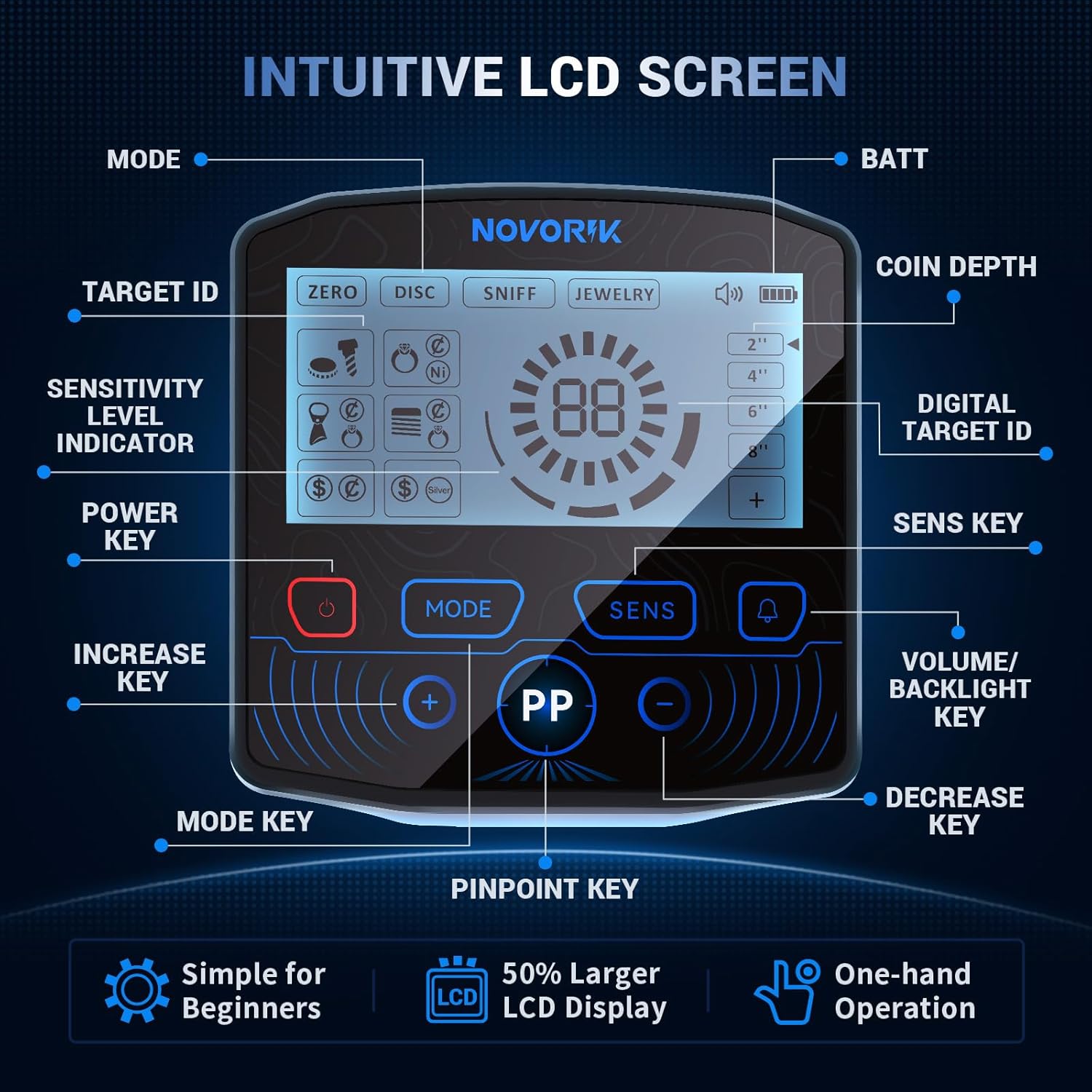
Image: Diagram illustrating the adjustable and retractable design of the metal detector, showing how to extend the handle and adjust the search coil.
- Attach Search Coil: Connect the 11-inch waterproof search coil to the lower end of the shaft. Ensure the cable is securely wrapped around the shaft to prevent tangling.
- Connect Headphones: Plug the included headphones into the designated port on the control unit.
Video: Official operation instructions for the DD60 metal detector, demonstrating assembly and basic usage. This video is provided by the seller.
Operating Instructions
Control Unit Overview
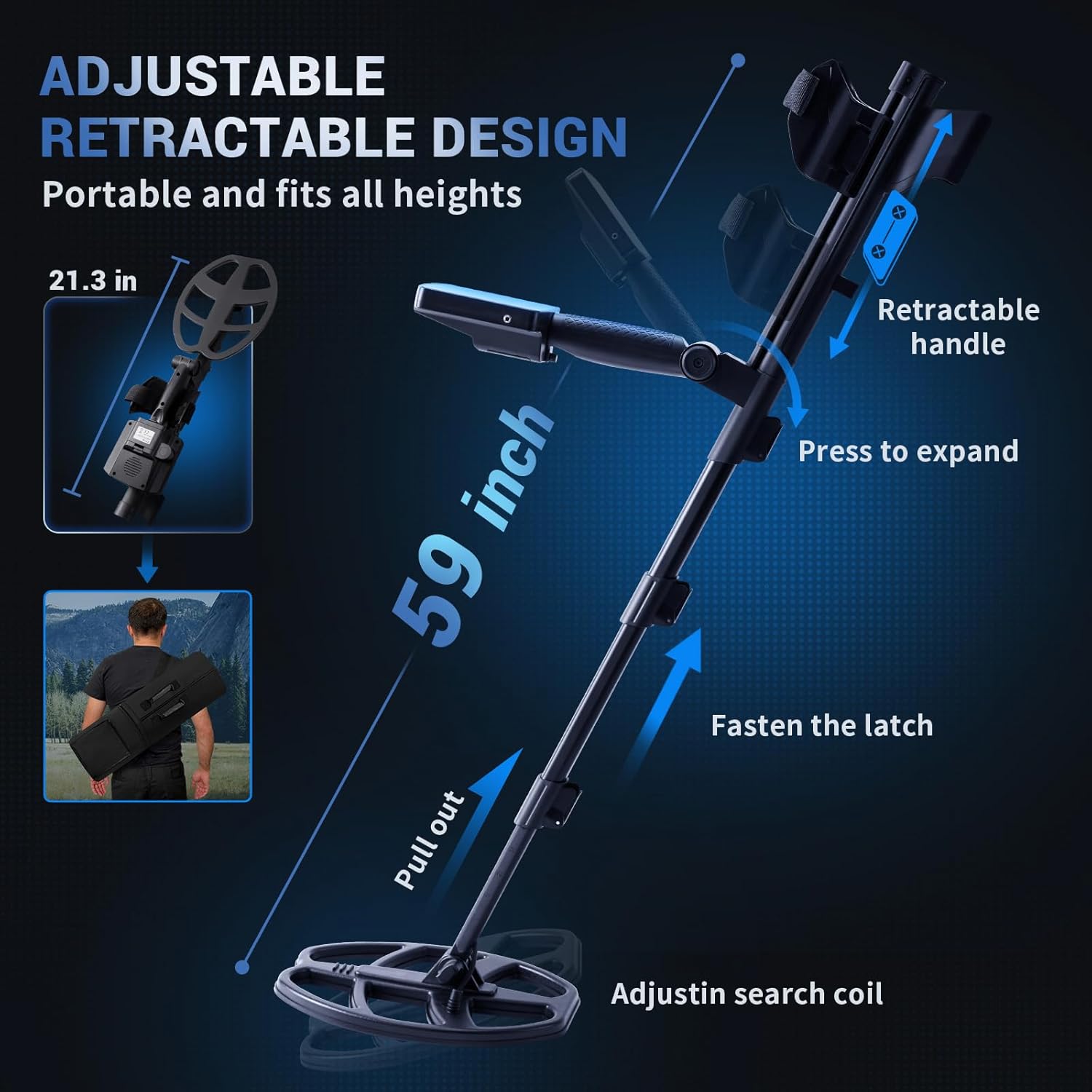
Image: Detailed view of the intuitive LCD screen and control buttons on the novorik metal detector, showing labels for Power Key, Mode Key, Sensitivity Level Indicator, Target ID, Coin Depth, Digital Target ID, Volume/Backlight Key, Increase/Decrease Keys, and Pinpoint Key.
- Power Key: Press to turn the detector ON/OFF.
- Mode Key: Cycles through the 5 detection modes.
- SENS Key: Adjusts sensitivity level.
- Volume/Backlight Key: Adjusts audio volume and screen backlight.
- PP (Pinpoint) Key: Activates pinpoint mode for precise target location.
- Increase/Decrease Keys (+/-): Used to adjust sensitivity, volume, or select discrimination settings within modes.
Detection Modes
The novorik Metal Detector features 5 exclusive terrain modes:
- All Metal (ZERO) Mode: Designed to detect all types of metal without discrimination.
- DISC (Discrimination) Mode: Allows you to reject unwanted metal types, focusing on specific targets.
- SNIFF Mode: Detects only memorized metal targets.
- JEWELRY Mode: Eliminates iron signals, responding only to other metals suitable for jewelry.
- PP (Pinpoint) Mode: Used for precise positioning of detected metals after a general sweep.

Image: Visual explanation of the five search modes: All Metal, DISC, SNIFF, JEWELRY, and Pinpoint, with icons representing target types.
Ground Sweeping Technique
- Keep the search coil parallel to the ground, approximately 1-2 inches above the surface.
- Sweep the coil slowly from side to side in overlapping motions. Avoid swinging it like a pendulum or too quickly, as this can lead to missed targets.
- Listen for changes in the audio tone and observe the LCD display for target identification and depth indicators.
Video: A user demonstrating the proper sweeping technique with a metal detector in a grassy area, showing how to keep the coil close to the ground and interpret the display for metal detection.
Video: A short preview video demonstrating the metal detector's operation and target identification on a coin. This video is provided by a customer.
Maintenance and Care
- Cleaning: After each use, wipe down the detector with a damp cloth. Ensure the search coil is clean, especially after use in wet or sandy conditions.
- Storage: Store the detector in a cool, dry place. Remove batteries if storing for extended periods to prevent leakage.
- Waterproof Coil: The 11-inch search coil is waterproof (IP66 rated), allowing for detection in shallow water. However, the control unit is not waterproof and should not be submerged.
- Battery Life: The detector operates for approximately 10 hours on a full charge. Recharge or replace batteries as needed.
Troubleshooting
| Problem | Possible Cause | Solution |
|---|---|---|
| No power | Dead or incorrectly installed batteries. | Check battery polarity, replace with fresh 9V batteries, or ensure charging cable is connected if rechargeable. |
| Erratic signals/False positives | High sensitivity, electromagnetic interference, or mineralized ground. | Reduce sensitivity (SENS button). Move away from power lines or other electronic devices. Use DISC mode to filter out unwanted metals. |
| No detection | Low sensitivity, incorrect mode, or coil not sweeping correctly. | Increase sensitivity. Ensure "All Metal" mode is selected for general searching. Verify proper sweeping technique (slow, parallel to ground). |
| Weak signal for known target | Target is too deep or small. | Increase sensitivity. Use Pinpoint mode for accurate location once a general area is identified. |
Specifications
- Brand: novorik
- Model: 11 INCH
- Search Coil Size: 11 inches (Double D)
- Waterproof Rating: IP66 (Search Coil only)
- Detection Modes: 5 (All Metal, DISC, SNIFF, JEWELRY, Pinpoint)
- Operating Frequency: 7 KHz
- Adjustable Length: 21" to 50"
- Extended Length: Up to 59 inches
- Item Weight: 2.9 lbs (unit only) / 7.28 pounds (packaged)
- Power Source: 2 x 9V Batteries (included)
- Battery Life: Approximately 10 hours
- Display: Intuitive LCD Display with Backlight
- Chip: Upgraded DSP Chip
Warranty and Support
For warranty information, technical support, or any inquiries regarding your novorik Metal Detector, please refer to the contact details provided in your product packaging or visit the official novorik website.
You may also find additional support and resources on the novorik Store on Amazon.
Ask a question about this manual
Ask about setup, troubleshooting, compatibility, parts, safety, or missing instructions. Manuals+ will review the question and use this page’s manual context to help answer it.