
Introduction
This manual provides essential information for the proper setup, operation, and maintenance of your ELIBOM Smartwatch AU2. Please read this manual thoroughly before using the device to ensure optimal performance and longevity.
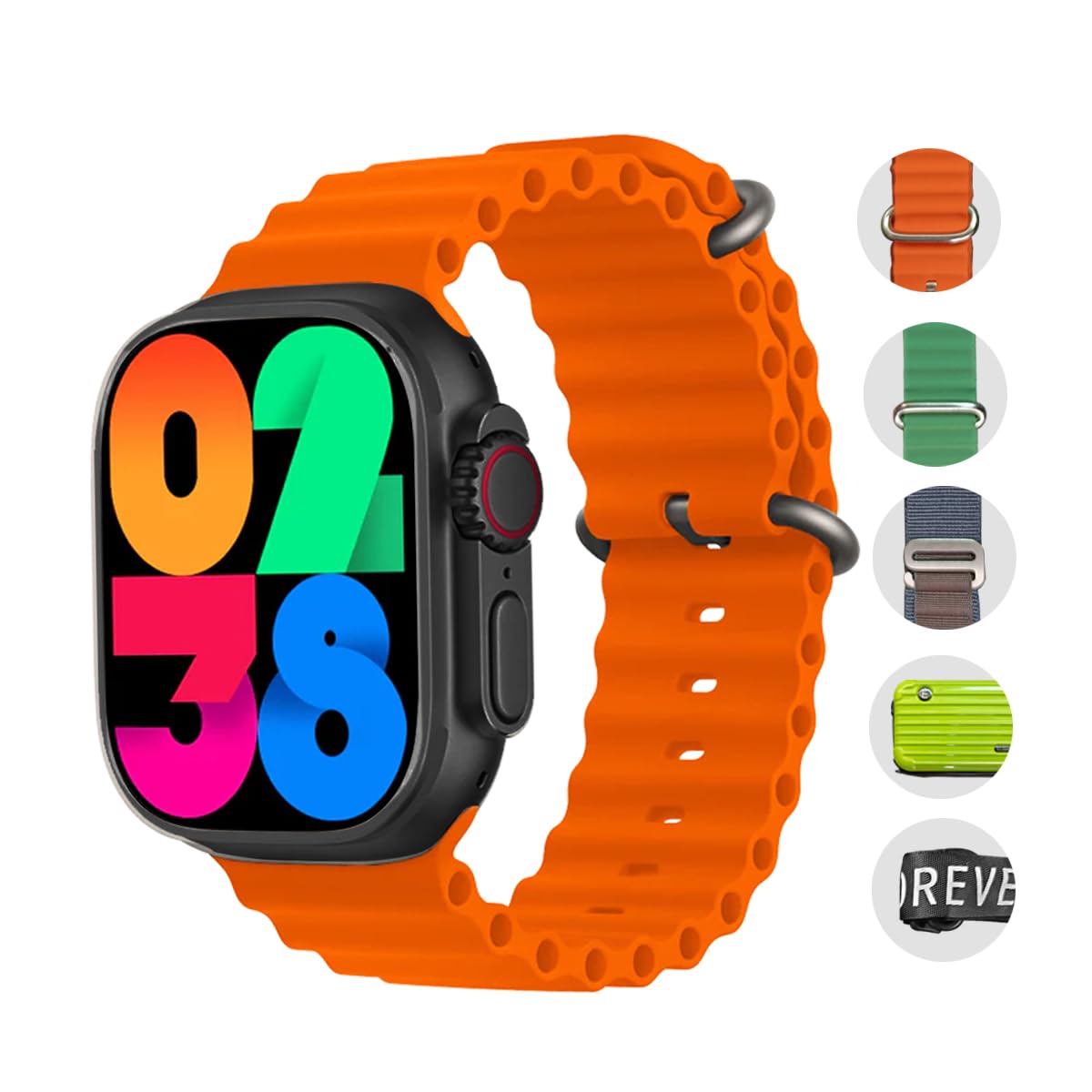
Figure 1: ELIBOM Smartwatch AU2
What's in the Box
The ELIBOM Smartwatch AU2 package includes the following components:
- ELIBOM Smartwatch AU2
- 2 Silicone Straps (Green and Orange)
- 1 Fabric Sport Strap (Camping/Hiking style)
- Wireless Charger
- Rigid Carrying Bag with Shoulder Strap
- Wrist Strap
Setup
1. Initial Charging
Before first use, fully charge your ELIBOM AU2 Smartwatch. Place the smartwatch on the provided wireless charger. The screen will indicate charging status. A full charge typically takes approximately 2 hours.
2. Strap Installation
The ELIBOM AU2 features interchangeable straps. To attach a strap, align the strap's clip mechanism with the slots on the smartwatch body and push until it clicks into place. To remove, press the release button on the underside of the watch and slide the strap out.
3. Powering On/Off
To power on the smartwatch, press and hold the side button until the ELIBOM logo appears. To power off, press and hold the side button, then select 'Power Off' on the screen.
4. Pairing with Your Smartphone
The ELIBOM AU2 connects to your smartphone via Bluetooth. Follow these steps:
- Download the companion application (refer to the packaging or quick start guide for app name) from your smartphone's app store.
- Ensure Bluetooth is enabled on your smartphone.
- Open the companion app and follow the on-screen instructions to search for and connect to your ELIBOM AU2.
- Confirm the pairing request on both your smartphone and the smartwatch.
Operating Instructions
Navigation
The ELIBOM AU2 features a 2.01-inch LED touchscreen for navigation. Swipe up, down, left, or right to access different menus and functions. Tap to select an option, and swipe right or press the side button to return to the previous screen.

Figure 2: 2.01-inch Screen Display
Making and Receiving Calls
Once paired with your smartphone, the ELIBOM AU2 allows you to make and receive calls directly from your wrist. Access the dialer or call log from the main menu. The integrated speaker and microphone provide clear audio for conversations.

Figure 3: Smartwatch Speaker and Side Button
Notifications
Enable notification permissions in the companion app to receive alerts for calls, messages, and other applications directly on your smartwatch screen.
Music Control
Control music playback on your smartphone from your smartwatch. Play, pause, skip tracks, and adjust volume without needing to access your phone.
Health and Fitness Tracking
The smartwatch continuously monitors various health metrics:
- Heart Rate: Real-time heart rate monitoring.
- Blood Oxygen: Measures blood oxygen saturation levels.
- Steps, Distance, Calories: Tracks daily activity, including steps taken, distance covered, and calories burned.
Sport Modes
The ELIBOM AU2 offers 4 multi-sport modes to track specific workouts. Select your activity from the sport menu to record performance data.

Figure 4: Multi-Sport Tracking
Remote Camera Shutter
Activate the remote camera shutter function through the companion app to take photos on your smartphone by tapping your smartwatch screen.
Maintenance
Cleaning
Wipe the smartwatch screen and body with a soft, lint-free cloth. For straps, use a damp cloth and mild soap if necessary, then dry thoroughly. Avoid using harsh chemicals, abrasive materials, or solvents.
Water Exposure
While the smartwatch is designed for daily wear, avoid prolonged exposure to water. Do not submerge the device. Dry the watch thoroughly if it gets wet.
Charging
Always use the original wireless charger provided with your ELIBOM AU2. Ensure the charging contacts are clean and dry before placing the watch on the charger.
Troubleshooting
- Smartwatch not turning on: Ensure the device is fully charged. Connect it to the wireless charger and wait a few minutes before attempting to power it on again.
- Cannot pair with smartphone:
- Verify Bluetooth is enabled on both the smartwatch and your smartphone.
- Ensure the companion app is installed and running on your smartphone.
- Restart both devices and try pairing again.
- Check if the smartwatch is already paired with another device. Disconnect if necessary.
- Inaccurate health readings: Ensure the smartwatch is worn snugly on your wrist, not too tight or too loose. Clean the sensors on the back of the watch. Restart the device.
- Calls or notifications not working:
- Confirm the Bluetooth connection between the smartwatch and smartphone is active.
- Check notification permissions for the companion app in your smartphone's settings.
- Ensure the 'Do Not Disturb' mode is not active on either device.
- Short battery life: Reduce screen brightness. Disable unnecessary notifications or features. Ensure the watch is fully charged each time.
Specifications
| Feature | Specification |
|---|---|
| Brand | ELIBOM |
| Model | AU2 |
| Screen Size | 2.01 inches LED |
| Connectivity | Bluetooth |
| Battery Life | Up to 3 days (average use) |
| Input Method | Touchscreen |
| Special Features | Wireless Charging, Phone Calls, Notifications, Sedentary Reminder, Music Player, 4 Sport Modes, Heart Rate Monitor, Blood Oxygen Monitor, Step Counter, Calorie Tracker, Remote Camera Shutter |
| Compatible Devices | Smartphones |
| Package Dimensions | 20 x 19 x 6.5 cm |
| Package Weight | 250 g |
Warranty and Support
For warranty information and customer support, please refer to the documentation included with your product packaging or contact your retailer. Keep your proof of purchase for warranty claims.