
Ezlo Smart Water Shut-Off Valve Control Kit User Manual
Model: EZL-WV3ZWPARENT-US | Brand: Ezlo
1. Introduction
The Ezlo Smart Water Shut-Off Valve Control Kit provides an advanced solution for protecting your home from water damage. This comprehensive kit includes the Ezlo Plus Hub, a versatile smart home hub supporting Z-Wave, Zigbee, and Wi-Fi, along with three Z-Wave water leak sensors and a smart water shut-off valve. It allows for remote management of your main water supply, offering peace of mind whether you are at home or away.

Figure 1: Overview of the Ezlo Smart Water Shut-Off Valve Control Kit, showing the smart hub, valve, and three leak sensors.
2. Product Components
Your Ezlo Smart Water Shut-Off Valve Control Kit includes the following:
- Smart Water Shut-Off Valve (Z-Wave Version)
- Brass Valve (available in ¾”, 1”, and 1¼” sizes)
- 3x Flood Sensors
- Ezlo Plus Smart Hub

Figure 2: Detailed view of the Ezlo Smart Water Shut-Off Valve, highlighting its two-part design: the Z-Wave Smart Actuator and the robust brass ball valve.
3. Understanding Your Smart Water Valve Kit
The smart water valve kit comes with one of three brass ball valve sizes: ¾”, 1”, and 1¼”. It is crucial to select the correct size that matches your existing water pipe for proper installation and function. If you are unsure, it is recommended to consult a qualified professional.
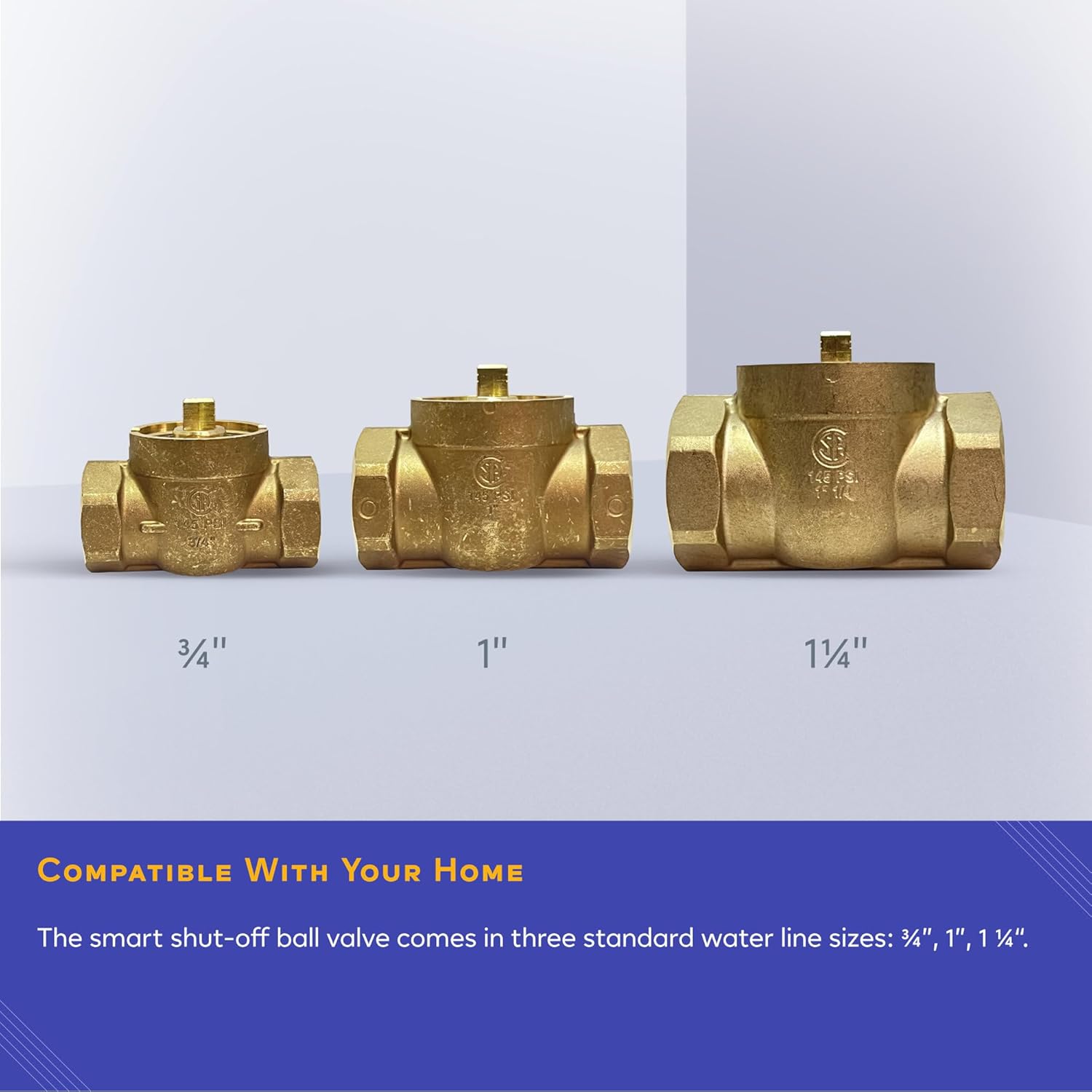
Figure 3: The three available sizes of the brass ball valve to ensure compatibility with various plumbing systems.
4. Installation Guide
For optimal performance and safety, professional installation is highly recommended. The following steps outline the general installation process:
- Shut off the water to your main valve: Locate your home's main water shut-off valve and turn off the water supply.
- Prepare the Ezlo brass valve: Prepare the brass valve for your specific plumbing installation.
- Measure and mark: Measure and mark where to cut your existing pipe for the new Ezlo brass valve installation.
- Start cutting: Carefully cut your existing piping according to your measurements.
- Drain and clean the piping: Allow any remaining water to drain from the pipes and clean them from excess debris.
- Level the brass valve: Once the valve is in place, ensure it is level. This helps in attaching the electronic actuator correctly.
- Finish & secure the pipes: Securely finish your Ezlo brass ball valve pipe installation. Ensure pipes are secure prior to attaching the Ezlo electronic actuator. Using a crimping tool is recommended for a fast and secure installation.
- Turn on your water main: Finalize the plumbing by turning the water back on to your water main.
- Attach the actuator and power: Finally, attach the Ezlo smart actuator by clipping it on top of the brass valve, then connect it to power.
Video 1: Detailed installation guide for the Ezlo Smart Water Shut-Off Valve Control Kit, covering all steps from preparing the pipes to attaching the actuator and pairing.

Figure 4: The Ezlo Smart Water Shut-Off Valve installed within a typical home plumbing system.
5. Operating the Valve
The Ezlo Smart Water Shut-Off Valve can be actuated manually from the included lever, remotely via the app, or included in personalized automations.
- Manual Control: Use the lever and buttons directly on the actuator to open or close the valve.
- App Control: Control the valve remotely through the MiOS smart home platform app on your smartphone.
- Voice Control: The Ezlo Water Valve is compatible with Alexa. Simply speak commands to stop or resume water flow.

Figure 5: The valve shown in both its open (ON) and closed (OFF) positions, demonstrating its operational states.

Figure 6: Example of a water leak detection notification received on a smartphone, indicating the main water valve was closed automatically.
6. Pairing with a Z-Wave Hub
To integrate your Ezlo Smart Water Shut-Off Valve into your smart home system, follow these pairing instructions using the MiOS app (example shown with Ezlo Plus Hub):
- Log-in: Log-in to your Z-Wave hub's app (e.g., Ezlo Plus).
- Tap on More: Navigate to the 'More' section in the app, then press the '+' button.
- Choose your Ezlo Plus: Select your Ezlo Plus hub from the list of controllers.
- Select Water Valve: Go to 'Water Valve' and choose 'Ezlo Plus Water Shut-Off Valve'.
- Connect to Power: Ensure your Water Valve is connected to power.
- Press Next: Follow the on-screen prompts and press 'Next'.
- Press Pairing Button: Go to your Water Valve and press once on the pairing button.
- Wait for Detection: Wait for the valve to be detected by the app.
- Tap Continue: Tap on 'Continue' to proceed with the connection security.
- Scan QR Code: When instructed, scan the QR code label found on the side or bottom of your Water Valve.
- Confirm Continue: Tap on 'Continue' again.
- Wait for Pairing: Wait for the valve to be paired successfully.

Figure 7: The MiOS smart home dashboard, showing how the Ezlo Water Shut-Off Valve integrates with other smart devices for comprehensive water security.
7. Maintenance
The Ezlo Smart Water Shut-Off Valve features a robust actuator designed for 20,000 on/off cycles, ensuring long-lasting durability. Regular visual inspection of the valve and piping for any signs of leaks or wear is recommended. Keep the actuator clean and free from dust or debris. No specific user-serviceable parts are inside the actuator.
8. Troubleshooting
If you encounter issues with your Ezlo Smart Water Shut-Off Valve Control Kit, consider the following common troubleshooting steps:
- No Power: Ensure the actuator is properly connected to a power source and the power adapter is functioning.
- Valve Not Responding: Check the physical connection between the actuator and the brass valve. Verify that the actuator is securely clipped.
- App Connectivity Issues: Ensure your Ezlo Plus Hub is online and connected to your home network. Restart the app and/or the hub if necessary.
- Pairing Failure: Double-check all steps in the pairing process. Ensure the valve is within range of your Z-Wave hub. Try resetting the valve and re-attempting the pairing process.
- Leak Sensor Not Triggering: Verify the leak sensors are placed correctly in areas prone to water leaks. Check battery levels if applicable (though the product states batteries are not included/required for the main valve, sensors might have them).
For persistent issues, please contact Ezlo customer support.
9. Specifications
| Feature | Detail |
|---|---|
| Model Number | EZL-WV3ZWPARENT-US |
| Brand | Ezlo |
| Style | Z-Wave Client 1¼" |
| Item Weight | 6 pounds |
| Product Dimensions | 17 x 14 x 17 inches |
| Country of Origin | China |
| Included Components | Smart Water Shut-Off Valve Z-Wave Version, brass Valve, 3x Flood sensor |
| Voltage | 24 Volts |
| Control Method | App |
| Compatible Devices | Home Security System |
| UPC | 850010803067 |
10. Warranty and Support
For information regarding product warranty, returns, or technical support, please refer to the official Ezlo website or contact their customer service directly. Keep your purchase receipt for warranty claims.


