
Wanbo WPA23
WANBO X2 Max Projector User Manual
Model: WPA23
1. Introduction
Thank you for purchasing the WANBO X2 Max Projector. This manual provides essential information for setting up, operating, and maintaining your projector. Please read it thoroughly before use to ensure optimal performance and safety. The WANBO X2 Max is a versatile projector offering Full HD 1080p resolution, 450 ANSI lumens brightness, and an integrated Android 9.0 operating system for a seamless entertainment experience.
2. Safety Information
- Do not look directly into the projector lens when the lamp is on.
- Ensure proper ventilation around the projector to prevent overheating.
- Keep the projector away from water, moisture, and flammable materials.
- Use only the power adapter supplied with the projector.
- Do not attempt to disassemble or repair the projector yourself. Contact qualified service personnel for assistance.
- Keep the projector out of reach of children.
3. Package Contents
Please check that all items are present in your package:
- WANBO X2 Max Projector
- Remote Control
- Power Cable
- User Manual (this document)
4. Product Overview
Familiarize yourself with the components and ports of your WANBO X2 Max Projector.

Figure 4.1: Top-down view of the WANBO X2 Max Projector, showcasing its sleek white design.

Figure 4.2: Front view of the projector, highlighting the main lens and the 'wanbo' branding.

Figure 4.3: Rear view of the projector, displaying the various input/output ports including USB, HDMI, AV, Audio, and the power input.
Key Components:
- Projection Lens: Emits the image onto the screen.
- Power Input: Connects to the power cable.
- USB Ports: For connecting USB storage devices.
- HDMI Ports: For connecting external devices like laptops, gaming consoles, or Blu-ray players.
- AV Port: For connecting older analog devices.
- Audio Output: For connecting external speakers or headphones.
- IR Receiver: For receiving signals from the remote control.
5. Setup
5.1 Placement
Choose a flat, stable surface for the projector. Ensure there is enough space for proper ventilation. The projection distance will determine the screen size. For optimal viewing, position the projector directly in front of your projection surface.
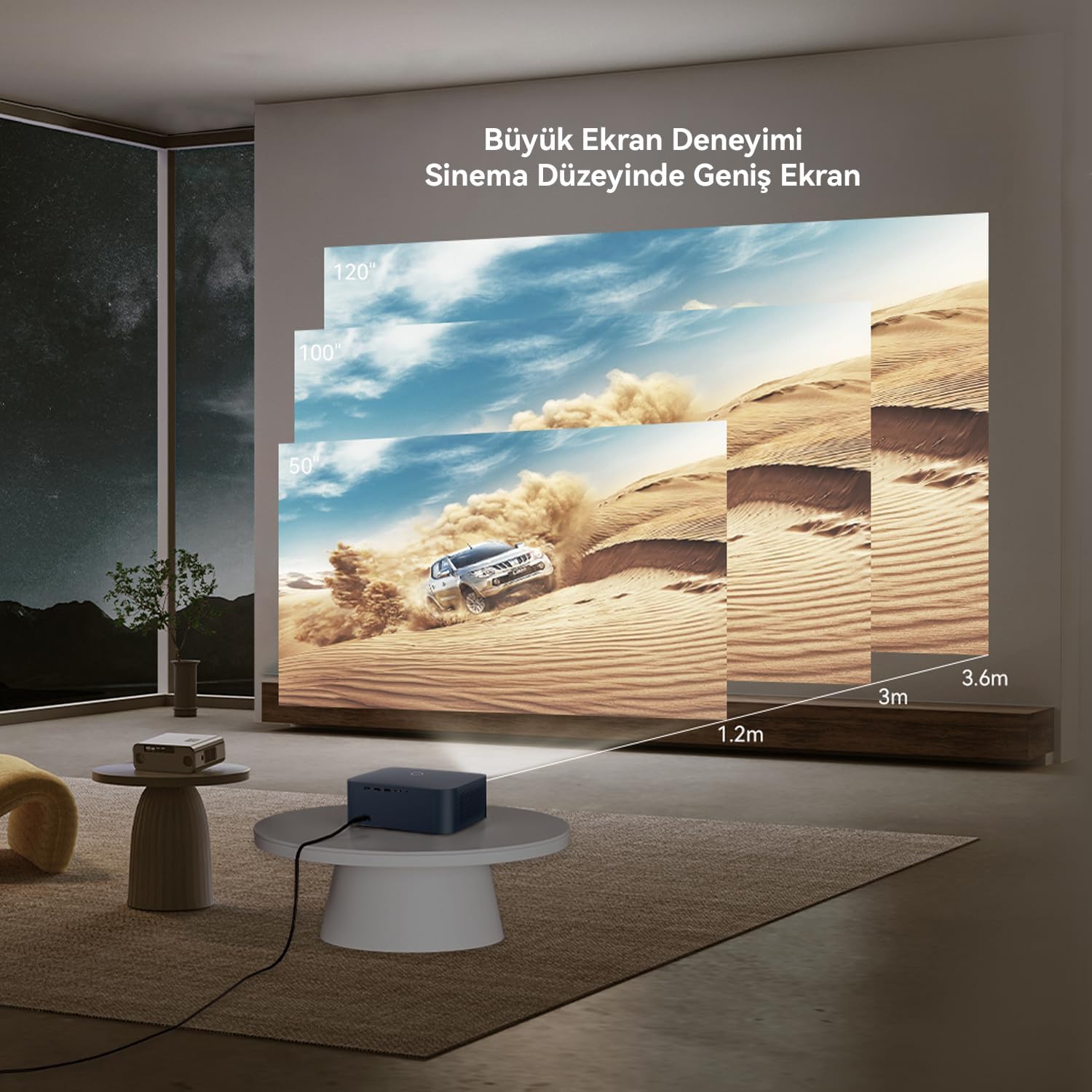
Figure 5.1: Guide for projection distances and corresponding screen sizes. For example, a 1.2m distance yields approximately a 50-inch screen, while 3.6m can achieve a 120-inch screen. The projector supports up to a 300-inch maximum image size.
5.2 Power Connection
- Connect the power cable to the projector's power input port.
- Plug the other end of the power cable into a power outlet.
- Press the power button on the projector or the remote control to turn it on.
5.3 Focus and Keystone Adjustment
The WANBO X2 Max features automatic focus and keystone correction. When the projector is powered on or moved, its AI vision algorithm system will automatically adjust the image to ensure clarity and a rectangular shape.

Figure 5.2: The projector's automatic focus system ensures a clear image upon startup or movement, utilizing Wanbo's proprietary AI vision algorithm.
6. Operating
6.1 Connecting Devices
The projector supports multiple connectivity options:

Figure 6.1: Overview of multi-device connection capabilities, including tablets, smartphones, PCs, laptops, DVD players, TV boxes, gaming consoles (Xbox/PS5), and cameras. The projector offers Audio, HDMI, AV, and USB ports.
- HDMI: Connect laptops, gaming consoles, Blu-ray players, or TV sticks using an HDMI cable. Select the corresponding HDMI input from the projector's source menu.
- USB: Insert a USB flash drive or external hard drive into the USB port to play media files directly.
- AV: Use an AV cable to connect older devices like DVD players or VCRs.
- Audio Out: Connect external speakers or headphones via the 3.5mm audio jack for enhanced sound.
6.2 Using the Remote Control
The included remote control allows you to navigate the projector's interface, adjust settings, and control media playback. Ensure the remote has batteries installed and is pointed towards the projector's IR receiver.
6.3 Navigating Android 9.0 Interface
The projector runs on Android 9.0, providing access to various apps and streaming services. Use the remote control to navigate the home screen, open applications, and adjust system settings.

Figure 6.2: The Android 9.0 interface offers a wide range of content, including films, TV series, shows, animations, and documentaries. Popular streaming service logos like Netflix, YouTube, Prime Video, and Disney+ are shown, indicating potential access to content.
6.4 WiFi Connection
To access online content and features, connect the projector to a Wi-Fi network:
- Go to the 'Settings' menu on the Android home screen.
- Select 'Network & Internet'.
- Turn on Wi-Fi and select your desired network from the list.
- Enter the Wi-Fi password if prompted.
The projector supports Dual-band WiFi 6, which significantly reduces latency for smoother streaming and online experiences.

Figure 6.3: Demonstration of the projector's WiFi 6 capabilities, illustrating reduced delay for a smooth and fast movie streaming experience.
6.5 Screen Mirroring
You can mirror content from your smartphone or tablet to the projector. Refer to the specific screen mirroring app or feature on your device and the projector's Android interface for instructions.
Important Note: Due to copyright protection, certain streaming services like Netflix, Amazon Prime Video, and Disney+ may not allow direct screen mirroring of their content. For these services, it is recommended to use a dedicated TV stick (e.g., Amazon Fire TV Stick, Google Chromecast) connected to the projector's HDMI port.
7. Maintenance
7.1 Cleaning the Lens
Use a soft, lint-free cloth specifically designed for optical lenses to gently wipe the projector lens. Do not use abrasive cleaners or excessive force, as this can scratch the lens.
7.2 General Care
- Keep the projector in a clean, dry environment.
- Avoid exposing the projector to extreme temperatures or direct sunlight.
- Regularly clean the projector's exterior with a soft, dry cloth.
- Ensure ventilation openings are not blocked.
7.3 Lamp Life
The projector's light source has an estimated lifespan of up to 50,000 hours, providing long-term usage without frequent lamp replacement.
8. Troubleshooting
If you encounter issues with your projector, refer to the following common problems and solutions:
| Problem | Possible Cause | Solution |
|---|---|---|
| No power | Power cable not connected; Power outlet faulty; Projector off | Check power cable connection; Try a different outlet; Press power button on projector/remote |
| No image | Input source not selected; Device not connected; Lens cap on | Select correct input source (HDMI, USB, AV); Ensure device is connected and powered on; Remove lens cap |
| Image blurry | Focus issue; Projector moved | Allow automatic focus to adjust; If manual adjustment is needed (rare), check settings. |
| Image distorted (trapezoid) | Keystone issue; Projector not perpendicular to screen | Allow automatic keystone correction to adjust. |
| No sound | Volume too low; Muted; External audio device not connected/selected | Increase volume; Unmute; Check external audio connections and settings |
| Remote control not working | Batteries low/dead; Obstruction; Out of range | Replace batteries; Remove obstructions; Ensure remote is pointed at IR receiver within range |
9. Specifications
Detailed technical specifications for the WANBO X2 Max Projector:

Figure 9.1: Infographic summarizing key features including 1080P FHD, 4K Support, 450 ANSI lumens, Android 9.0, Automatic Focus, Automatic Keystone Correction, 2000:1 Contrast, Dual Band 6G WiFi, 10W Hi-Fi Speaker, Tripod and Ceiling Mount Compatibility, 50,000 hour Lamp Life, Lightweight and Portable design.
| Feature | Specification |
|---|---|
| Brand | Wanbo |
| Model Number | WPA23 |
| Native Resolution | 1920 x 1080 (Full HD) |
| Brightness | 450 ANSI Lumens |
| Contrast Ratio | 2000:1 |
| Operating System | Android 9.0 |
| Connectivity Technology | HDMI, USB, AV, Dual-band WiFi 6 |
| Max Image Size | 300 inches |
| Lamp Life | Up to 50,000 hours |
| Audio Output | 10W Hi-Fi Speaker, 3.5mm Audio Jack |
| Special Features | Automatic Focus, Automatic Keystone Correction, Portable, Tripod and Ceiling Mount Compatible |
| Dimensions (L x W x H) | 28 x 27 x 16 centimeters |
| Weight | 1.4 Kilograms |
10. Warranty and Support
10.1 Manufacturer's Warranty
The WANBO X2 Max Projector comes with a 2-year manufacturer's warranty. This warranty covers defects in materials and workmanship under normal use. Please retain your proof of purchase for warranty claims.
10.2 Customer Support
For technical assistance, troubleshooting, or warranty inquiries, please contact Wanbo customer support. Refer to the official Wanbo website or your purchase documentation for the most up-to-date contact information.
You can also visit the Wanbo Store on Amazon for more product information and support resources.
Related documentsWPA23


Ask a question about this manual
Ask about setup, troubleshooting, compatibility, parts, safety, or missing instructions. Manuals+ will review the question and use this page’s manual context to help answer it.