1. Introduction
This manual provides detailed instructions for the operation and maintenance of the Irfora WiFi+BT 50A Solar Controller. Please read this manual thoroughly before using the device to ensure proper function and safety.
The Irfora WiFi+BT 50A Solar Controller is an advanced MPPT solar charge controller designed for efficient power management in solar energy systems. It features intelligent charging, an LCD display, dual USB outputs, and comprehensive protection mechanisms.
2. Key Features
- MPPT Solar Controller: Automatic focusing MPPT tracking charging, high charging efficiency, continuous detection during charging, bidirectional focusing tracking.
- LCD Display: Industrial-grade master control chip, AD sampling precision, temperature, 16-level charging current, discharge current, and cumulative output real-time display on a large LCD screen for clear visibility.
- Dual USB Port: 5V/2A max output, capable of supplying power to two mobile phones, tablet PCs, and other devices simultaneously.
- Multiple Protection: Built-in overheating, overcurrent, short circuit, open circuit protection, and reverse connection protection. The controller automatically recovers when the fault is eliminated, preventing device damage.
- Applicable Battery: Suitable for all kinds of lead-acid batteries (including open, sealed, gel, and other batteries). For lithium batteries, users must be familiar with battery characteristics and set charging parameters accordingly.

Figure 1: Front view of the Irfora 50A Solar Controller, showing the LCD screen displaying input/output values, temperature, and dual USB charging ports.
3. Product Overview

Figure 2: The solar charging controller highlighting its BT/WiFi intelligent control capabilities, with a smartphone displaying the companion app interface.

Figure 3: Overview of the controller's safety and reliability features, including green environmental protection, MPPT technology, large LCD screen, adjustable parameters, intelligent control, and multiple built-in protections.
4. Setup and Installation
Before installation, ensure all components are present and undamaged. It is recommended to install the controller in a well-ventilated area, away from direct sunlight and moisture.
- Prepare Wiring: Ensure all wires are of appropriate gauge for the current and voltage.
- Connect Battery: Connect the battery to the controller first. Ensure correct polarity (+ to + and - to -).
- Connect Solar Panel: Connect the solar panel to the controller. Ensure correct polarity.
- Connect Load (Optional): If using the load output, connect your DC load to the controller.
- Power On: The controller will automatically detect the system voltage and begin operation.
Important Safety Note: Always connect the battery first and disconnect it last to prevent damage to the controller.
5. Operating Instructions
5.1. LCD Display and Buttons
The large LCD display provides real-time data on charging current, discharge current, battery voltage, and temperature. Use the buttons below the screen to navigate through different display modes and adjust settings.

Figure 4: The LCD display showing various operational parameters: charging current, discharge current, and accumulated power generation.
5.2. APP Remote Control (BT/WiFi)
The controller supports intelligent control via a mobile application, allowing real-time monitoring and parameter adjustments. Download the official APP from your device's app store.
- Download APP: Search for the "Irfora Solar Controller" app on your smartphone's app store.
- Connect: Enable Bluetooth or Wi-Fi on your smartphone and follow the in-app instructions to connect to the controller.
- Monitor & Control: Once connected, you can view device working status, current/voltage, and other parameters. You can also adjust settings remotely.

Figure 5: Illustration of mobile phone control, demonstrating how the BT/WiFi intelligent control allows direct access and management of the solar controller.
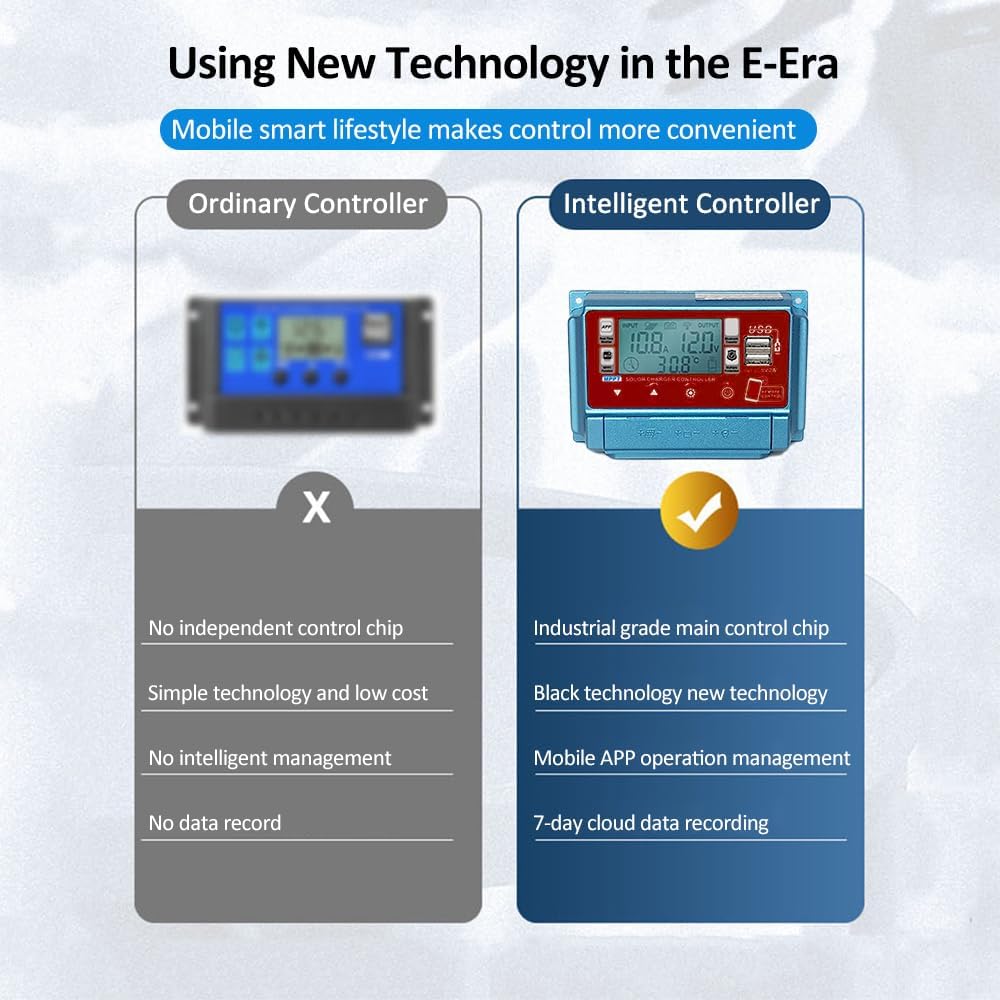
Figure 6: A comparison showing the advantages of the intelligent controller over an ordinary one, emphasizing features like industrial-grade chip, mobile APP operation, and 7-day cloud data recording.

Figure 7: Screenshots demonstrating real-time viewing of device working status and the ability to adjust current/voltage and other parameters via the mobile application.
6. Maintenance
To ensure optimal performance and longevity of your solar controller, regular maintenance is recommended:
- Cleanliness: Keep the controller clean and free from dust. Use a dry, soft cloth for cleaning.
- Connections: Periodically check all wiring connections to ensure they are secure and free from corrosion.
- Ventilation: Ensure the installation area remains well-ventilated to prevent overheating.
- Firmware Updates: Check for any available firmware updates through the mobile application to ensure the controller has the latest features and bug fixes.
7. Troubleshooting
This section addresses common issues you might encounter with your solar controller.
| Problem | Possible Cause | Solution |
|---|---|---|
| Controller not powering on. | Battery not connected or reverse polarity. | Check battery connections and ensure correct polarity. |
| No charging current. | Solar panel not connected, insufficient sunlight, or panel fault. | Check solar panel connections. Ensure adequate sunlight. Test solar panel voltage. |
| USB ports not charging. | Overload on USB ports or low battery voltage. | Reduce USB load. Ensure battery voltage is sufficient. |
| APP connection issues. | Bluetooth/WiFi off, controller out of range, or APP not updated. | Ensure Bluetooth/WiFi is on. Move closer to controller. Update APP. |

Figure 8: Visual representation of the multiple protection mechanisms integrated into the controller, ensuring system safety.
8. Specifications
| Parameter | Value |
|---|---|
| Current | 50A (This model) |
| Voltage | 12V/24V/36V/48V/60V (Auto-sensing) |
| Self-Consume | <10mA |
| USB Output | 5V / 2A Max (Dual USB) |
| Operating Temperature | -10 ~ +60℃ |
| Material | ABS + Metal |
| Product Dimensions | 5.24 x 2.76 x 1.38 inches |
| Item Weight | 6.9 ounces |
| Display Type | LCD |

Figure 9: The controller highlighting its wide voltage compatibility (12V-60V) and high charging efficiency through MPPT technology.
9. Warranty and Support
This product comes with a standard manufacturer's warranty. For specific warranty terms and conditions, please refer to the documentation included with your purchase or contact Irfora customer support.
For technical support, troubleshooting assistance, or any inquiries regarding your Irfora Solar Controller, please visit the official Irfora website or contact their customer service department. Contact information can typically be found on the product packaging or the manufacturer's website.
Note: Always purchase from authorized sellers to ensure valid warranty coverage.


