Introduction
This manual provides essential information for setting up, operating, maintaining, and troubleshooting your VIBOX VI-215 Gaming PC. This system features an AMD Ryzen 3 3200G processor with integrated Radeon Vega 8 graphics, 16GB of DDR4 RAM, and a 480GB SSD, running on the Linux operating system. Please read this manual thoroughly before using your PC.
Product Overview
The VIBOX VI-215 is a gaming PC tower designed for everyday computing, light content creation, and gaming. It features a modern design with tempered glass panels and RGB lighting.

Figure 1: VIBOX VI-215 Gaming PC Tower with tempered glass panels.
Key Features:
- Processor: AMD Ryzen 3 3200G (4 Cores, up to 4.0 GHz)
- Graphics: Integrated Radeon Vega 8
- Memory: 16GB DDR4 RAM at 3200 MHz
- Storage: 480GB SSD
- Operating System: Linux Mint (pre-installed)
- Connectivity: Wi-Fi, Ethernet, USB 2.0, USB 3.0, HDMI
- Cooling: Hex RGB Infinity 120mm fans with reverse airflow design
Setup Instructions
1. Unpacking the PC
Carefully remove the PC from its packaging. Ensure all protective films and internal packaging materials are removed, especially from inside the tempered glass panels. Handle the PC with care to avoid damage to the glass or internal components.
2. Connecting Peripherals
Connect your monitor, keyboard, mouse, and other peripherals to the appropriate ports on the back and front of the PC. Refer to the connectivity diagram below for port identification.

Figure 2: Front Panel Connectivity
- Power Button: Located on the front panel.
- RGB Change Button: To cycle through RGB lighting modes.
- Reset Button: For system reset.
- Headphone Jack: For audio output.
- USB 2.0 Ports: For connecting standard USB devices.
- USB 3.0 Ports: For high-speed USB devices.
- HDMI Port: Connect your monitor to the HDMI port on the rear I/O panel.
- Ethernet Port: For wired network connection.
- Power Input: Connect the power cable to the power supply unit at the rear of the PC.
3. Initial Power On
After connecting all necessary cables, press the power button on the front panel to turn on the PC. The system will boot into the pre-installed Linux Mint operating system.
4. Operating System (Linux Mint)
Your VIBOX VI-215 PC comes with Linux Mint pre-installed. Linux Mint is a lightweight and fast operating system, ideal for maximizing system resources during gaming sessions. It offers a user-friendly interface and strong community support.
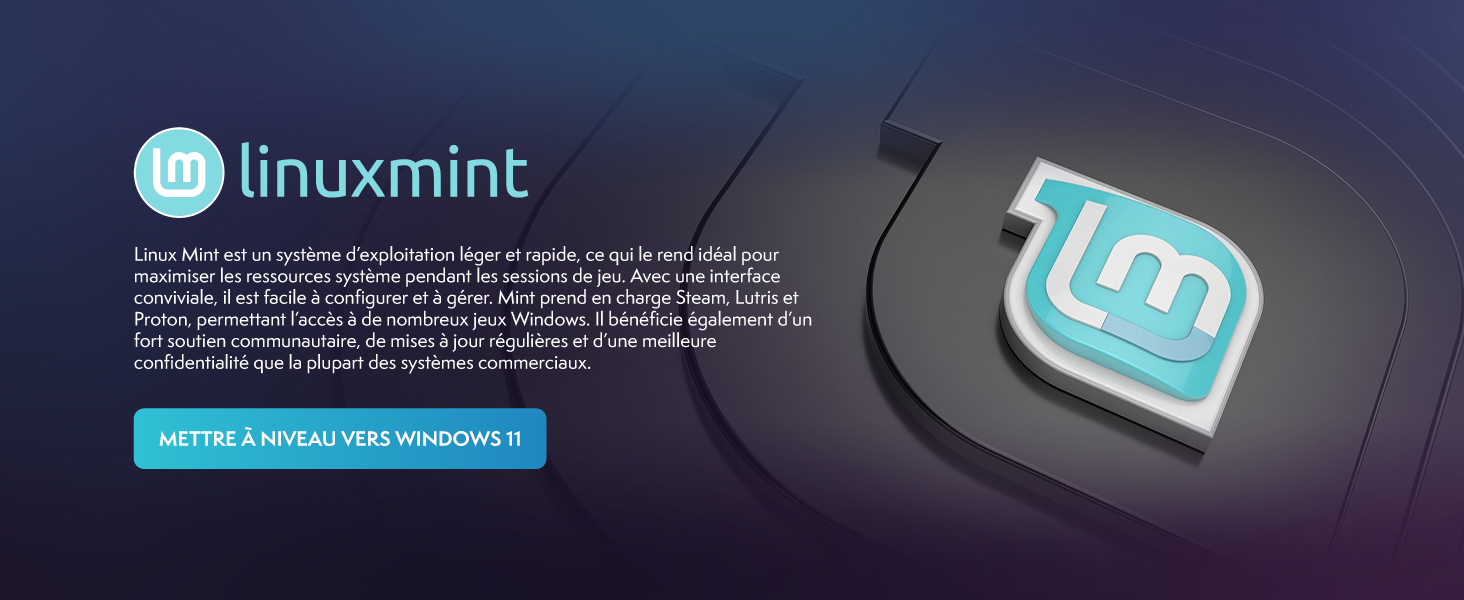
Figure 3: Linux Mint Operating System Features
If you prefer to install a different operating system, such as Windows, you will need to acquire a license and installation media separately. The PC is compatible with various operating systems.
5. Network Connection
The PC supports both wired (Ethernet) and wireless (Wi-Fi 802.11n) connections. For Wi-Fi, ensure the included Wi-Fi adapter is connected (if external) or that internal Wi-Fi is enabled in the system settings. Follow the on-screen prompts in Linux Mint to connect to your network.
Operating Instructions
Basic Usage
Upon booting, you will be presented with the Linux Mint desktop environment. You can navigate using your mouse and keyboard. Applications can be launched from the start menu or desktop shortcuts. The 480GB SSD ensures fast boot times and application loading.
Gaming Performance
The VIBOX VI-215 is equipped with an AMD Ryzen 3 3200G processor and integrated Radeon Vega 8 graphics, providing suitable performance for many popular games at 720p to 1080p resolutions. The 16GB DDR4 RAM supports fluid multitasking and improved system performance during gaming.
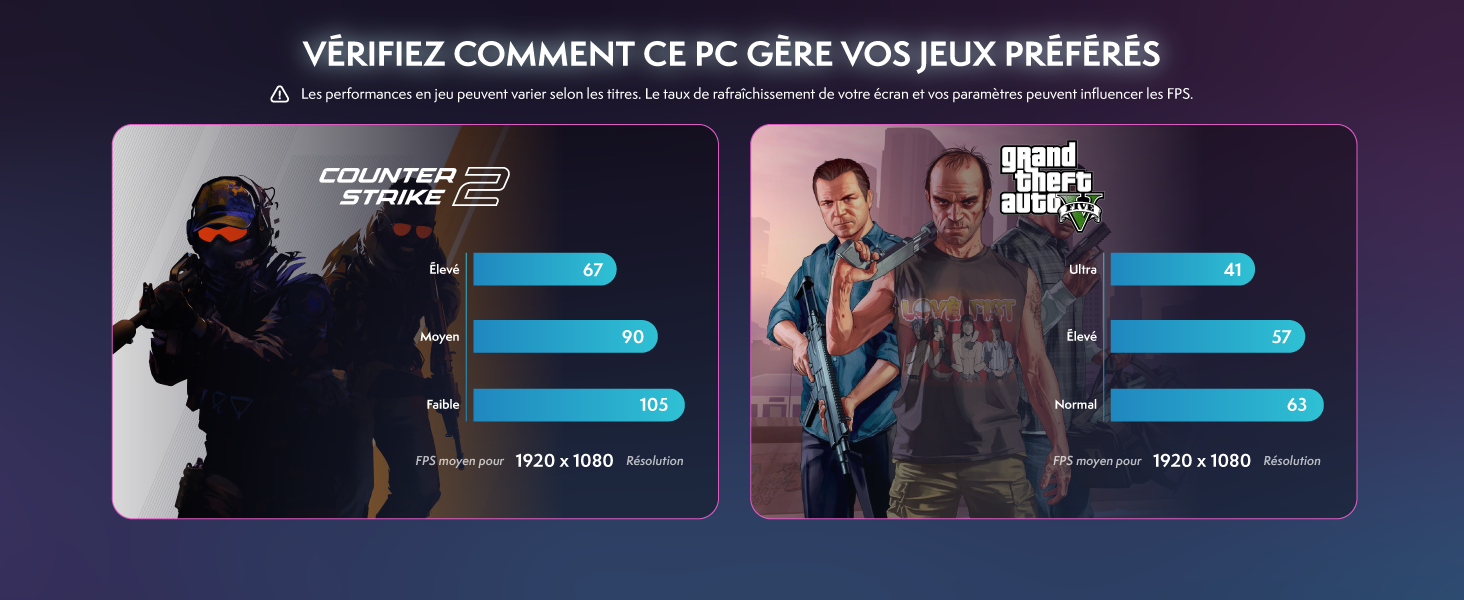
Figure 4: Example Game Performance (Counter-Strike 2, GTA V)
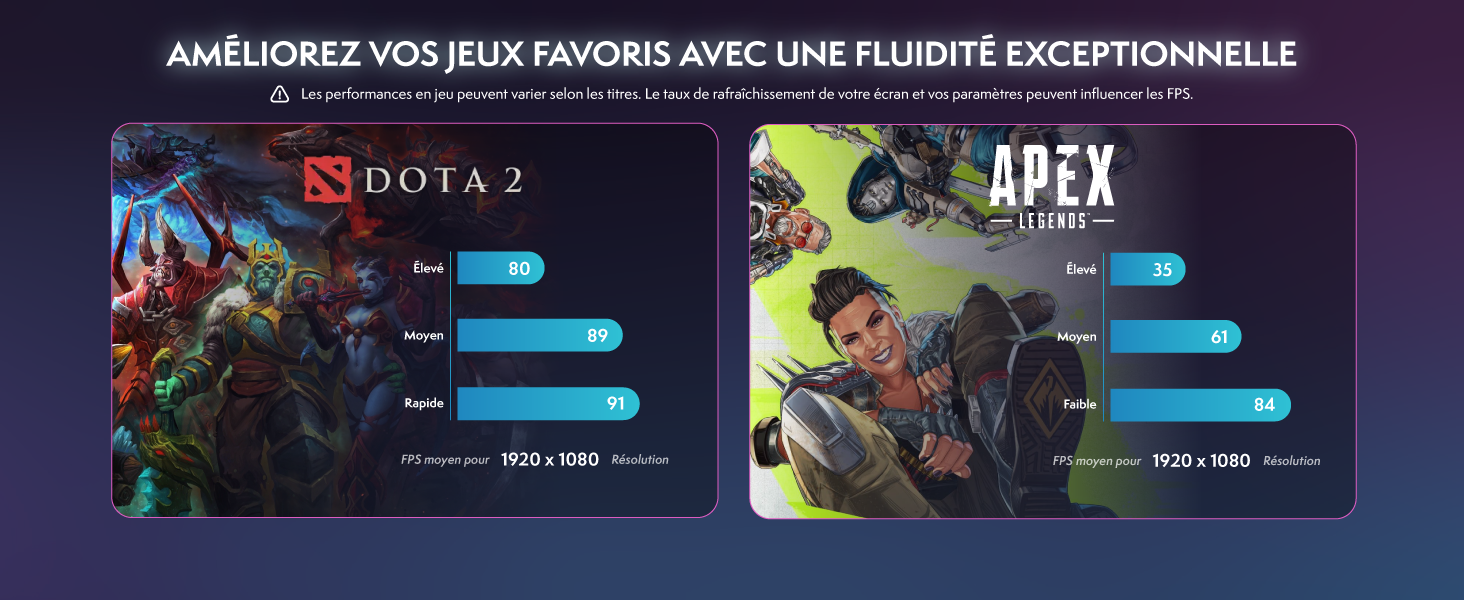
Figure 5: Example Game Performance (DOTA 2, Apex Legends)
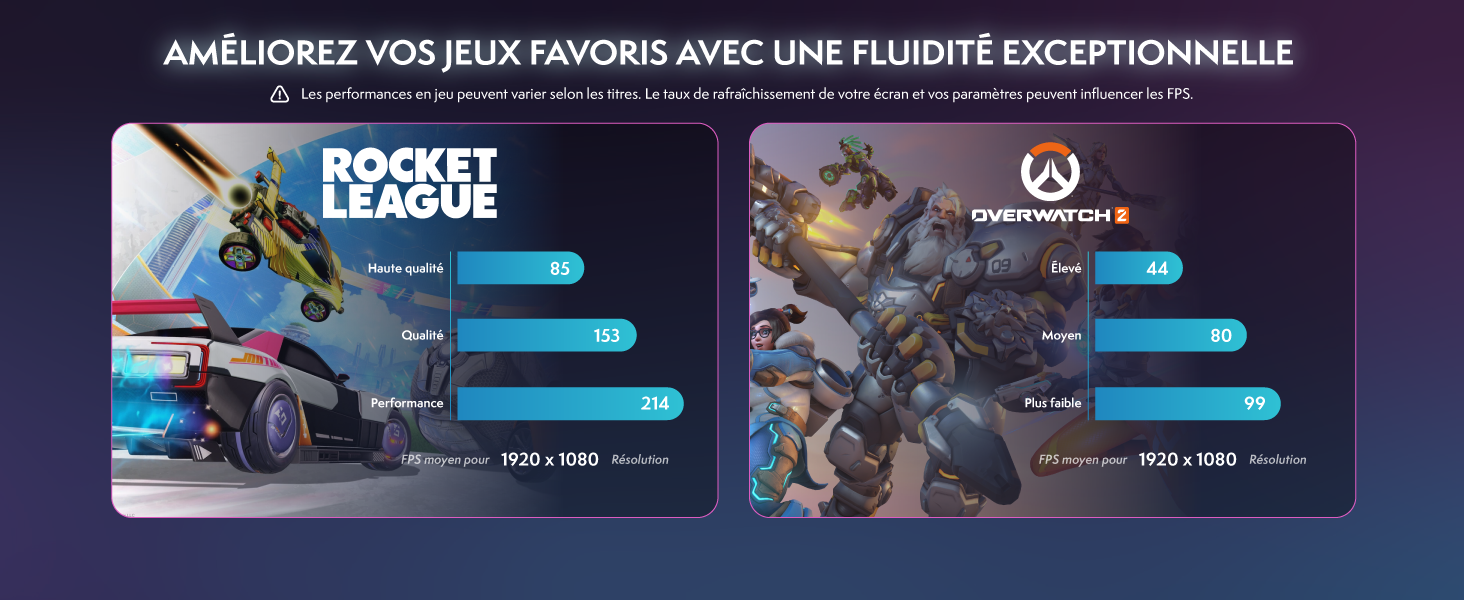
Figure 6: Example Game Performance (Rocket League, Overwatch 2)
Note: Game performance may vary depending on the title, screen refresh rate, and in-game settings.
RGB Lighting Control
Use the RGB Change Button on the front panel to cycle through various lighting effects and colors for the Hex RGB Infinity 120mm fans.
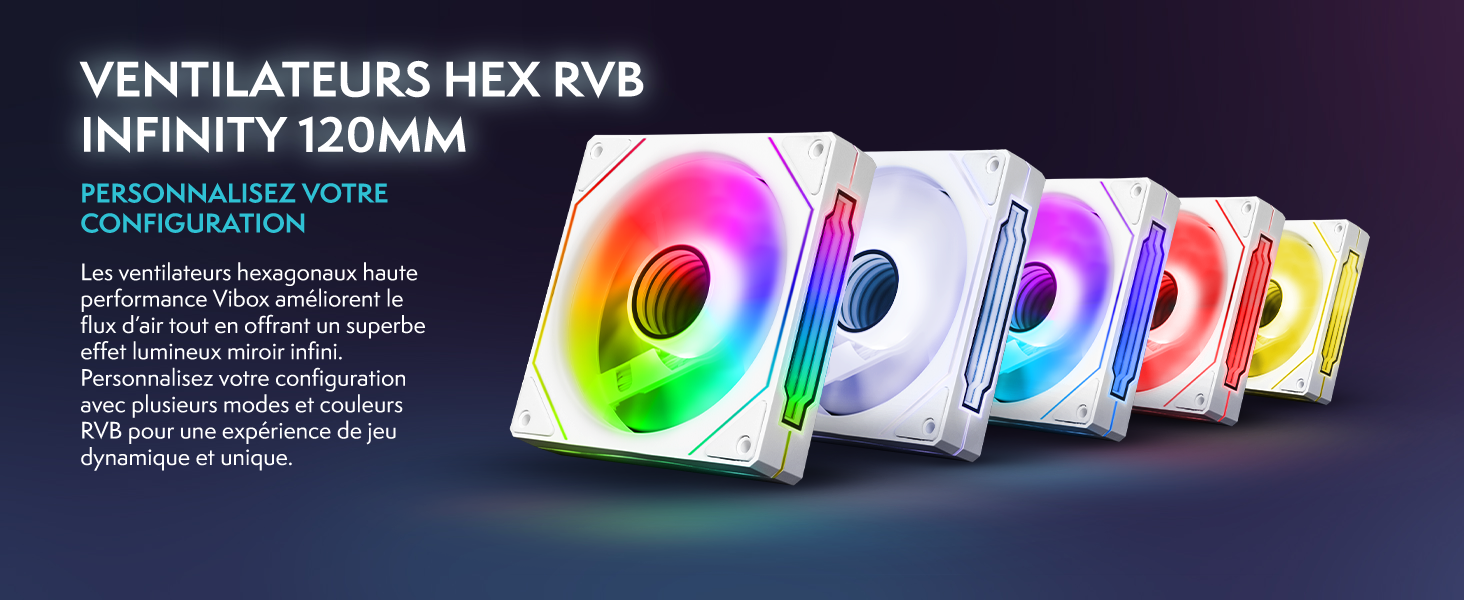
Figure 7: Hex RGB Infinity 120mm Fans
Maintenance
Cleaning
- Exterior: Use a soft, dry cloth to clean the exterior of the PC, including the tempered glass panels. Avoid abrasive cleaners.
- Dust: Periodically clean dust from the fan vents and interior using compressed air. Ensure the PC is powered off and unplugged before cleaning.
Software Updates
Regularly update your Linux Mint operating system and installed software to ensure optimal performance and security. Linux Mint provides a built-in Update Manager for this purpose.
System Care
Ensure the PC is placed in a well-ventilated area to prevent overheating. The reverse airflow cooling design helps manage internal temperatures.

Figure 8: Reverse Airflow Cooling Diagram
Troubleshooting
No Power
- Check if the power cable is securely connected to both the PC and the wall outlet.
- Ensure the power switch on the power supply unit (if present) is in the 'On' position.
- Test the power outlet with another device.
No Display on Monitor
- Verify that the monitor is powered on and the video cable (HDMI) is securely connected to both the PC and the monitor.
- Ensure the monitor's input source is set correctly (e.g., HDMI).
- If you have a dedicated graphics card installed (upgrade), ensure the monitor is connected to the graphics card's port, not the motherboard's integrated graphics port.
Operating System Not Loading
- Restart the PC. If the issue persists, there might be a problem with the SSD or OS installation.
- Consult online resources for Linux Mint troubleshooting or consider reinstalling the operating system if necessary.
Poor Performance
- Ensure all drivers and the operating system are up to date.
- Check for excessive background applications.
- Monitor system temperatures to ensure the PC is not overheating.
Specifications
| Feature | Specification |
|---|---|
| Brand | VIBOX |
| Model Number | VI-215 |
| Series | VI-215 |
| Color | VTX-8 White |
| Operating System | Linux |
| Hardware Platform | PC |
| Processor Brand | AMD |
| Processor Type | Ryzen 3 3200G |
| Processor Speed | 3.6 GHz (Max 4.0 GHz) |
| Number of Cores | 4 |
| CPU Cache Size | 4 MB |
| RAM Size | 16 GB DDR4 |
| Maximum Memory | 128 GB |
| Hard Drive Technology | SSD |
| Storage Capacity | 480 GB |
| Graphics Chipset Brand | AMD |
| Graphics Card Description | Integrated |
| GPU | Radeon Vega 8 |
| Graphics Card RAM | 2 GB (Shared) |
| Processor Socket | Socket AM4 |
| Power Supply Type | DC |
| Connectivity Type | Wi-Fi, Ethernet |
| Wireless Technology Type | 802.11n |
| Hardware Interface | USB |
| HDMI Ports | 1 |
| USB 2.0 Ports | 3 |
| USB 3.0 Ports | 3 |
| Connector Type | Ethernet, HDMI, USB, Wi-Fi |
| Peripheral Compatibility | Headset, Keyboard, Printer, Monitor, Mouse |
| Software Included | 3 Months Norton 360 Gamer Antivirus Protection |
| Item Dimensions (L x W x H) | 35 x 28 x 38 cm |
| Specific Product Uses | Gaming, Photo Editing, Video Editing |
| PC Type | Computer Tower |
Warranty Information
The VIBOX VI-215 PC comes with a manufacturer's warranty of 2 years for parts and lifetime labor. This warranty covers defects in materials and workmanship under normal use. Please retain your proof of purchase for warranty claims. For detailed terms and conditions, refer to the warranty documentation provided with your product or contact VIBOX customer support.
Spare parts are available for a period of 2 years from the date of purchase.
Support
For technical assistance, troubleshooting beyond this manual, or warranty inquiries, please contact VIBOX customer support. VIBOX offers dedicated assistance and has extensive experience in gaming PC manufacturing.
Please visit the official VIBOX website or refer to the contact information provided in your product packaging for the most up-to-date support channels.


