
1. Product Overview
The AGARO Elegant Stick Vacuum Cleaner (Model 34160) is a versatile 2-in-1 dry vacuuming solution designed for efficient cleaning across various surfaces. It functions as both a handheld and a stick vacuum, offering flexibility for different cleaning tasks. Equipped with a powerful 150W motor and cyclonic suction, it provides up to 9kPa suction power. The vacuum features two adjustable suction modes and a motorized multi-floor rolling brush, making it suitable for hard floors, carpets, and upholstery. Its rechargeable battery ensures cordless operation, providing convenience and ease of use.

Image: The AGARO Elegant Stick Vacuum Cleaner in its full stick configuration, ready for floor cleaning.
2. Included Components
The AGARO Elegant Stick Vacuum Cleaner package includes the following components:
- Main Unit (Handheld Vacuum)
- Extension Tube
- Motorized Floor Brush
- Crevice Nozzle
- Multi-purpose Brush
- Wall Mount
- Charging Adaptor
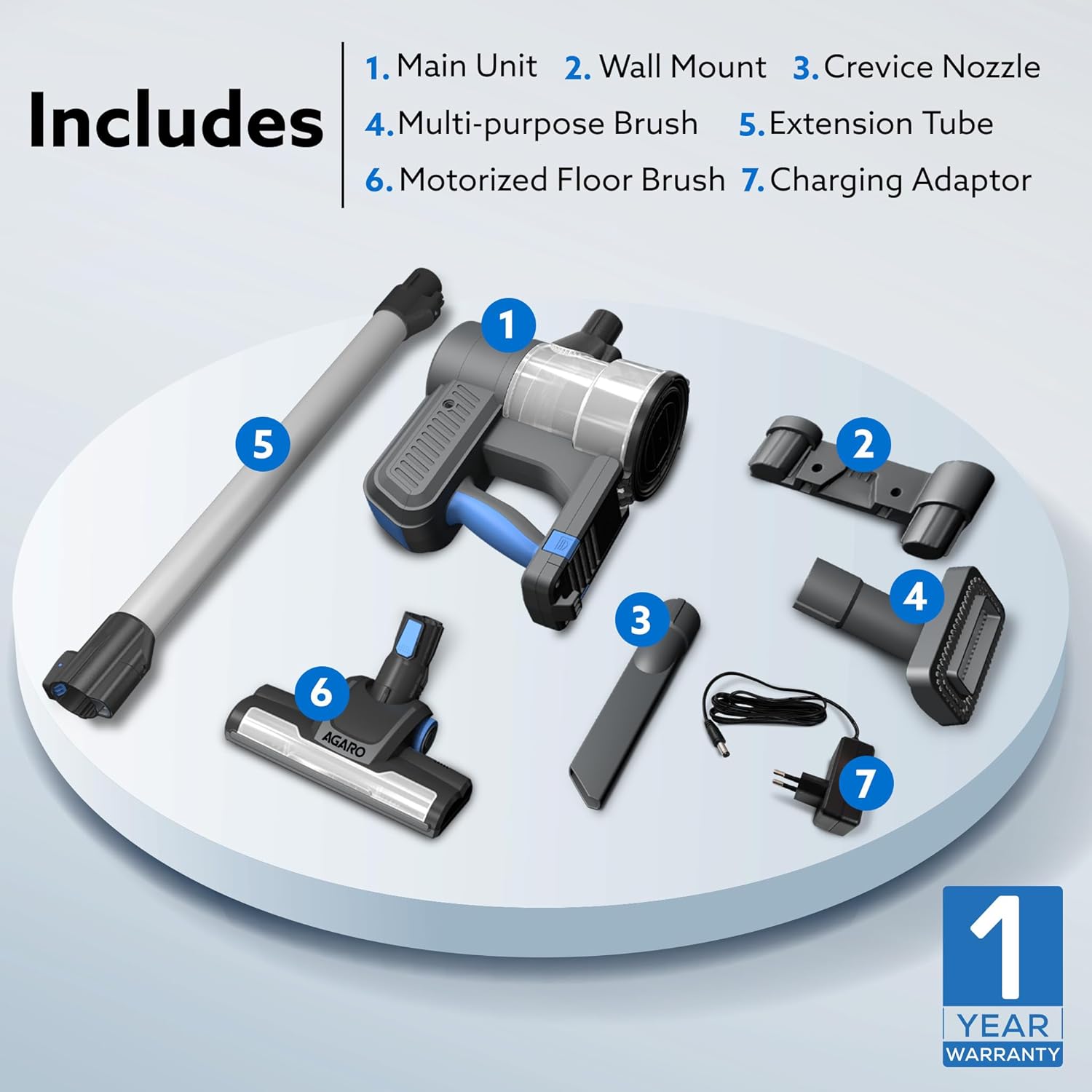
Image: A visual representation of all included parts: main unit, extension tube, motorized floor brush, crevice nozzle, multi-purpose brush, wall mount, and charging adaptor.
3. Setup and Assembly
3.1 Initial Charging
Before first use, fully charge the vacuum cleaner. Connect the charging adaptor to the main unit and plug it into a power outlet. The battery indicator lights will show charging progress. A full charge takes approximately 5 hours.
3.2 Assembling the Stick Vacuum
- Insert the extension tube into the main unit until it clicks securely.
- Attach the motorized floor brush to the other end of the extension tube, ensuring it locks into place.
- To disassemble, press the release buttons on the connections and pull the parts apart.

Image: Demonstrates the vacuum's 2-in-1 functionality, showing it as a handheld unit and as a stick vacuum with the extension tube and floor brush attached.
3.3 Assembling the Handheld Vacuum with Attachments
For handheld use, detach the extension tube and motorized floor brush. Directly attach the desired accessory (crevice nozzle or multi-purpose brush) to the main unit.
- Crevice Nozzle: Ideal for narrow gaps, corners, and hard-to-reach areas like between sofa cushions or car seats.
- Multi-purpose Brush: Suitable for cleaning upholstery, curtains, keyboards, and other delicate surfaces.

Image: An internal view illustrating the cyclonic suction system and the 150W motor, highlighting the vacuum's powerful cleaning mechanism.
4. Operating Instructions
4.1 Power On/Off and Suction Modes
Press the power button on the main unit to turn the vacuum cleaner on or off. The vacuum offers two suction modes:
- Low Mode: Provides up to 32 minutes of runtime, suitable for light cleaning and extended use.
- High Mode: Provides up to 22 minutes of runtime, ideal for stubborn dirt and deep cleaning.
Press the mode selection button to switch between low and high suction settings.

Image: A detailed view of the vacuum's control panel, illustrating the power button, mode selection button, and battery indicator lights.
4.2 Cleaning Different Surfaces
The motorized multi-floor rolling brush is designed to effectively clean both hard floors and carpets, removing dust, dirt, and pet hair. For specific areas, use the appropriate attachments:
- Hard Floors: Use the motorized floor brush in stick mode.
- Carpets: Use the motorized floor brush in stick mode, selecting high suction for deeper cleaning.
- Upholstery & Curtains: Use the multi-purpose brush in handheld mode.
- Tight Spaces & Corners: Use the crevice nozzle in handheld mode.

Image: The motorized multi-surface roller brush in action, demonstrating its ability to deep clean dust, dirt, and pet hair from various floor types.
Note: This vacuum cleaner is designed for DRY vacuuming only. Do not use it to vacuum liquids or wet debris.
5. Maintenance
5.1 Emptying the Dust Container
The vacuum features a 0.5L bagless dust container. To empty:
- Ensure the vacuum is turned off.
- Locate the dust container release button (often marked "PUSH to open").
- Press the button to open the bottom flap of the dust container and empty its contents into a waste bin.
- Close the flap securely until it clicks.
Empty the dust container regularly to maintain optimal suction performance.

Image: A visual guide demonstrating how to open and empty the 0.5L bagless dust container by pressing the release button.
5.2 Cleaning the HEPA Filter
The vacuum is equipped with a HEPA filter, which should be cleaned periodically to ensure efficient filtration and suction.
- Twist and pull out the filter assembly from the dust container.
- Tap the filter gently to remove loose dust.
- If heavily soiled, rinse the filter under cold running water. Ensure it is completely dry before reinserting.
- Reassemble the filter and dust container.
Do not use detergents or hot water to clean the filter. Allow it to air dry completely, away from direct sunlight or heat sources.
5.3 Cleaning the Motorized Floor Brush
Hair and debris can get tangled in the motorized brush. Regularly inspect and clean the brush roll.
- Turn off the vacuum and detach the motorized floor brush.
- Use scissors or a brush to remove any tangled hair or fibers from the brush roll.
- Ensure the brush roll spins freely before reattaching.
6. Troubleshooting
If you encounter issues with your AGARO Elegant Stick Vacuum Cleaner, refer to the following common troubleshooting steps:
| Problem | Possible Cause | Solution |
|---|---|---|
| Vacuum does not turn on | Battery is depleted or not charged. | Charge the battery fully. Ensure the charging adaptor is properly connected. |
| Reduced suction power | Dust container is full, filter is clogged, or an attachment is blocked. | Empty the dust container. Clean the HEPA filter. Check all attachments and tubes for blockages. |
| Motorized brush not rotating | Brush roll is tangled with hair/debris or blocked. | Turn off the vacuum and remove any obstructions from the brush roll. |
| Short battery runtime | Battery not fully charged or battery degradation. | Ensure the battery is fully charged (approx. 5 hours). If the issue persists, contact customer support. |
If the problem persists after following these steps, please contact AGARO customer support for further assistance.
7. Specifications
| Feature | Detail |
|---|---|
| Brand | AGARO |
| Model Name | Elegant |
| Model Number | 34160 |
| Type | 2-in-1 Stick & Handheld Dry Vacuum Cleaner |
| Power Source | Battery Powered |
| Motor Wattage | 150 Watts |
| Suction Power | Up to 9 kPa |
| Suction Modes | 2 (Low, High) |
| Filter Type | HEPA Filter |
| Dust Container Capacity | 0.5 Liters (Bagless) |
| Battery Life (Low Mode) | Up to 32 minutes |
| Battery Life (High Mode) | Up to 22 minutes |
| Recharging Time | Up to 5 hours |
| Noise Level | 80 Decibels |
| Item Weight | 1200 Grams |
| Dimensions (L x W x H) | 75L x 12.2W x 22.5H Centimeters |
| Surface Recommendation | Hard Floor, Carpet |
8. Warranty and Support
The AGARO Elegant Stick Vacuum Cleaner comes with a 1-year warranty from the date of purchase. Please retain your purchase receipt as proof of warranty.
For technical support, warranty claims, or any product-related inquiries, please contact AGARO customer service:
- Manufacturer: Universal Corporation Limited
- Address: 4/1 Middleton Street, Sikkim Commerce House, Kolkata - 700071
- Contact Information: Refer to the product packaging or the official AGARO website for the most current contact details.
Always refer to the official AGARO website or contact customer support for the most up-to-date information and assistance.