
Introduction
This manual provides comprehensive instructions for the installation, operation, and maintenance of your Roadanvi X12 12.3-inch Android Car Stereo. Please read this manual thoroughly before installation and use to ensure proper function and to maximize your experience with the device. This unit is designed to integrate seamlessly with specific Toyota RAV4 models, enhancing your vehicle's infotainment capabilities.

Image: The Roadanvi X12 12.3-inch Android Car Stereo unit, showcasing its QLED touchscreen display with a modern user interface featuring applications like Phone, Music, Maps, and Settings.
Vehicle Compatibility
The Roadanvi X12 Car Stereo is specifically designed for Toyota RAV4 models manufactured between 2019 and 2022. It includes a plug-and-play cable and Canbus system to ensure compatibility with your vehicle's existing features. This unit is engineered to retain factory functionalities such as steering wheel controls, 360-degree camera, rearview camera, JBL amplifier, A/C information display, reverse radar, and door open hints.
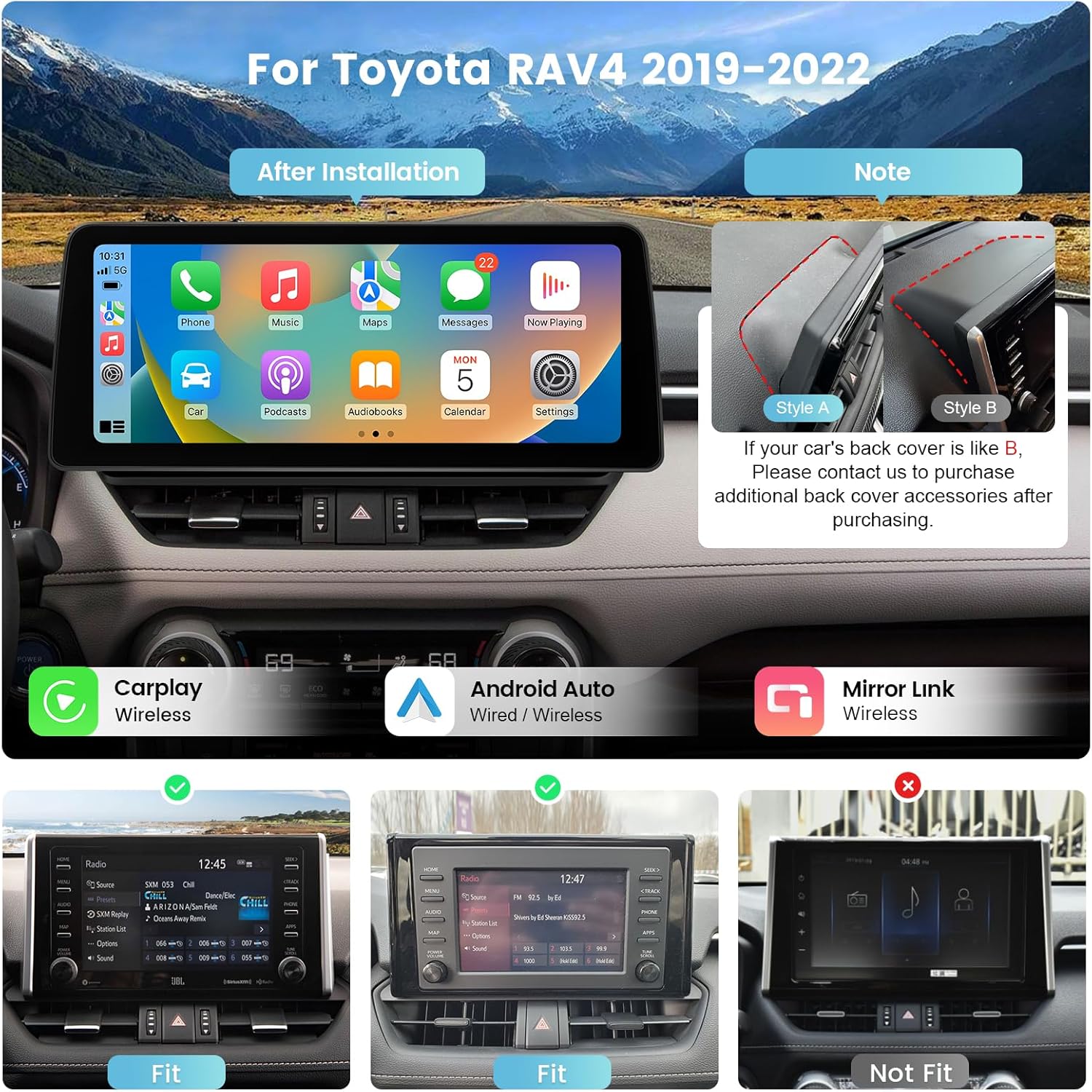
Image: An illustration of the Roadanvi X12 car stereo seamlessly integrated into a Toyota RAV4 dashboard, highlighting its compatibility with wireless Apple CarPlay, wired/wireless Android Auto, and wireless Mirror Link.
Retained Factory Features
- Steering Wheel Controls
- Door Open Hint
- Factory Amplifier (JBL)
- Factory USB/AUX Port
- A/C Information Display
- Factory Reverse Camera + Reverse Trajectory
- 360° Camera + Radar
Note: If your original vehicle does not possess these features, they will not be added by installing this unit.

Image: A visual representation of various factory car features, such as steering wheel controls, door open hints, factory amplifier, USB/AUX port, A/C information, reverse camera, and 360-degree camera, all retained with the Roadanvi X12 installation.
Back Cover Verification
Before purchasing or installing, please verify the style of your car's original back cover. If your car's back cover matches 'Style B' as shown in the image, you may need to purchase additional back cover accessories.

Image: A comparison image displaying two distinct styles of car back covers, labeled 'Style A' and 'Style B', with an alert indicating that 'Style B' may require additional accessories for proper fitment.
What's in the Box
Your Roadanvi X12 package includes all necessary components for installation and operation:
- Roadanvi X12 Head Unit
- Tool Kit
- User Manual
- Audio Output Cable
- Cam In Cable
- SIM Slot Cable
- Dual USB Cable
- GPS Antenna
- Microphone
- 4G Antenna
- Power Cable
- Canbus Decoder
- USB Adapter

Image: A detailed layout of all items included in the Roadanvi X12 product package, such as the main unit, tool kit, user manual, various audio and data cables, antennas, microphone, and power cable.
Setup & Installation
Installation of the Roadanvi X12 unit requires careful attention to wiring and component placement. It is recommended to consult online video guides for detailed visual instructions, as the included manual provides general guidance.
General Installation Steps
- Preparation: Ensure the vehicle's engine is turned off and the battery is disconnected before beginning any electrical work.
- Remove Original Head Unit: Carefully remove the factory stereo unit and trim panels.
- Connect Wiring Harness: Connect the provided plug-and-play wiring harness to the vehicle's existing connectors and to the Roadanvi X12 unit. Ensure all connections are secure.
- Connect Peripherals: Attach the GPS antenna, 4G antenna, microphone, and USB cables to their respective ports on the head unit.
- SIM Card Installation (Optional): If using a 4G SIM card, turn off the engine before inserting the SIM card into the SIM slot cable. Ensure it is a standard SIM card (not Micro or Nano).
- Test Functionality: Before fully reassembling the dashboard, temporarily reconnect the battery and test the unit's basic functions (power, audio, touch screen, steering wheel controls, camera inputs).
- Reassemble: Once all functions are verified, carefully reassemble the dashboard and secure the Roadanvi X12 unit in place.
Wiring Diagrams
Refer to the following diagrams for detailed wiring connections. It is crucial to connect the reverse trigger wire (C) to C1 for the rear view to be triggered correctly. If the rear view is not triggered, switch wire C from C1 to C2.

Image: A detailed diagram illustrating the dedicated wiring connections for the Roadanvi X12 unit, including power, camera, radio, speaker cables, and USB adapter, with specific notes on the reverse trigger wire.

Image: A comprehensive stereo wiring diagram showing all input and output connections for the Roadanvi X12, including GPS ANT, 4G Antenna, AUX-V IN, SUB OUT, CAM IN, FL, FR, RL, RR, USB-1, CCD-12V, BRAKE, GND, FRONT CAMERA, AUX-L IN, AUX-R IN, SIM Card Slot, USB-2, MICROPHONE, and WIFI ANT.
Operating Instructions
The Roadanvi X12 features an intuitive Android 12 operating system with a 12.3-inch QLED touchscreen for easy navigation and control.
Key Features and Functions
- QLED Touch Screen: The 1920x720 high-resolution QLED display offers clear visuals and sensitive touch response. It includes day and night modes for optimal visibility and reduced eye strain.
- Wireless Apple CarPlay & Android Auto: Connect your smartphone wirelessly to access navigation, music, messages, and calls through the stereo's interface. Use voice commands (Siri/Hey Google) or the touchscreen for control.
- Mirror Link: Cast your phone's screen directly to the car stereo display for a larger view of your mobile content.
- Bluetooth 5.0: Enjoy faster transmission speeds and a stable connection for hands-free calling and audio streaming. Download your phonebook for easy access.
- AM/FM Radio: Tune into local radio stations for real-time news, weather forecasts, and entertainment.
- GPS Navigation: The unit supports both online and offline navigation. Use the 4G SIM card slot (SIM card not included) for real-time traffic updates and online maps, or utilize offline maps without an internet connection.
- DTS Sound System: Experience enhanced audio quality with built-in DTS surround sound and 4*50W output. Customize your sound with EQ, Bass Boost, and Slope settings.
- Fiber Optical Output: If your external amplifier supports optical fiber digital input, this feature allows for direct connection to achieve optimal sound quality.
- Split Screen Functionality: Run two applications simultaneously on the screen for multitasking.

Image: The DTS sound system interface of the Roadanvi X12, showing various audio customization options including equalizer (EQ), bass boost, and slope adjustments, designed to enhance the in-car audio experience.

Image: The Roadanvi X12 QLED screen demonstrating its intelligent day and night switch feature, showing how the display adjusts brightness and color scheme for clearer visibility during the day and reduced eye irritation at night.
Maintenance
To ensure the longevity and optimal performance of your Roadanvi X12 car stereo, follow these maintenance guidelines:
- Screen Cleaning: Use a soft, lint-free cloth specifically designed for electronic screens. Gently wipe the QLED touch screen to remove dust and fingerprints. Avoid abrasive cleaners or harsh chemicals.
- Software Updates: Periodically check for available software updates to ensure your unit has the latest features and security patches. Follow the on-screen instructions for any updates.
- Environmental Conditions: Avoid exposing the unit to extreme temperatures, direct sunlight for prolonged periods, or excessive moisture.
- Cable Connections: Periodically check all cable connections to ensure they are secure and free from damage. Loose connections can lead to intermittent functionality.
- General Care: Treat the unit with care to prevent physical damage. Avoid placing heavy objects on it or applying excessive force to the screen.
Troubleshooting
If you encounter issues with your Roadanvi X12 unit, refer to the following common problems and solutions:
| Problem | Possible Cause / Solution |
|---|---|
| No radio stations or static reception | Ensure the radio antenna is securely plugged into the head unit. Check for any damage to the antenna cable. |
| Apple CarPlay / Android Auto / Bluetooth not connecting or disconnecting frequently | Try re-pairing your device. Ensure your phone's Bluetooth and Wi-Fi are enabled. Check for any software updates for both the stereo and your phone. Ensure your phone is in close proximity to the unit. |
| GPS displays in Kilometers per hour (kph) instead of Miles per hour (mph) | Access the unit's settings menu, navigate to 'System' or 'Navigation' settings, and change the unit of measurement from metric to imperial. |
| Speakers not working properly or intermittent sound | Inspect the speaker wiring harness connections. Ensure all pins are properly seated and not dislodged. |
| Difficulty hearing or being heard during calls | Check the microphone connection. Adjust the microphone sensitivity settings in the unit's audio menu. Ensure no obstructions are blocking the microphone. |
| Certain features stop working after adjusting settings | Exercise caution when modifying advanced settings. If an issue arises after a setting change, try reverting the change or performing a factory reset (note: a factory reset will erase all user data and settings). |
| No physical buttons for volume or power | This unit is designed with a full touchscreen interface. Volume and power controls are managed through the touchscreen interface or steering wheel controls (if retained). |
Detailed Specifications
| Feature | Specification |
|---|---|
| Brand | Roadanvi |
| Model Name | X12 (For Toyota RAV4 2019-2022) |
| Operating System | Android 12 |
| Processor | Unis7862S True Octa-core |
| RAM | 4GB |
| ROM | 64GB |
| Display Size | 12.3 Inches |
| Screen Type | QLED Touch Screen |
| Resolution | 1920x720 |
| Viewing Angle | 178° Full-viewing angle |
| Connectivity Technology | Bluetooth 5.0, USB, 5G WiFi, 4G SIM Card Slot |
| Special Features | Wireless Apple CarPlay, Android Auto, Mirror Link, Built-in DTS, GPS Navigation (Online/Offline), AM/FM Radio, Fiber Optical Output, Split Screen |
| Audio Output Mode | Stereo (4*50W output) |
| Map Type | North America (Pre-installed or supported) |
| Mounting Type | Dashboard Mount |
| Item Weight | 6.09 pounds |
| Product Dimensions | 12.3 x 12.3 x 5.5 inches |
| ASIN | B0D2HQVN72 |
| Date First Available | April 23, 2024 |
Warranty Information
The Roadanvi X12 Android Car Stereo comes with a 1-year warranty from the date of purchase. This warranty covers manufacturing defects and malfunctions under normal use. Please retain your proof of purchase for warranty claims. For specific terms and conditions, refer to the warranty card included in your package or contact customer support.
Customer Support
For any questions, technical assistance, or support regarding your Roadanvi X12 car stereo, please contact our customer service team:
- Email: office@roadanvi.com
- Online Resources: Visit the official Roadanvi website or Amazon brand store for additional FAQs, video tutorials, and product information.
When contacting support, please provide your product model (X12) and a detailed description of the issue to facilitate a quicker resolution.