Introduction
This manual provides detailed instructions for the operation, maintenance, and troubleshooting of your BAOFENG UV-5RX Multi-Band Ham Radio. The UV-5RX is an upgraded version of the UV-5R, offering multi-band capabilities including VHF/1.25M/UHF frequencies, 50 CTCSS and 210 DCS codes, dual band, SOS emergency function, scan, dual display, and dual standby. It is designed for efficient and convenient communication.
Please read this manual thoroughly before using the device to ensure proper and safe operation.
Package Contents
Upon opening the package, verify that all items are present and in good condition. The standard package for the 2P-5RX model typically includes:
- BAOFENG UV-5RX Two-Way Radios (2 units)
- TD-771 Long Antenna (2 units)
- TD-805s Mini Antenna (2 units)
- Lithium Polymer Batteries (2 units, 3800mAh)
- Charging Docks with AC Adapters (2 sets)
- USB Programming Cable (CH430)
- Earphones (2 units)
- Belt Clips (2 units)
- Hand Straps (2 units)

Image: Overview of the BAOFENG UV-5RX package contents, showing two radios, two long antennas, two short antennas, two batteries, two charging bases, two power adapters, a programming cable, and two earpieces.
Setup
1. Battery Installation and Charging
The BAOFENG UV-5RX comes with a 3800mAh Lithium Polymer battery. Before first use, ensure the battery is fully charged.
- Align the battery with the grooves on the back of the radio and slide it upwards until it clicks into place.
- To charge, place the radio (with battery installed) into the charging dock. Ensure the metal contacts on the battery align with those on the charger.
- Connect the AC adapter to the charging dock and plug it into a power outlet. The indicator light on the charger will typically show red during charging and green when fully charged.

Image: The BAOFENG UV-5RX radio shown alongside its 3800mAh battery, illustrating how the battery attaches to the radio unit.

Image: A visual representation of the radio battery being charged in its dedicated charging dock, with a charging indicator.
2. Antenna Attachment
The UV-5RX comes with two types of antennas: the TD-771 long antenna for extended range and the TD-805s mini antenna for portability. Choose the appropriate antenna for your communication needs.
- Screw the desired antenna clockwise onto the antenna connector at the top of the radio until it is finger-tight. Do not overtighten.

Image: The BAOFENG UV-5RX radio displayed with both the longer TD-771 antenna and the shorter TD-805s antenna, highlighting the antenna options.
Operating Instructions
1. Power On/Off and Volume Control
- To power on, rotate the volume knob (top-left) clockwise until you hear a click.
- To power off, rotate the volume knob counter-clockwise until you hear a click.
- Adjust the volume by rotating the same knob.
2. Frequency and Channel Selection
The UV-5RX supports both Frequency Mode (VFO) and Channel Mode (MR).
- Press the VFO/MR button to switch between Frequency Mode and Channel Mode.
- In Frequency Mode, use the keypad to directly input frequencies or the UP/DOWN arrow buttons to adjust.
- In Channel Mode, use the UP/DOWN arrow buttons to cycle through programmed channels.
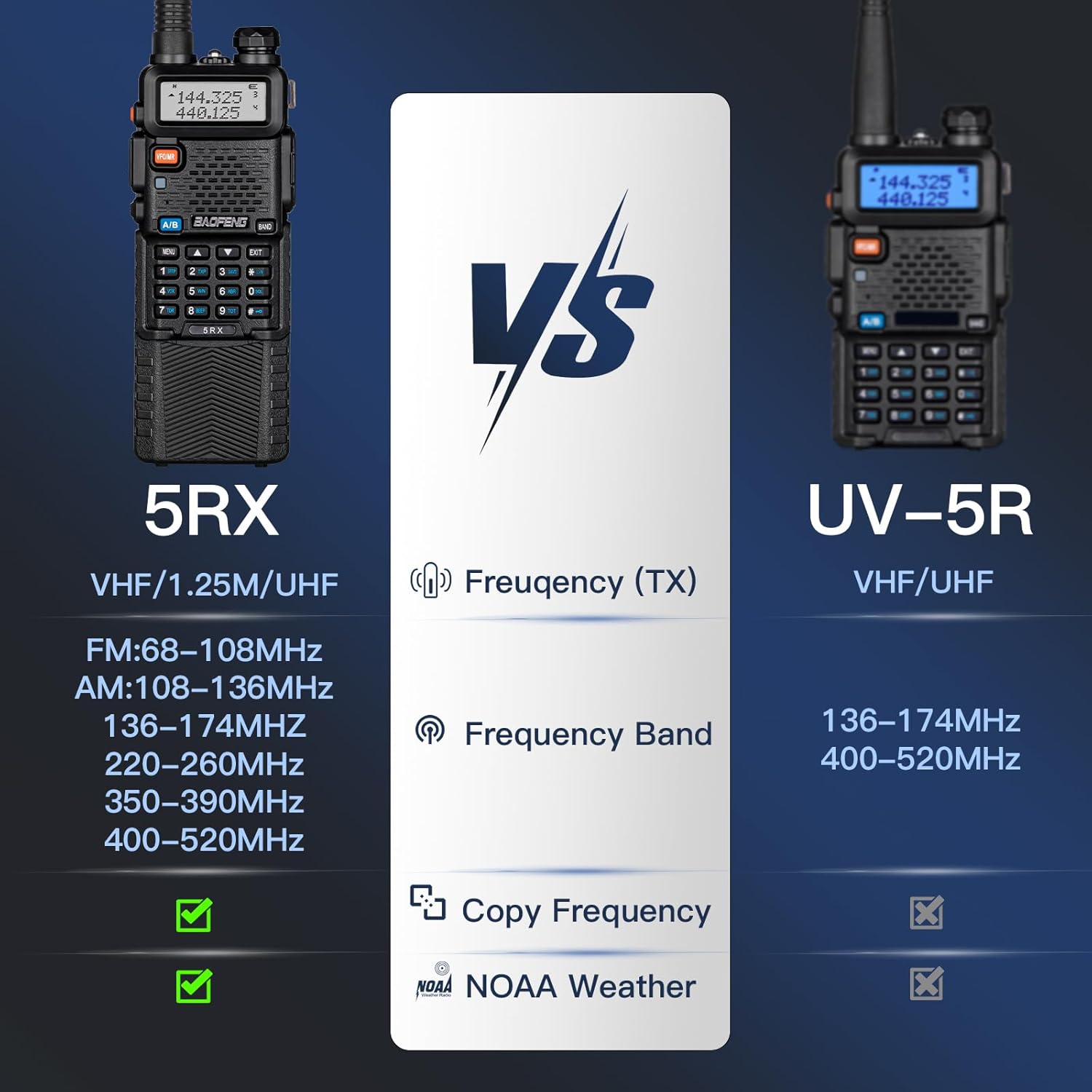
Image: The BAOFENG UV-5RX radio highlighting its professional ham radio features, including multi-band operation, VOX, CTCSS/DTC, FM/AM reception, frequency copy, CHIRP software compatibility, 128 channels, and NOAA Weather alerts.
3. Transmitting and Receiving
- To transmit, press and hold the PTT (Push-To-Talk) button on the left side of the radio. Speak clearly into the microphone. Release the PTT button to receive.
- Ensure you are on an appropriate frequency or channel for communication.
4. Copy Frequency Function
The one-key copy frequency feature allows for quick replication of an attached intercom channel, simplifying operation.
- Turn on the radio and press the BAND button to match UHF for VHF frequency.
- The monitor will display the frequency and CTCSS/DCS when another radio transmits.
- Press the MENU button to save the detected frequency and CTCSS or DCS to a channel.

Image: A step-by-step guide demonstrating the "One Key Frequency" copy function, showing how to use the BAND and MENU buttons to detect and save frequencies and CTCSS/DCS codes.
5. Programming with CHIRP & CPS Software
The UV-5RX supports computer programming for advanced customization of channels and settings.
- Connect the radio to your computer using the CH430 USB programming cable.
- Use CHIRP software (select "Baofeng 5RX" model) or other compatible CPS software (e.g., from walkietalkiesoftware.com) to program frequencies, tones, and other parameters.

Image: The BAOFENG UV-5RX radio, its battery, and a USB programming cable, illustrating its compatibility with CHIRP and CPS software for computer-based programming.
Maintenance
1. Cleaning
- Wipe the radio's surface with a soft, damp cloth. Do not use harsh chemicals or abrasive cleaners.
- Ensure the radio is dry before use or charging.
2. Battery Care
- Avoid fully discharging the battery frequently to prolong its lifespan.
- Store the battery in a cool, dry place when not in use for extended periods.
- Do not expose the battery to extreme temperatures or direct sunlight.
3. Storage
- Store the radio in a dry, dust-free environment.
- Remove the battery if storing the radio for a long duration.
Troubleshooting
| Problem | Possible Cause | Solution |
|---|---|---|
| Radio does not power on. | Battery is not installed correctly or is discharged. | Ensure battery is properly seated. Charge the battery fully. |
| Cannot transmit or receive. | Incorrect frequency/channel, antenna not attached, or low battery. | Verify frequency/channel. Check antenna connection. Charge battery. |
| Poor audio quality or static. | Weak signal, interference, or incorrect squelch setting. | Move closer to the other radio. Adjust squelch level. Check for local interference. |
| Programming issues with software. | Incorrect cable driver, wrong radio model selected in software, or faulty cable. | Install correct USB cable drivers. Ensure "Baofeng 5RX" is selected in CHIRP. Try a different cable if available. |
Specifications
| Feature | Detail |
|---|---|
| Model | UV-5RX |
| Frequency Range | VHF: 136-174 MHz, UHF: 400-520 MHz, 1.25M band |
| Number of Channels | 128 |
| Battery Type | Lithium Polymer (3800mAh) |
| Voltage | 7.4 Volts |
| Talking Range Maximum | Up to 5 miles (depending on terrain and conditions) |
| Special Features | Dual Band, Emergency Alarm, Long Range, Copy Frequency, AM/FM Air Band Receiving, NOAA Weather |
| Dimensions (Package) | 10.08 x 8.58 x 2.72 inches |
| Item Weight | 2.48 pounds |
| FCC ID | 2AJGM-5RX |

Image: A comparison table showing the differences between the BAOFENG 5RX and the older UV-5R model, specifically detailing their frequency transmission ranges and additional features like Copy Frequency and NOAA Weather support on the 5RX.
Warranty and Support
Warranty Information
The BAOFENG UV-5RX comes with a 1-year warranty from the date of purchase. This warranty covers manufacturing defects. Please retain your proof of purchase for warranty claims.
Technical Support
For technical assistance or any issues not covered in this manual, please contact BAOFENG customer support. As the BAOFENG 5RX radio is a new product, a dedicated technical team is available to provide professional support and resolve any problems you may encounter.
You can often find support contact information on the official BAOFENG website or through your retailer.


