
1. Introduction
Thank you for choosing the Gaiatop Mini Neck Fan (Model HF-04). This versatile device combines a portable fan, an LED makeup mirror, and a power display, designed for personal cooling and convenience. Please read this manual carefully before use to ensure proper operation and maintenance.
2. Safety Information
- Do not immerse the fan in water or other liquids.
- Keep out of reach of children and pets.
- Do not disassemble, repair, or modify the device yourself. Contact customer support if issues arise.
- Avoid placing fingers or foreign objects into the fan blades.
- Charge the device using the provided USB cable and a compatible power adapter (5V/1A recommended).
- Do not expose the fan to extreme temperatures or direct sunlight for extended periods.
3. Package Contents
Verify that all items are present in your package:
- 1 x Gaiatop Mini Neck Fan (HF-04)
- 1 x USB Charging Cable (Type-C)
- 1 x Adjustable Lanyard
- 1 x User Manual

Image: Contents of the Gaiatop Mini Neck Fan package.
4. Product Overview
The Gaiatop Mini Neck Fan (HF-04) features a compact design with multiple functionalities.

Image: Front view of the Gaiatop Mini Neck Fan.
Key Features:
- 3-Speed Settings: Adjust airflow from natural breeze to strong wind.
- LED Makeup Mirror: Integrated 1X magnifying mirror with 360° rotation.
- Power Display: Real-time LED display shows current speed level and battery percentage.
- Multi-functional Design: Can be used as a neck fan, handheld fan, or desk fan.
- Rechargeable Battery: Built-in battery provides portable power.

Image: Digital display and speed settings.
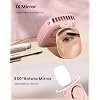
Image: 360° rotating makeup mirror feature.
5. Setup
5.1 Initial Charging
Before first use, fully charge the fan. Connect the provided USB Type-C cable to the charging port on the fan and the other end to a USB power source (e.g., computer, wall adapter). The LED display will show the battery percentage during charging. A full charge takes approximately 2.5 hours.

Image: Charging the Gaiatop Mini Neck Fan.
5.2 Attaching the Lanyard
Thread the adjustable lanyard through the designated loop on the fan. Adjust the length for comfortable wear around your neck.
6. Operating Instructions
6.1 Power On/Off and Speed Adjustment
- Power On: Press the power button once to turn on the fan at speed 1. The LED display will show "01" and the current battery percentage.
- Adjust Speed: Press the power button repeatedly to cycle through speed 2 ("02"), speed 3 ("03").
- Power Off: After speed 3, press the power button one more time to turn off the fan.
6.2 Using the LED Makeup Mirror
Gently open the top cover of the fan to reveal the integrated 1X magnifying mirror. The mirror can be rotated 360° to achieve the desired angle for makeup application or quick checks.
6.3 Using as a Desk Fan
The fan's design allows it to stand upright on a flat surface, functioning as a small desk fan. The rotating mirror can also act as a stable base when positioned correctly.
6.4 Understanding the Power Display
The LED display shows the current fan speed (01, 02, 03) and the remaining battery percentage (e.g., 100%, 50%, 10%). This allows you to monitor battery life in real-time.
Video: Demonstration of the Gaiatop Portable Handheld Fan's features and usage.
Video: Overview of the Neck Fan Rechargeable Portable Fan with 360 Rotate Mirror functionality.
7. Maintenance
7.1 Cleaning
- Ensure the fan is turned off before cleaning.
- Wipe the exterior of the fan with a soft, dry cloth.
- For the mirror, use a soft, lint-free cloth, possibly dampened with a small amount of glass cleaner, then wipe dry.
- Do not use abrasive cleaners or solvents.
7.2 Storage
When not in use for an extended period, store the fan in a cool, dry place away from direct sunlight. Ensure the battery is partially charged (around 50%) before storage to prolong its lifespan.
8. Troubleshooting
| Problem | Possible Cause | Solution |
|---|---|---|
| Fan does not turn on | Low battery | Charge the fan fully. |
| Weak airflow | Low battery or low speed setting | Charge the fan or increase the speed setting. |
| Fan not charging | Faulty cable/adapter or improper connection | Ensure the cable is securely connected. Try a different USB cable or power adapter. |
| Mirror is loose | Normal wear | The mirror is designed to rotate; if it becomes excessively loose, contact support. |
If the problem persists after trying the above solutions, please contact Gaiatop customer support.
9. Specifications
- Model Number: HF-04
- Brand: Gaiatop
- Product Dimensions: 1.58"D x 3.07"W x 4.49"H
- Power Source: Battery Powered (Rechargeable)
- Number of Speeds: 3
- Noise Level: 40 dB
- Wattage: 5 watts
- Main Power Connector Type: USB Type C
- Material: Plastic
- Special Features: 360° Rotate Mirror, LED Power Display, Handheld & Desktop Functionality
10. Warranty and Support
The Gaiatop Mini Neck Fan (Model HF-04) comes with a 1-Year Warranty from the date of purchase. This warranty covers manufacturing defects and malfunctions under normal use.
For warranty claims, technical support, or any questions regarding your product, please contact Gaiatop customer service through the retailer where you purchased the product or visit the official Gaiatop website for contact information.