
1. Introduction
Thank you for choosing the DEWENWILS Wireless Remote Control Sockets. This manual provides essential information for the safe and efficient use of your product. These sockets offer a convenient way to control your electrical appliances remotely, enhancing comfort and energy efficiency in your home or office. The system is designed for ease of use, featuring a simple plug-and-play setup with pre-programmed components.

Image: Overview of the DEWENWILS Wireless Remote Control Sockets highlighting key features like compact size, 30M range, heavy duty, and programmability.
2. Safety Information
Please read all safety instructions carefully before using this product. Failure to follow these instructions may result in electric shock, fire, or serious injury.
- Electrical Rating: Do not exceed the maximum load of 13A, 3120W. Overloading can cause overheating and fire hazards.
- Indoor Use Only: This product is designed for indoor use in dry locations. Do not expose to water or damp conditions.
- Child Safety: The sockets are equipped with safety shutters to prevent children from inserting objects into the live parts. Always supervise children around electrical devices.
- Material Quality: Constructed from high-quality, fire-retardant PC material for enhanced electrical safety.
- UKCA Certified: This product is UKCA certified, ensuring compliance with relevant safety standards.
- Maintenance: Do not attempt to disassemble or repair the unit. Refer all servicing to qualified personnel.

Image: Illustration of the built-in safety shield feature, showing a child near a socket, emphasizing protection against accidental contact.

Image: Visual representation of the fire-retardant material used in the socket's construction, highlighting its safety features.
3. Package Contents
Upon opening your package, please verify that all items are present and in good condition:
- 5 x DEWENWILS Wireless Remote Control Sockets
- 2 x Remote Controls
- Batteries for Remote Controls (pre-installed or included)
- This Instruction Manual

Image: The complete set of 5 wireless remote control sockets and 2 remote controls included in the package.
4. Product Overview
The DEWENWILS Wireless Remote Control Sockets system allows you to control appliances from a distance using radio frequency (RF) technology. Each socket features a manual on/off button and a programming button.
Key Features:
- Plug and Play: Pre-programmed for immediate use, no complex setup required.
- Compact Design: Space-saving design ensures adjacent outlets remain accessible.
- Extended Range: Strong RF signal provides up to 30 meters (100 feet) control range in open areas. RF signals can penetrate walls, doors, and windows, allowing control across different floors.
- Programmable & Expandable: Easily pair additional DEWENWILS remote controls or sockets to customize your system without signal interference.
- Energy Saving: Helps eliminate standby power consumption of connected devices, saving energy and reducing electricity costs.
- Convenience for All: Ideal for controlling hard-to-reach appliances, beneficial for the elderly, pregnant women, individuals with disabilities, and children.

Image: The compact design of the socket, shown plugged into a wall behind furniture, demonstrating its space-saving advantage.
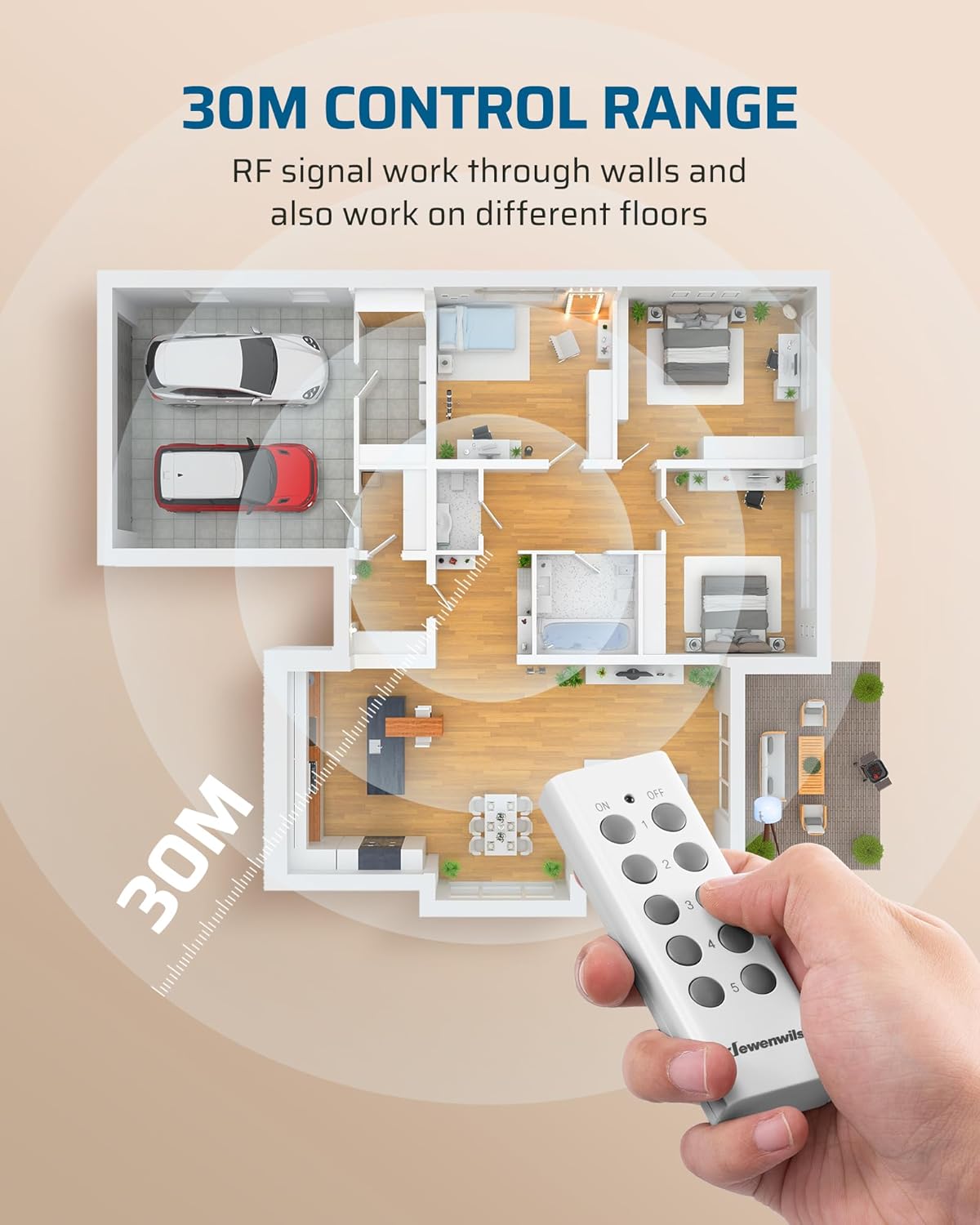
Image: Diagram illustrating the 30-meter control range of the remote, showing its ability to operate through walls and across different floors.

Image: A visual representation of how the remote control sockets help eliminate standby power, contributing to energy savings.

Image: A collage highlighting the convenience of the product for various users, including the elderly, pregnant women, and those with mobility challenges.
5. Setup
The DEWENWILS Wireless Remote Control Sockets are designed for immediate use with no complex setup or pairing required out of the box.
- Unpack: Carefully remove all components from the packaging.
- Insert Batteries: Ensure batteries are correctly installed in the remote controls. (Typically, they are pre-installed with a protective tab to be removed).
- Plug In: Plug a DEWENWILS remote control socket into any standard UK wall outlet.
- Connect Appliance: Plug your desired appliance (e.g., lamp, fan, vacuum) into the DEWENWILS remote control socket.
- Test: Use the corresponding button on the remote control to turn the appliance on and off.
6. Operating Instructions
Operating your DEWENWILS Wireless Remote Control Sockets is straightforward:
- Remote Control: Each remote control has numbered buttons (1-5) corresponding to the sockets, plus a master ON and OFF button.
- Individual Control: Press the numbered 'ON' button (e.g., '1 ON') to turn on the appliance connected to socket 1. Press the corresponding 'OFF' button ('1 OFF') to turn it off.
- Master Control: Use the 'ALL ON' button to turn on all paired sockets simultaneously. Use the 'ALL OFF' button to turn off all paired sockets simultaneously.
- Manual Control: Each socket also has a manual ON/OFF button on its side. Press it once to toggle the power state of the connected appliance.

Image: Demonstrates using the remote control to operate a lamp, highlighting the convenience of not needing to fumble for a switch in the dark.

Image: Examples of various applications for the remote control sockets in different rooms and for different types of appliances.
7. Pairing and Expansion
Your DEWENWILS sockets and remotes come pre-programmed. However, you can re-program them or pair additional DEWENWILS remote controls and sockets as needed.
To Pair a Socket to a Remote Button:
- Plug the socket into a wall outlet.
- Press and hold the small programming button on the side of the socket until its indicator light starts flashing slowly (approximately 3-5 seconds).
- While the indicator light is flashing, press the desired 'ON' button (e.g., '1 ON') on the remote control.
- The socket's indicator light will stop flashing and turn solid, then turn off, indicating successful pairing.
- Test the pairing by pressing the 'ON' and 'OFF' buttons for that channel on the remote.
To Clear All Pairings from a Socket:
- Plug the socket into a wall outlet.
- Press and hold the small programming button on the side of the socket until its indicator light starts flashing rapidly (approximately 8-10 seconds).
- Release the button. All previous pairings for that socket are now cleared.
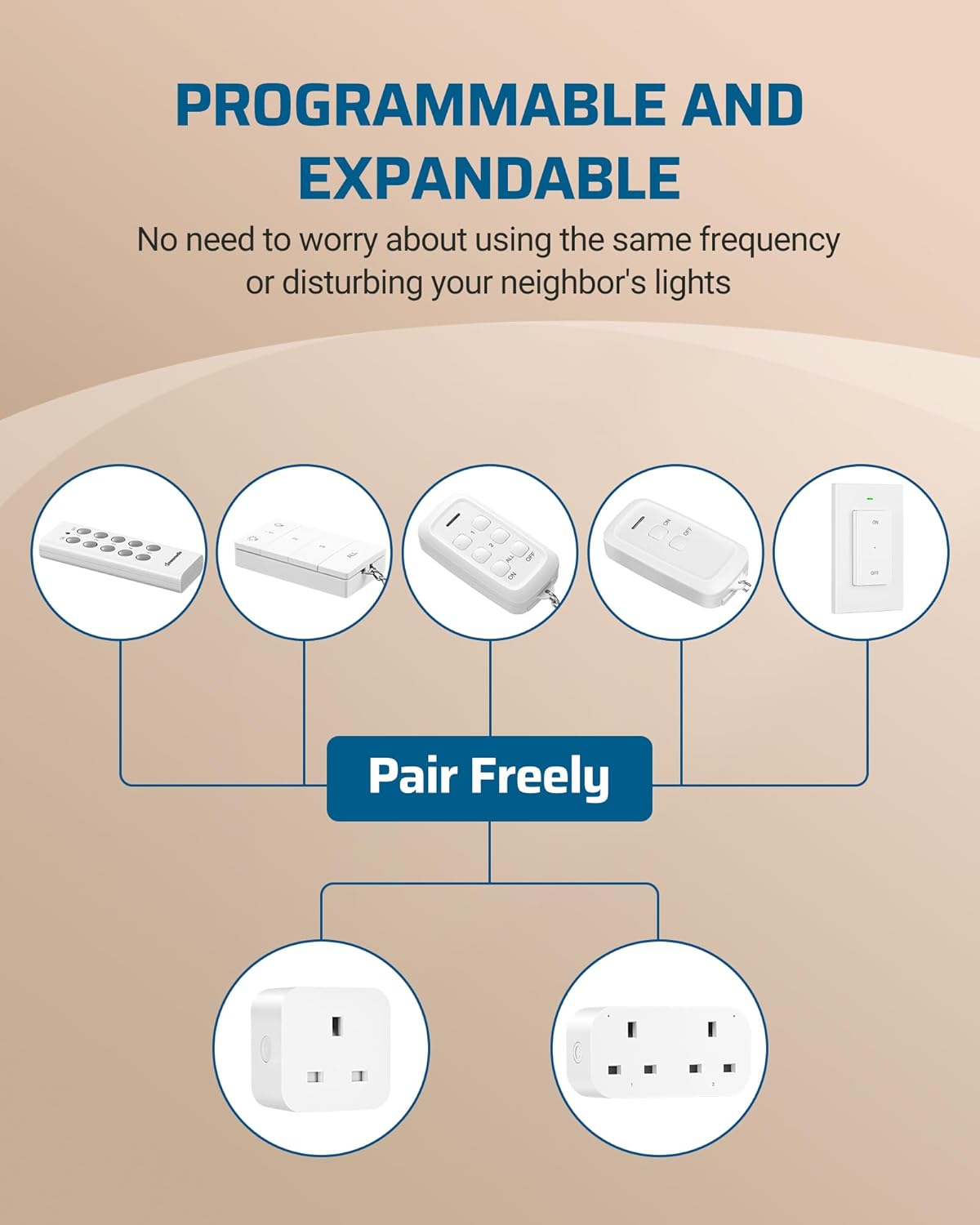
Image: Diagram demonstrating the programmable and expandable nature of the system, allowing free pairing between different DEWENWILS remote controls and sockets.
8. Maintenance
- Cleaning: Wipe the sockets and remote controls with a dry, soft cloth. Do not use abrasive cleaners or solvents.
- Battery Replacement: The remote controls use alkaline batteries (typically CR2032 or similar, check the remote for specific type). When the remote's range decreases or it stops responding, replace the battery. Ensure correct polarity when inserting new batteries.
- Storage: Store the product in a cool, dry place away from direct sunlight and extreme temperatures when not in use for extended periods.
9. Troubleshooting
- Appliance does not turn ON/OFF:
- Ensure the appliance is properly plugged into the remote socket and the appliance's own power switch is ON.
- Verify the remote socket is securely plugged into the wall outlet and receiving power.
- Check the remote control battery. Replace if necessary.
- Ensure the remote control and socket are properly paired. Refer to Section 7 for pairing instructions.
- Test the socket using its manual ON/OFF button.
- Reduced Remote Control Range:
- Replace the remote control battery.
- Ensure there are no major obstructions (e.g., large metal objects, thick concrete walls) between the remote and the socket.
- Avoid using the system near strong electromagnetic interference sources.
- Interference with other RF devices:
- The system is designed to minimize interference. If issues occur, try re-pairing the socket to a different channel on the remote.
10. Specifications
| Feature | Specification |
|---|---|
| Model Number | UHRS205M |
| Operating Voltage | 240 Volts |
| Max Load Current | 13A |
| Max Load Wattage | 3120W |
| Frequency | 433.92 MHz |
| Control Range | Up to 30 meters (open area) |
| Remote Battery Type | Alkaline (e.g., CR2032) |
| Switch Type | 5-way |
| Operation Mode | ON-OFF |
| Product Dimensions (Socket) | Approx. 5.80cm (L) x 2.78cm (W) x 6.81cm (H) |
| Product Dimensions (Remote) | Approx. 10.40cm (L) x 3.61cm (W) |
| Material | Fire-retardant PC, Brass contacts |
| Certifications | UKCA |

Image: Detailed dimensions of both the remote control socket and the handheld remote control.
11. Warranty and Support
DEWENWILS products are manufactured to high-quality standards. For any questions, technical support, or warranty claims, please contact DEWENWILS customer service through the retailer where the product was purchased or visit the official DEWENWILS website for contact information.


