
1. Introduction
Welcome to the realme C65 5G user manual. This guide provides detailed instructions on how to set up, operate, maintain, and troubleshoot your new smartphone. The realme C65 5G is designed to offer a seamless and powerful mobile experience, featuring advanced connectivity, a high-resolution camera, and a long-lasting battery.

Figure 1.1: Front view of the realme C65 5G smartphone.
The realme C65 5G features a vibrant display and a sleek design, optimized for comfortable handling and immersive viewing.
2. Safety Information
Please read this safety information carefully before using your device to ensure safe and proper operation. Keep this manual for future reference.
- Battery Safety: Do not attempt to replace the battery yourself. Use only realme-approved chargers and cables. Do not expose the device to extreme temperatures or direct sunlight.
- Water and Dust Resistance: The device has an IP54 rating for dust and splash resistance. Avoid submerging the device in water or exposing it to high-pressure water jets.
- Driving Safety: Always prioritize driving safety. Do not use your phone while driving unless absolutely necessary and in accordance with local laws.
- Hearing Protection: Avoid prolonged listening at high volume levels to prevent hearing damage.
- Disposal: Dispose of the device and its accessories responsibly according to local regulations. Do not dispose of with household waste.
3. Package Contents
Upon opening your realme C65 5G package, please verify that all the following items are included:
- realme C65 5G Smartphone
- Power Adapter
- USB Cable (Type-C)
- SIM Ejector Tool
- Quick Start Guide
- Safety Information and Warranty Card
Note: Contents may vary slightly depending on region.
4. Product Overview
Familiarize yourself with the physical components of your realme C65 5G.

Figure 4.1: Back view of the realme C65 5G, highlighting the camera module.
The rear of the realme C65 5G features a prominent camera setup and the realme branding, showcasing its elegant Feather Green finish.
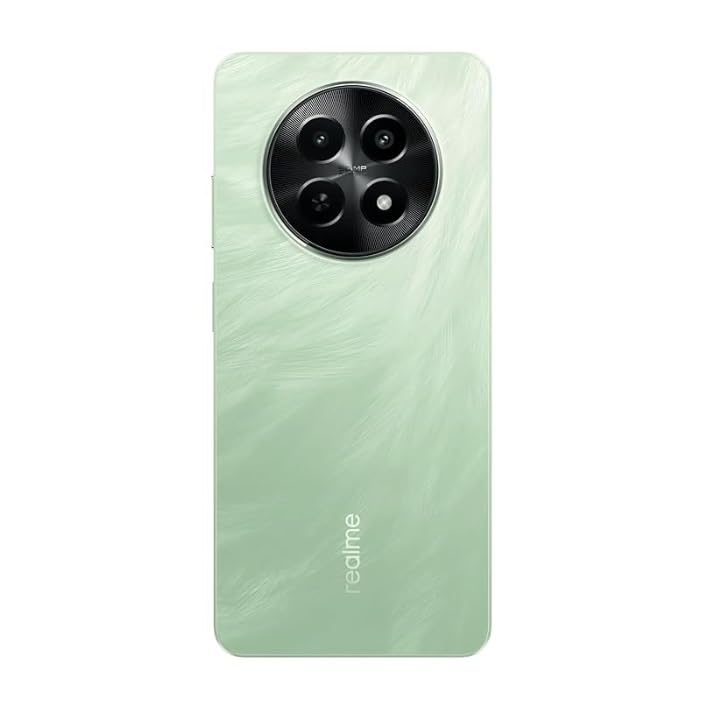
Figure 4.2: Side view of the realme C65 5G, showing the power button and volume keys.
The ultra-slim 7.89 mm body of the realme C65 5G houses the side-mounted fingerprint sensor integrated into the power button, along with the volume controls.
Physical Components:
- Front Camera: Located at the top center of the display.
- Display: 6.72-inch HD+ LCD with 120Hz refresh rate.
- Side-mounted Fingerprint Sensor: Integrated into the power button for quick and secure unlocking.
- Volume Buttons: Located on the side for adjusting audio levels.
- USB Type-C Port: For charging and data transfer.
- 3.5 mm Audio Jack: For connecting headphones.
- Speaker: Located at the bottom of the device.
- SIM Card Tray: For inserting SIM cards and expandable storage.
5. Setup
5.1 Inserting SIM Cards and MicroSD Card
- Locate the SIM card tray on the side of your device.
- Insert the SIM ejector tool into the small hole next to the tray and push gently until the tray pops out.
- Place your Nano-SIM card(s) and/or microSD card (up to 2TB) into the designated slots on the tray, ensuring proper orientation.
- Carefully push the tray back into the device until it clicks into place.
5.2 Powering On Your Device
- Press and hold the Power button (side-mounted fingerprint sensor) until the realme logo appears on the screen.
- Follow the on-screen instructions to complete the initial setup, including language selection, Wi-Fi connection, Google account setup, and security settings.
6. Operating Your Device
6.1 Basic Navigation (realme UI 5.0 based on Android 14)
- Home Screen: The main screen where you can access apps and widgets.
- App Drawer: Swipe up from the home screen to access all your installed applications.
- Notification Panel: Swipe down from the top of the screen to view notifications and quick settings.
- Recent Apps: Swipe up from the bottom of the screen and hold to view recently used applications.
6.2 Dynamic Button and Air Gestures
- Dynamic Button: Customize the side-mounted fingerprint sensor to quickly access your favorite apps or functions with a double-press or long-press.
- Air Gestures: Control your phone without touching it. Use simple hand movements to swipe through apps, answer calls, or mute notifications. Refer to Settings > Smart & Convenient > Gestures & Motions for configuration.
6.3 Mini Capsule 2.0
The Mini Capsule 2.0 provides enhanced notification display that adapts to your usage, offering quick access to essential information such as charging status, step count, and event reminders directly from the punch-hole camera area.
7. Camera Usage
The realme C65 5G is equipped with a powerful camera system to capture your moments.

Figure 7.1: The realme C65 5G, ready to capture moments with its advanced camera system.
The realme C65 5G's camera is optimized for various lighting conditions, ensuring high-quality photos and videos.
7.1 Camera Specifications
- Rear Camera: 50MP AI Camera with f/1.8 aperture. Features include Night Mode, Street Photography, HDR, and Pro Mode.
- Front Camera: 8MP Selfie Camera with f/2.0 aperture. Supports Portrait Mode, Night Mode, and Dual View Video.
7.2 Using the Camera App
- Open the Camera app from your home screen or app drawer.
- Swipe left or right to switch between different modes (e.g., Photo, Video, Portrait, Night).
- Tap the shutter button to take a photo or start/stop recording a video.
- Use the zoom controls or tap on the screen to focus on a specific area.
8. Battery and Charging
Your realme C65 5G is equipped with a 5000 mAh massive battery, providing extended usage time. It supports 15W quick charging.
8.1 Charging Your Device
- Connect the USB cable to the power adapter.
- Plug the power adapter into a power outlet.
- Connect the USB Type-C end of the cable to the charging port on your phone.
- The charging indicator will appear on the screen.
8.2 Battery Care Tips
- Avoid fully discharging the battery frequently.
- Do not leave the phone charging for excessively long periods after it's fully charged.
- Keep the device within optimal temperature ranges (0°C to 35°C) for better battery longevity.
9. Connectivity
The realme C65 5G offers various connectivity options to keep you connected.
- 5G Connectivity: Experience ultra-fast internet speeds with 5G network support.
- Wi-Fi: Connect to wireless networks for internet access. Supports Wi-Fi Direct and Hotspot.
- Bluetooth: Pair with Bluetooth devices such as headphones, speakers, and smartwatches.
- GPS: Utilize GPS, Beidou, Galileo, GLONASS, QZSS, NavIC, and GNSS for accurate location services.
- Dual-SIM: Supports two SIM cards for managing personal and work numbers simultaneously.
10. Maintenance
Proper maintenance ensures the longevity and optimal performance of your realme C65 5G.
- Cleaning: Use a soft, lint-free cloth to clean the screen and body of the phone. Avoid using harsh chemicals or abrasive materials.
- Software Updates: Regularly check for and install system updates to ensure your device has the latest features, security patches, and performance improvements. Go to Settings > About device > realme UI version.
- Storage Management: Periodically clear unnecessary files and apps to free up storage space. The device supports expandable storage up to 2TB.
- Rainwater Smart Touch & IP54 Rating: The device is designed to ensure reliable touch response even with wet hands and offers resistance against dust and water splashes. However, it is not waterproof.
11. Troubleshooting
This section addresses common issues you might encounter with your realme C65 5G.
| Problem | Possible Solution |
|---|---|
| Device not turning on | Ensure the battery is charged. Press and hold the Power button for at least 10 seconds to force restart. |
| Apps crashing or freezing | Clear app cache/data (Settings > Apps > [App Name] > Storage). Update the app or reinstall it. |
| Poor network signal | Check SIM card insertion. Restart the device. Try resetting network settings (Settings > System settings > Back up and reset > Reset phone > Reset network settings). |
| Fingerprint sensor not working | Ensure your finger is clean and dry. Re-register your fingerprints (Settings > Password & security > Fingerprint). |
| Battery drains quickly | Close background apps. Reduce screen brightness. Disable unnecessary features like GPS or Bluetooth when not in use. Check battery usage in settings to identify power-hungry apps. |
12. Specifications
Detailed technical specifications for the realme C65 5G (Model: RMX3997).
| Feature | Specification |
|---|---|
| Operating System | Android 14 (realme UI 5.0) |
| Processor | MediaTek Dimensity 6300 5G chipset |
| RAM | 6 GB (with up to 6 GB Dynamic RAM) |
| Internal Storage | 128 GB |
| Expandable Storage | Up to 2 TB via microSD |
| Display | 6.72-inch HD+ LCD, 720 x 1604 pixels, 120Hz refresh rate, 240Hz touch sampling rate |
| Rear Camera | 50MP AI Camera (f/1.8) |
| Front Camera | 8MP Selfie Camera (f/2.0) |
| Battery | 5000 mAh |
| Charging | 15W Quick Charging |
| Connectivity | 5G, Wi-Fi, Bluetooth, GPS (GPS, Beidou, Galileo, GLONASS, QZSS, NavIC, GNSS), Dual-SIM |
| Audio Jack | 3.5 mm |
| Dimensions | 16.46 x 7.61 x 0.76 cm |
| Weight | 186 g |
| Special Features | Dynamic Button, Air Gestures, Mini Capsule 2.0, Rainwater Smart Touch, IP54 Rating, AI Boost |
13. Warranty and Support
realme provides a standard warranty for your device. Please refer to the warranty card included in your package for specific terms and conditions, including warranty period and coverage details.
13.1 Obtaining Support
- Online Support: Visit the official realme website for FAQs, troubleshooting guides, and software downloads.
- Customer Service: Contact realme customer service for technical assistance or warranty claims. Contact details can be found on the realme website or your warranty card.
- Service Centers: For hardware issues, locate an authorized realme service center near you.
14. Official Product Video
Watch the official product overview video for the realme C65 5G to learn more about its features and design.
Video 14.1: Official overview of the realme C65 5G, showcasing its design, key features, and performance capabilities.
This video provides a visual demonstration of the smartphone's highlights, including its display, camera, and overall user experience.